Beckhoff EK9300 Manuel de l'opérateur

Documentation
EK9300
PROFINET-Bus Coupler for EtherCAT Terminals
3.2.6
2019-12-20
Version:
Date:


Table of contents
EK9300 3Version: 3.2.6
Table of contents
1 Foreword ....................................................................................................................................................5
1.1 Notes on the documentation..............................................................................................................5
1.2 Safety instructions .............................................................................................................................6
1.3 Documentation issue status ..............................................................................................................7
1.4 Version identification of EtherCAT devices .......................................................................................7
1.4.1 Beckhoff Identification Code (BIC)................................................................................... 12
2 Product overview.....................................................................................................................................14
2.1 EKxxxx - System overview ..............................................................................................................14
2.2 Technical data .................................................................................................................................15
2.3 Technical data PROFINET ..............................................................................................................16
3 Mounting and wiring................................................................................................................................17
3.1 Mounting..........................................................................................................................................17
3.1.1 Instructions for ESD protection ........................................................................................ 17
3.1.2 Dimensions ...................................................................................................................... 18
3.1.3 Installation on mounting rails – Bus Coupler ................................................................... 18
3.2 Wiring...............................................................................................................................................20
3.2.1 Power supply ................................................................................................................... 20
3.2.2 Ethernet ........................................................................................................................... 22
3.2.3 ATEX - Special conditions (standard temperature range) ............................................... 26
3.2.4 ATEX Documentation ...................................................................................................... 26
3.2.5 UL notice.......................................................................................................................... 27
4 Parameterization and commissioning...................................................................................................28
4.1 Meaning of the DIP switch...............................................................................................................28
4.2 Further interfaces ............................................................................................................................28
4.3 Setting the IP address .....................................................................................................................29
5 Configuration ...........................................................................................................................................30
5.1 Representation of an EtherCAT slave on PROFINET.....................................................................30
5.2 EK9300 configuration ......................................................................................................................34
5.3 EK9300 EtherCAT configuration .....................................................................................................36
5.4 EK9300 – Configuration example....................................................................................................40
5.5 From firmware Version 6 .................................................................................................................42
5.5.1 EK9300 - CoE data access over PROFINET .................................................................. 42
5.5.2 EK9300 - multi-configuration mode ................................................................................. 44
5.5.3 EK9300 - IO-LINK............................................................................................................ 46
5.6 From firmware version 8..................................................................................................................49
5.6.1 EBus Error Behaviour ...................................................................................................... 49
5.6.2 Activating the web page................................................................................................... 51
6 Ethernet ....................................................................................................................................................52
6.1 PROFINET system presentation .....................................................................................................52
7 Error handling and diagnosis.................................................................................................................54
7.1 Diagnostic LEDs ..............................................................................................................................54
8 Appendix ..................................................................................................................................................56

Table of contents
EK93004 Version: 3.2.6
8.1 Update Bus Coupler image .............................................................................................................56
8.2 EK9300 – FAQ ................................................................................................................................57
8.3 List of Abbreviations ........................................................................................................................57
8.4 Support and Service ........................................................................................................................60

Foreword
EK9300 5Version: 3.2.6
1 Foreword
1.1 Notes on the documentation
Intended audience
This description is only intended for the use of trained specialists in control and automation engineering who
are familiar with the applicable national standards.
It is essential that the documentation and the following notes and explanations are followed when installing
and commissioning these components.
It is the duty of the technical personnel to use the documentation published at the respective time of each
installation and commissioning.
The responsible staff must ensure that the application or use of the products described satisfy all the
requirements for safety, including all the relevant laws, regulations, guidelines and standards.
Disclaimer
The documentation has been prepared with care. The products described are, however, constantly under
development.
We reserve the right to revise and change the documentation at any time and without prior announcement.
No claims for the modification of products that have already been supplied may be made on the basis of the
data, diagrams and descriptions in this documentation.
Trademarks
Beckhoff®, TwinCAT®, EtherCAT®, EtherCATG®, EtherCATG10®, EtherCATP®, SafetyoverEtherCAT®,
TwinSAFE®, XFC®, XTS® and XPlanar® are registered trademarks of and licensed by Beckhoff Automation
GmbH. Other designations used in this publication may be trademarks whose use by third parties for their
own purposes could violate the rights of the owners.
Patent Pending
The EtherCAT Technology is covered, including but not limited to the following patent applications and
patents: EP1590927, EP1789857, EP1456722, EP2137893, DE102015105702 with corresponding
applications or registrations in various other countries.
EtherCAT® is registered trademark and patented technology, licensed by Beckhoff Automation GmbH,
Germany.
Copyright
© Beckhoff Automation GmbH & Co. KG, Germany.
The reproduction, distribution and utilization of this document as well as the communication of its contents to
others without express authorization are prohibited.
Offenders will be held liable for the payment of damages. All rights reserved in the event of the grant of a
patent, utility model or design.

Foreword
EK93006 Version: 3.2.6
1.2 Safety instructions
Safety regulations
Please note the following safety instructions and explanations!
Product-specific safety instructions can be found on following pages or in the areas mounting, wiring,
commissioning etc.
Exclusion of liability
All the components are supplied in particular hardware and software configurations appropriate for the
application. Modifications to hardware or software configurations other than those described in the
documentation are not permitted, and nullify the liability of Beckhoff Automation GmbH & Co. KG.
Personnel qualification
This description is only intended for trained specialists in control, automation and drive engineering who are
familiar with the applicable national standards.
Description of instructions
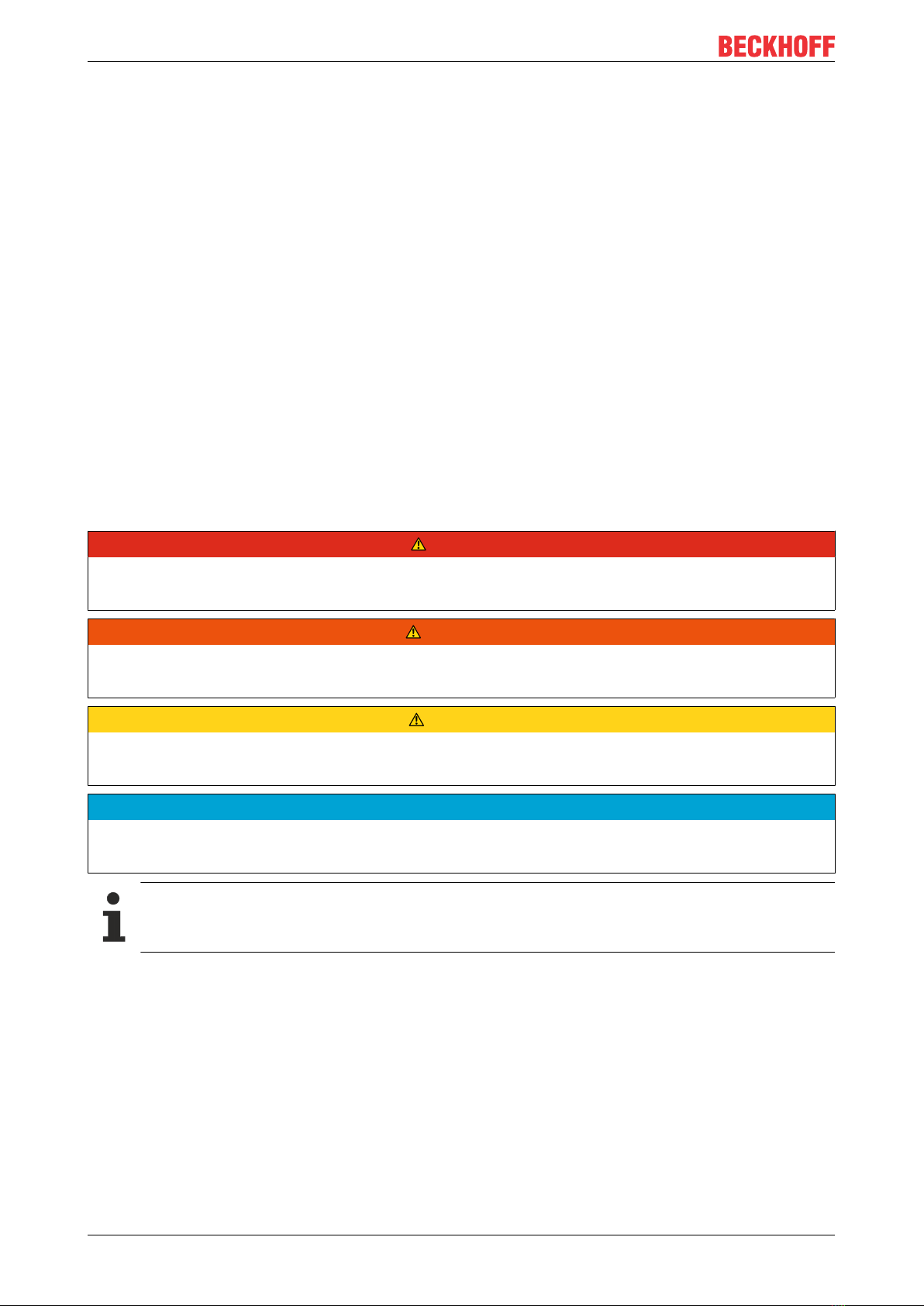
In this documentation the following instructions are used.
These instructions must be read carefully and followed without fail!
DANGER
Serious risk of injury!
Failure to follow this safety instruction directly endangers the life and health of persons.
WARNING
Risk of injury!
Failure to follow this safety instruction endangers the life and health of persons.
CAUTION
Personal injuries!
Failure to follow this safety instruction can lead to injuries to persons.
NOTE
Damage to environment/equipment or data loss
Failure to follow this instruction can lead to environmental damage, equipment damage or data loss.
Tip or pointer
This symbol indicates information that contributes to better understanding.

Foreword
EK9300 7Version: 3.2.6
1.3 Documentation issue status
Version Comment
3.2.6 • Update chapter “Configuration”
• Update structure
3.2.5 • Update chapter “Configuration”
• Update structure
3.2.4 • Update UL notice
3.2.3 • Update Technical data
• Update structure
3.2.2 • Update chapter “Update Bus Coupler image”
3.2.1 • Update chapter “Technical data”
3.2.0 • Configuration From firmware Version 8 added
• Update chapter “Technical data”
3.1.0 • Update chapter "Notes on the documentation"
• Update chapter "EK9300 - PROFINET" -> "EKxxxx - Systemübersicht"
• Update chapter "Technical data"
• Addenda chapter "Instructions for ESD protection"
• Addenda chapter "ATEX - Special conditions (standard temperature range)" and note
"ATEX Documentation"
• Addenda chapter "UL notice"
3.0.0 • Migration
• Update structure
2.1.0 • Chapter CoE data access over PROFINET added
• Chapter Multi-configuration mode added
• Chapter IO-LINK added
2.0.0 • Addenda and corrections
• First published
1.0.1 • Addenda and corrections
1.0.0 • Preliminary version
1.4 Version identification of EtherCAT devices
Designation
A Beckhoff EtherCAT device has a 14-digit designation, made up of
• family key
• type
• version
• revision
Example Family Type Version Revision
EL3314-0000-0016 EL terminal
(12 mm, non-
pluggable connection
level)
3314 (4-channel thermocouple
terminal)
0000 (basic type) 0016
ES3602-0010-0017 ES terminal
(12 mm, pluggable
connection level)
3602 (2-channel voltage
measurement)
0010 (high-
precision version)
0017
CU2008-0000-0000 CU device 2008 (8-port fast ethernet switch) 0000 (basic type) 0000

Foreword
EK93008 Version: 3.2.6
Notes
• The elements mentioned above result in the technical designation. EL3314-0000-0016 is used in the
example below.
• EL3314-0000 is the order identifier, in the case of “-0000” usually abbreviated to EL3314. “-0016” is the
EtherCAT revision.
• The order identifier is made up of
- family key (EL, EP, CU, ES, KL, CX, etc.)
- type (3314)
- version (-0000)
• The revision -0016 shows the technical progress, such as the extension of features with regard to the
EtherCAT communication, and is managed by Beckhoff.
In principle, a device with a higher revision can replace a device with a lower revision, unless specified
otherwise, e.g. in the documentation.
Associated and synonymous with each revision there is usually a description (ESI, EtherCAT Slave
Information) in the form of an XML file, which is available for download from the Beckhoff web site.
From 2014/01 the revision is shown on the outside of the IP20 terminals, see Fig. “EL5021 EL terminal,
standard IP20 IO device with batch number and revision ID (since 2014/01)”.
• The type, version and revision are read as decimal numbers, even if they are technically saved in
hexadecimal.
Identification number
Beckhoff EtherCAT devices from the different lines have different kinds of identification numbers:
Production lot/batch number/serial number/date code/D number
The serial number for Beckhoff IO devices is usually the 8-digit number printed on the device or on a sticker.
The serial number indicates the configuration in delivery state and therefore refers to a whole production
batch, without distinguishing the individual modules of a batch.
Structure of the serial number: KKYYFFHH
KK - week of production (CW, calendar week)
YY - year of production
FF - firmware version
HH - hardware version
Example with
Ser. no.: 12063A02: 12 - production week 12 06 - production year 2006 3A - firmware version 3A 02 -
hardware version 02
Exceptions can occur in the IP67 area, where the following syntax can be used (see respective device
documentation):
Syntax: D ww yy x y z u
D - prefix designation
ww - calendar week
yy - year
x - firmware version of the bus PCB
y - hardware version of the bus PCB
z - firmware version of the I/O PCB
u - hardware version of the I/O PCB
Example: D.22081501 calendar week 22 of the year 2008 firmware version of bus PCB: 1 hardware version
of bus PCB: 5 firmware version of I/O PCB: 0 (no firmware necessary for this PCB) hardware version of I/O
PCB: 1
Unique serial number/ID, ID number
In addition, in some series each individual module has its own unique serial number.
See also the further documentation in the area

Foreword
EK9300 9Version: 3.2.6
• IP67: EtherCAT Box
• Safety: TwinSafe
• Terminals with factory calibration certificate and other measuring terminals
Examples of markings
Fig.1: EL5021 EL terminal, standard IP20 IO device with serial/ batch number and revision ID (since
2014/01)
Fig.2: EK1100 EtherCAT coupler, standard IP20 IO device with serial/ batch number
Fig.3: CU2016 switch with serial/ batch number

Foreword
EK930010 Version: 3.2.6
Fig.4: EL3202-0020 with serial/ batch number 26131006 and unique ID-number 204418
Fig.5: EP1258-00001 IP67 EtherCAT Box with batch number/ date code 22090101 and unique serial
number 158102
Fig.6: EP1908-0002 IP67 EtherCAT Safety Box with batch number/ date code 071201FF and unique serial
number 00346070
Fig.7: EL2904 IP20 safety terminal with batch number/ date code 50110302 and unique serial number
00331701
Table des matières
Autres manuels Beckhoff Adaptateur