BEARROBOTICS Servi Plus Manuel utilisateur

Servi Plus User ManualServi Plus User Manual
ver 1.0.5

Servi Plus User Manual
About This Manual
This document describes how to use and maintain Servi Plus. Please read this
manual before starting to use the product for proper use.
yThe content of this manual is based on the default settings and screens.
yThe content of this manual as well as the exterior and specications of the
product are subject to change for improvement without prior notice.
Target Audience
This manual is designed for Servi Plus users.
Conventions
This manual follows the below conventions for users’ better understanding.
Symbol Meaning
Key Parts and GUIs
Buttons and graphical user interfaces (GUIs) of the screen
are highlighted in bold.
If multiple menu options need to be selected in sequence,
the order is given by the symbol > between options.
Notes and Cautions Useful use instructions and additional information are
provided in Notes and Cautions.
Cross Reference
Provides shortcuts to relevant contents or detailed
information within the user manual. Cross references are
highlighted with underscores (_).
Figures Figures are provided to help users understand how to use
the product and access screens.
Copyrights
Copyright © 2023 Bear Robotics, Inc. All Rights Reserved.
Trademark
All trademarks included in this manual are registered trademarks, and the name
of this product and other trademarks in this manual are registered trademarks of
their respective companies.
Restriction
This document is protected by copyright laws. The reproduction, distribution, or
modification of this document, in whole or in part, without official consent is strictly
prohibited.
Disclaimer
Bear Robotics, Inc. makes every effort to ensure but cannot guarantee that the
information contained in this document is complete and accurate. The user shall
bear the sole responsibility for any consequences of using this document.
Bear Robotics, Inc. has the right to change the content of this document without
prior notice.

Servi Plus User Manual
Standards Approvals (only USA)
This device complies with part 15 of the FCC Rules. Operation is subject to the
condition that this device does not cause harmful interference (1) this device may
not cause harmful interference, and (2) this device must accept any interference
received, including interference that may cause undesired operation.
Any changes or modifications not expressly approved by the party responsible for
compliance could void the user’s authority to operate the equipment.
NOTE: This equipment has been tested and found to comply with the limits for
a Class A digital device, according to part 15 of the FCC Rules. These limits are
designed to provide reasonable protection against harmful interference when the
equipment is operated in a commercial environment. This equipment generates,
uses, and can radiate radio frequency energy and, if not installed and used in
accordance with the instruction manual, may cause harmful interference to radio
communications. Operation of this equipment in a residential area is likely to
cause harmful interference in which case the user will be required to correct the
interference at his own expense.
FCC ID: PD99260NG / 2AC7Z-ESPC3MINI1
The W52 and W53 band can only be used indoors.

Servi Plus User Manual
About This Manual 2
Target Audience 2
Conventions 2
Copyrights 2
Standards Approvals (only USA) 3
Safety Precautions 5
Robot Components 8
Components 8
Part Names 9
How to Use 10
Check before use 10
Coverage - Space and Recognition 10
Turning On/Off 11
Charging the Robot 11
E-stop 12
Using Trays 13
About Lights 13
Using Servi Plus 16
Using Robot Workow 20
Status Messages 27
Robot Settings 28
General 28
About 29
Wi-Fi 29
Localization 30
Zero Weight 30
Manual Drive 31
Sound 31
Robot Workow 32
Advanced 32
Reboot 33
Managing Robots 34
Product Specications 38
Robot 38
Charger 39
Content

Servi Plus User Manual | 5
Safety Precautions
These instructions are provided to help ensure user safety and prevent any
damage or loss of property. To ensure proper use, please read the instructions
below.
Warning
Warning
A warning indicates a possible risk that may lead to death or severe
injury.
Power Supply
yTake measures to prevent the risk of electric shock or re.
– Be careful not to damage the power cord. It may cause a re or electric
shock.
– Do not forcefully pull out or insert the power plug with wet hands or
grab the power cord excessively.
– Do not use a damaged power plug, power cord, or loose outlet.
– Do not plug multiple electrical devices into one outlet at the same
time.
– Be sure to check the rated power and voltage and use the appropriate
power source.
– Do not insert conductive objects such as sticks or nails into the outlet
holes with the power is connected.
– Do not touch the pins of the plug directly after removing it from the
outlet.
– Any foreign matter on the pins and contact area of the power plug
should be cleaned thoroughly with a dry cloth.
Usage
yBe careful not to expose the robot to moisture or liquid.
yAvoid using robots in areas where ammable gas or liquid is leaked, or
where there is a lot of industrial oil or metallic dust.
yTake care to prevent the robot from being exposed to moisture or getting
wet.
yDo not use the product nearby high-voltage appliances.
yDo not get in the way of the robot's path while it is moving.
yBe careful not to let children hang on or ride on the robot. It may cause
electric shock, tipping, accidents, or injuries.
yDo not apply a strong impact to the robot when using or moving it.
yIf the robot malfunctions or produces strange noises, smells, or smoke,
stop the robot immediately using the E-stop button and contact customer
service for assistance.

Safety Precautions
Servi Plus User Manual | 6
Charging/Battery
yCharge the robot using the charging adapter provided as a component.
Failing to do so may result in damage to the robot or its battery.
yUnplug the charging adapter when not using it an extended period of
time.
yAfter removing the charging adapter from the robot, be sure to close
the charging cover. Leaving it open may allow foreign objects to enter.
Otherwise, a failure or a re can occur.
yDo not charge the robot in areas where water is present. Otherwise, a
failure or a re can occur.
Caution
Caution
Caution indicates a risk that may lead to injuries or property
damages.
Usage
yPlease avoid using the robot in places with excessively high or low
temperatures.
yRemove any wires, liquids, debris, or other foreign objects from the oor
before using the robot.
yDo not cover the robot's sensors with stickers or other foreign objects.
yThe robot is intended only for use indoors. Do not use the robot outdoors
or beyond the designated operating range.
yRemove any obstacles such as chairs, tables, or trash cans from the
robot's path and keep pets away from it while it is in operation.
yDo not push or move the robot by holding its tray while it is moving. This
can cause damage to the weight sensor.
yDuring peak times, monitor robot behaviors and manually stop it if there is
a risk of collision.
yDo not use the robot in areas with strong indoor lighting or direct
reections of light. Doing so can affect its perception of the environment,
leading to unexpected circumstances.
yDo not install, modify, disassemble, or repair the robot arbitrarily. For
installation or repair, please contact customer service.
yDo not use the robot in places with magnetic elds or electromagnetic
interference.
yIf any liquids, such as water or beverages enter the robot, turn off it
immediately and contact our customer center.
yDo not change the preset speed during installation. Doing so can cause a
risk of collision.
yDo not place items on the robot tray that exceed its size or load capacity.
yPick up the food only after the robot stops at the designated table.

Safety Precautions
Servi Plus User Manual | 7
yTake care when placing hot dishes or objects on the robot tray to avoid
burns.
yBe careful not to get your foot or small objects caught in the robot's
bottom drive unit while it is moving or rotating.
yDo not turn off the robot's volume completely. If you do not hear the sound
of its movement or guidance, it can cause a risk of collision.
yDo not scratch or press the touch screen with sharp objects.
yBe careful that conductive materials do not touch the touch screen.
yIf the robot malfunctions or the screen becomes unresponsive, press the
E-stop button on the back bottom to stop it.
Charging/Battery
yCharge the battery promptly to avoid the robot running out of power.
Leaving the robot with a low battery for extended periods could shorten its
battery life or cause malfunctions.
yContact customer service if the battery life is signicantly shorter than
usual.
yDo not disassemble the battery pack or modify/change any internal
components.
yDo not short-circuit the robot's charging terminals with wires or metallic
objects. Doing so may cause malfunctions.
yWhen storing the robot for extended periods, turn off the power and store
it in a safe place.
yWhen storing the robot for extended periods, make sure to charge it
regularly to prevent discharging.
Cleaning
yWhen cleaning the product, avoid using alcohol or cleaning agents
containing acidic or strong components.
yUse a soft, dry cloth, or rag to remove foreign substances from the robot
surfaces, including the top of the robot, camera sensor, or LiDAR sensor.
yMake sure to turn off the power before cleaning or inspecting the robot.

Servi Plus User Manual | 8
Robot Components
Components
The robot is delivered with the following components.
Robot main body Charger
Top Tray Pad Middle Tray Pad (2ea) Bottom Tray Pad
Spare Part-in Plugs (2ea)

Robot Components
Servi Plus User Manual | 9
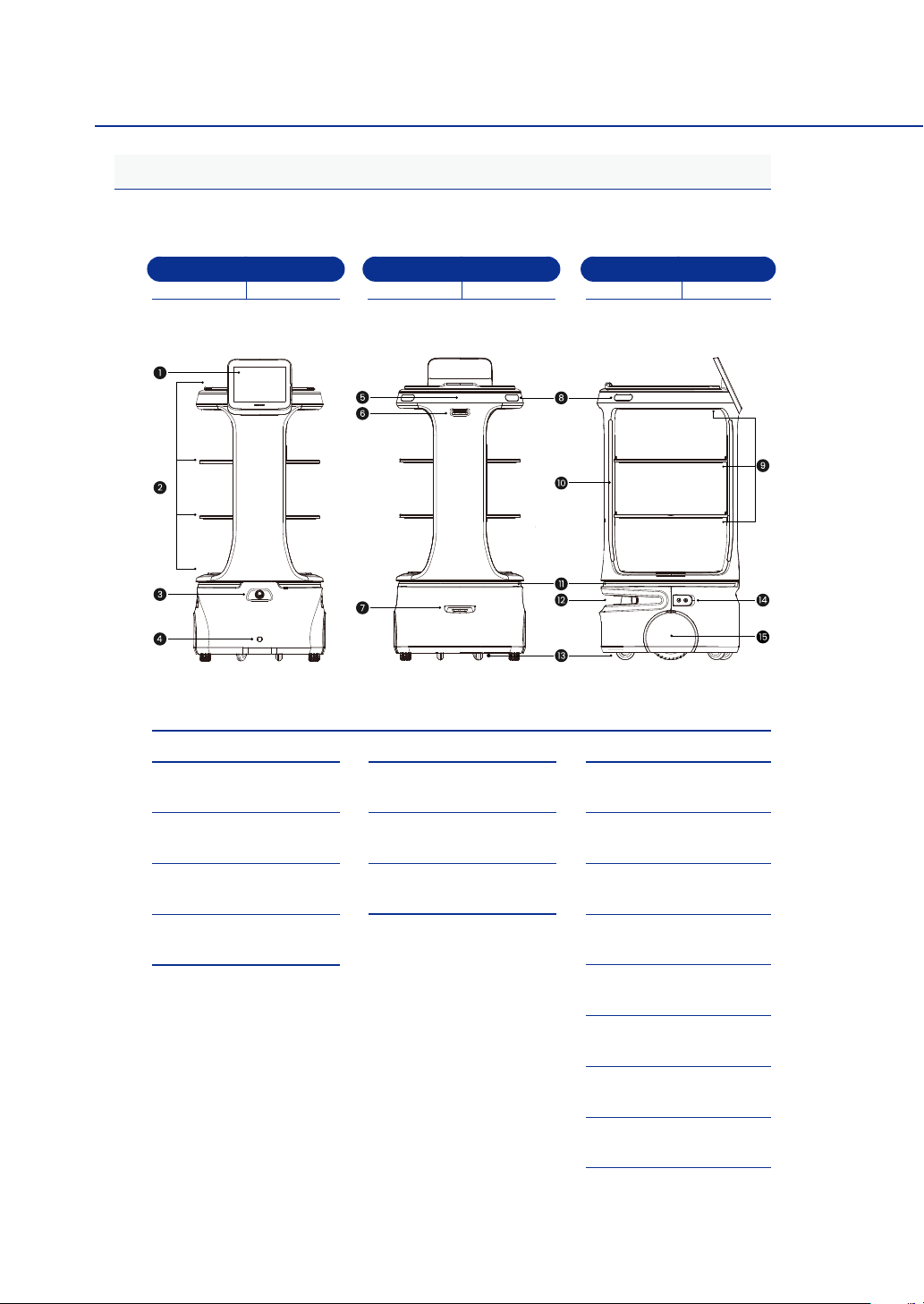
Part Names
Below are the part names and locations.
Back Front Side
앞면 뒷면 옆면
1Touch screen
2Tray
3E-stop button
4Wireless charging
sensor (optional)
53-Sided custom
display
6
Down-facing camera,
front camera
7Up-facing camera
8Side button
9Food light
0Pillar light
!Base LED
@LiDAR sensor
#Auxiliary wheels
$Charging terminal
and power button
%Wheels

Servi Plus User Manual | 10
How to Use
Check before use
Below are the recommended environmental conditions for the robot's operation.
yThe optimal operating temperature range for the robot is 50 – 95 ˚F (10 – 35
˚C), and the optimal humidity range is 10 – 80%.
yUse the robot in an indoor space with no moisture and good ventilation.
yUse the robot on a at oor without vibrations or risk of shocks.
yClear the path of the robot's movement.
Coverage - Space and Recognition
Below is the robot’s coverage including the minimum range of movement and
recognition.
yThe minimum path clearance width for the robot’s passing is 31.5 in (80 cm).
Make sure to leave enough space for the robot to move safely.
yThe robot uses a 2D LiDAR sensor and a 3D depth sensor to detect objects
and calculate the distance to and location of objects.
– The 2D LiDAR (Light Detection and Ranging) detects surrounding objects
and measures information such as distance, direction, and speed to the
target. The maximum measurement range of the 2D LiDAR is 65.6 ft (20 m)
with 230° of coverage.
– The 3D depth sensor measures the distance to surrounding objects. The
measurement range of the 3D depth sensor is 8.2 ft (2.5 m).
ySince obstacles placed outside the camera's measurement range or sensor's
recognition range are difcult for the robot to detect, make sure to remove
them from the robot's path. Examples of obstacles that the robot may have
difculty detecting include:
– Small objects with a thickness of less than 2 in (5 cm), small bumps or
steps on the oor
– Objects hanging or oating in the air such as lighting xtures or mobiles
– Objects made of mirrors or glass materials
Table des matières