
Barista Technology PUQpress Mode d'emploi

Maintenance & repair manual
Puqpress -
Precision coffee tamper
VERSION 2.0.4
DATE: 14-12-2016

2
TABLE OF CONTENTS
1Introduction.......................................................................................................... 3
1.1 Warranty........................................................................................................ 3
1.2 Model types................................................................................................... 3
1.3 Revision status.............................................................................................. 3
2Operating faults.................................................................................................... 4
3Replacement of various components................................................................... 5
3.1 Replace drive unit.......................................................................................... 5
3.2 Replace induction sensor.............................................................................. 9
3.3 Clean tamper base (daily cleaning)............................................................. 12
3.4 Remove tamper base and clean cavity (weekly cleaning)........................... 13
3.5 Adjust lower clamp ...................................................................................... 15
3.6 Adjust tamping force.................................................................................... 17
4Changing tamper base....................................................................................... 18
4.1 Upper clamp types....................................................................................... 18
4.2 Determine upper clamp type ....................................................................... 18
4.3 Espresso machine brand and tamper diameter........................................... 19
5Exploded view: Total assembly.......................................................................... 19
6Order spare parts............................................................................................... 20
6.1 Order procedure.......................................................................................... 20
6.2 Recommended spare parts......................................................................... 20
6.3 Part list (all parts)......................................................................................... 21

3
1 INTRODUCTION
In this document the repair and maintenance of the Puqpress precision coffee tamper
is described. The unit is maintenance free and only has to be cleaned daily. However
due to extensive use various components wear and can break. The sequence of
replacing components is described in detail. The first step is to find the cause of the
problem. Various possible defects are listed in section 2. If the defect is not listed in
section 2, please contact us via service@puqpress.com.
All repairs should be executed by mastered people with knowledge of electrical and
mechanical components.
1.1 Warranty
As agreed by the Exclusive distribution agreement, section 6.7, the warranty period of
the product is 12 month and/or 100.000 tamping cycles (whichever first occurs).
Repairs after this period are not covered by the supplier.
The most common failure mode is the drive unit.After many cycles the drive unit wears
and can break. Replacement of drive unit can be found in section 3.1.
1.2 Model types
Many different models are available. The main difference is the tamper base diameter,
upper clamp type and power cable. All important components are similar for every
model type.
1.3 Revision status
Revision 2.0.1: Initial issue
Revision 2.0.2: Errors updated
Revision 2.0.3: Assembly sequence updated.

4
2 OPERATING FAULTS
DEFECT CAUSE REMEDY SECTION
Tamper disk does
not move, unit is ON
and display is
working
Fault in drive unit Replace drive unit 3.1
Fault in induction
sensor Replace induction
sensor. 3.2
Tamped surface is
not even Tamper base is dirty Clean tamper base 3.3
Cavity upper clamp
is dirty Remove tamper base
and clean cavity 3.4
Tamping is not level
Lower clamp not
correctly set and
portafilter can rotate
Adjust lower clamp 3.5
Tamping force is too
low Force setting too low Adjust tamping force on
display 3.6
Fault in drive unit Clean drive unit 3.1
Fault in drive unit Replace drive unit 3.1
Tamper diameter
not correct
Change to other
tamper base
diameter
Change tamper base 4.1
Change from 58mm
base to 53mm or
53mm to 58mm
Change tamper base
AND upper clamp type 4.2
Components are
missing Various
Find missing
component in exploded
view or part list and
order spare parts
5 / 6.3

5
3 REPLACEMENT OF VARIOUS COMPONENTS
3.1 Replace drive unit
Step
Description
1
Switch the device ON and activate the CLEAN mode. Tamper
base goes down. Switch OFF and remove power cable.
2
Remove main housing – top cover
3
Remove the hexagon bolt M5x100 + spring washer M5 using the
Allen key 4mm.
Remove the tamper base.
NOTE: Tamper base has left-hand screw thread!

6
4
Remove the main housing – middle cover which is mounted to the
main body with 3 cross head cap screws M4x10
5
Unscrew 2 screws as is shown in the figure below.
6
Open the main housing – back cover.
NOTE: the push buttons (red) are fragile
so be careful when opening back cover.

7
7
Disconnect the earthing cable from
the DC worm gear motor.
8
Unscrew 2 hexagon head cap screws M5x25.
9
Disconnect the connectors as are shown in the figures below.
8
10
Remove the drive unit and replace the drive unit with a new unit.
11
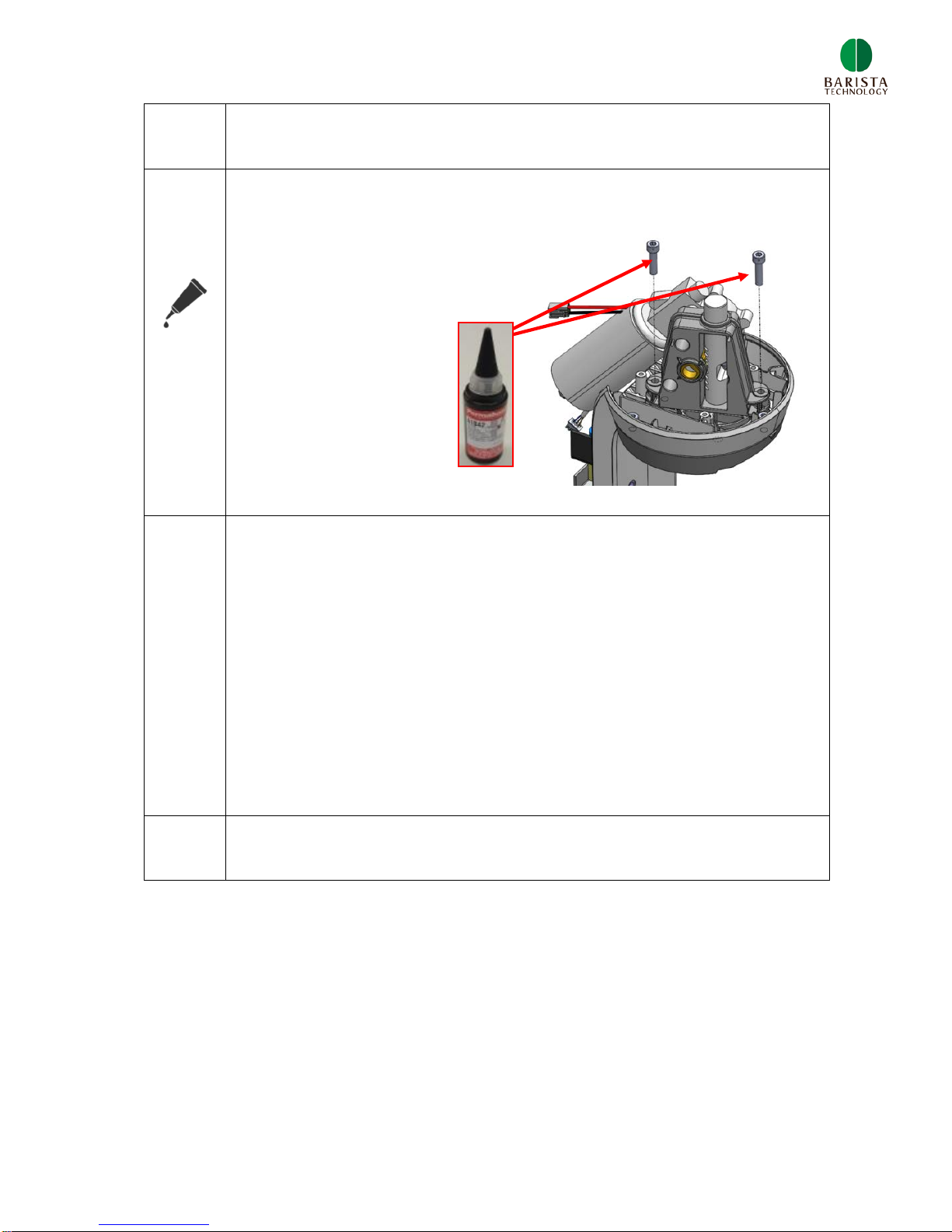
Mount the upper clamp to the main body with 2 hexagon head cap
screws M5x25.
Apply Permabond A1042
on screw threads.
12
Connect both connectors, see step 9.
Fasten the earthing cable to the DC motor, see step 8.
Mount the main housing – back cover, see step 5.
Mount the main housing – middle cover, see step 4.
Mount the tamper base, see step 3.
Mount the main housing – top cover, step 2.
13
Check functioning of new drive unit

9
3.2 Replace induction sensor
Step
Description
1
Remove main housing – top cover
2
Remove the main housing – middle cover which is mounted to the
main body with 3 cross head cap screws M4x10
3
Unscrew 2 screws as is shown in
the figure below.

10
4
Open the main housing – back cover.
NOTE: the push buttons (red) are fragile
so be careful when opening back cover.
5
The sensor is fixed with a set screw M5. Unscrew the set screw
using Allen key 2.5mm via the
hole as shown below. The drive
units doesn’t need to be removed.
6
Remove the induction sensor and
disconnect the connector.
Table des matières


