
Bargeheights LED 54AW Manuel utilisateur

bargeheights
User Manual
LED 54AW

LED 54AW User Manual rev. A
TABLEOFCONTENTS
1. The Beginning
Unpacking
Support
Introduction
DMX Quick Reference
2. Safety Information
3. Setup
DMX Cabling
DMX Termination
3-pin vs. 5-pin
Master/Slave Mode
4. Operation/Conguration
Menu Structure
DMX Control Mode
Standalone Control Modes
Master/Slave Mode
TechnicalSpecications
Photometric Data
5. Care/Maintenance
Returns
Shipping Damage
Contact Us
3
3
3
4
4
5
6
6
6
7
7
8
9
10
11
12
13
13
14
14
15
15

Page 3©2010 Bargeheights, Inc.
1. THEBEGINNING
Thanks!
Thank you for choosing the Bargeheights LED 54AW! This ver-
satile PAR-style LED wash luminaire will provide reliable perfor-
mance day in and day out. To ensure long lasting performance,
please follow the guidelines in this manual. The instructions
here are important for your safety and the maintenance of this
xture.Enjoy!
Unpacking
All of our luminaires are thoroughly tested prior to being
shipped. While your LED 54AW functioned perfectly when it left
us, it may have been bumped around during shipping. Please
inspect the carton and if you notice any damage, take a good
lookatthexture.Ifyouseeanydamage,itisimportantto
contactoursupportteamrightaway.And,ifyoundanypieces
necessary for operation are missing – let us know! We’ll make it
right as soon as possible.
Support
If something is not working properly, let us know! Grab a com-
puter or your favorite handheld device and head to
www.bargeheights.com/support for user manuals, DMX
channel lists and support information. You can also email us at
WARNING!
Toreducetheriskofreorelectricalshock,donotattemptto
usethisxturewithanycoversmissingorremoved.
The Bargeheights LED 54AW carries a one-year (365 day) man-
ufacturers’ limited warranty. Please contact Bargeheights for
warranty repair or returns. All returns require an SR (Service
Request)number.Ifyourxtureisstillunderwarranty,contact
us and we’ll walk you through the process.

Page 4 LED 54AW User Manual rev. A
Introduction
•PAR-styleLEDWashLuminaire
•Amber/Whitecolormixingvia54x1wLEDs
(18 Amber, 36 White)
•Highoutput,lowpowerconsumption
•Variableelectronicstrobe
•Variableelectronicdimmer
•Master/Slavemodes
•Built-instandalonemodes-nocontrollerrequired!
•Amber/Whitecolormixingabilityinstandalonemode
•Ruggedaluminumchassis
•Yokewithintegratedoormount
•Quietinternalfanforcooling
DMX Quick Reference
Channel Function
1 Overall Intensity/Strobe
2 Amber Intensity
3 White 1 Intensity
4 White 2 Intensity

Page 5©2010 Bargeheights, Inc.
2. SAFETYINFORMATION
•DONOTconnectthextureintoadimmer.Useconstantlinevoltageonlyto
avoid damage.
•Makesureyouareconnectingthexturetolinevoltagethatisnothigher
thanthevoltagestatedontherearofthexture.
•TheLED54AWisforindooruseonly.Donotexposethexturetorain,or
other moisture like your dishwasher.
•Donotoperatethexturewithammableitemsnearby.NEVERlayanything
onthexturewhileitison.
•Giveitspace!TheLED54AWneedsatleast6in(15cm)fromothersurfaces
andobjects.Makesurethatnoneoftheventilationorfanslotsareblocked.
•ALWAYSdisconnectthexturefromitspowersourcebeforeservicingor
cleaning.
•ALWAYSsecureyourLED54AWusingasafetycable.NEVERhangorcarryit
by its cord. It has a yoke for a reason!
•DONOToperatewhentheambienttemperaturesarehigherthan104°F
(40°C).Ifit’stoohotforyou,it’stoohotforyourLED54AW!
•IfyourLED54AWstopsworkingproperly,stopusingitimmediately.NEVER
trytorepairityourself.Attemptingrepairsintheeldcanresultindamageor
injury.Pleasecontactusforrepairsorreplacement.
•Makesurethepowercordisnotfrayedordamaged.
•Neverdisconnectthepowercordbypullingonthecord.Usetheplug!
•Avoiddirecteyeexposuretothelightsourcewhileitison.It’scoollooking,
and fun to watch, but staring into the light can damage your eyes!
Therearenouserserviceablepartsinsidethisxture.Donot
openthehousingorattemptanyrepairsyourself.Notonlyisit
a bad idea, it will void your warranty – which is a bummer when
you need a working light! If you do need service, please contact
Bargeheights.Damagessustainedasaresultofmodications
tothexture,ordisregardinginformationinthismanualwill
not be covered by your warranty. If something is wrong, let us
take a look at it. We’ll help you out!
!Caution!

Page 6 LED 54AW User Manual rev. A
3. SETUP
DMX Cabling
The LED 54AW has standard 3-pin XLR connectors for DMX con-
trol and daisy-chaining. Up to 32 devices can be daisy-chained
together on a single run. Standard microphone cables will
probably work OK, but DMX is a serial data transmission with
impedancespecicationsthataredifferentthananalogaudio.
CablesspecicallydesignedtotransmitDMXsignalswillalways
workbest.Asanexample,Belden©9841meetsthespecica-
tions for DMX-512 applications. The longer the cable distance,
the more important proper cable selection is.
DMX Termination
Sometimes, errors will crop up in your DMX line – especially if it
isalongrun.Whenthisisthecase,orifyoujustwanttomake
sure your DMX runs have the best chance at accurate transmis-
sion, you can use a terminator. A terminator is a 120 ohm ¼
watt resistor which is connected between pins 2 and 3 of a male
XLR connector (DATA + and DATA -). This connector is inserted
inthefemaleXLRconnectorofthelastxtureinyourdaisy
chain to terminate the line. Using a cable terminator will de-
crease the possibility of erratic behavior. Terminators are avail-
able on the internet and from lighting retailers. If you’re handy
with a soldering iron, they are simple to build yourself!
1
120 Ohm resistor
¼ watt
DMX Terminator
3-pin XLR Male connector
1
2
3
1
2
3
Shield
Data +
Data -
2
3

Page 7©2010 Bargeheights, Inc.
3-pin vs. 5-pin
Some manufacturers use 5-pin XLR connectors for DMX trans-
mission. Don’t worry! The two are still compatible. Adapters are
available on the internet and from lighting retailers. If you want
to build your own, here are the proper connections:
Cable Conductor 3-pin Female
(output)
5-pin Male
(input)
Shield (Ground) Pin 1 Pin 1
DMX Data + Pin 2 Pin 2
DMX Data - Pin 3 Pin 3
not connected - not connected
not connected - not connected
Master/Slave Mode
The LED 54AW also has a Master/Slave mode. In this mode you
cansettherstxtureinthelinetoactasthemastercontrol-
ler–andupto32otherxturescanbeconnectedandwillmir-
rortheoperationoftherst.Inthisconguration,youdonot
need a DMX controller.
Connectthexturesjustas
you would for DMX control.
See the OPERATION sec-
tion of this manual for more
information on how to set up
Master/Slave mode.
DMXIN DMX OUT
DMXIN DMX OUT
Master Fixture
Slave Fixture
to next xture

Page 8 LED 54AW User Manual rev. A
4. OPERATION/CONFIGURATION
We here at Bargeheights don’t really care for DIP switches.
They are hard to see in the dark, and since most of us don’t
quickly think in binary, they are tricky to set properly. The
LED 54AW has an LED display with a simple menu system.
There are four control buttons below the display that allow you
to navigate the control menus.
<MENU> – Go up a level in the menu system
<ENTER> – Select the current number / menu selection
<UP>–Scrolltothenexthighernumberormenuselection
<DOWN>–Scrolltothenextlowernumberormenuselection
To access the main menu press the <MENU> button. Use the
<UP> or <DOWN> buttons to navigate through the menu
options. Press the <ENTER> button to select the option dis-
played, and use the <UP> or <DOWN> buttons to change
the settings. Once your changes are made press <ENTER> to
accept the change.
If the LED 54AW menu remains static for more than eight sec-
ondsitwillautomaticallyreturntoitslastsetting.Toexitthe
menu without making any changes press the <MENU> button.
8888
Menu Enter Up Down

Page 9©2010 Bargeheights, Inc.
Menu Structure
Addr
AL--
3L--
3l--
FLAS
FAdE
ASC-
SOUA
SOUF
A001-A512
AL00-AL12
3L00-3L12
3l00-3l12
FL00-FL12
FA00-FA12
AS00-AS12
DMX Address Setting
Amber Dimmer
White 1 Dimmer
White 2 Dimmer
StrobeSlow->Fast
ColorFadeSlow->Fast
ColorCycleSlow->Fast
Sound Control Mode:
Color Cycle
Sound Control Mode:
Strobe
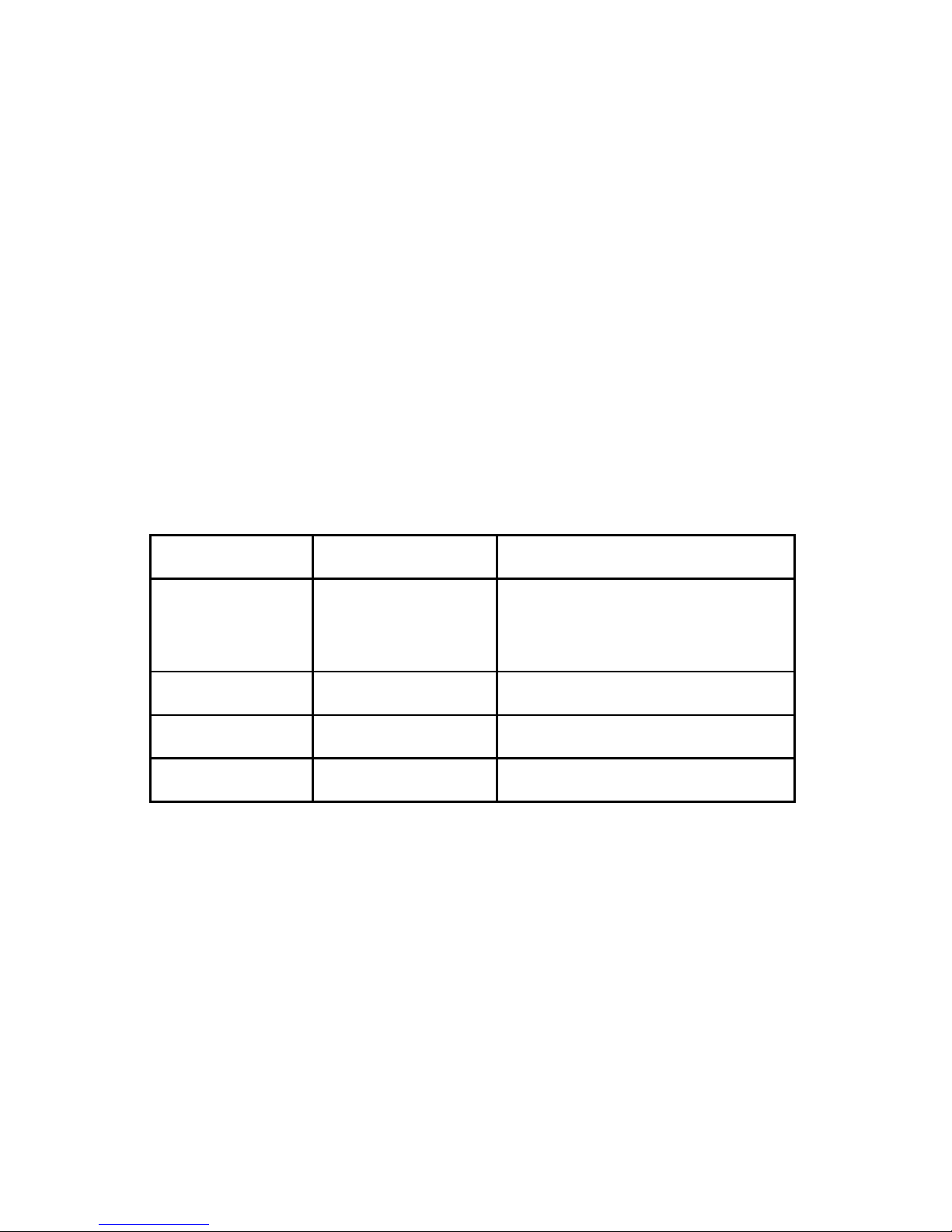
Page 10 LED 54AW User Manual rev. A
DMX Control Mode
To change the DMX starting address:
•Press<MENU> until Addr is displayed.
•Press<ENTER> to display the channel number, and press
<UP> or <DOWN> to select your starting address.
(A001-A512)
•Press<ENTER> to assign your selection.
DMX Mode Channel List
Channel Channel Value Function
1
0-127
128-249
250-255
Overall Intensity
StrobeSlow->Fast
FullIntensity
2 0-255 Amber Intensity
3 0-255 White 1 Intensity
4 0-255 White 2 Intensity
Autres manuels pour LED 54AW
1
Table des matières
Manuels Projecteur populaires d'autres marques

VIZULO
VIZULO Micro Martin Guide de l'utilisateur

EuroLite
EuroLite LED IP FL-100 SMD Manuel utilisateur

Cooper Wheelock
Cooper Wheelock XB12 Manuel utilisateur

Allen + Roth
Allen + Roth 17624-000 Manuel utilisateur

ADJ
ADJ 4 STAGE PAK Manuel utilisateur

Cooper Lighting
Cooper Lighting EGL91SW233 Manuel utilisateur


