
Ayra ComPar 2 Manuel utilisateur

ComPar 2
RGB SMD wash light with remote control
User manual
All information and illustrations shown in this user manual are subject to change without further notice.
User manual version: 1.0 Creation date + author initials: 04-11-2015 RV Revision date + author initials:

Introduction
Thank you for purchasing the Ayra ComPar 2. This user-friendly wash light fixture enables you to create a
great atmosphere with various bright colours. The ComPar 2 features 4 RGB SMD 0 0 LEDs, ensuring
optimal short-distance colour mixing and wide-angle light projection. As such, the ComPar 2 is the perfect
way sublty light up any room, party tent or venue.
Read this user manual before you set up the device and familiarise yourself with the product and its
accessories. Also check the contents of the box for possible damage or missing parts.
If you encounter any problems during use, contact your local dealer for more information and help.
The ComPar 2 features a robust and compact housing, equipped with a double bracket that makes it easy to
suspend the fixture or place it on a floor. An infrared remote control allows you to select colour presets and
many other options without touching the display or menu buttons. The ComPar 2 has a wide range of built-in
colour presets, as well as colour fade/jump options. DMX and master/slave options are also available.
As the ComPar 2's SMD LEDs deliver a wide beam angle, they are ideal for smooth wash lighting, as well as
short-distance illumination of objects. This makes the ComPar 2 a great tool for lighting a dark DJ booth, or
for lighting up semi-transparent DJ booth panels.
The fixture's compact design allows for low-profile applications. Four rubber feet provide adequate support,
and because the connectors are located on the sides, the unit can be installed in a flat position. This also
helps to prevent cable management problems. Additional useful features include DMX connectors and power
daisy-chain options. The ComPar 2 is often used as a party light, and is often found in party rooms,
community centres, bars, dance studios, rollerskate rinks, bowling venues, etc.
All information and illustrations shown in this user manual are subject to change without further notice.
User manual version: 1.0 Creation date + author initials: 04-11-2015 RV Revision date + author initials:

Safety instructions
- Make sure there is no damage caused by transport. If the device seems damaged from the outside, do not
use it and contact your dealer for more information.
- To make sure the device remains in perfect condition and safe to operate, follow the instructions and
warning notes of this user manual.
- Damage caused by improper use or modifications to the device are not covered by the warranty.
- This device does not have any user-serviceable parts inside. This device must be serviced by qualified
technicians.
- The light source of this device is not replaceable. When the light source reaches the end of its life, the
whole fixture must be replaced.
Important notes regarding health and safety
- Never let the power cord come into contact with other cables. Handle the power cord and all mains
connectors with caution.
- Never remove any warning or informative labels from the unit.
- Never leave cables lying around.
- Do not open the device and do not modify any hardware or software.
- Do not insert objects into the air vents of this device.
- Do not connect this device to a dimmer pack.
- Do not switch the system on and off frequently, as this will reduce the lifespan of the device.
- Do not drive the inputs of the fixture with a signal greater than required to work at full performance.
- Only use this device indoors, avoid contact with water, moisture and other liquids. Do not place items filled
All information and illustrations shown in this user manual are subject to change without further notice.
User manual version: 1.0 Creation date + author initials: 04-11-2015 RV Revision date + author initials:
WARNING!
Always keep this device away from moisture and rain! Hazardous electric shocks may occur!
WARNING!
Only connect this device to a suitable power outlet. This device is intended to work on a specific
AC current. Connecting it to power outlets with other voltages may result in permanent damage
and possible hazardous situations, such as fire or electric shocks!
WARNING!
Be careful when operating this device. Touching live wires inside and outside the unit may cause
hazardous electric shocks!

with liquids on top of the unit.
- Avoid nearby flames or heat sources, do not place this device near flammable liquids, gas or flammable
items.
- Always disconnect the device when it is not in use for a longer period or time, when servicing is needed, or
when the device needs cleaning.
- Only handle the power cord by its connectors. Never pull the cable to remove a connector from its socket,
as this could lead to damage and electric shocks.
- Always operate this device with a stable AC current.
- Always operate this device with the AC ground wire connected to the electrical system's ground.
- Never use other types of cables other than those specified in the manual, do not use defective or
malfunctioning cables. Contact your dealer if the included or required cables do not work properly with this
device.
- If the device has been exposed to considerable temperature changes (for example, transport from outdoors
to indoors), do not connect the device immediately. Do not activate the unit until it has reached room
temperature as moisture might build up inside the unit, which may cause it to short-circuit and/or cause
electric shocks.
Guidelines and types of use
- This device is intended to be used by adults for entertainment lighting in locations such as community
centres, bars, dance studios, rollerskating rinks, bowling alleys, etc.
- This device is not suitable for use by children and must always be operated by an adult.
- Only use the device when the environment is suitable and will not cause any damage. Do not use the
product in damp or dusty environments, or where permanent damage may occur such as:
- indoor swimming pools where chlorine is used.
- Beaches, where sand and salt are present.
- Outdoors.
- Indoor areas where intense heat sources are present or where the temperature exceeds levels that
are comfortable for humans.
- Use only the included power cable and only connect the device to a suitable power outlet with the correct
output voltage. Connecting the device to a power outlet with the wrong type of voltage or using the product
with a wrong type of power supply may cause permanent damage to the device.
- Avoid shocks and collisions during use and transport. Do not transport the device while in use. Avoid brute
force during the installation and operation of this device.
- Familiarise yourself with the functions of the device before use. Do not allow operation of the device by
unskilled or unqualified people.
- Use of the device in ways other than described in this user manual may cause damage and injury. Ayra
cannot be held responsible for any damage or injury caused by improper use.
Storage and transport
- This device is intended for mobile use as well as fixed installations. During transport, use the original
packaging of the product, the included flight bag or a fitting flight case, preferably filled with foam.
- This device is not intended for continuous use. Operation breaks will ensure that the lifespan of the device
is not reduced.
- If the device is not used for a longer period of time, disconnect it from its power source and store it in its
original packaging, or in a fitting flight case.
- Store the device under dry conditions indoors, and do not expose the device to extreme temperature
changes.
Housing
- Inspect the housing of the device frequently. Make sure there are no severe dents, cracks or missing
screws. Do not use the device if the housing is not in optimal condition. Contact your dealer or a skilled
technician when in doubt about the state of the device.
- Check the fixture and screws for corrosion. Corrosion should not be present on the fixture. Contact your
dealer or a skilled technician if corrosion is found on the fixture.
- Every power or signal chassis connector should be mounted tightly. Do not use the device if connectors are
loose.
- Do not use the power cord if the wires are visible. The cable cannot be replaced by the user and should
only be repaired or replaced by a skilled technician.
All information and illustrations shown in this user manual are subject to change without further notice.
User manual version: 1.0 Creation date + author initials: 04-11-2015 RV Revision date + author initials:

- Prevent the build-up of dust and dirt. Clean the exterior of the fixture every month with a dry or damp cloth.
If the device is used intensively, the cleaning frequency must be increased. Disconnect the fixture when it is
going to be serviced.
Fuses
- The main fuse of this device is located on the rear of the device. In most cases, it is directly next to the
power inlet.
- Only replace a fuse with a new one of the same type and rating! Do not use a fuse with a higher or lower
rating.
- Do not bridge the fuse with electrical wires or aluminium foil as the fuse is used for protection against
electrical shocks and short circuits.
- Always put the fuse cover back on the fuse compartment.
Battery hazard
WARNING
Do not ingest battery.
Chemical burn hazard.
The remote control supplied with this equipment contains a coin/button cell battery.
If a coin/button cell battery is swallowed, it can cause severe internal burns in just 2 hours and possibly lead
to death.
Keep new and used batteries away from children.
If the battery compartment does not close securely, stop using the product and keep it away from children.
If you think batteries may have been swallowed or placed inside any part of the body, seek immediate
medical attention.
CAUTION
Danger of explosion if battery is incorrectly replaced.
Replace only with the same or equivalent type of battery.
Do not expose batteries to excessive heat such as sunshine, fire and the like.
Do not leave batteries in an extremely high-temperature environment, as this may cause explosions or
leakage of flammable liquids or gas.
Do not burn batteries, do not place batteries in a hot oven, and do not crush or cut batteries, as this may
cause explosions.
Do not subject batteries to extremely low air pressure (high altitudes), as this may cause explosions or
leakage of flammable liquids or gas.
If equipment is not used for an extended period of time (e.g. a few months), batteries should be removed.
Instantly remove empty batteries from the equipment.
Do not store loose batteries or carry them in your pocket or purse. Contact with metal objects like coins and
keys, etc. may cause them to leak, rupture or short-circuit.
Recycling:
Do not dispose of batteries in general household waste. Batteries can contain substances that may harm the
environment. If they are properly recycled, used batteries are a valuable source of reusable materials.
Contact your local government for information on battery disposal.
All information and illustrations shown in this user manual are subject to change without further notice.
User manual version: 1.0 Creation date + author initials: 04-11-2015 RV Revision date + author initials:

Symbol clarification
WEEE Dispose of this product properly. This product is part of the WEEE directive – the
Waste Electrical and Electronic Equipment directive. The requirements stated in this directive
apply to all manufacturers and producers of electronic equipment in the EU.
Do not dispose of this product together with regular household trash. Contact your local
government for more information about proper disposal and recycling of electronic products in
your region. By recycling this product properly after use, we can work together to enjoy these
products and also protect our environment from being polluted.
CE The CE mark indicates that the product complies with applicable European directives and
regulations.
Indoor use only This device is designed to be used indoors only. The maximum ambient
temperature should not exceed 40 degrees Celsius (104 degrees Fahrenheit).
Contact
Ayra professional lighting products
Verrijn Stuartweg 18
4462 GE Goes
The Netherlands
Please do not send any products directly to this address. If you wish to return a product for a refund or
repair, please contact your local dealer for an RMA (Return Material Authorisation).
All information and illustrations shown in this user manual are subject to change without further notice.
User manual version: 1.0 Creation date + author initials: 04-11-2015 RV Revision date + author initials:

Box contents
Box contents
1x ComPar 2 fixture
1x Power cable IEC C13 to Schuko (3x 1mm²)
1x Power cable IEC C13 to UK (3x 1mm²)
1x IR remote control with CR202 battery
Unit and accessory inspection
- Always use the supplied power cable to connect the unit to a power supply. If the cable appears broken or
has visible damage, do not use it.
- If the unit is not going to be used for a longer period of time, disconnect it from the power supply and store it
in a dust-free environment.
- Always check the unit for possible damage before use. If you suspect that something is wrong with the unit,
do not connect it to a power source! If you suspect that your unit is broken or damaged, contact your local
dealer or a certified technician to inspect the unit.
All information and illustrations shown in this user manual are subject to change without further notice.
User manual version: 1.0 Creation date + author initials: 04-11-2015 RV Revision date + author initials:
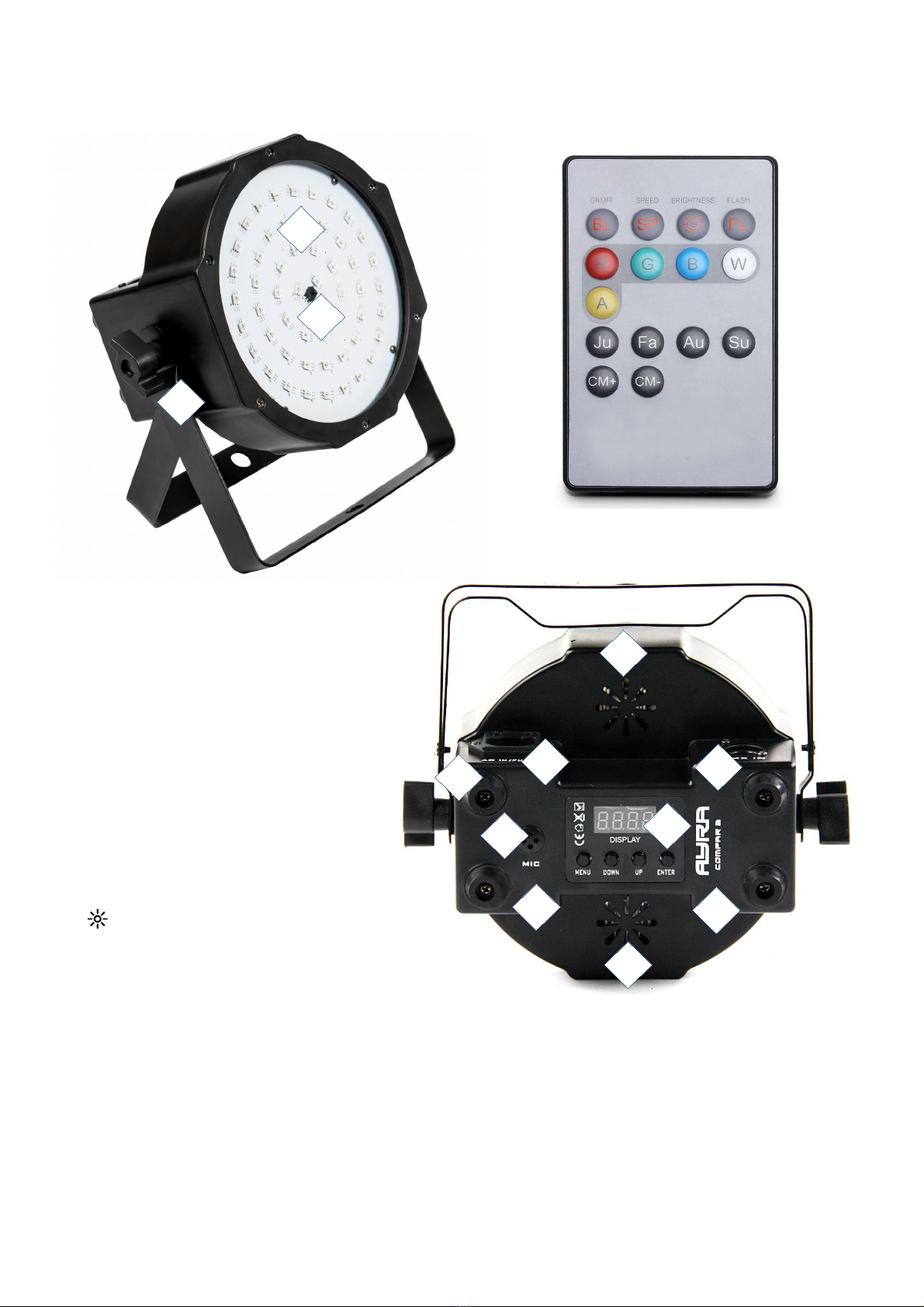
Device overview
1. Beam output
2. IR remote control receiver
3. dual bracket with tightening knobs
4. rubber feet
. IEC C14 power input + fuse
6. IEC C14 power output
7. DMX input (3p XLR)
8. DMX output (3p XLR)
9. ventilation slots
10. microphone
11. LED display with menu buttons
Remote control functions
BL: Blackout (on/off)
SP: Speed
: Brightness
FL: Flash (Strobe)
R: Red intensity
G: Green intensity
B: Blue intensity
W: White intensity (not available on this product)
A: Amber intensity (not available on this product)
JU: Colour jump
FA: Colour fade
AU: Auto mode
SU: Sound mode
CM+ Next Colour preset
CM- Previous colour preset
All information and illustrations shown in this user manual are subject to change without further notice.
User manual version: 1.0 Creation date + author initials: 04-11-2015 RV Revision date + author initials:
4
8
2
1
3
5
9
6
7
9
11
10

Setting up the unit
To activate the unit, use the included power cable to connect it to a suitable 230V, 0Hz power outlet.
The device will need a few seconds to start up and will continue in the previously used mode. If that is the
DMX mode and no signal is detected, the fixture will switch to the last selected stand-alone mode.
The device can now be set as desired, using the menu display or the included remote control. The remote
control allows you to control the ComPar 2 when it's set to stand-alone mode, or when it's connected in a
master-slave setup. This way, standard colour presets, colour fades, sound-controlled modes, etc. can be
selected.
If you need additional options, the menu display and buttons can be used to select the right settings.
Use the display and the menu buttons underneath to set preferences, change settings and scroll through the
menu. “Enter” is used to save a certain setting or preset. Press “Menu” for at least 2 seconds to return to the
main menu.
The table below explains each feature and value.
display Mode Function
ADDR DMX address setting Address 001 … 12
CHND DMX channel mode 2CH – 2 Channel mode
3CH1 – 3 Channel mode RGB
3CH2 – 3 Channel mode dimmer, strobe, macro
6CH – 6 Channel mode
SLND Slave mode Master: Master unit
Slave: Slave unit (follows master commands)
SHND Show modes
COLO COL1 – COL7: Colour preset
RGBW: CR00 – CR99: Dimmer red
CG00 – CG99: Dimmer green
CB00 – CB99: Dimmer blue
CF00 – CF99: Flash speed (strobe speed)
JUMP JU00 – JU99: Colour jump speed
JF00 – JF99: Flash speed (strobe speed)
FADE FA00 – FA99: Colour fade speed
FF00 – FF99: Flash speed (strobe speed)
SHOW Sound-controlled operation
SOUN Sound mode on/off ON/OFF: Switch sound sensitivity on or off
SENS Sound sensitivity 00 – 99: Sound sensitivity in %
BALA Colour balance RED: Red correction 000 – 2
GREE: Green correction 000 – 2
BLUE: Blue correction 000 - 2
LED ON/OFF LED display on/off when not in use
DISP Dlsp / dslp Display flip
TEST Test mode Easy way of checking LEDs during maintenance
HOUR Working hours 0000 – 9999 working hours
VER Firmware version Shows firmware version
ADDR DMX address setting, used to determine the DMX starting channel. Starting with the selected
channel, the fixture will respond to values corresponding with the number of used channels. (For example, if
you set the starting address to value 003, the fixture will respond to channels 3, 4, , etc.)
CHND The fixture's channel mode makes it possible to select the right channel mode setting for each
application. For simple and basic setups, users may prefer to use the 2CH mode. For advanced setups,
users may prefer to choose the 6CH mode to be able to control every feature.
All information and illustrations shown in this user manual are subject to change without further notice.
User manual version: 1.0 Creation date + author initials: 04-11-2015 RV Revision date + author initials:

SLND Select the right master or slave mode for the fixture. The standard mode is the master mode. Select
Slave mode 1 or 2 (2 is partially reversed in music-controlled mode), and the fixture will only follow signals
provided by the master fixture.
To use the master/slave mode, connect two ComPar 2 fixtures using a standard 3P XLR male - 3P XLR
female cable (not included). Connect the DMX output of the master to the DMX input of the slave unit.
Regardless of the mode selected on the master fixture (AutoRun, Sound-controlled), the slave will mimic the
actions.
NOTE please note that it is not possible to switch to any operating mode if the Slave mode is activated on
your fixture!
SHND The show modes grant access to the various stand-alone operating modes. A short explanation:
COLO: Colour presets, choose between 7 static colours.
RGBW: This product allows for RGB only. Set all dimmer levels individually to achieve a custom colour
preset.
JUMP: Colour jump, jumps directly from one colour preset to the next. Strobe can be set individually.
FADE: Colour fade, fades smoothly from one colour preset to the next. Strobe can be set individually.
SHOW: Sound-controlled mode
SOUN The sound status shows whether the unit's built-in microphone is activated or not. It can be enabled
or disabled in the menu with the ON/OFF selector.
SENS The sensitivity of the built-in microphone is adjustable, in order to optimise the built-in sound-
controlled mode. If your music source (speakers) is placed far away, for instance, it is possible to increase
the sensitivity, making sure that the fixture responds to the sound accurately. The sensitivity can be adjusted
from 0 to 100, 100 being the most sensitive.
LED LED display on/off. If you use this device in a club or theatre, the environment is usually dark.
Therefore, it is possible to shut off the LED menu display light when it is not in use. The default setting is ON,
which means that the LED display remains on all the time. Set to OFF, the display will switch off when it
hasn't been used for approximately one minute.
DISP Display flip function. Invert the display status, and the status of the buttons will also change. From the
correct reading position, Menu is always on the left and Enter is always on the right. This feature is
particularly practical if the device is suspended near a wall, so you cannot read the status easily.
TEST When this mode is selected, the unit tests each LED colour individually. During maintenance broken
LEDs can be easily spotted.
HOUR Service intervals are primarily used by rental companies and by users who use their fixtures
frequently. After a specific number of operating hours, the fixture is brought in for service, to check if all
components are in good shape and to fix any problems. This function displays the number of hours that the
product has been used.
VER Displays the firmware version that is installed on the PCB. Users cannot upload new firmware to this
fixture.
REST Resets the fixture without removing the power cables or switching the unit off.
All information and illustrations shown in this user manual are subject to change without further notice.
User manual version: 1.0 Creation date + author initials: 04-11-2015 RV Revision date + author initials:
Ce manuel convient aux modèles suivants
1
Table des matières
Autres manuels Ayra Projecteur


Manuels Projecteur populaires d'autres marques

VIZULO
VIZULO Micro Martin Guide de l'utilisateur

EuroLite
EuroLite LED IP FL-100 SMD Manuel utilisateur

Cooper Wheelock
Cooper Wheelock XB12 Manuel utilisateur

Allen + Roth
Allen + Roth 17624-000 Manuel utilisateur

ADJ
ADJ 4 STAGE PAK Manuel utilisateur

Cooper Lighting
Cooper Lighting EGL91SW233 Manuel utilisateur


