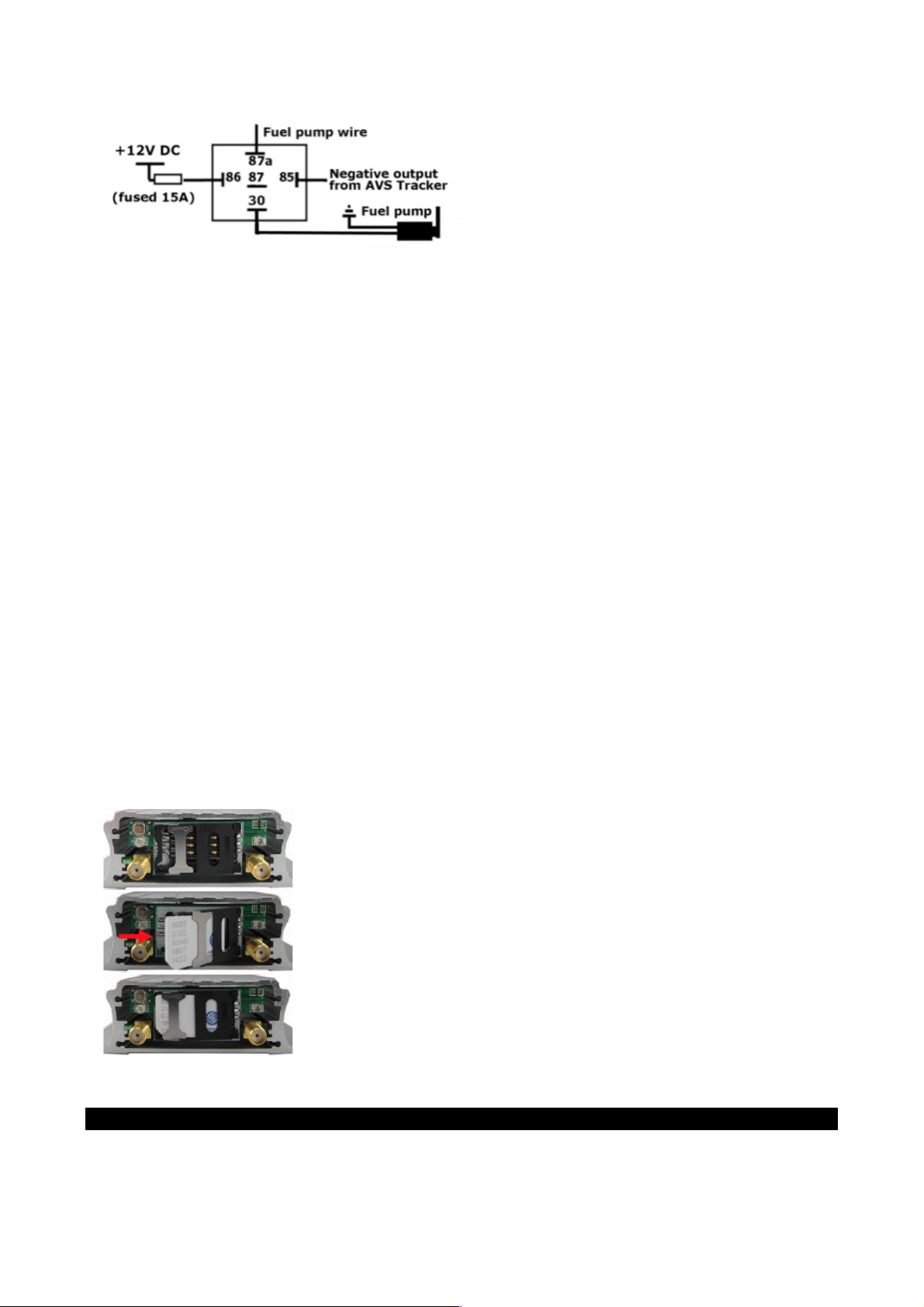
OPTIONAL AVS TRACKER CONTROLLED FUEL KILL IMMOBILISER RELAY
If the customer requests a fuel cut relay be installed it is controlled via sending on/off commands from
the AVS Tracking interface. This can be done from either PC/Mac or mobile phone/portable device. This
feature is strictly to be used only in an emergency situation.
To activate fuel cut the customer sends a Fuel Cut command. This will cut fuel to the vehicle if and when
it is travelling at less than 20km/hour. To re-start the vehicle the customer sends a Fuel Flow command.
The car will not start until this command has been received.
Remember use of this feature relies on the tracker being in an area of good GSM coverage for the
commands to be received. If a fuel cut command is sent but the vehicle is not in GSM coverage the
command will not be received by the tracker until the vehicle is back in GSM coverage range. Conversely,
if the tracker does not have GSM coverage (and the car has been disabled) the tracker will not receive the
command to turn off fuel cut and the car will not be started.
Text controlled fuel cut should be installed only if specifically requested by the customer. Please
advise us if you have fitted fuel kill so we can include user instructions in the customer’s
introduction email. Ensure the customer is fully aware that all liability for requesting and using the
feature lies with them.
REMOVING/RE-INSTALLING THE SIM
**Only remove the SIM if requested by AVS tech support**
1. Turn off the tracker pushing and holding the power button until both LEDs go out
2. Remove the screws on the front cover and remove the front cover
3. Slide the SIM holder lock to release the SIM.
IMPORTANT: CALL MANTA AT THE COMPLETION OF INSTALL TO TEST THE TRACKER
Please ring Manta at the completion of installation (0800 438 862 or 09 476 8052) so we can confirm the
device is online and can test any inputs/output. This must be done BEFORE you leave site or return the
vehicle to the customer.