
AVM FRITZ!Repeater 600 Manuel utilisateur
AVM GmbH, Alt-Moabit 95, D-10559 Berlin, Germany
en.avm.de
411368003
Quick Start Guide
600
FRI!
Repeater
WLAN-Karte
Customer Service
Service information and help can be found on our website and in the social networks:
Service en.avm.de/service
Manual en.avm.de/service/manuals
Guide en.avm.de/guide
Downloads en.avm.de/nc/service/downloads
Support request en.avm.de/service/support-request/your-support-request
Social networks

English .......................................................................... 4
Deutsch .......................................................................... 16
Español .......................................................................... 28
Français .......................................................................... 40
Italiano .......................................................................... 52
Nederlands .......................................................................... 64

Package Contents and Device Features
No. Meaning Function
1Button
Connect
Press for 1 sec.:
Connect
(start WPS)
Press for 6 sec.:
Connect with other
access point
Press for
15 sec.:
Load factory
settings
2
LED
displays the
connection
to the
FRITZ!Box
(wireless
router)
Connect
on connected with FRITZ!Box
(wireless router)
ashing
•slowly (every 2 seconds): not
connected with FRITZ!Box
(wireless router), no wireless
connectioncongured
•fast (twice per second): a
procedure like WPS, restart or
update in progress
Connect
ashing connection to FRITZ!Box (wireless
router) interrupted
Security
• Operate the FRITZ! Repeater 600 in a dry place that is free of dust and
provideforsufficientventilation.
• TheFRITZ!Repeater600isintendedforindooruseonly.Neverletliquids
getinsidethehousing.
• InserttheFRITZ!Repeater600intoanelectricaloutletthatiseasyto
reach.
• DonotopentheFRITZ!Repeater600housing.Openingand/orrepairing
thedevicecanpresentahazard.
• UnplugtheFRITZ!Repeater600fromtheoutletbeforecleaning.Cleanthe
deviceusingamoistcloth.
A description of all LED conditions and button functions is presented in the
PDF manual at en.avm.service
Connect
1 FRITZ!Repeater 600
Connect
2
1
54

1. Plug the FRITZ!Repeater into an outlet
nearyourFRITZ!Box(wirelessrouter).
TheFRITZ!Repeaterstartsoperation.
2. Wait until the LED starts slowly
ashinggreen.Assoonasthe
LEDslowlyashesgreen,the
FRITZ!Repeater is ready for a
connection.
3. Press the Connectbutton.
TheLEDashesgreenmorerapidly.
Connecting the FRITZ!Repeater 600 to the Router at the
Touch of a Button (WPS)
The FRITZ!Repeater600
The FRITZ! Repeater 600 is a wireless repeater that extends the range of
yourWi-Finetwork.
Here are the most important instructions for starting operation with your
FRITZ!Repeater.APDFmanualwithdescriptionsofallfunctionsand
instructions is available on our website en.avm.de/service.
TheFRITZ!Repeater600supportsMeshWi-Fi.ThankstoMeshWi-Fi,
the FRITZ!Repeater combined with a FRITZ!Box with FRITZ!OS 7
automatically adopts the FRITZ!Box’s Wi-Fi settings, receives its
updatesviatheFRITZ!Box,anditswirelessLANperformanceis
optimized.FormoreinformationonMeshWi-Fi,seethePDFmanual
and our website at en.avm.de/mesh.
The FRITZ!Repeater 600 has a user interface which you can open in
awebbrowseronallconnecteddevices.
1
2
3
76

4. Within2minutes,startWPSonyourFRITZ!Box:
- FRITZ!Box with WPS or Connect/WPS
button:pressbuttonbriey
- FRITZ!Boxes with WLAN or WLAN/
WPS button: press button for about 6
seconds until the WLANLEDashes.
Power/DSL
WLAN
Fon/DECT
Connect/WPS
Info
When the LED on the FRITZ!Repeater lights up permanently, the
Wi-Ficonnectionhasbeenestablished.
IftheLEDstartsashingslowlygreenagain,theconnectionwas
notestablished.Repeattheconnectioninstructionsstartingfrom
step3.
5. InserttheFRITZ!Repeaterintoanoutletlocatedabouthalfway
between the FRITZ!Box and the wireless devices to be added to the
Wi-Finetwork.TheFRITZ!RepeaterandyourFRITZ!Boxconnect
oncemore.Assoonastheconnectionhasbeenestablished,the
LEDlightsup.TheFRITZ!Repeater600isreadyforoperation.
Power/DSL
WLAN
Fon/DECT
Connect/WPS
Info
Wi-Fi Wi-Fi
LED lights up green
the FRITZ!Repeater has a good Wi-Fi
connectionandisreadyforoperation.
LED lights up orange
the FRITZ!Repeater has a weak
wirelessLANconnection.Plugthe
FRITZ!Repeater into an outlet closer to
yourFRITZ!Box.
LED ashing continuously orange
cannotconnectviaWi-Fi.Plugthe
FRITZ!Repeater into an outlet closer to
yourFRITZ!Box.
WiththeFRITZ!AppWLANyoucandeterminetheoptimum
position for your FRITZ!Repeater in the home network of your
FRITZ!Box.
4
5
98

Connect the FRITZ!Repeater 600 to the Wireless Router
using the Wizard
If your wireless router does not support setup at the touch of a button
(WPS), use the wizard to connect the FRITZ!Repeater with the wireless
router.
1
Establishing a Connection to the Computer
1. PlugtheFRITZ!Repeaterintoanoutletnearyourwirelessrouter.The
FRITZ!Repeaterstartsoperation.
2. WaituntiltheLEDstartsslowlyashinggreen.
3. Select the Wi-Fi network of your FRITZ!Repeater on the computer, and
starttheconnectionprocess.
4. EnterthenetworkkeyoftheFRITZ!Repeater.Theprecongured
uniquenetworkkeyisprintedonthebackofthisguideandonthe
backofthedevicehousing.
ThecomputerestablishesaconnectiontotheFRITZ!Repeater.
2
Run the Wizard
1. Open the web browser on your computer and enter http://fritz.
repeaterintheaddressbar.
2. Thecongurationwizardappearsandguidesyouthroughsetupofthe
Wi-FiconnectionbetweentheFRITZ!Repeaterandyourwirelessrouter.
3. Insert the FRITZ!Repeater into an outlet located about halfway between
the wireless router and the wireless devices to be added to the Wi-Fi
network.TheFRITZ!Repeaterandyourwirelessrouterconnectonce
more.
LED lights up green: the FRITZ!Repeater has a good Wi-Fi connection
andisreadyforoperation.
LED lights up orange: the FRITZ!Repeater has a weak Wi-Fi
connection.InsertthetheFRITZ!Repeaterintoanoutletclosertothe
wirelessrouter.
LED ashing continuously orange: cannot connect via Wi-Fi.Insertthe
theFRITZ!Repeaterintoanoutletclosertothewirelessrouter.
1110

FRITZ!Repeater 600 in the Home Network
FRITZ!Repeater 600 on a FRITZ!Box with Mesh
In the home network of a FRITZ!Box with Mesh (FRITZ!OS 7 or newer),
operationofyourFRITZ!Repeaterisespeciallyeasyandconvenient.
• When Mesh is enabled, all of the FRITZ!Box’s Wi-Fi network settings are
permanentlyadopted.
• Updates for the FRITZ!Repeater can be performed directly in the
FRITZ!Box user interface under Home Network / Mesh.
• Mesh Wi-Fi provides for the optimum Wi-Fi connections of all wireless
devices.
FRITZ!Repeater 600 on a FRITZ!Box without Mesh or
a Wireless Router from Another Manufacturer
• DuringcongurationtheFRITZ!RepeateradoptstheWi-Finetworkname
andpasswordoftheFRITZ!Box(wirelessrouter).
• IftheWi-Finetworknameand/orpasswordischangedintheFRITZ!Box
(wirelessrouter),theFRITZ!Repeaterhastobereconnected.
• SettingsandupdatesfortheFRITZ!Repeaterareconguredand
performedviatheFRITZ!Repeateruserinterface.
Opening the User Interface of the FRITZ!Repeater 600
• With a FRITZ!Box:
Enter http://fritz.repeater in the web browser on a connected device
toopentheuserinterfaceoftheFRITZ!Repeater.Performanyupdate
available under System / Update.
• With another wireless router:
1.Open the user interface of the your wireless router to determine the IP
addressassignedtotheFRITZ!Repeater.
2.Enter the IP address in the web browswer to open the user interface of
theFRITZ!Repeater.
3.SecureyourRepeaterwithapasswordthersttimeyouopentheuser
interface.
4.Perform any update available under System / Update.
1312
App
Store
Google Play
Store
Diagnosis
The FRITZ!Repeater transfers diagnostics data to AVM, which support AVM
infurtherdevelopingtheproduct.Thisallowsyoutobenetdirectlyfrom
optimizationsandFRITZ!OSupdates.Formoredetailedinformation,seethe
help on the user interface at http://fritz.repeater.
Legal Notice
Legal information and licensing conditions are presented in the user
interface under Help / Legal Notice.
Disposal
InaccordancewithEuropeandirectives,theFRITZ!Repeater600andits
cablemaynotbedisposedwithhouseholdwaste.Bringthesetoyour
localcollectionpointsfordisposal.
Declaration of CE Conformity
AVM declares herewith that the device is compliant with the basic
requirementsandtherelevantrulesindirectives2014/53/EU,
2009/125/ECand2011/65/EU.
The long version of the declaration of CE conformity is available at
http://en.avm.de/ce.
Radio Frequencies and Transmitter Power
• Wi-Fitechnologyat2.4GHzrange:2.4GHz–2.483GHz,
maximum 100 mW
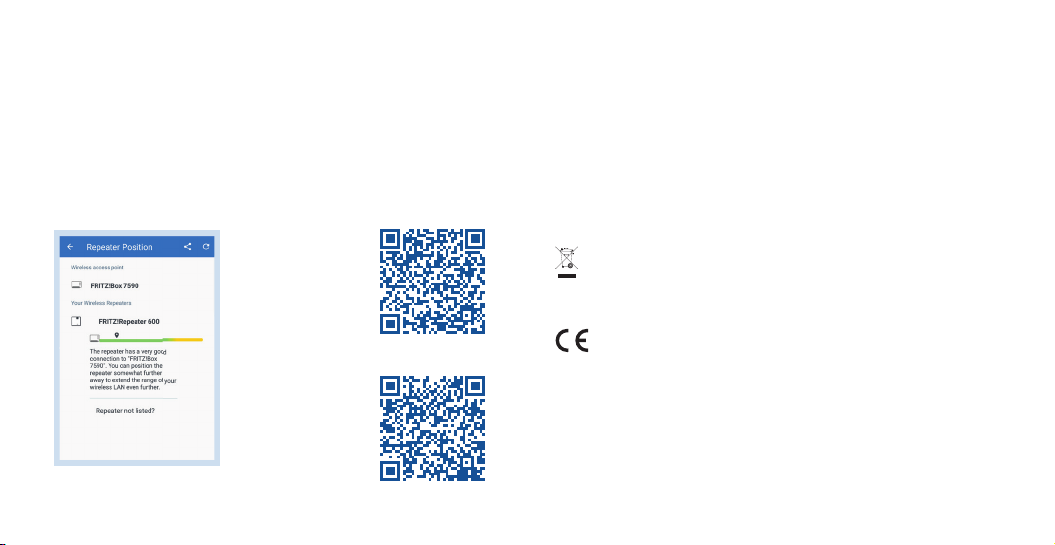
Position FRITZ!Repeater with the FRITZ!App WLAN
FRITZ!Repeaters increase the Wi-Fi range of your home network optimally
when they are positioned corresponding to the spatial conditions at your
location.
TheFRITZ!AppWLANhelpsyoutocongureyourFRITZ!Repeatersand
positionthemattheideallocations.ForthistheFRITZ!AppWLANmustbe
installedonyoursmartphoneandbeconnectedtothehomenetwork.
TheFRITZ!AppWLANcanbedownloadedforfree:
1514

Nr. Bedeutung Funktion
1Taste
Connect
1 Sek. drücken:
Verbindung her-
stellen (WPS)
6 Sek. drücken:
mit anderer
Basis verbinden
15 Sek.
drücken:
Werks-
einstellungen
laden
2
LED
zeigt die
Verbindung
zur
FRITZ!Box
(WLAN-
Router)
Connect
leuchtet mitFRITZ!Box(WLAN-Router)
verbunden
blinkt
•langsam (alle 2 Sekunden):
nicht mit FRITZ!Box
(WLAN-Router)verbunden,
keineWLAN-Verbindung
eingerichtet
•schnell (2-mal pro Sekunde):
ein Vorgang wie WPS,
NeustartoderUpdatewird
ausgeführt
Connect
blinkt Verbindung zur FRITZ!Box
(WLAN-Router)istunterbrochen
Lieferumfang und Gerätemerkmale
Sicherheit
• Betreiben Sie den FRITZ!Repeater 600 an einem trockenen und
staubfreienOrtundsorgenSiefürausreichendeBelüftung.
• DerFRITZ!Repeater600istfürdieVerwendunginGebäudenvorgesehen.
EsdürfenkeineFlüssigkeitenindasInnereeindringen.
• SteckenSiedenFRITZ!Repeater600ineineleichterreichbareSteckdose.
• ÖnenSiedenFRITZ!Repeater600nicht.DurchÖnenund/oder
unsachgemäßeReparaturenkönnenSiesichinGefahrbringen.
• TrennenSiedenFRITZ!Repeater600vorderReinigungvomStrom.
VerwendenSiefürdieReinigungeinfeuchtesTuch.
DieBeschreibungallerLED-ZuständeundTastenfunktionenndenSieim
PDF-Handbuch unter avm.de/service
Connect
1 FRITZ!Repeater 600
Connect
2
1
1716

1. Stecken Sie den FRITZ!Repeater in
eineSteckdoseinderNäheIhrer
FRITZ!Box(WLAN-Router).
Der FRITZ!Repeater startet.
2. Warten Sie bis die LED langsam grün
blinkt.SobalddieLEDlangsamgrün
blinkt, ist der FRITZ!Repeater bereit
eineVerbindungherzustellen.
3. Drücken Sie die Taste Connect.
DieLEDblinktschnellergrün.
FRITZ!Repeater 600 per Tastendruck (WPS) mit dem
WLAN-Router verbinden
Der FRITZ!Repeater600
DerFRITZ!Repeater600isteinWLAN-Repeater,derdieReichweiteIhres
WLAN-Funknetzesvergrößert.
Hier erhalten Sie die wichtigsten Informationen, um Ihren FRITZ!Repeater
inBetriebzunehmen.EinPDF-HandbuchmitBeschreibungenaller
FunktionenundAnleitungenndenSieaufunsererInternetseite
avm.de/service.
DerFRITZ!Repeater600unterstütztWLANMesh.Im
Zusammenspiel mit einer FRITZ!Box mit FRITZ!OS 7 übernimmt der
FRITZ!RepeaterdankWLANMeshautomatischdieWLAN-
Einstellungen der FRITZ!Box, erhält seine Updates über die
FRITZ!BoxundseineWLAN-Leistungwirdoptimiert.Nähere
InformationenzuWLANMeshndenSieimPDF-Handbuchundauf
unserer Internetseite avm.de/mesh.
DerFRITZ!Repeater600hateineBenutzeroberäche,dieSieaufallen
angeschlossenenGerätenineinemInternetbrowserönenkönnen.
1
2
3
1918
Table des matières
Langues :
Autres manuels AVM Répétiteur


