Avermedia AS311 Manuel utilisateur

2
Disclaimer
All pictures contained in this documentation are example images only. The images may vary depending on
the product and software version. Information presented in this documentation has been carefully checked
for reliability; however, no responsibility is assumed for inaccuracies. The information contained in this
documentation is subject to change without notice.
Copyright and Trademark Information
© 2021 by AVerMedia Technologies, Inc. All rights reserved. No part of this publication, in whole or in
part, may be reproduced, transmitted, transcribed, altered or translated into any language in any form by
any means without the written permission of AVerMedia Technologies, Inc. Information and specication
contained in this manual are subject to change without notice and do not represent a commitment on the
part of AVerMedia.
For more information, please visit www.avermedia.com.
AVerMedia is trademark or registered trademark of AVerMedia Technologies, Inc.
Headquarters
Address No.135, Jian 1st Rd., Zhonghe Dist., New Taipei City 23585, Taiwan
Website www.avermedia.com
Support www.avermedia.com/support
Telephone +886-2-2226-3630
US Oce
Address 4038 Clipper Ct., Fremont, CA 94538, United States
Website www.avermedia-usa.com
Europe Oce
Address Hanauer Landstrasse 291 B, 60314 Frankfurt Hessen, Germany
國際總部
地址 23585新北市中和區建一路135號
網址 www.avermedia.com
支援 www.avermedia.com/support
電話 +886-2-2226-3630
中国子公司
地址 上海市静安区武宁南路488号智慧广场1510室
网址 www.avermedia.com.cn
电话 +86-21-52987985
Japan Oce
Address 6F,KojimachiSyueiBldg,4-3-13Kudan-minami,Chiyoda-ku,Tokyo,102-0074,Japan
Website www.avermedia.co.jp/
Support www.avermedia.co.jp/support

3
Important Safety Instructions
1. Read these instructions.
2. Keep these instructions.
3. Follow all instructions.
4. Heed all warnings.
5. Do not use the apparatus on uneven or unstable surfaces.
6. Do not use this apparatus in a wet environment or near water.
7. Unplug the apparatus before cleaning. Clean only with a dry cloth.
8. Use in a well ventilated environment. Do not block any ventilation openings.
9. Use the apparatus within ambient temperatures 32–104°F (0–40°C).
10. Use power sources within the specied voltage range.
11. Do not place heavy objects on the apparatus.
12. Do not install near heat sources such as radiators or stoves.
13. Do not defeat the safety purposes of the polarized or grounding-type plug.
14. Protect the power cord from being walked on or pinched, particularly where the cord
connects with plugs or adapters.
15. Only use the attachments and accessories specied by the manufacturer.
16. Unplug this apparatus during lightning or when unused for prolonged periods of time.
17. Do not modify or disassemble the apparatus in any way.
18. Refer all servicing to AVerMedia Customer Service.
19. Do not dispose the apparatus as general household waste. Dispose in accordance
with local environmental laws.
重要安全說明
1. 仔細閱讀這些說明。
2. 妥善保存這些說明。
3. 遵守所有的指示。
4. 注意所有的警告。
5. 請勿將本產品安裝於不平穩的表面。
6. 請勿在潮濕或靠近水的地方使用本產品。
7. 清潔前請拔除電源。僅使用乾布清潔。
8. 請於通風的環境使用本產品。請勿堵住通風口。
9. 請於規格溫度範圍32–104°F(0–40°C)使用本產品。
10. 請使用額定電壓範圍內的電源。
11. 請勿放置重物於本產品上。
12. 請勿安裝於熱源附近如暖器或火爐旁。
13. 請勿破壞極性或接地插頭的安全防護設計。
14. 請保護電源線,勿使其被踩踏或碾壓,特別是與插頭或變壓器的連接處。
15. 僅使用製造商指定的配件及零件。
16. 打雷或長時間不使用時請拔除電源。
17. 請勿以任何方式改造或拆解本產品。
18. 如需維修請洽本公司客服人員。
19. 請勿當作家庭垃圾任意丟棄。請遵從當地環境法規妥善處理。

4
重要安全说明
1. 仔细阅读这些说明。
2. 妥善保存这些说明。
3. 遵守所有的指示。
4. 注意所有的警告。
5. 请勿将本产品安装于不平稳的表面。
6. 请勿在潮湿或靠近水的地方使用本产品。
7. 清洁前请拔除电源。仅使用干布清洁。
8. 请于通风的环境使用本产品。请勿堵住通风口。
9. 请于规格温度范围32–104°F(0–40°C)使用本产品。
10. 请使用额定电压范围内的电源。
11. 请勿放置重物于本产品上。
12. 请勿安装于热源附近如暖器或火炉旁。
13. 请勿破坏极性或接地插头的安全防护设计。
14. 请保护电源线,勿使其被踩踏或碾压,特别是与插头或变压器的连接处。
15. 仅使用制造商指定的配件及零件。
16. 打雷或长时间不使用时请拔除电源。
17. 请勿以任何方式改造或拆解本产品。
18. 如需维修请洽本公司客服人员。
19. 请勿当作家庭垃圾任意丢弃。请遵从当地环境法规妥善处理。

5
EN
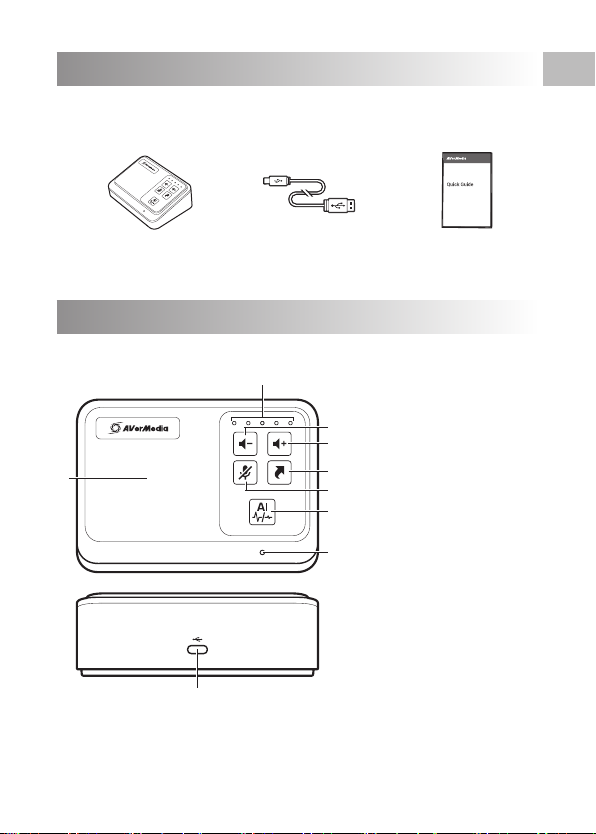
Parts and Ports
Inside the Box
These are what you'll nd in the box:
Quick Guide
USB Type-C to
Type-A Cable
AS311
Note: Volume can be fully adjusted via computer’s volume setting.
2
4
5
1
3
6
8
9
7
1 Speaker
2Volume Indicators
3Volume "–" Button
Tap 1X: Decrease volume
Hold: Decrease to minimum
volume
4Volume "+" Button
Tap 1X: Increase volume
Hold: Increase to maximum
volume
5HotKey
Tap1X:Activateshortcut
6Mic.MuteButton
Tap1X:Mute/unmutemic.
7AIButton/Indicator
T
a
p1X:EnableAInoise
reduction
8Microphone
9
USB Type-C Port

6
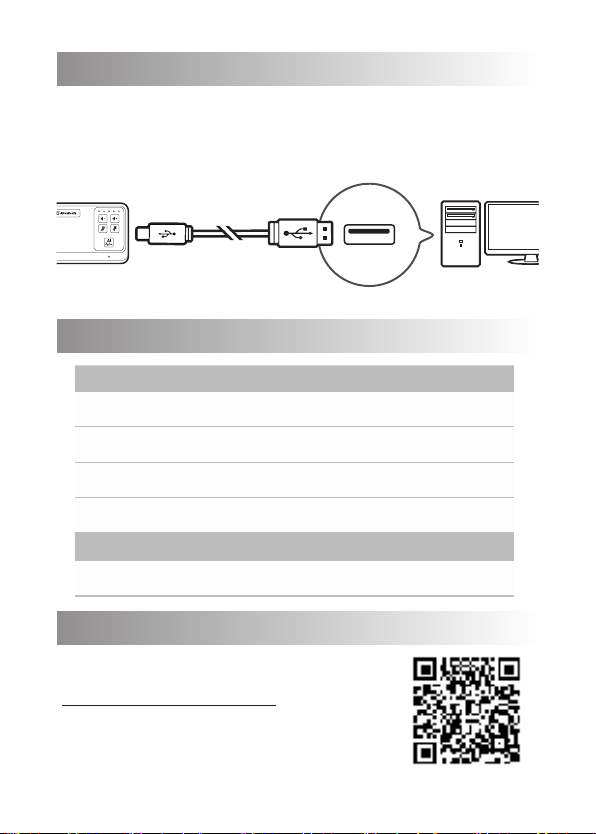
Connection
Connect AS311 to your computer via the included USB cable. Once
connected, the speakerphone will automatically function as your com-
puter’s default speaker and microphone device, namely AVerMedia
Speakerphone AS311.
LED Indications
Volume Indicators Status
Flashing blue Starting up
Solid blue (at volume level) Ready
Solid red (all indicators) Microphone muted
Flashing blue once
(middle indicator) Hot key pressed once
AI Indicator Status
Solid blue AI noise reduction enabled
More Info
This device does not require a driver installation.
For more information, visit our webpage
http://q.avermedia.com/AS311 or scan this
QR code.

7
Specications
Connection Type USB Type-C, USB Type-A via cable
Power Supply 5 V / 0.5 A
Speaker 3 W (max.)
Speaker Frequency
Response 250 Hz – 14 kHz
Mic. Sensitivity -29 dB V/Pa @ 1 kHz
Mic. Frequency Response 150 Hz – 6.5 kHz
Mic. S/N > 59 dB
Effective Range 3 m (unobstructed)
Dimensions (W x D x H) 12 x 8 x 4 cm (4.7 x 3.1 x 1.6 in)
Weight 195 g (6.9 oz)
Note: Specications are subject to change without prior notice. Please refer to our
webpage for the latest details.
Deutsch
Verpackungsinhalt
Inhalt der Schachtel:
• AS311
• USB Typ-C an Typ-A-Kabel
• Schnellanleitung
Teile und Anschlüsse
1. Lautsprecher
2. Lautstärkeanzeigen
3. Lautstärke "–" Taste
1 x Antippen: Lautstärke verringern
Halten: Mindestlautstärke
4. Lautstärke "+" Taste
1 x Antippen: Lautstärke erhöhen
Halten: Maximale Lautstärke
5. Hotkey
1 x Antippen: Tastenkürzel aktivieren
6. Mik. Stummschalten-Taste
1 x Antippen: Mikrofon laut/stumm schalten
7. KI-Taste/Anzeige
1 x Antippen KI-Rauschunterdrückung aktivieren
8. Mikrofon
9. USB Typ-C-Anschluss
Hinweis: Die Lautstärke kann vollständig über
die Lautstärkeeinstellung des Computers
angepasst werden.
Verbindung
Verbinden Sie AS311 über das beiliegende
USB-Kabel mit Ihrem Computer. Nach
der Verbindungsherstellung wird das
Speakerphone automatisch zum
standardmäßigen Lautsprecher- und
Mikrofongerät Ihres Geräts, d. h. AVerMedia
Speakerphone AS311.
LED-Anzeigen
Lautstärkeanzeigen
Status
Blinkt Blau Startet
Statisch blau
(Lautstärkepegel) Bereit
Statisch rot (alle
Anzeigen)
Mikrofon
stummgeschaltet
Blinkt einmal Blau Hotkey einmal gedrückt
KI-Anzeige Status
Statisch Blau
KI-Rauschunterdrückung
aktiviert
Weitere Informationen
Dieses Gerät benötigt KEINE
Treiberinstallation. Für weitere Informationen
besuchen Sie bitte unsere Webseite unter:
http://q.avermedia.com/AS311 oder
scannen Sie den QR-Code.

8
Français
Contenu du Coffret
Contenu de la boîte:
• AS311
• Câble USB Type-C vers Type-A
• Guide de démarrage rapide
Présentation du produit
1. Haut-Parleur
2. Indicateurs de volume
3. Bouton de volume "-"
Appuyer 1X: Diminuer le volume
Maintenir Enfoncé: Diminuer le volume au
minimum
4. Bouton de volume "+"
Appuyer 1X: augmenter le volume
Maintenir Enfoncé: Augmenter le
volume au maximum
5. Touche de raccourci
Appuyer 1X: Activer le raccourci
6. Bouton "Couper le Son" du Micro
Appuyer 1X: activer / désactiver le micro.
7. Bouton / Indicateur IA
Appuyer 1X: activer la réduction de bruit IA
8. Microphone
9. Port USB de type C
Remarque: le volume peut être entièrement
réglé via le réglage du volume de
l'ordinateur.
Connexion
Branchez AS311 sur votre ordinateur via le
câble USB inclus. Une fois branché, le haut-
parleur fonctionnera automatiquement en
tant que haut-parleur et microphone par
défaut de votre ordinateur, sous le nom
AVerMedia Speakerphone AS311.
Indications des LED
Indicateurs de volume Statut
Bleu clignotant Démarrage
Bleu en continu (au
niveau du volume) Prêt
Rouge en continu (au
niveau du volume)
Microphone coupé
Bleu clignotant une fois Touche de raccourci
pressée une fois
Indicateur IA Statut
Bleu en continu Réduction de bruit IA
activée
Plus d’informations
Cet appareil ne nécessite PAS l'installation de
pilotes. Pour plus d'informations, visitez notre
page web http://q.avermedia.com/AS311 ou
scannez ce code QR.
Italiano
Contenuto della scatola
Contenuto:
• AS311
• Cavo USB Type-C to Type-A
• Guida rapida
Parti e porte
1. Altoparlanti
2. Indicatori del volume
3. Pulsante "–" Volume
Un tocco: Diminuisci volume
Tieni premuto: Diminuisci al minimo il volume
4. Pulsante "+" Volume
Un tocco: aumenta volume
Tieni premuto: aumenta al massimo il volume
5. Hot Key
Un tocco: attiva scorciatoia
6. Pulsante Mute per microfono
Un tocco: attiva/disattiva mic.
7. Pulsante IA/Indicatore
Un tocco: Abilita AI per la riduzione del rumore
8. Microfono
9. Porta USB Type-C
N.B.: I livelli di volume possono essere al meglio
regolati dalle impostazioni del PC.
Collegamento
Connetti AS311 al tuo computer con il cavo
USB incluso. Una volta connesso, il dispossitivo
inizierà a funzionare automaticamente come
dispositivo di default sia come AVerMedia
Speakerphone AS311.
Indicazioni LED
Indicatori del Volume Status
Indicatore blu
lampeggiante
Inizializzando
Blu per i livelli del volume Pronto
Rosso per tutti gli
indicatori
Microfono
disattivato
Indicatore blu sso Hot key premuto
una volta
Indicatore IA Status
Blu sso IA riduzione del
rumore attivata

9
Maggiori informazioni
Questo dispositivo NON richiede
l'installazione di un driver. Per maggiori
informazioni, visita la nostra pagina web
http://q.avermedia.com/AS311 o fai la
scansione di questo codice QR.
Español
Dentro de la caja
Esto es lo que encontrarás en la caja:
• AS311
• Cable USB Tipo C a tipo A
• Guía rápida
Componentes del producto
1. Altavoz
2. Indicador de volumen
3. Volumen "–" Boton
Presiona 1X: Bajar volumen
Manten: Bajar volumen al minimo
4. Volumen "+" Boton
Presiona 1X: Subir volumen
Presionar: Subir volumen al maximo
5. Hot Key
Presiona 1X: Activa atajo
6. Mic. Mute boton–Pulsa 1X: Mute/unmute mic.
7. AI Boton/Indicador
Pulsa 1X: Activa AI noise reduction
8. Microfono
9. USB Tipo C Puerto
Nota: El volumen puede ser ajustado via el
volumen del PC.
Conexión
Conecta el AS311 a tu PC via el cable USB
incluido. Una vez conectado, tu altavoz
funcionará automaticamente como tu
altavoz principal, llamado AVerMedia
Speakerphone AS311
Indicadores LED
Indicador de volumen
Estado
Intermitente azul Encender
Azul jo (nivel de
volumen) Listo
Rojo jo (todos los
indicadores)
Micrófono muteado
Intermitente azul una
vez
Hot Key pulsado
una vez
Indicador IA Estado
Azul jo AI noise reduction
activado
Más Información
Este dispositivo no requiere de instalación de
driver. Para más información, visite nuestra
página web http://q.avermedia.com/AS311 o
escanee este código QR.
Nederlands
In de doos
Dit is wat u in de doos zult vinden:
• AS311
• USB-kabel type C naar type A
• Beknopte handleiding
Onderdelen en poorten
1. Luidspreker
2. Volume-indicatoren
3. Knop volume "–"
1x tikken: volume verlagen
Vasthouden: verlagen tot minimum volume
4. Knop volume "+"
1x tikken: volume verhogen
vasthouden: verhogen tot maximum volume
5. Sneltoets
1x tikken: snelkoppeling activeren
6. Knop microfoon dempen
1x tikken: microfoon dempen/inschakelen
7. AI-knop/-indicator
1x tikken: AI ruisonderdrukking inschakelen
8. Microfoon
9. USB-poort type C
Opmerking: Het volume kan volledig worden
aangepast via de volume-instellingen van de
computer.
Verbinding
Sluit de AS311 aan op uw computer via
de meegeleverde USB-kabel. Zodra de
luidsprekertelefoon is aangesloten, zal deze
automatisch functioneren als de standaard
luidspreker en microfoon van uw computer,
namelijk de AVerMedia Speakerphone AS311.
Led-indicatoren
Volume-indicatoren
Status
Knipperend blauw Opstarten
Brand blauw (op
volumeniveau) Gereed
Brand rood (alle
indicatoren)
Microfoon gedempt
Knippert eenmaal
blauw
Sneltoets eenmaal
ingedrukt

10
AI-indicator Status
Brand blauw AI ruisonderdrukking
ingeschakeld
Meer informatie
Dit apparaat vereist GEEN installatie van een
stuurprogramma. Ga voor meer informatie
naar onze webpagina http://q.avermedia.
com/AS311 of scan deze QR-code.
Polski
W pudełku
W opakowaniu znajdują się:
• AS311
• Kabel USB Typ-C do Typ-A
• Skrócona instrukcja obsługi
Części i złącza
1. Głośnik
2. Wskaźniki głośności
3. Przycisk głośności „–”
Naciśnij 1X: Zmniejszanie głośności
Przytrzymaj: Zmniejszenie do
minimalnej głośności
4. Przycisk głośności „+”
Naciśnij 1X: Zwiększanie głośności
Przytrzymaj: Zwiększanie do
maksymalnej głośności
5. Klawisz skrótu
Dotknij 1X: Aktywuj skrót
6. Mikr. Przycisk wyciszenia
Dotknij 1X: Wyciszenie/wyłączenie
wyciszenia mikrofonu
7. Przycisk/wskaźnik AI
Dotknij 1X: Włączenie inteligentnej
redukcji szumów
8. Mikrofon
9. Złącze typu C
Uwaga: Głośność może być w pełni
regulowana poprzez ustawienia głośności
komputera.
Połączenia
Podłącz AS311 do komputera za pomocą
dołączonego kabla USB. Po podłączeniu
zestaw sluchawkowo-mikrofonowy będzie
automatycznie funkcjonował jako domyślne
urządzenie głośnikowe i mikrofonowe
komputera, a mianowicie AVerMedia
Speakerphone AS311.
Wskazania LED
Wskaźniki głośności
Status
Migają na niebiesko Uruchamianie
Stałe niebieskie (przy
poziomie głośności) Gotowe
Stałe czerwone
(wszystkie wskaźniki)
Mikrofon wyciszony
Miga raz na niebiesko Jedno naciśnięcie
klawisza skrótu
Wskaźnik AI Status
Stały niebieski
Włączona
inteligentna funkcja
redukcji szumów
Więcej informacji
To urządzenie NIE wymaga instalacji
sterownika. Aby uzyskać więcej informacji,
odwiedź naszą stronę internetową http://
q.avermedia.com/AS311 lub zeskanuj kod QR.
Čeština
Obsah balení
Následuje obsah balení:
• AS311
• USB kabel typ c až typ A
• Rychlý návod
Popis částí
1. Reproduktor
2. Kontrolky hlasitosti
3. Tlačítko hlasitosti "–"
1 klepnutí: Snížení hlasitosti
Podržení: Snížení hlasitosti na minimum
4. Tlačítko hlasitosti "+"
1 klepnutí: Zvýšení hlasitosti
Podržení: Zvýšení hlasitosti na maximum
5. Aktivační klávesa
1 klepnutí: Aktivovat zkratku
6. Tlačítko Ztlumit mikrofon
1 klepnutí: Ztlumit mikrofon/Zrušit ztlumení
mikrofonu
7. Tlačítko/Kontrolka AI
1 klepnutí: Aktivovat snížení šumu AI
8. Mikrofon
9. Port USB typ C
Poznámka: Hlasitost lze upravit prostřednictvím
nastavení hlasitosti v počítači.
Připojení
Připojte AS311 k počítači pomocí přiloženého
kabelu USB. Po připojení bude hlasitý
telefon automaticky fungovat jako výchozí
reproduktor a mikrofon vašeho počítače,
konkrétně AVerMedia Speakerphone AS311.
Table des matières