Aventura DMB-04R Manuel utilisateur

- 1 -
DMB-04R Embedded Mobile DVR - User Manual
(V1.0)
User Manual of DMB-04R Embedded Mobile DVR (V1.0)

- 2 -
Statement
Thank you for purchasing our product. If there are any questions or requests, please don't hesitate to contact us.
This manual may become technically outdated or contain printing errors, and the content is subject to change without
notice. The updates will be added into the new version of this manual. We will readily improve or update the products
or procedures described in the manual.
Tips for users:
· Please install the DVR in well-ventilated places;
· Please make sure the DVR operates in the allowed range of
temperature and humidity;
· Dust inside the DVR may cause a short circuit after dampening; Please
regularly clean the board, connector, chassis fan,etc.
· Please select the hard driver manufacturers recommended HDDs
which can meet the demand of DVR—24/7 operation, reading and
writing large amount of data.
User Manual of DMB-04R Embedded Mobile DVR (V1.0)

- 3 -
1Production Description ......................................................................................................................................................................................... 6
1.1 Overview..................................................................................................................................................................................................... 6
1.2 Key Functions ............................................................................................................................................................................................. 6
2Installation help .................................................................................................................................................................................................... 9
2.1 Check device and accessories..................................................................................................................................................................... 9
2.2 SATA Installation.........................................................................................................................................................................................9
2.3 SIM/UIM card installation ........................................................................................................................................................................11
2.4 Rear Panel Interface Description..............................................................................................................................................................12
2.5 KEY Ignition Switch Connection................................................................................................................................................................13
2.6 Alarm Output Connection Guide.............................................................................................................................................................. 16
3Operation Guide .................................................................................................................................................................................................17
3.1 Front Panel Description............................................................................................................................................................................17
3.2 IR Control.................................................................................................................................................................................................. 18
3.3 Menu Description.....................................................................................................................................................................................20
3.3.1 Menu items ....................................................................................................................................................................................20
3.3.2 Menu Operations ...........................................................................................................................................................................21
3.4 Input Method ...........................................................................................................................................................................................23
4Basic Operation Guide ........................................................................................................................................................................................24
4.1 Power On ..................................................................................................................................................................................................24
4.2 Preview ..................................................................................................................................................................................................... 25
4.3 User name and password......................................................................................................................................................................... 25
4.4 PTZ Control ...............................................................................................................................................................................................27
4.5 Manual Record .........................................................................................................................................................................................27
4.6 Playback.................................................................................................................................................................................................... 28
4.7 Backup Recorded Files.............................................................................................................................................................................. 29
User Manual of DMB-04R Embedded Mobile DVR (V1.0)

- 4 -
5Parameters Setup Guide..................................................................................................................................................................................... 32
5.1 Basic Setting .............................................................................................................................................................................................32
5.1.1 Administrator and Password .........................................................................................................................................................32
5.1.2 Add and Delete User ......................................................................................................................................................................33
5.1.3 Unit Name and Device ID............................................................................................................................................................... 34
5.2 Local Preview Setup .................................................................................................................................................................................35
5.2.1 Video output standard................................................................................................................................................................... 35
5.2.2 Screen Saver Setup ........................................................................................................................................................................ 35
5.2.3 OSD Setup ......................................................................................................................................................................................35
5.2.4 Video Parameters Setup ................................................................................................................................................................36
5.2.5 Mask Area Setup ............................................................................................................................................................................36
5.2.6 Preview Properties.........................................................................................................................................................................37
5.3 Alarm setup ..............................................................................................................................................................................................38
5.3.1 External Alarm Input and Relay Output......................................................................................................................................... 38
5.3.2 Motion Detection Alarm ................................................................................................................................................................ 40
5.3.3 Video Loss Alarm............................................................................................................................................................................42
5.3.4 View Tampering Alarm .................................................................................................................................................................. 42
5.4 Recording Setup ....................................................................................................................................................................................... 42
5.4.1 Recording parameters description ................................................................................................................................................ 43
5.4.2 Pre-Record Time and Post-Record Time........................................................................................................................................ 43
5.4.3 Record Schedule Setup ..................................................................................................................................................................43
5.5 Network Parameters ................................................................................................................................................................................44
5.6 PTZ ............................................................................................................................................................................................................45
5.7 Exceptions.................................................................................................................................................................................................47
5.8 Mobile Setup ............................................................................................................................................................................................48
5.8.1 Boot & Halt Setup ..........................................................................................................................................................................48

User Manual of DMB-04R Embedded Mobile DVR (V1.0)

- 5 -
5.8.2 GPS Setup....................................................................................................................................................................................... 49
5.8.3 Server Login Setup .........................................................................................................................................................................50
6Utilities ................................................................................................................................................................................................................51
6.1 Save Parameters....................................................................................................................................................................................... 51
6.2 Restore Parameters.................................................................................................................................................................................. 51
6.3 Upgrade ....................................................................................................................................................................................................52
6.4 Hard Disk Management............................................................................................................................................................................ 52
6.5 Clear Alarm Out ........................................................................................................................................................................................53
6.6 Reboot ......................................................................................................................................................................................................53
6.7 Power Off..................................................................................................................................................................................................53
6.8 View Log ...................................................................................................................................................................................................53
6.9 System Information..................................................................................................................................................................................54
Appendix A HDD Capacity Calculation.......................................................................................................................................................................55
Appendix B ETHERNET Connect Cable Made Method...............................................................................................................................................57
Appendix C Specifications..........................................................................................................................................................................................58
Appendix D FAQ .........................................................................................................................................................................................................60
User Manual of DMB-04R Embedded Mobile DVR (V1.0)

- 6 -
1Production Description
1.1 Overview
Embedded digital video recorder DMB-04R is an excellent high-definition digital product designed for vehicle surveillance. It combines the latest technology from
fields of IT, mechanism and electronics, such as, video and audio compression & decompression, recording of high capacity hard disk, hard disk vibration- proof and
bracing technology, TCP/IP, GPS, wireless, etc.
DMB-04R can either work alone or in groups basing on internet.
In addition, built-in application code in FLASH definitely makes it more stable.
Key features:
Support SATA;
Adopt patented army technology of high shock tolerance for hard disk;
Support ignition power on;
Support shutdown delay and auto power on/off;
Support GPS and automatic time sync;
Specific platform for vehicle remote monitoring;
Support variety of wireless networks video transmission.
1.2 Key Functions
Compression technology
· 4-ch PAL/NTSC Vin, H.264 based. Choice of changeable bit rate and frame rate, configurable video quality and data rate;
· Each channel supports 4CIF (6fps), DCIF (12fps), 2CIF (15fps), CIF (full frame) and QCIF (full frame) encoding;
User Manual of DMB-04R Embedded Mobile DVR (V1.0)

- 7 -
· 1-ch AIN, 16kps OggVorbis standard real-time compression;
· Choice of synchronously mixed video & audio and single video;
· Support dual-stream, local storage and wireless network transmission can be set separately;
· Support video parameters dynamic setting;
· Support OSD and LOGO.
Feature of local process
Video recording
· Variety of recording models: Schedule recording, manual recording, alarm recording, etc;
· Support 1 or 2 SATA, adopt patented army technology of high shock tolerance for hard disk;
· HD format FAT32;
· Management locking ensures the security of key information;
· Pre-allocation and low-seeking technology ensure recorded data be effectively scanned;
· SMART;
· Choice of recording modes cycle and non-cycle;
·Support USB 2.0, recordings backup to flash disk, USB HD, USB CD/DVDRW.
Preview and playback
· Portion (or whole) video mask;
· Portion (or whole) video mask alarm;
· Choice of playback modes fast forward, fast backward and single frame; Search by recording type and time;
· Indication of recording and alarm status.
Alarm
· Support speed limit alarm;
· 4-ch input alarm, 2-ch output alarm;
· Choice of alarm types motion detected, mask, video loss and sensor input;
· Alarm schedule setup;
· A series of exception alarm, such as HD error and video format conflict.
Security
· Customizing authority for operators by the administrator. Support multi-administrators, more flexible security management;
· Channel based authority;
· A super user with user name admin, password 12345.
Network
User Manual of DMB-04R Embedded Mobile DVR (V1.0)

- 8 -
· TCP/IP based;
· Wireless comfortable compression technology;
· Software for alarms e.g. switch triggered, abnormity and GPS;
· Screen capture at client software;
· Track tracing and video playback at client side;
· PPP enabled;
· Log system.
Client developing
· SDK provided;
· DEMOs with source code provided.
User Manual of DMB-04R Embedded Mobile DVR (V1.0)

- 9 -
2 Installaon help
2.1 Check device and accessories
Please check carefully according to the list inside once you get it.
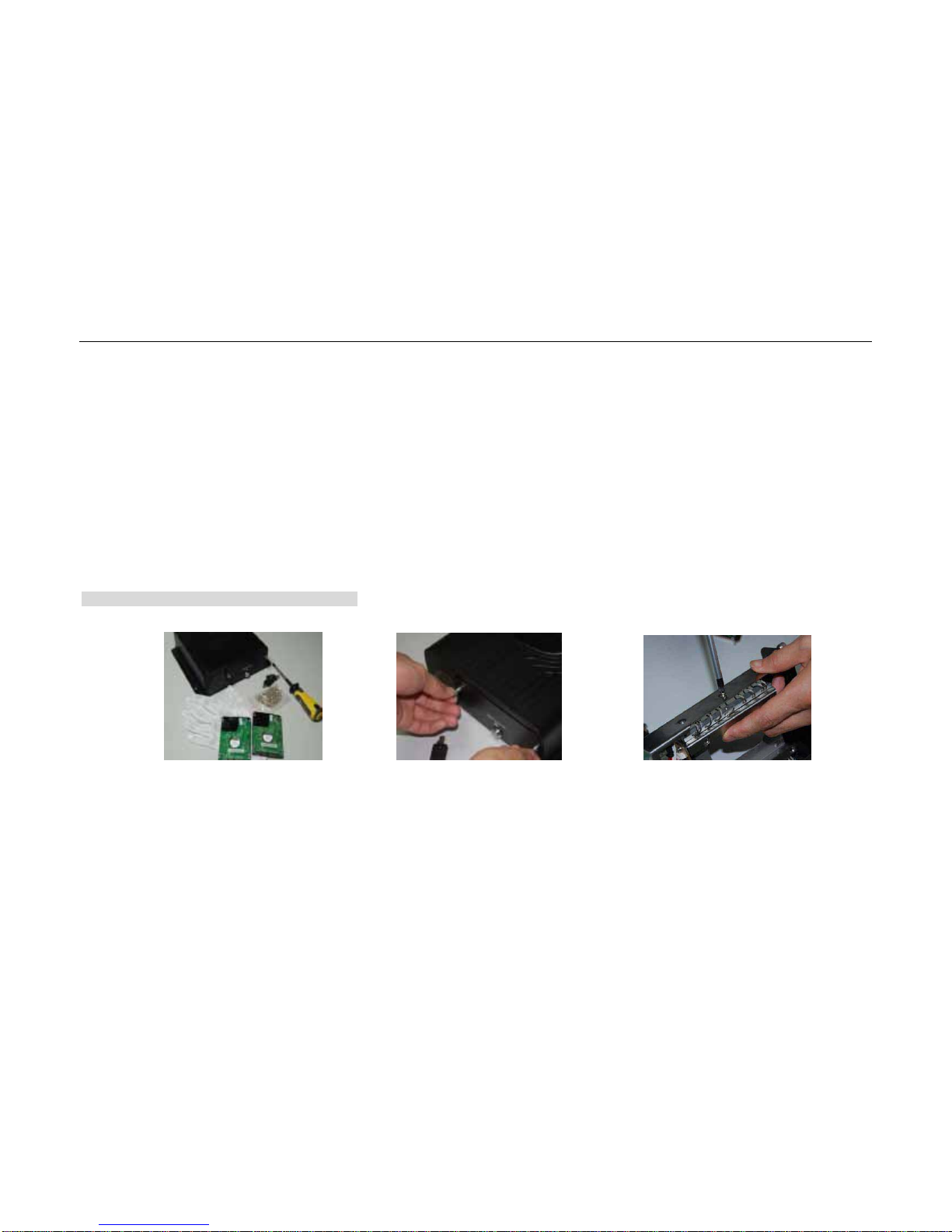
2.2 SATA Installaon
Note: Please make sure the operation is under power off.
DMB-04R Installaon Steps
1. Please prepare all the tools and
materials: 2.5 inch SATA HD,
an-stac gloves, HDD-Lock key,
cross screwdriver, HD screws
2. First, open the HD-Lock with
the key, and loosen the screw
alone the an-clockwise. Then
pull out the HD box with uniform
force.
3. Remove the 6 screws used for
fixing the HD bracket on the right
and lesides.
User Manual of DMB-04R Embedded Mobile DVR (V1.0)

- 10 -
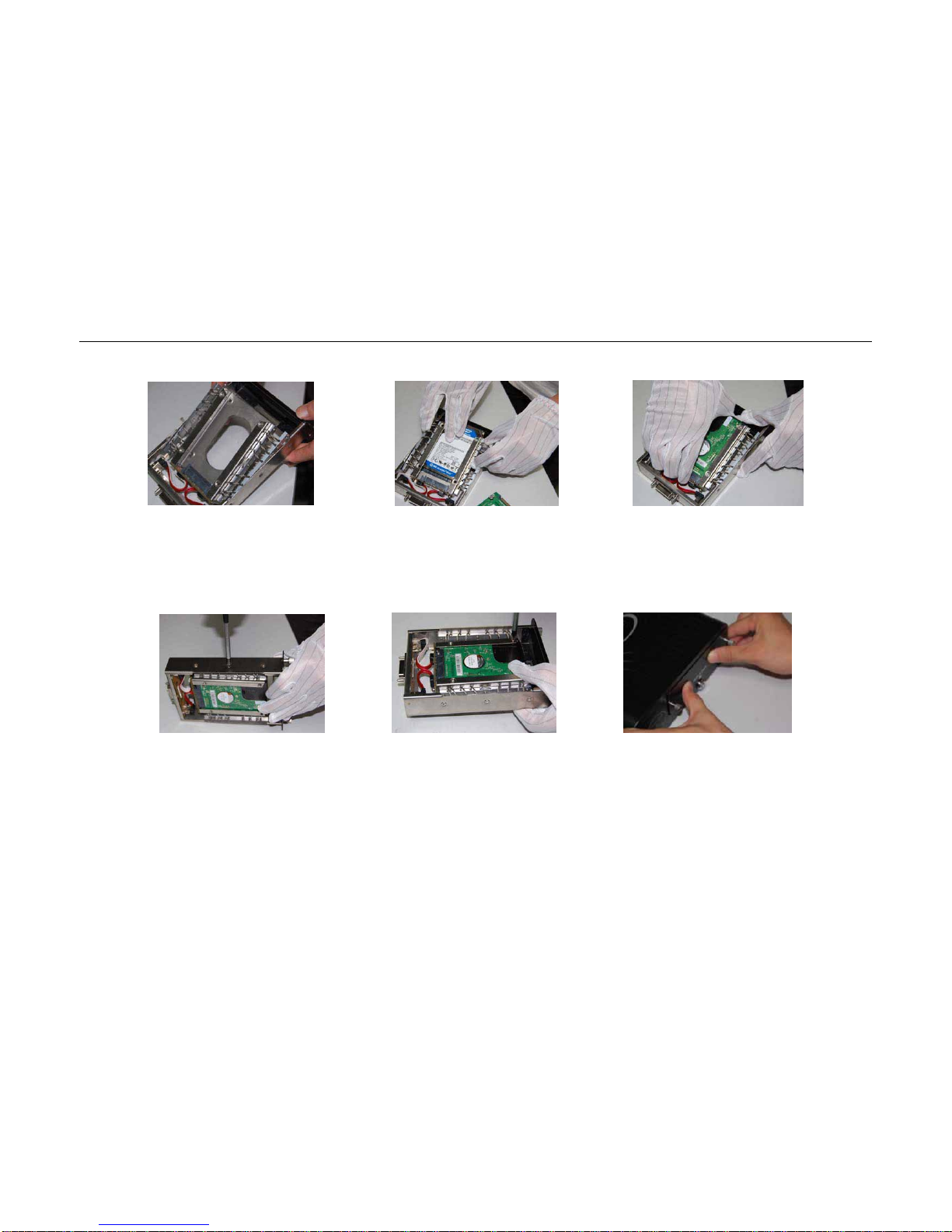
4. Upward Push out the HD
bracket on the side of baffle with
appropriate force.
5. Please wear anstac gloves.
Carefully put in the first HD on the
bracket (PCB face down), aim at
the HD interface and insert it
ghtly.
6. Put in the second HD on the
bracket (PCB face down), aim at
the HD interface and insert it
ghtly.
7. Restore the HD bracket
posion, aim at the holes and
ghten the screws.
8. Install the HD screws, and
fasten the HDs (4 screws per HD)
9. Aer the HD installaon, push
in the HD box and screw up. Don’t
forget to lock the HD-Lock.
User Manual of DMB-04R Embedded Mobile DVR (V1.0)
Table des matières
Autres manuels Aventura DVR