
AvatarMind iPal Manuel utilisateur

iPal® User Manual
For Children’s Education, Families, Elder Care, and
Retail/Hospitality
Official Website www.ipalrobot.com
Twitter –www.twitter.com/avatarmindinc?lang=en
Facebook -- www.facebook.com/AvatarMindInc
This manual may not be reprinted without permission
Copyright© 2017 NanjingAvatarMind Robot Technology Co.,Ltd Copyright
Reserved

1
Contents
1. Introduction to iPal......................................................................4
2. Making friends with iPal..............................................................5
3. Accessories.................................................................................6
4. Hardware.....................................................................................7
4.1. A brief tour of iPal...................................................................... 7
4.2. On/Off Switch............................................................................. 9
4.3. Screen....................................................................................... 10
4.4. Components............................................................................. 11
4.5. Charging................................................................................... 12
5. Getting Started......................................................................... 13
5.1. Environmental Considerations.............................................. 13
5.2. How to move iPal.................................................................... 13
5.3. Setup Wizard ........................................................................... 13
6. iPal Applications....................................................................... 17
6.1. How to use iPal applications.................................................. 17
6.2. Settings..................................................................................... 19
6.2.1. System Settings............................................................... 19
6.2.2. Robot Settings................................................................. 23
6.2.3. User Settings ................................................................... 25
6.3. Examples.................................................................................. 25
6.3.1. Stories............................................................................... 25
6.3.2. Music................................................................................. 26

2
6.3.3. Games.............................................................................. 27
6.3.4. Camera............................................................................. 27
6.3.5. Gallery............................................................................... 28
6.3.6. Education.......................................................................... 29
6.3.7. Calendar........................................................................... 30
6.4. iPalProgrammer....................................................................... 32
6.4.1. Introduction ...................................................................... 32
6.4.2. Modules............................................................................ 32
6.4.3. Operations........................................................................ 33
6.4.4. Menu................................................................................. 35
6.4.5. Delete................................................................................ 36
6.4.6. Download Template........................................................ 37
6.5. Man-iPal Interaction................................................................ 37
6.5.1. Introduction ...................................................................... 37
6.5.2. Face Recognition............................................................ 38
6.5.3. Natural User Interface (NUI) Settings.......................... 41
7. Download Applications............................................................. 43
7.1. App Store.................................................................................. 43
7.2. Download.................................................................................. 44
7.2.1. App List............................................................................. 44
7.2.2. Search App by Category/Filter...................................... 44
7.2.3. Download & Install .......................................................... 45
7.2.4. Use New App................................................................... 45
8. iPal Maintenance ..................................................................... 46
8.1. iPal............................................................................................. 46
8.2. Charger..................................................................................... 46

3
9. Warranty................................................................................... 47
9.1. Security..................................................................................... 47
9.2. Usage........................................................................................ 48
9.3. Storage..................................................................................... 49
10. FCC Warning............................................................................ 49
10.1. FCC Warning....................................................................... 49
10.2. RF Exposure Statement..................................................... 50
Appendix.......................................................................................... 51
Ⅰ: iPal Specification........................................................................... 51
Ⅱ: Charger Specification................................................................... 52
Ⅲ: Others............................................................................................. 53

4
1. Introduction to iPal
iPal isa fullyfunctional humanoid robotthat is3.5feet tall. It hasmany
motors, microphones, cameras, sensors (infrared, ultrasound and
touch) which enable iPal™ to be aware of its surroundings and to
facilitate interactions with and between humans
iPal is an open system based on the Android operating system with
extensions for motion, sensors and natural language conversation,
allowing awealth of thirdparty applications to be delivered on a robot.
For children and families, iPal is an affordable social robot that is a
friend, teacher, and safety monitor for children. iPal provides
educational content in an engaging manner that supports social
development and encourages interest in science and technology. iPal
cooperates with parents to provide better quality of life for children
and gives them a head start in education. iPal is not intended to be a
standalone babysitter or a replacement for parents or finding friends
their own age -- no robot can or should take the place of parents or
friends. But iPal can make the everyday lives of parents a little easier
and provide a much richer experience for children compared just to
sitting in front of a TV.
For elders iPal™ is a constant companion that supplements personal
care services and has the potential to provide security with alerts for
many medical emergencies. As an elder companion and safety
monitor. iPal can facilitate social interaction and companionship for

5
elders who may not be able to get out as much as they’d like due to
physical limitations. iPal can aid in health and safety monitoring,
reminding elders to take their medications as prescribed and allowing
caregivers and loved ones to check in on individuals through the iPal
smartphone app.
Other versions of iPal are in development for children with special
needs (e.g., autism), hospitality, retail, home security, and more.
AvatarMind also offers the iPal platform for 3rd party developers. The
goal of the iPal™ Robot Development Platform is to provide partners
with all the tools and support needed to enable them to quickly and
efficiently modify iPal’s software and content for their specific use.
They can then deploy and market their own robotic branded product
at a small fraction of the cost of developing their own robot. Details
are given in the iPal platform section of www.ipalrobot.com.
2. Making friends with iPal
iPal is designed with a friendly, non-threatening demeanor, and has
multiple sensors to assure safe human interaction. iPal has a
conversational spoken language interface, facial expressions, full
arm/hand movement, and has the potential to sense the mood of
people. iPal encourages physical activity and enables people to stay
connected with their friends and the world.
6
3. Accessories
To begin, please verify that you have received the items or
accessories listed as below:
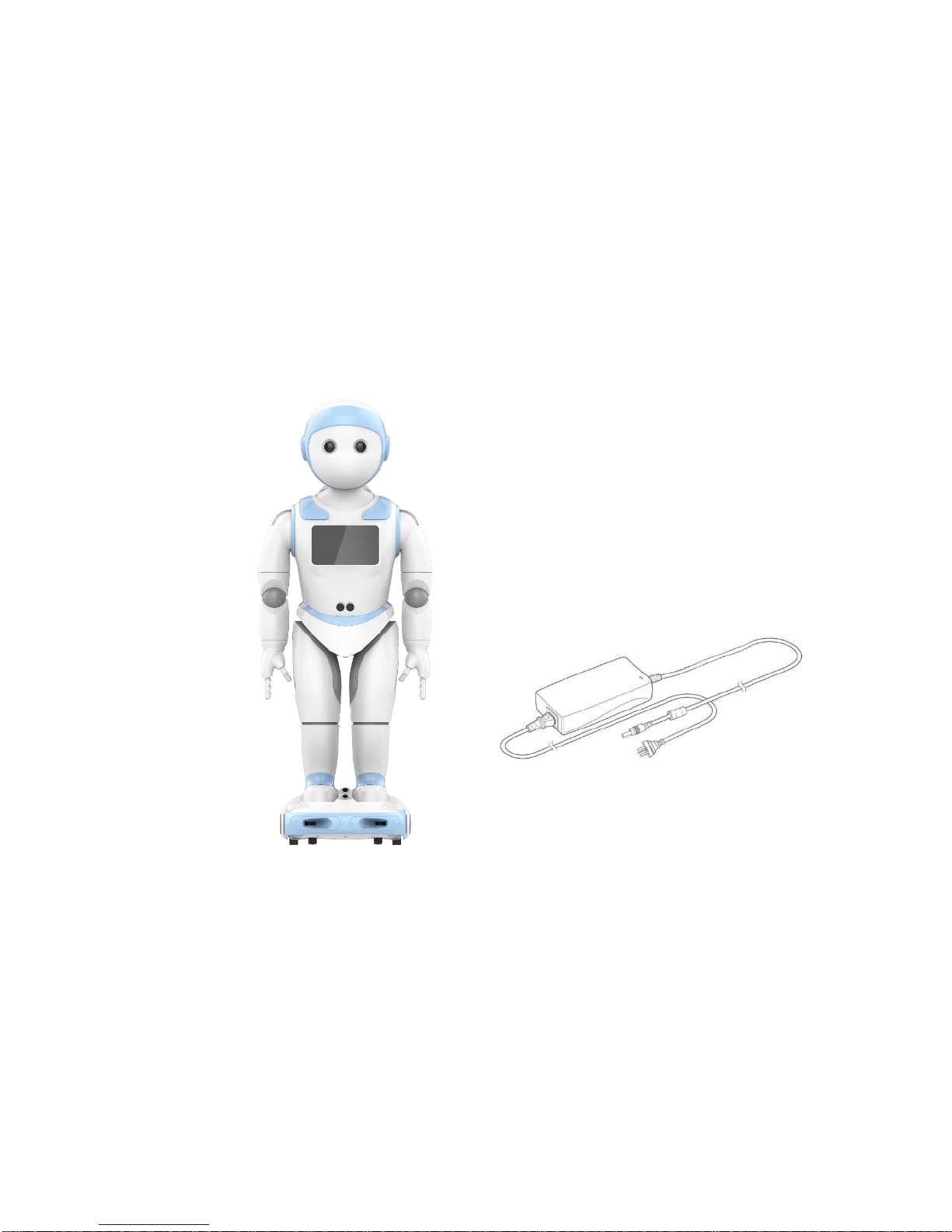
iPal robot, charger, warranty card, user manual
iPal robot
Charger (including wire)

7
4. Hardware
4.1. A brief tour of iPal

8
9
4.2. On/Off Switch
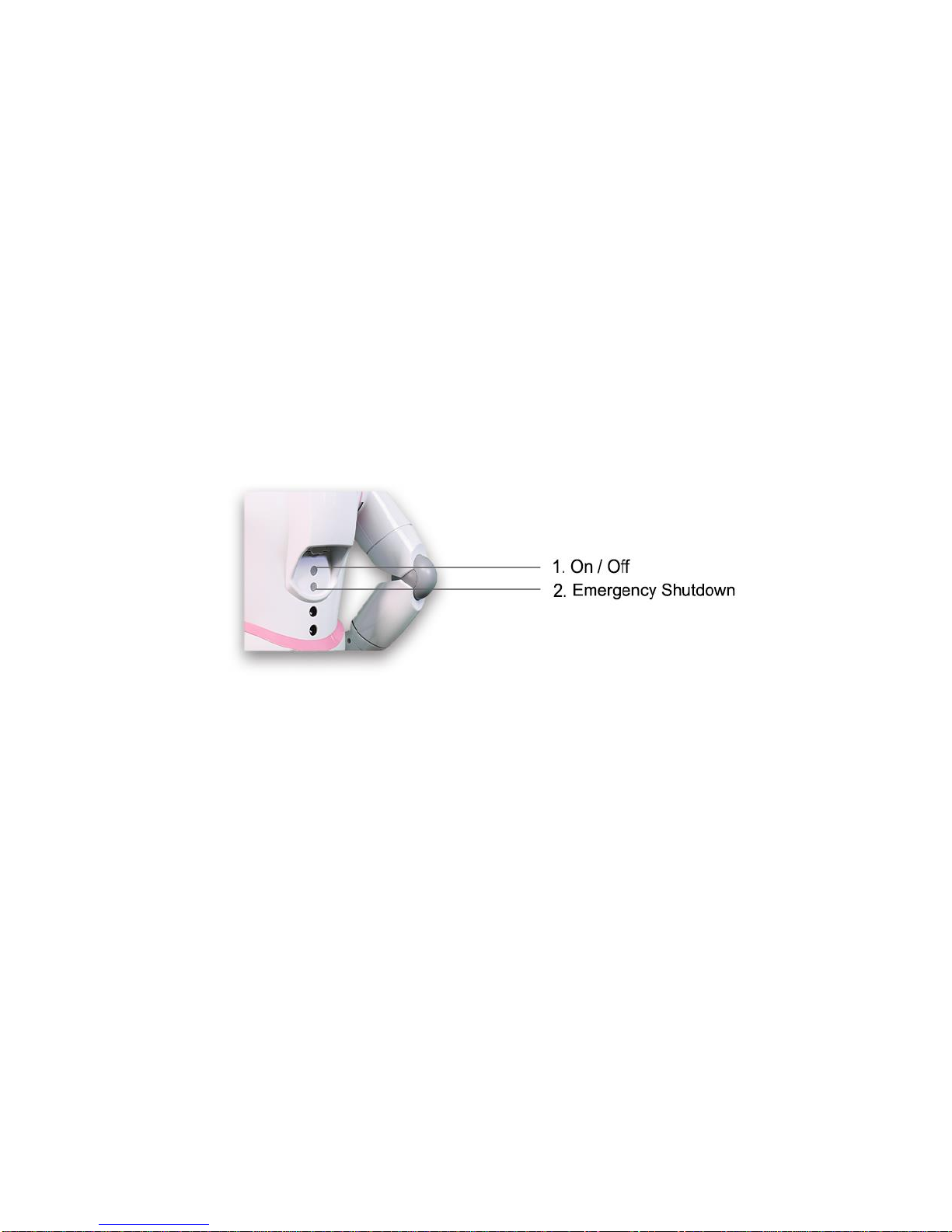
iPal has 2 buttons at the back, an on/off button and an emergency
shutdown button. To turn on iPal hold down the On/Off button for 2
seconds. To turn off iPal with the normal shutdown procedure, hold
down the On/Off button for 2 seconds. For emergencies, press the
emergency shutdown button to immediately power off iPal
Table des matières
Manuels Robotique populaires d'autres marques

STEMCenter USA
STEMCenter USA Pi-Bot v2.00 Manuel utilisateur

SunFounder
SunFounder PiDog Manuel utilisateur

Universal Robots
Universal Robots UR5 Manuel utilisateur

Universal Robots
Universal Robots E Series Manuel utilisateur

YASKAWA
YASKAWA MOTOMAN-MPL80 II Manuel utilisateur

EFORT
EFORT ECR5 Manuel d'instructions


