
AUTLED LC-006-001 Manuel utilisateur
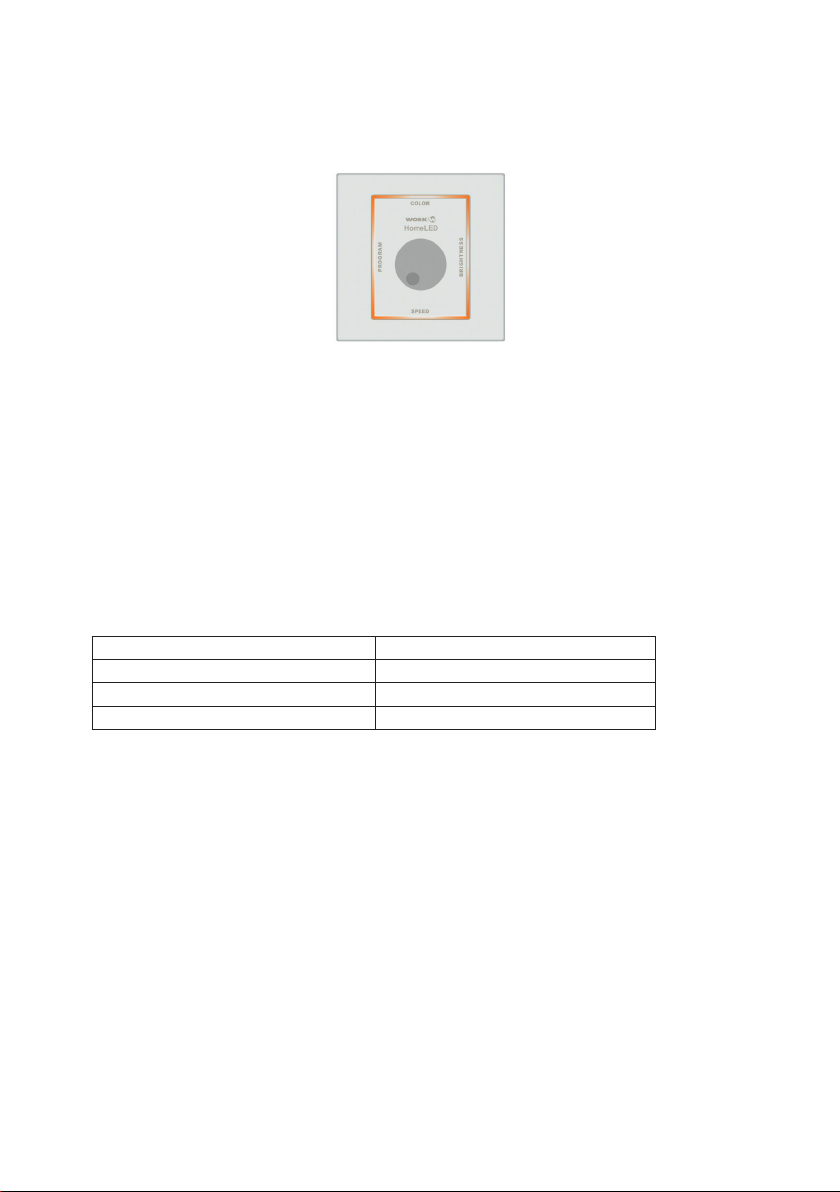
LED DMX & PWM Controller RGB - User Manual
Item no.: LC-006-001
1. Product Description
The controller is a simple LED controller sending DMX 512 signals and PWM signals. Thus, LEDs can
be driven directly or via DMX. The controller have color selection, brightness of color graduation rate
and the selection of predened gradients to be set. The controller is suitable for any RGB LED light.
Mounting on delivered surface mount box.
2. Performance Parameter
Power Rating Controller 3x2A (72W/12V) od. (144w/24V)
Output Signal DMX512
Product Dimensions (L x W x H in mm) L 86 x W 86 x H 24 mm
Weight 75 g
3. Operations
1. On/O Switch
Press the toggle and hold it down for about 3 seconds, the output will be turned o.
Rotating the toggle or pressing the toggle once resumes the output setting.
2. USITT DMX-512 Standard Signal
3. Built-in 10 patterns to control RGB xtures, Assignable fade settin in Automode
4. Manually adjust RGB color saturation in Manual Mode
5. RGB indicator on the panel to view on the output state in a realtime
Two Modes as follows:
6a. AUTO MODE
Choosing PROGRAM menu will activate AUTOMODE automatically.
In this mode, the brightness and speed can be adjusted.
6b. MANUEL MODE
Select COLOR menu, totate the toggle to activate the manual mode and adjust the color manually
*via DMX-512: red color (1st channel), green color (2nd channel), blue color (3rd channel)

Four Menus as follows:
Pressing the toggle once will activate one menu. The indicated LED of chosen menu displays the xed
color while the colors of the other three sides vary with the variety of output values.
Menu PROGRAM:
Program 1 + 2: The LED indicator shows at„Program“ the color red.
Program 3 + 4: The LED indicator shows at„Program“ the color green.
Program 5 + 6: The LED indicator shows at„Program“ the color blue.
Program 7 + 8: The LED indicator shows at„Program“ the color yellow.
Program 9 + 10: The LED indicator shows at„Program“ the color cyan.
Program Auto : The LED indicator shows at„Program“ the color white.
(Autoprogram is the sequential running of these 1 to 10 programs.)
1. Rotate the toogle to the Menu PROGRAM and press the toggle short.
2. Rotate the toogle to select the desired program.
Menu COLOR:
1. Rotate the toogle to the Menu COLOR and press the toggle short.
2. Rotate the toogle to adjust the color manually.
Menu BRIGHTNESS:
1. Rotate the toogle to the Menu BRIGHTNESS and press the toggle short.
2. Rotate the toggle to adjust the RGB brightness. When reaching the maximum/
minimum value, the LED indicator will ash repeatedly three times.
Menu SPEED.
1. Rotate the toogle to the Menu SPEED and press the toggle short.
2. Rotate the toggle to adjust the level of speed. The speed is from 0.4s to 50s. It
changes as 0.4s, 0.6s, 0.8s,1.0s,1.2s,....50s.
Adjusting the speed activates AUTOMODE automatically.
When reaching the maximum / minimum value, the LED indicator will ash
repeatedly three times.

4. Dimension
5. Conjunction Diagram
5a. Connection example directly to control LED Line via PWM Signal: (Master/Slave):
5b. Connection example via DMX Signal:

6. Safety Warnings:
1. To avoid installed the product in mineeld, strong magnetic eld and high voltage area.
2. To ensure the wiring is correct and rm avoiding short circuit damages to components and
cause re.
3. Please install the product in a well ventilated area to ensure appropriate temperature
environment.
4. The product must be worked with DC constant voltage power supply.
Please check the consistence of input power with the product, if the output voltage of the
power comply with that of the product.
5. Connect the wire with the power on is forbidden. Ensure proper wiring rst then check to
ensure no short-circuit, then power on.
6. Don‘t repair it by yourself whenever an error occur. Contact the supplier for any inquiry.
Table des matières
Autres manuels AUTLED Contrôleurs

AUTLED
AUTLED LC-012-004 Manuel utilisateur
AUTLED
AUTLED LC-002-010 Manuel utilisateur

AUTLED
AUTLED LC-004-942 Manuel utilisateur

AUTLED
AUTLED LC-002-022 Manuel utilisateur

AUTLED
AUTLED LC-002-021 Manuel utilisateur

AUTLED
AUTLED LC-002-014 Manuel utilisateur

AUTLED
AUTLED LC-004-914 Manuel utilisateur

AUTLED
AUTLED LC-012-004 Manuel utilisateur

AUTLED
AUTLED LC-002-015 Manuel utilisateur

AUTLED
AUTLED LC-004-944 Manuel utilisateur


