
Autel ATS100 Manuel utilisateur
I
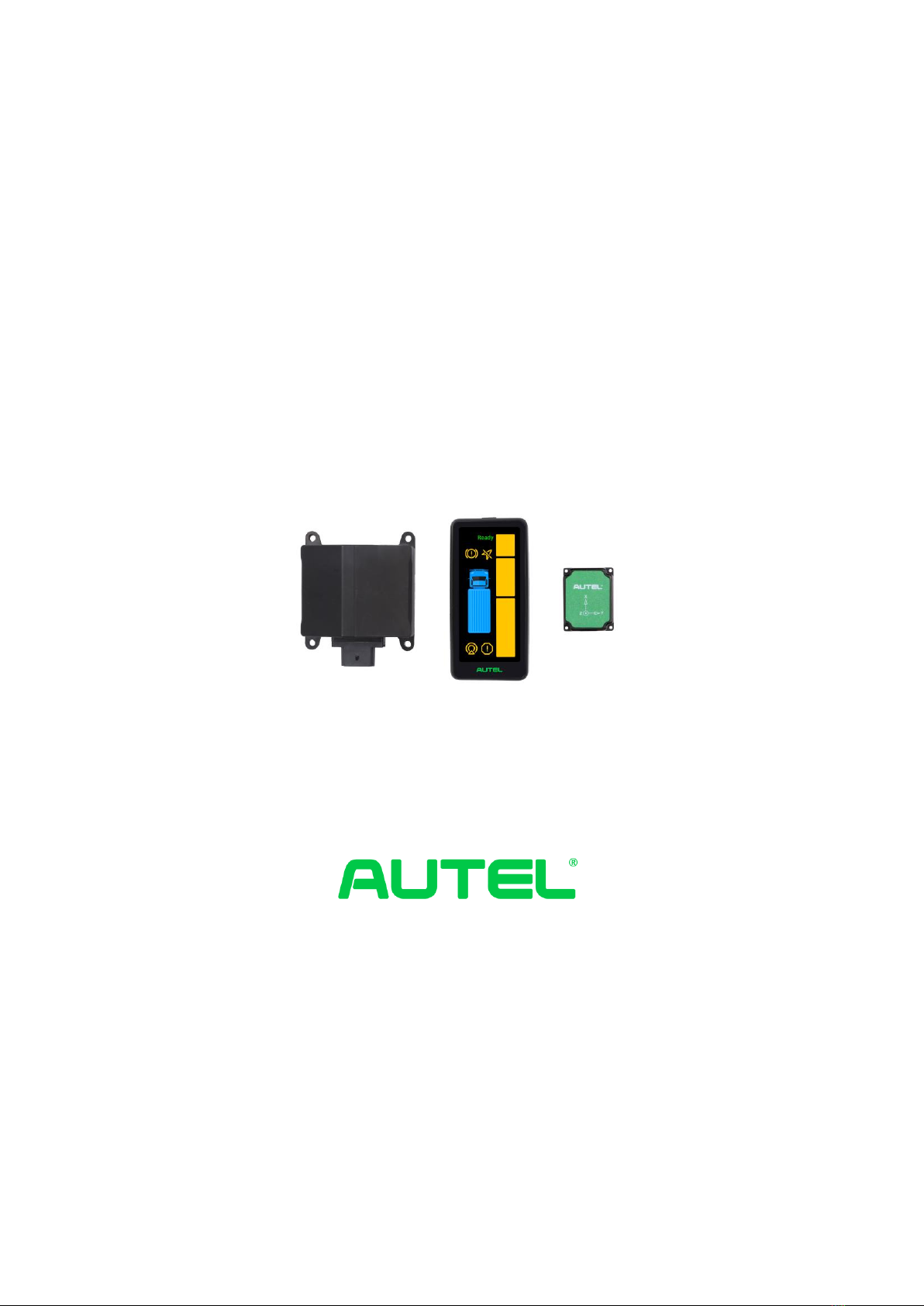
ATS100 (with GPS)
Intelligent Turn Assistant
User Guide
Autel Intelligent Automobile Co., Ltd.

II
Trademark
Autel® , MaxiSys® , MaxiDAS® , MaxiScan® , MaxiTPMS® , MaxiVideo® , MaxiRecorder® and MaxiCheck® _ are trade-
marks of Autel Intelligent Technology Corp., Ltd., registered in China, the United States and other
countries.All other brands are trademarks or registered trademarks of their respective holders.
Copyright Information
No part of this manual may be reproduced without the prior written permission of Autel Intelligent
Automobile Co., Ltd. reproduced, stored in a retrieval system, or transmitted in any form or by any
means, electronic, mechanical, photocopied, recorded or otherwise.
Disclaimer of Warranties and Limitation of Liability
All information, specifications and illustrations in this manual are based on the latest information
available at the time of printing.
Autel IntelligentAutomobile Co.,Ltd. shall not be liable for any direct, special, incidental, indirect,
or consequential damages (including lost profits) as a result of using the product.
IMPORTANT
Before operating or servicing this equipment, please read this manual carefully, paying particular
attention to the safety warnings and precautions.
For Services and Support
Web: www.auteltech.cn
Mail: Support@auteltech.net
Hotline: 0086-755-2267-2493 (Headquarters in China) / 1-855-AUTEL-US (288-3587) (North
America) / 0049 (0) 6103-2000520 (Europe) / +045 5948465 (APAC) / + 971 585 002709 (IME)
For technical support in all other markets please contact your local distributor.

III
Table of contents
1. ATS100 Turn Assistant Introduction .......................................................................... 4
1.1 ASR100 Radar Introduction .................................................................................... 4
1.2 Warning display ......................................................................................................... 6
1.3 GPS&IMU module .................................................................................................... 9
1.4 System connections and the cable harness .............................................................. 9
2. User Manual ................................................................................................................. 13
2.1 Radar installation .......................................................................................................... 13
2.2 Radar wiring .................................................................................................................. 17
2.3 Input signal for the system ............................................................................................ 18
2 .4 Power access .................................................................................................................. 19
2.5 Installation of GPS and IMU module .......................................................................... 20
2.6 Screen installation ......................................................................................................... 20
2.7 Generation of installation report ................................................................................. 22
4
1. ATS100 Turn Assistant Introduction
ATS100 is a turn assistant with precise target recognition and vehicle blind spot warn-
ings. The system components are as follows: a millimeter wave radar with an operating
frequency of 76-77 GHz and a maximum RF output power of 12 dBm, a spirit level, a
mounting bracket (optional), a warning screen, a GPS and IMU module, and the cable.
The millimeter wave radar can accurately measure object distance, speed, angle and
other information through the difference in echoes between the transmitting and receiv-
ing electromagnetic waves. It is an all-weather and all-dayturn assistant with a working
temperature of -40℃ - 85℃. The warning screen warns the driver of a dangerous object
in the blind spot and reminds the driver to make timely adjustments on the road to avoid
accidents.
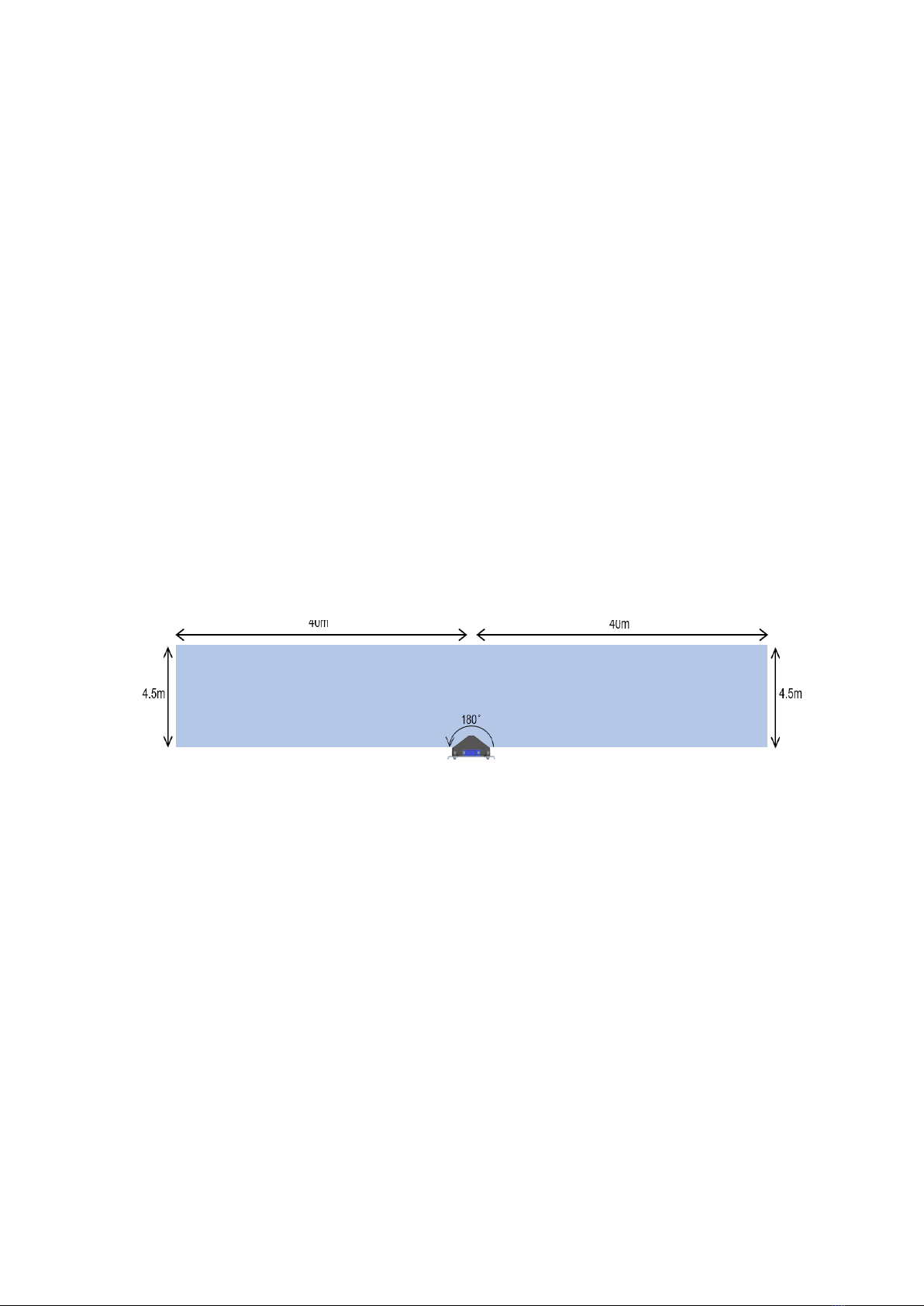
The ATS100 turn assistant covers 180° on one side, no blind spots, with a target detec-
tion range of up to 80 x 4.5m. With a compact structure, it has collision prediction and
graduated alarm function, can be connected with external CAN (Controller Area Net-
work) and CAN FD (Flexible Data) interfaces can be integrated and supports 12 V or
24 V supply voltage.
Figure 1-1ASR100 radar coverage
The warning objects of theATS100 turning assistant include:
Dynamic vulnerable road users moving at speeds equal to or exceeding 5 km/h ,
including pedestrians, bicycles, electric bicycles, etc.
1.1 ASR100 Radar Introduction
The ASR100 77 GHz millimeter wave radar is a compact, rugged radar sensor designed
and manufactured by Autel Intelligence Vehicle® in China to warn heavy duty trucks/
buses etc. of side blind spots with IP69K protection housing, in line with the environ-
ment for commercial vehicle use .
5
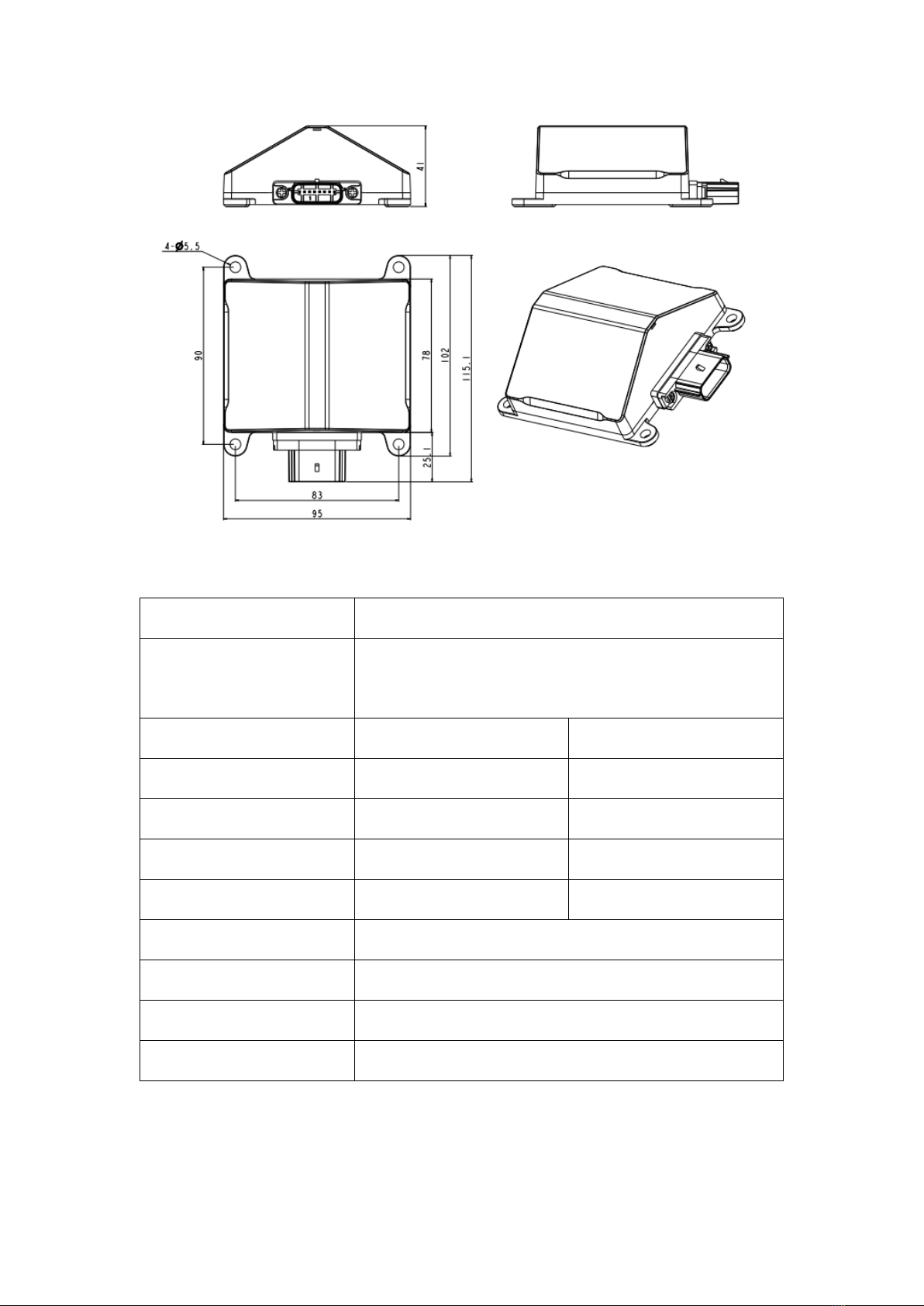
Figure 1-2ASR100 dimensions
Performance parameters:
working frequency
76-77GHz
Maximum detection range
±80 m (vehicle)
±40 m (pedestrian/bicycle)
working mode
slow speed
High speed
minimum detection range
0.25m
0.9m
distance resolution
0.31 m
0.96 m
distance accuracy
±0.16m
±0.5m
speed range
±60km/h
±150km/h
speed accuracy
±0.43km/h
speed resolution
0.86km/h
horizontal angle
180°
angular accuracy
±0.8°
General parameters:

6
size
115mm x 95mm x 41mm
weight
2 30g
power consumption
6.5W
communication interface
CAN2.0, CAN_FD
operating voltage _
8V - 32V;
Passenger car 12V ,
Commercial vehicle 24V
operating temperature _
-40℃ ~ 85℃
storage temperature
-40℃~105℃
installation angle redundancy
-2°~2°
protection rating _
IP69K
operating cycle
60ms
1.2 Warning indicator
The ATS 100 turning assistance system uses a precision detection system to predict the
future probability of collision with the object and provides users with dynamic detection
and display-based intelligent alerts to remind drivers to take timely preventive measures
to reduce the possibility of accidents. The warning display screen supports adaptive
brightness control, allowing the screen brightness to adjust based on the brightness of
the surrounding environment to provide a reduction in driver's eye fatigue during the
night.
7
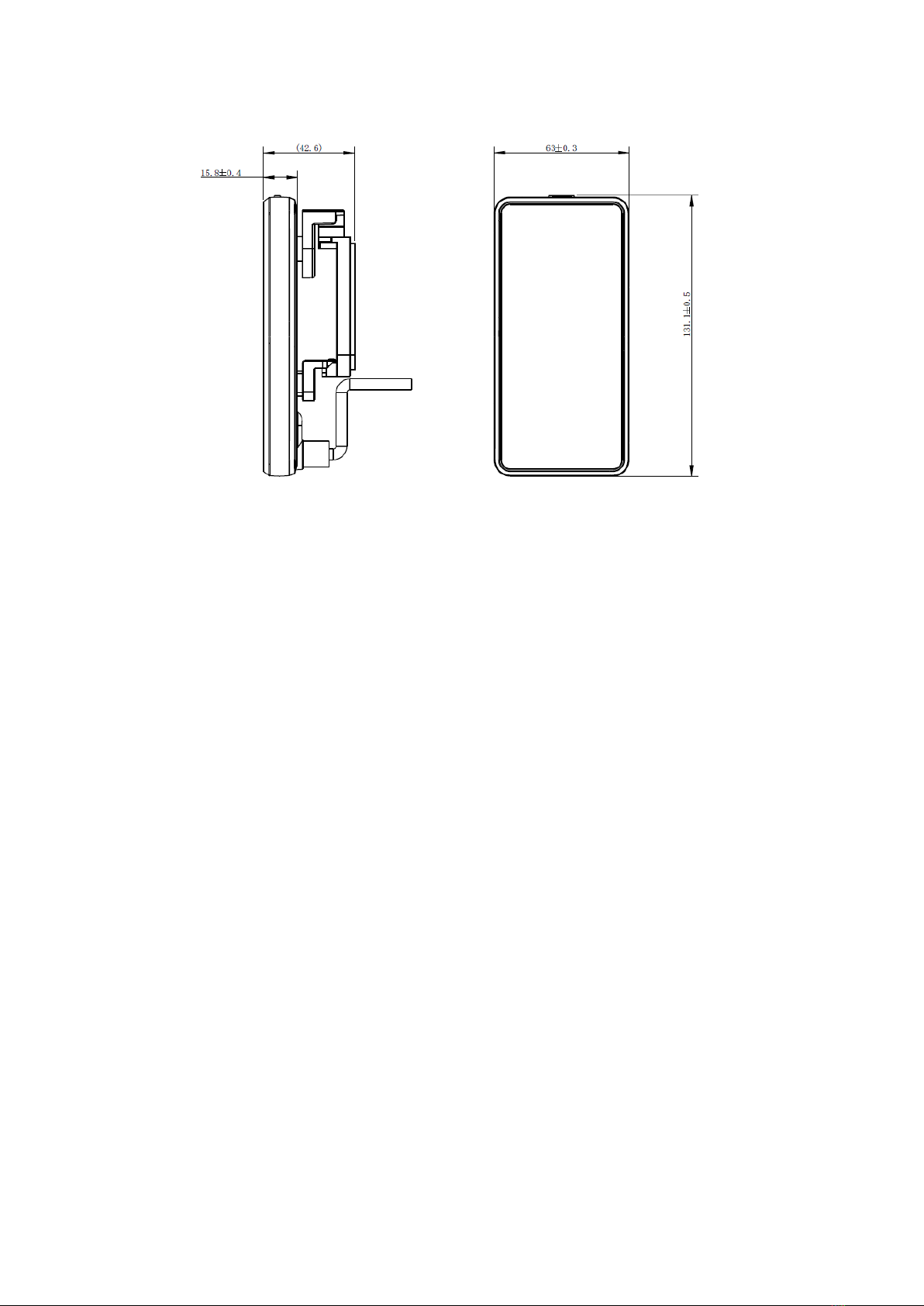
Figure 1-3 Display size
The warning function is divided into three levels as follows:(Note: Conditions for
activating the warning function: The vehicle speed is less than or equal to 30km/h.)
Level 1 warning : The steering wheel angle is less than 30° and the object enters
the warning area, then a section of warning light LEDs will light up, as shown in
Figure 1-4.
Level 2 Warning : The vehicle is turning right, the steering wheel angle is more
than 30°, or the turn signal is turned on (if the turn signal is connected), and the
vehicle and the object are expected to collide within a certain time, then a section
of warning light LEDs will start flashing.
Level 3 Warning : The vehicle turns right, the steering wheel angle is greater than
30°, or the turn signal is turned on (if the turn signal is connected), and the vehicle
and the object are about to collide, then the warning light starts to flash and also an
acoustic warning tone is triggered.
The driver can get the approximate location of the object based on the section of warn-
ing light LEDs that are on or flashing.
The detailed description of each warning light on the display is as follows:
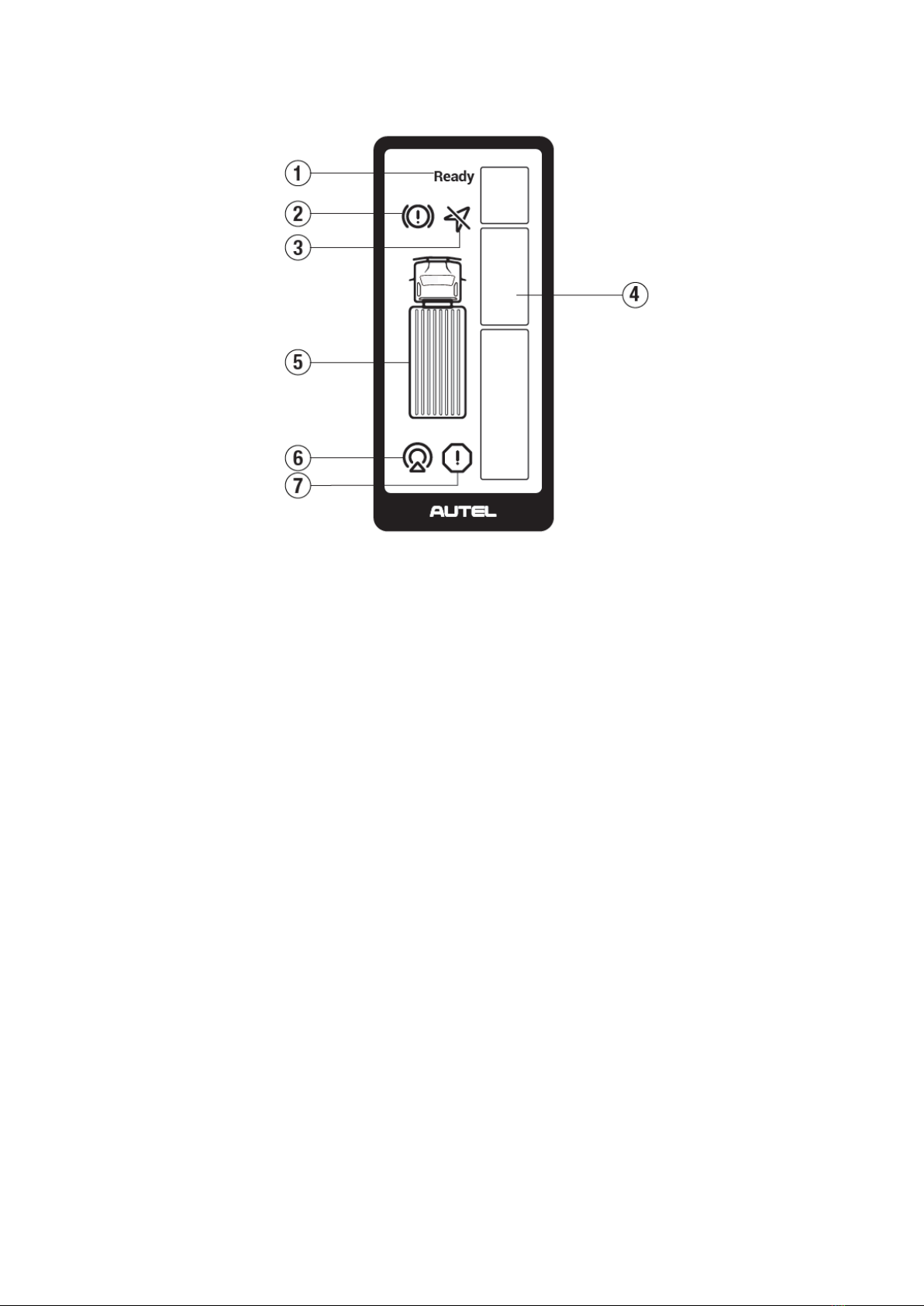
8
Figure 1-4 Warning light description
①Warning module operation and status indicator: Lights up when the status of the
warning module is normal.
②Brake Indicator: This light flashes when braking is active. (Currently this function
is not available.)
③GPS error indicator: lights up when the GPS sensor has no signal (temporarily),
flashes when the GPS sensor has an permanent error signal.
④Warning light: Provides early warning of dangerous objects. The warning area is
divided into three different priorities: upper zone (2-5 m in front of the vehicle front),
middle zone (2 m in front of the vehicle front - 7 m behind the vehicle front), and lower
zone (7-30 m behind the vehicle front). If several objects are in the upper, middle or
lower zone at the same time, give priority to the middle, then the lower, then the upper
zone.
⑤Vehicle model: for reference; is in a steady light state after switching on.
⑥Radar Status Indicator: Steady light indicates temporary radar failure, usually
caused by factors such as blocked radar or poor weather conditions; Blinking indicates
permanent radar failure that requires professional repair.
⑦System malfunction indicator : The indicator light flashes when there is a malfunc-
tion in the entire system.

9
Troubleshooting:
Table 1-1 Error description and troubleshooting
status symbol
Error Descrip-
tion
repair manual
Warning mod-
ule operation
and status dis-
play
does not light up
after switching
on
Hardware failure and needs to be replaced
Radar Status
Indicator
The error lamp
is always on
possible reason:
1. Obstructed by objects such as snow, mud, etc.
2. Extreme weather, heavy rain and snow, etc.
3. The installation angle is greater than 5°
Radar Status
Indicator
Fault light
flashes
Hardware failure and needs to be replaced
system error
display
Fault light
flashes
Hardware failure and needs to be replaced
GPS error dis-
play
Fault light
flashes
Restart after power off, if the error persists, you
need to replace the hardware
1.3 GPS&IMU module
This module integrates a high-precision gyroscope, an accelerometer and a GPS mod-
ule. With this module, no input signal such as speed, acceleration or yaw rate from
vehicle is needed.
1.4 System connections and the wiring harness
Connect each connector of the radar, display, GPS and IMU module harness as shown
below.
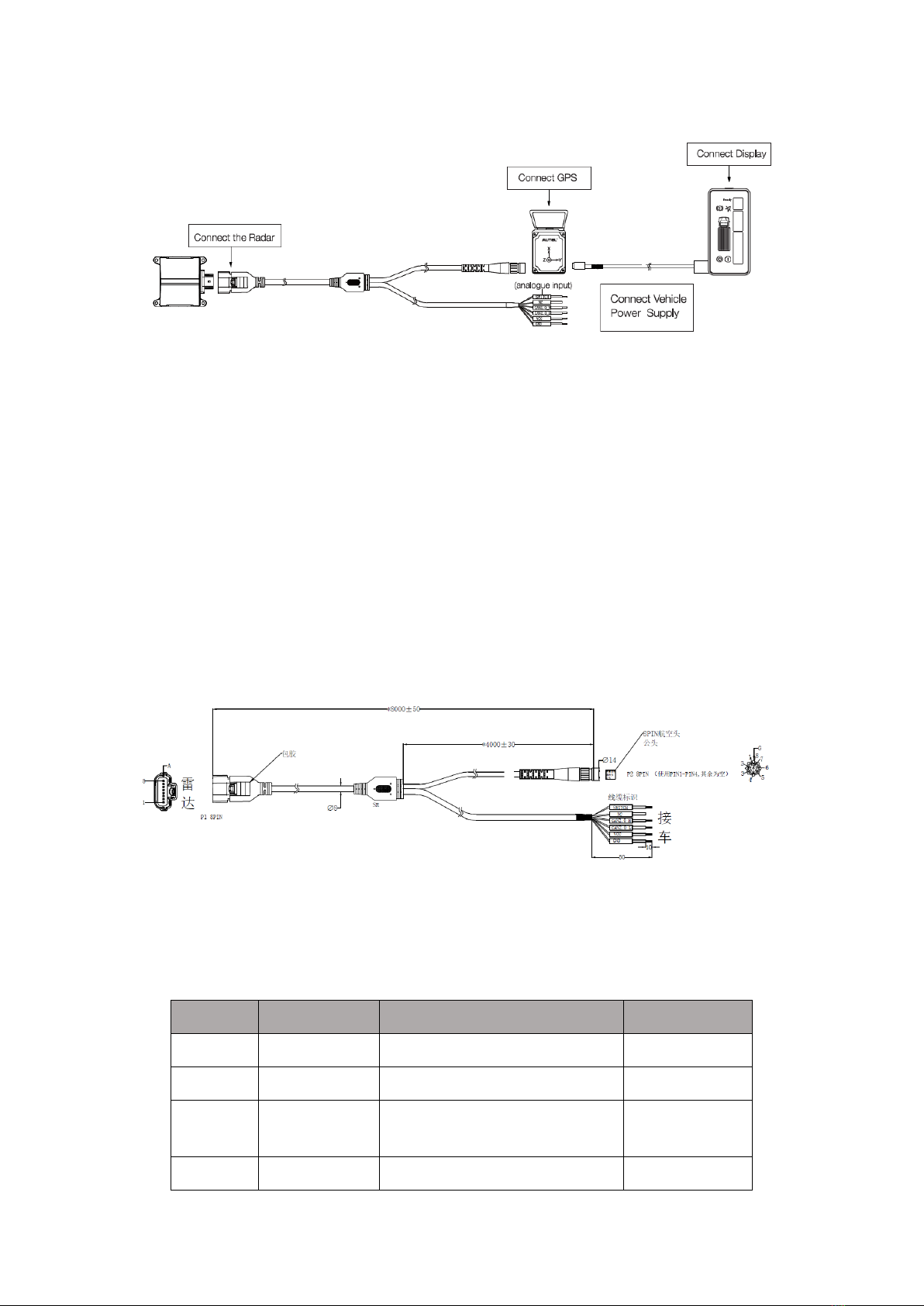
10
Figure 1-5 System Connections Schematic
Description of the radar wiring harness
In the figure below, connector P1 is connected to the radar. It has 8 pins and the pin
order is shown below. The pin number in the figure corresponds to the pin definition in
Table 1-2. The P2 connector is connected to the GPS&IMU module; it has 8 pins, and
the pin number of P2 in the figure corresponds to the pin definition in Table 1-3. The
P3 connector is connected to the vehicle and the power supply, it has 6 pins, and the pin
number of P3 in the figure corresponds to the pin definition in Table 1-4. The end of
each cable has a printed label. Please check this carefully during installation. Do not
turn on the device if the connectors are not properly connected.
Figure 1-6 Radar Wiring Harness Diagram
Radar interface P1 definition table:
Table 1-2 Definition of radar interface P1
Pin No.
definition
Area
cable color
1
VCC
8~32V DC
Red
2
NC
empty
Orange
3
SWITCH
Input : 1 2/2 4V DC
Output : 0VDC _
Blue
4
Dimensions
0 V DC voltage
Black
Autres manuels pour ATS100
1
Table des matières
Autres manuels Autel Accessoires automobiles

Autel
Autel MaxiTPMS TS508 Manuel utilisateur

Autel
Autel MaxiIM TOYOTA 8A BLADE KEY Manuel utilisateur

Autel
Autel Maxi US AC W12-H Manuel utilisateur

Autel
Autel APB112 Manuel utilisateur

Autel
Autel MaxiVCI V150 Manuel utilisateur

Autel
Autel MaxiCharger DC Fast Manuel utilisateur

Autel
Autel MaxiIM TOYOTA 8A BLADE KEY Manuel utilisateur

Autel
Autel MaxiCharger AC Wallbox Home Manuel utilisateur


