
Autarco 4G-STICK Manuel utilisateur

14G-STICK-D for Autarco Inverters
Installation Manual
Installation Manual IM.S2.4G-STICK-D-EN-V1.0
4G-STICK
Monitoring system
for Autarco Inverters

2
Installation Manual
4G-STICK-D for Autarco Inverters

3
Installation Manual
IM.S2.4G-STICK-D-EN-V1.03
Installation Manual
Information
Contact
www.autarco.com
Address
Torenallee 20
5617 BC Eindhoven
The Netherlands
This manual is an integral part of the unit. Please read the manual carefully
before installation, operation or maintenance. Keep this manual for future
reference.
Product information is subject to change without notice. All trademarks are
recognized as the property of their respective owners.
© Autarco Group B.V.
All rights reserved.
Installation Manual

44G-STICK-D for Autarco Inverters
Installation Manual
Tables of contents
1
1.1
1.2
2
2.1
2.2
3
3.1
3.2
3.3
3.3.1
3.3.2
3.4
3.5
3.6
3.7
3.7.1
3.7.2
3.8
4
4.1
5
5.1
5.2
5.3
5.4
5.4.1
5.4.2
6
7
8
17
18
Installation
Read this first
Important symbols
Connection structure for 4G monitoring
Topology overview
When do you choose a 4G stick?
Installation
What type of SIM card is required?
Which SIM card size is required?
SIM card security code override (unlock)
For Android
For iPhone
Inserting SIM card in the 4G-stick
Installing 4G stick in inverter
Connection with several inverters
Network configuration
Public mobile network (4G) configuration
Local WiFi network configuration
New stick’s IP address after installation
Control
Does the stick have a connection?
Helios & MyAutarco
Registering stick in Helios
Customer registration for MyAutarco
Access MyAutarco monitoring platform (installer)
Access MyAutarco monitoring platform (user)
After installation of the stick by the installer
After installation of the stick by the user

54G-STICK-D for Autarco Inverters
Installation Manual
Tables of contents
6
7.1
7.2
7.3
7.4
8
20
21
23
Resetting the stick
Troubleshooting
The stick has no power (red ‘PWR’ indicator is off)
The red ‘PWR’ light is on, but the orange ‘COM’ light is off
Signal quality
Local router settings
FCC Certification

64G-STICK-D for Autarco Inverters
Installation Manual
1
1.1 Read this first
The purpose of this user manual is to provide instructions and a detailed description of procedures
for installing, operating, maintaining and troubleshooting the Autarco 4G sticks. These 4G sticks
can be used with all Autarco inverters. They can operate on both a WiFi as well as a 4G SIM card.
Please keep this user manual available at all times.
Important symbols
WARNING! Indicates safety instruction, which if not correctly followed, can result in injury
or property damages.
Installation
1.2
74G-STICK-D for Autarco Inverters
Installation Manual
Topology overview
2
2.1
2.2
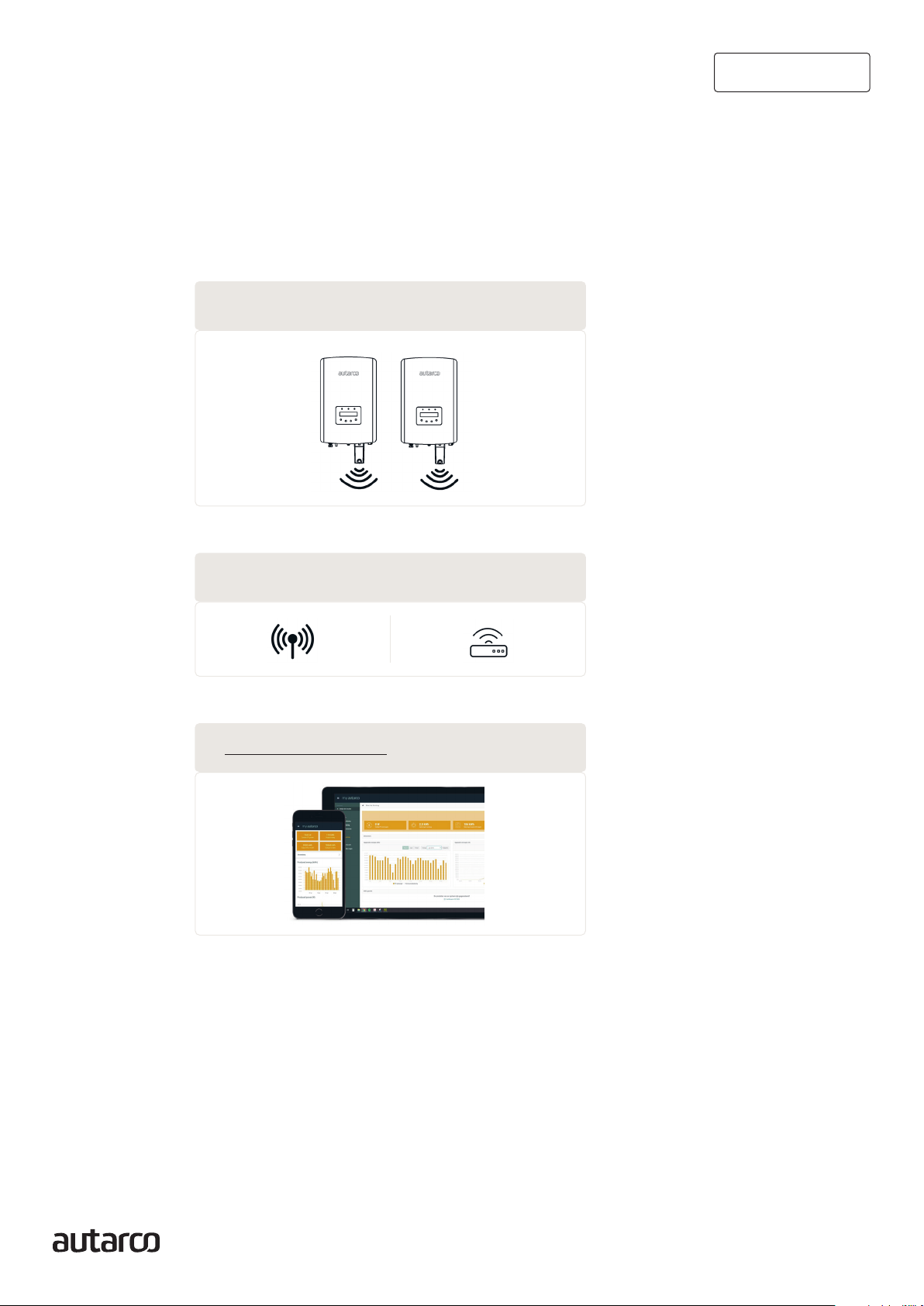
Connection structure for
4G monitoring
1. Inverter(s) with 4G-STICK-D
2. Public mobile network (4G) or Local router (WiFi)
3. https://my.autarco.com
Inverter(s) communicate via 4G-STICK-D with a public mobile network or via WiFi with local router
4G-STICK-D communicates via public mobile network or local router with the Autarco-server
Monitoring data becomes visible in MyAutarco platform
When do you choose a 4G stick?
The advantage of monitoring over a 4G network is that in places where there is no Ethernet or WiFi
(local network), an Autarco solar power system can still be monitored remotely.
NOTE: Monitoring with a 4G connection uses the public mobile network. This requires a (micro) SIM
card and in most cases a subscription with an external provider for which costs are associated.

84G-STICK-D for Autarco Inverters
Installation Manual
3
3.1
3.2
3.3
3.3.1
Installation
What type of SIM card is required?
To use the 4G stick you need an M2M or IoT SIM card. These cards have low monthly usage fees and
limited bandwidth. Some providers of these SIM cards also have a portal to manage multiple cards.
A SIM card uses approximately 10 KB per inverter per day.
Which SIM card size is required?
You need a micro SIM card to operate the 4G stick.
SIM card security code override (unlock)
If the SIM card has a PIN code, you must cancel or unlock it via a mobile phone. To unlock your SIM
card, please take the following steps:
For Android
WARNING! Most smartphones these days use a SIM card in the so-called nano format. Ensure the
SIM card size your phone uses before proceeding. You may need to have the SIM card cut to size
and fit on an adapter again after canceling the security code. This is to be able to place the SIM card
of the correct size back into the 4G stick.
1. Insert the SIM card into a phone (instead of your regular SIM card)
2. Go to ‘Settings’
3. Choose ‘Security’
4. Choose ‘Set up SIM Lock’
5. Choose ‘SIM card Lock’
6. Turn the ‘Lock SIM card’ option OFF
7. Choose ‘OK’
The SIM card is now no longer locked.
4. SIM card formats

94G-STICK-D for Autarco Inverters
Installation Manual
3.3.2
3.4
For iPhone
WARNING! Most iPhones use a SIM card in the so-called nano format. If you want to use an iPhone,
you will have to have the SIM card cut to size and fit on an adapter again after canceling the security
code. This is to be able to place the SIM card of the correct size back into the 4G stick.
1. Insert the SIM card into a phone (instead of your regular SIM card)
2. Go to ‘Settings’
3. Choose ‘Mobile network’
4. Choose ‘SIM PIN Code’
5. Turn OFF the ‘SIM PIN Code’ option
6. Enter the PI code to unlock the SIM card
7. Choose ‘OK’
The SIM card is now no longer locked.
*The SIM card PIN code is stated with your new SIM card. If the SIM card has not been set up before,
this PIN code is usually 0000.
Inserting SIM card in the 4G-stick
After canceling the security code of the SIM card, it can be placed in the 4G stick.
WARNING! You need to access sensitive electronics to insert the SIM card into the 4G-STICK-D.
Handle with care or you may damage the stick!
1. Push the two tabs on the side of the stick
2. Pull out the circuit board from the protective housing
3. Place the SIM card on the circuit board
4. Place the circuit board back into the housing till you hear a click of the tabs
5. Removing the protective housing
1
2
1
10 4G-STICK-D for Autarco Inverters
Installation Manual
3.5 Installing 4G stick in inverter
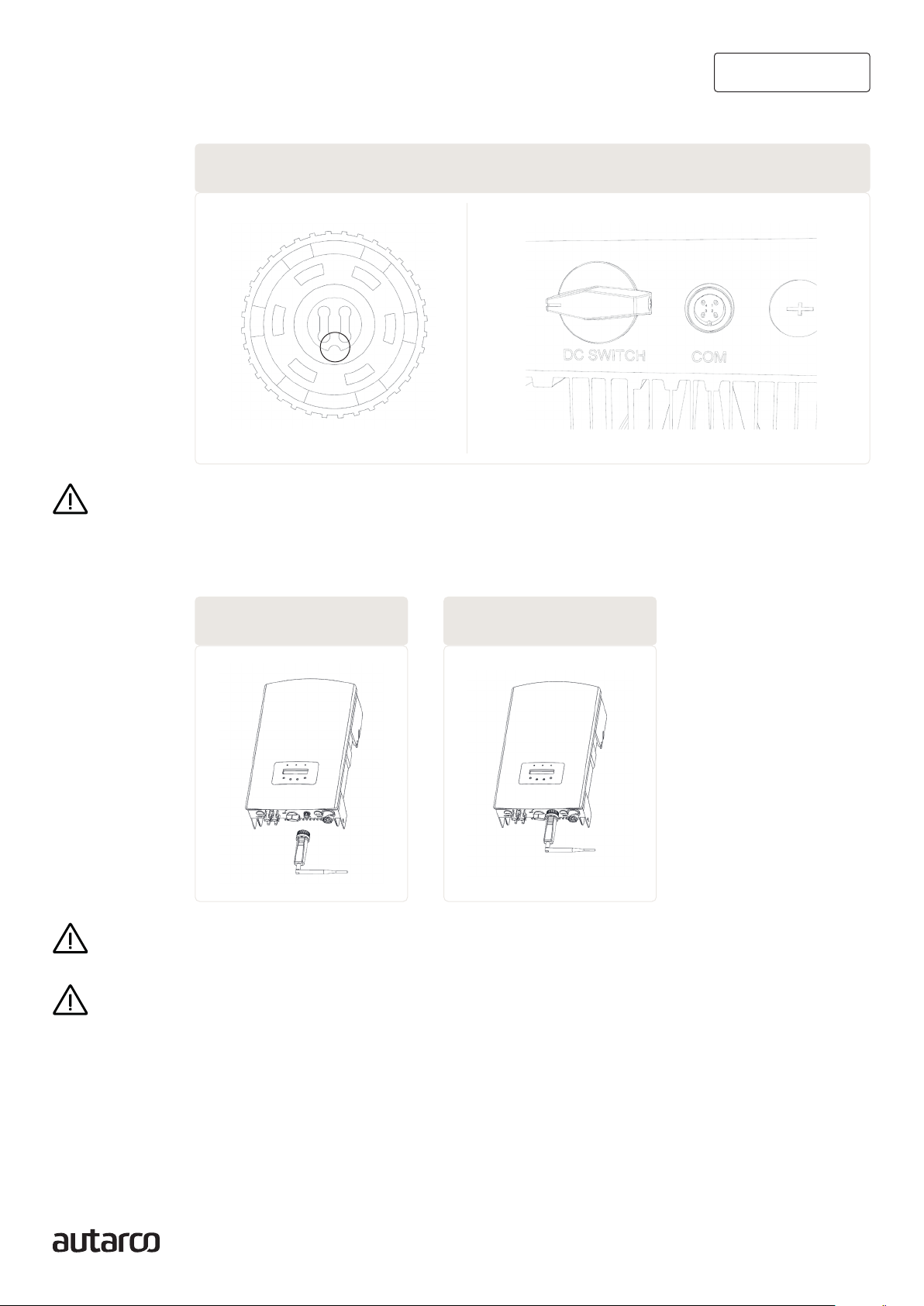
1. Plug the 4G stick into the corresponding connection point of the inverter.
ATTENTION! Make sure that the position of the connecting piece of the stick is correct. Place the
small notch on the connection point correctly so that the numbering of the 4-pin connector matches
the numbering on the inverter.
2. Plug the 4G stick into the corresponding connection point of the inverter.
WARNING! To prevent damage, do not turn the black housing itself.
WARNING! Keep the 4G stick away from large metal objects and electrical appliances with magnetic
fields such as microwave, refrigerator, mobile phone, concrete walls, solar panels and metal walls
to ensure the quality of communication.
6. Connector Notch & COM port notch
7. Connection point & stick 8. Stick installation
Table des matières
Autres manuels Autarco Onduleur

Autarco
Autarco SX Mark III Series Manuel utilisateur

Autarco
Autarco UX Series Manuel utilisateur

Autarco
Autarco MX Mark III Series Manuel utilisateur

Autarco
Autarco XLX-MII Series Manuel utilisateur

Autarco
Autarco OX Series Manuel utilisateur

Autarco
Autarco XLX20000S Manuel utilisateur

Autarco
Autarco UX-MII-Series Manuel utilisateur

Autarco
Autarco MX3000 Manuel utilisateur

Autarco
Autarco SX700 Manuel utilisateur

Autarco
Autarco PELD10-MII Manuel utilisateur


