Aurora Multimedia MW-156 Manuel utilisateur

1
5
5
.6
M
”
M
MW
M
i
n
Use
W
-
1
n
i-
W
r Man
Ma
n
15
Wa
ual
n
ual
N
5
6
a
ll
N
umb
e
Ti
l
e
r: 1
0
l
e
0
1108

i
n
f
o
The MW-1
n
ternational u
o
llow the saf
e
zFollow all
zDo not at
t
zProvide
p
zKeep obj
e
zUse only
zDo not u
s
S
a
56 has been
se. Howeve
r
e
ty instruction
instructions
a
t
empt to serv
p
roper ventila
t
e
cts that mig
h
the power ad
s
e liquid or a
e
a
fe
t
tested for co
r
, like all elec
t
s to protect y
a
nd warning
s
ice this unit y
t
ion and air ci
h
t damage th
e
apter and po
w
e
rosol cleane
r
t
y
a
nformance t
o
t
ronic equip
m
ourself from
p
s
marked on t
ourself, exce
rculation an
d
e
device and
w
er cords an
r
s to clean thi
2
a
n
d
o
safety regul
a
m
ents, the M
W
p
ossible injur
y
his unit.
pt where exp
d
do not use
n
assure that t
h
d connection
s unit. Alway
s
d
N
o
a
tions and re
W
-156 shoul
d
y
and to mini
m
lained in this
n
ear water.
h
e placemen
t
cables desig
s
unplug the
p
o
ti
c
quirements,
a
d
be used wi
t
m
ize the risk
manual.
t
of this unit i
s
ned for this
u
p
ower to the
d
c
e
a
nd has bee
n
t
h care. Plea
s
of damage t
o
s
on a stable
u
nit.
d
evice befor
e
USER Manual
n
certified for
s
e read and
o
the unit.
surface.
e
cleaning.

USER Manual
3
WARNING
TO REDUCE THE RISK OF FIRE OR ELECTRIC SHOCK, DO NOT EXPOSE THIS PROCUCT TO RAIN OR MOISTURE. DO NOT
INSERT ANY METALLIC OBJECT THROUGH THE VENTILATION GRILLS OR OTHER OPENNINGS ON THE EQUIPMENT.
Apparatus shall not be exposed to dripping or splashing and that no objects filled with liquids, such as vases, shall be placed on the
apparatus
CAUTION
EXPLANATION OF GRAPHICAL SYMBOLS
The lightning flash with arrowhead symbol, within an equilateral triangle, is intended to alert the user to the presence of
“dangerous voltage” within the product’s enclosure that may be of sufficient magnitude to constitute a risk of electric
shock to persons.
The exclamation point within an equilateral triangle is intended to alert the user to the presence of important operating
and maintenance (servicing) instructions in the literature accompanying the product.
Class Ⅰconstruction
An apparatus with CLASS Ⅰconstruction shall be connected to a MAINS socket outlet with a protective earthling connection.
Battery
Batteries (battery pack or batteries installed) shall not be exposed to excessive heat such as sunshine, fire or the like.
(CAUTION)
Danger of explosion if battery is incorrectly replaced. Replace only with the same or equivalent type.
Disconnection Device
Disconnect the main plug from the apparatus, if it’s defected. And please call a repair man in your location.
When used outside of the U.S., it may be used HAR code with fittings of an approved agency is employed.
CAUTION
These servicing instructions are for use by qualified service personnel only. To reduce the risk of electric shock, do not perform any
servicing other than that contained in the operating instructions unless you are qualified to do so.

USER Manual
4
FCC Information (for U.S.A)
Note: This equipment has been tested and found to comply with the limits for a Class A digital device, pursuant to part 15 of the FCC
Rules. These limits are designed to provide reasonable protection against harmful interference when the equipment is operated in a
commercial environment.
This equipment generates, uses, and can radiate radio frequency energy and, if not installed and used in accordance with the
instruction manual, may cause harmful interference to radio communications. Operation of this equipment in a residential area is
likely to cause harmful interference in which case the user will be required to correct the interference at his own expense.
Changes or modifications not expressly approved by the party responsible for compliance could void the user's authority to operate
the equipment under FCC rules.
NOTE ON RECYCLING (for EUROPE)
This product’s packaging materials are recyclable and can be reused. Please dispose of any materials in accordance with the local
recycling regulations.
When discarding the unit, comply with local rules or regulations.
Batteries should never be thrown away or incinerated but disposed of in accordance with the local regulations concerning chemical
waste.
This product and the accessories packed together constitute the applicable product according to the WEEE directive except
batteries

USER Manual
5
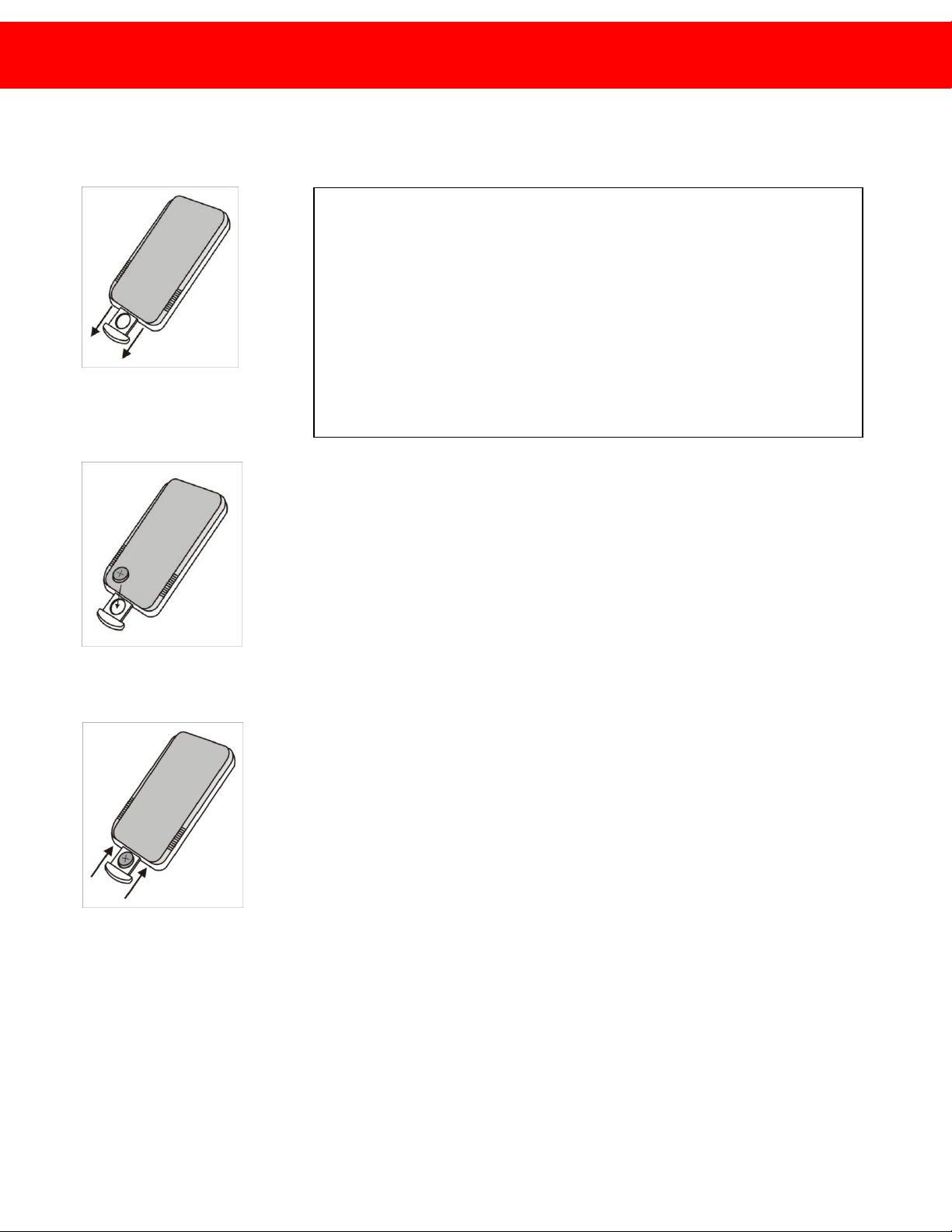
Inserting battery to remote control
1. Pull out the insert part.
2. Place the battery checking
“+” polarity.
3. Push in the insert part
Introduction
Remote control angle range
Remote control angle range is within 3~5m distance with 60 degree of angle scope.
Using IR extension receiver
IR extension receiver is used to control the MW-156 from far distance or behind an
obstacle. When IR extension receiver is connected front IR of MW-156 will not work.

USER Manual
6
Package and accessories
※Accessories may be changed without any notice.
※Additional accessories or any accessories other than above should be purchased separately.

USER Manual
7
Before connecting
MW-156 basically consists of a master and multiple slaves.
Connections

USER Manual
8
1. Master before connecting
2. Slave before connecting

USER Manual
9
0MW-156 Connection Method
1. Prepare the MW-156
. (C
an be composed up to 4x4)
2. Connection of screens shall be done from the master at the left upper part and slaves in order.
3. Connect the power cables and IR to the MW-156.
4. (Extend IR shall be connected only to the master and receipt of remote controller signal is blocked for the slave.)
5. Connect LAN cable (direct cable/CAT 5 LAN cable) to the MW-156 and the hub.
6. Turn on the power and use the product after adjusting the bezel size.
Control is all done through the master. Slave setup and resolution setup shall be done from the slaves themselves.

USER Manual
10
MASTER PLAY LIST menu
00PLAY LIST menu – Remote Control Unit00
⊙Press LIST on remote control to open
PLAY LIST menu.
:
PLAY LIST menu is frequently used, please read carefully before using.
Basic
Usage
Table des matières