
AudioBahn AX202P Manuel utilisateur

M U LTI-CHANNEL ELECTRONIC CROSSOVER
NETW ORK W ITH REM OTE CONTROL
A X 202P A X 303P


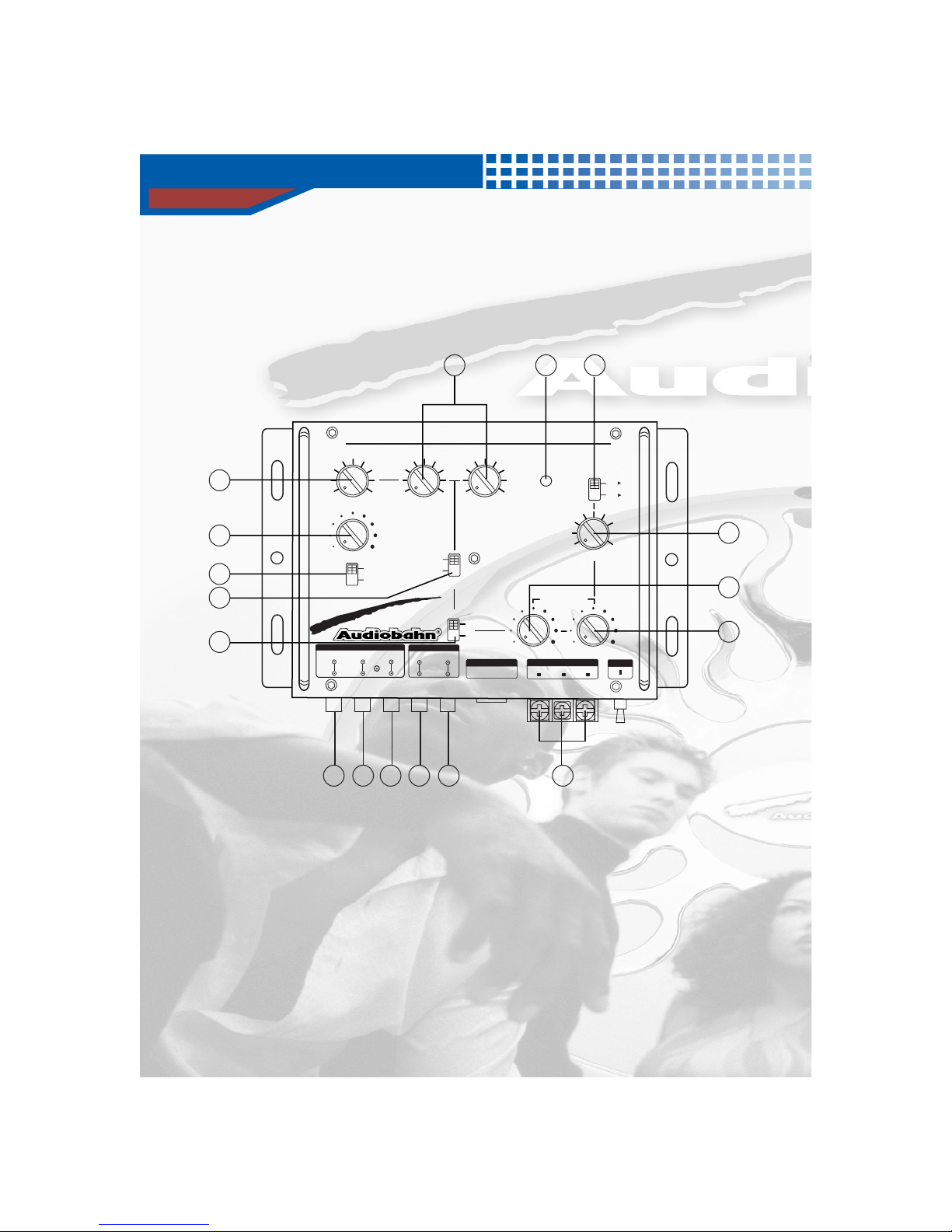
Controls and Functions
5
1. INPUT LEVEL CONTROL
This gain control is used to adjust the sensitivity of the unit to match the radio's output.
2. SUBWOOFER FREQUENCY CONTROL
By turning the selector you can choose from an infinite number of crossover points from 40Hz - 400Hz.
3. BASS EQUALIZER / BASS FREQUENCY CONTROL
By turning the selector, you activate a single octave 12dB boost from 25Hz - 250Hz, depending on the
position of the frequency selector.
AX202P
11
8
7
6
1
2
317 4
5
9
10
12 13 14 15 16
MAIN UNIT
AX202P
2 - WAY ELECTRONIC CROSSOVER WITH REMOTE CONTROL
MIN MAX
INPUT LEVEL
MIN MAX MIN MAX
40H 80H
X10
X1
Z
Z
40HZ
BATT
SUB WOOFER
SUB WOOFER HIGH PASS
GND REM
POWER FUSE
REMOTE
X-OVER FREQ
Od8 12d8
BASS BOOST
NORMAL
REVERSE
PHASE
MODE
MONO
STEREO
25H 250H
PWR
Z
Z
BASS FREQ
FREQ
MULTI FILTER
40H 400HZ
Z
X-OVER FREQ
400HZ
L
R
REAR FRONT SUB HIGH
IN / OUT
OUT
IN
IN / OUT
OUTPUT LEVEL
INPUT
OUTPUT

Controls and Functions
6
4. FREQUENCY MULTIPLIER
This switch changes crossover points from 40Hz - 80Hz to 400Hz - 8kHz for high frequency drivers.
5. HIGH-PASS FREQUENCY SELECTOR
By turning the selector, you can choose from an infinite number of crossover points from 40Hz-8kHz.
6. IN / OUT SWITCH
See page 11. (Signal connection diagram)
7. PHASE SHIFTER SWITCH
Allows you to change the phase of your subwoofer 0 to 180 to help compensate for timing differences
between drivers.
8. STEREO / MONO SWITCH
By moving this switch to the "MONO" position, the subwoofer output changes from stereo to mono,
thus facilitating a single subwoofer control.
9. SUBWOOFER GAIN CONTROL
By turning this control clockwise, you increase the subwoofer channel level.
10. HIGH-PASS GAIN CONTROL
By turning this control clockwise, you increase high channel level.
11. REAR CHANNEL INPUT JACKS
Connect rear input signal from sound source into these jacks via RCA cables.
12. FRONT CHANNEL INPUT JACKS
Connect front input signal from source unit into these jacks via RCA cables.
13. IN / OUT JACKS
You can use this connection if you have another pre-amp audio source or connect two or more
AX202P units together.
14. SUBWOOFER OUTPUT JACKS
Connect the RCA cable to the subwoofer channel of the amplifier input.
15. HIGH-PASS OUTPUT JACKS
Connect the RCA cables to the front channel of the amplifier input.
16. POWER TERMINAL
Make connections using the supplied detachable plug. Connect the "B+" terminal to the battery
positive (+). Connect the "B-" terminal to chassis ground. Connect the REMOTE terminal to a 12V
(switched) DC source to allow the bass driver to be turned on/off by the head unit.
17. POWER LED
This blue LED light up when the unit is on.

Controls and Functions
7
AX303P
1. INPUT LEVEL CONTROL
This gain control is used to adjust the sensitivity of the unit to match the radio's output.
2. SUBWOOFER FREQUENCY CONTROL
By turning the selector you can choose from an infinite number of crossover points from 40Hz - 400Hz.
3. BASS EQUALIZER / BASS FREQUENCY CONTROL
By turning the selector, you activate a single octave 12dB boost from 25Hz - 250Hz, depending on the
position of the frequency selector.
15 16 17 18 19 20 21
11
10
9
1
2
3 4 5622
7
8
13
14
12
MAIN UNIT
AX303P
3 - WAY ELECTRONIC CROSSOVER WITH REMOTE CONTROL
MIN MAX
INPUT LEVEL
MIN MAX MIN MAX MIN
MID
MAX
BATT
SUB WOOFER
SUB WOOFER
MID-RANGE
HIGH PASSHIGH PASS LOW PASS
BAND PASS
HIGH PASS
HIGH PASS
GND REM
POWER
FUSE
REMOTE
40H 80H
Z
Z
40H 80H
Z
Z
X-OVER FREQ
40H 80H
Z
Z
Od8 12d8
BASS BOOST
NORMAL
REVERSE
PHASE
MODE
MONO
STEREO
25H 250H
PWR
Z
Z
BASS FREQ
FREQ
MULTI FILTER
40H 400H
Z
Z
X-OVER FREQ
L
R
L
R
REAR FRONT MID - RANGE
SUB HIGH
IN / OUT
OUT
IN
IN / OUT
OUTPUT LEVEL
INPUT
OUTPUT

Controls and Functions
8
4. MID-RANGE / HIGH-PASS FREQUENCY SELECTOR
By turning the adjustable dial, you can select a high-pass crossover point for the mid output between
40Hz-800Hz.
5. MID-RANGE / LOW-PASS FREQUENCY SELECTOR
By tuning the adjustable dial, you can select a low-pass crossover point for the mid output between
2kHz - 7kHz
6. HIGH-PASS FREQUENCY SELECTOR
By turning the selector, you can choose from an infinite number of crossover points from 40Hz-8kHz.
7. HIGH-PASS / BAND-PASS Selector
When this switch is in high-pass mode, the low pass filter can't be used.
8. FREQUENCY MULTIPLIER
This switch changes crossover points from 40Hz - 80Hz to 400Hz - 8kHz for high frequency drivers.
9. IN / OUT SWITCH
See page 12. (Signal connection diagram)
10. PHASE SHIFTER SWITCH
Allows you to change the phase of your subwoofer 0 to 180 to help compensate for timing differences
between drivers.
11. STEREO / MONO SWITCH
By moving this switch to the "MONO" position, the subwoofer output changes from stereo to mono,
thus facilitating a single subwoofer control.
12. SUBWOOFER GAIN CONTROL
By turning this control clockwise, you increase the subwoofer channel level.
13. IN / OUT JACKS
You can use this connection if you have another pre-amp audio source or connect two or more
AX202P units together.
14. HIGH-PASS GAIN CONTROL
By turning this control clockwise, you increase the high channel level.
15. REAR CHANNEL INPUT JACKS
Connect rear input signal from source unit into these jacks via RCA cables.
16. FRONT CHANNEL INPUT JACKS
Connect front input signal from source unit into these jacks via RCA cables.

Controls and Functions
9
17. IN / OUT JACKS
You can use this connection if you have another pre-amp audio source or connect two or more
AX303P units together.
18. SUBWOOFER OUTPUT JACKS
Connect the RCA cable to the subwoofer channel of the amplifier input.
19. MID-RANGE OUTPUT PORT
Connect the RCA cable to the rear channel of the amplifier input.
20. HIGH-PASS OUTPUT JACKS
Connect the RCA cables to the front channel of the amplifier input.
21. POWER TERMINAL
Make connections using the supplied detachable plug. Connect the "B+" terminal to the battery
positive (+). Connect the "B-" terminal to chassis ground. Connect the REMOTE terminal to a 12V
(switched) DC source to allow the bass driver to be turned on/off by the head unit.
22. POWER LED
This blue LED light up when the unit is on.
1. SUBWOOFER GAIN CONTROL
This control adjusts the subwoofer gain control.
2. Q SELECT
Allows independent, continuous change of the boost frequency bandwidth (Q-factor) for each band
from 20 (narrow bandwidth, steep slope), to 2 (wide bandwidth, gentle slopes).
2
1
MAX
2
20
AX202P
REMOTE CONTROLLER
MIN
LEVEL
Q.
REMOTE CONTROL UNIT
Ce manuel convient aux modèles suivants
3
Table des matières
Autres manuels AudioBahn Crossover


