
Audioaccess AVR21EN Manuel utilisateur

Thank you for purchasing an Audioaccess®AVR21EN. This Quick-Start Guide
will help you with a basic main-room system installation. For detailed informa-
tion on any step and for multiroom setup, please refer to the Audioaccess
W.H.E.N.
™Installation Instructions Manual. We strongly recommend that you
read that manual for complete details on how to install, configure and operate
the AVR21EN, as well as for the important safety information it contains.
Figure 1 – Speaker Placement
The colors shown for each speaker correspond to the matching
output terminal connection on the back of the AVR21EN.
NOTE: If only using 5.1, connect the surround speakers
to the left side surround (S. SURR. LEFT) and right side
surround (S. SURR. RIGHT), regardless of physical position.
FRONT
LEFT
SPEAKER
(White)
BACK
SURROUND
LEFT
SPEAKER*
(Brown)
BACK
SURROUND
RIGHT
SPEAKER*
(Tan)
CENTER
SPEAKER
(Green)
SUBWOOFER
(Purple)
(Blue)
(SIDE)
SURROUND
LEFT
SPEAKER
FRONT
RIGHT
SPEAKER
(Red)
(Gray)
(SIDE)
SURROUND
RIGHT
SPEAKER
Step 1. Place your speakers in
the listening room.
*7.1 or 7.0 speaker setup only
SPEAKER PLACEMENT
AVR21EN QUICK-START GUIDE
Connections Color Guide
Audio Connections Left Right
Front
Center
(Side) Surround
Subwoofer
Back Surround
Digital Audio Connections
Coaxial
Optical
Video Connections
Composite
S-Video
Component Video
HDMI™Video
Match the colored jacks on the AVR21EN to the appropriate
jacks on your source equipment or speakers. The colors are
standardized, but not all equipment or connectors use them.
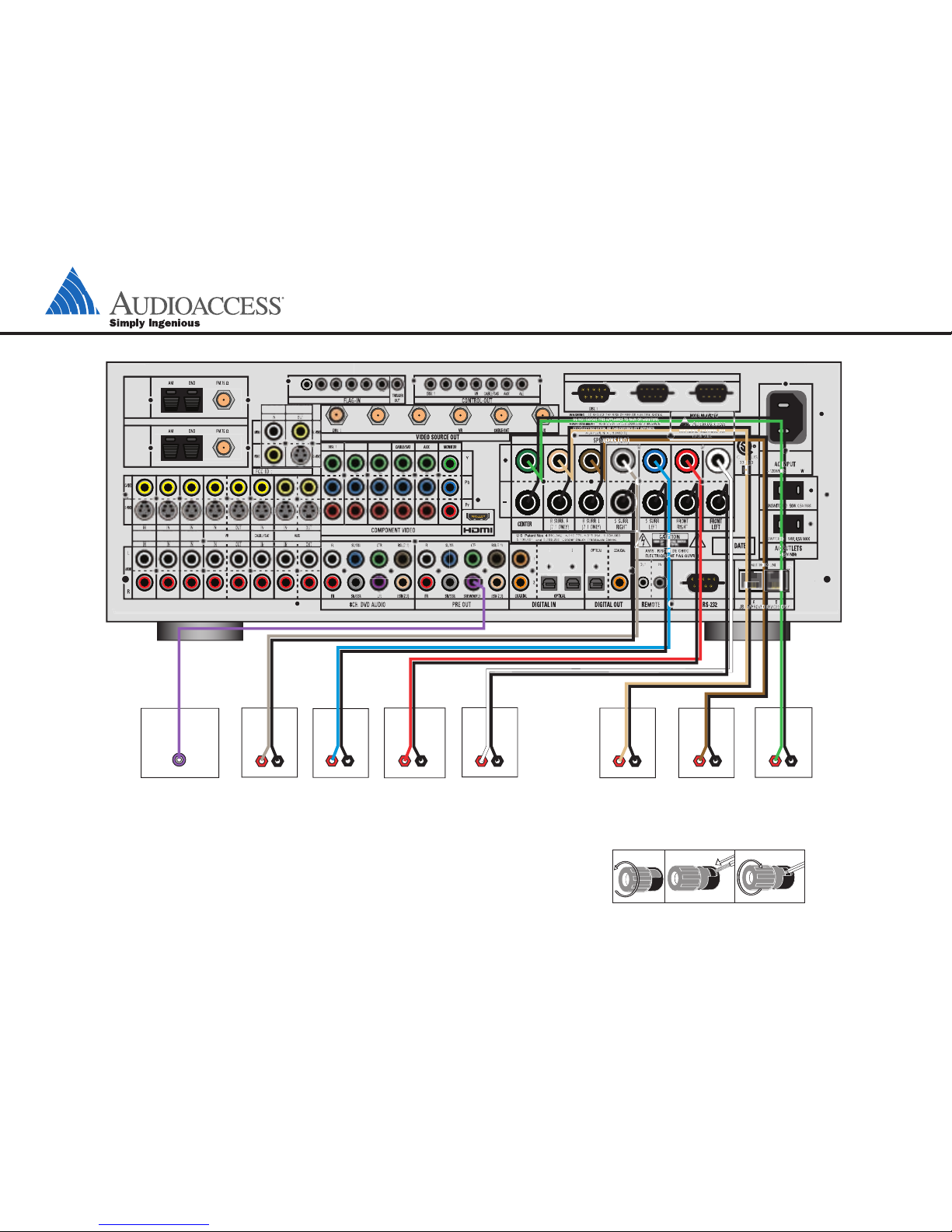
Step 2. Connect the speakers to the receiver: red (+) on speaker to colored (+) on receiver and black (–) to black (–).
Step 3. Connect the Subwoofer Pre-Out jack to the Line-In jack on your subwoofer.
You may adjust the settings on the subwoofer later as needed.
BACK SURROUND
LEFT SPEAKER
(7.1 CH. ONLY)
BACK SURROUND
RIGHT SPEAKER
(7.1 CH. ONLY)
FRONT RIGHT
SPEAKER
FRONT LEFT
SPEAKER
SUBWOOFER
+
_
+
_
LINE IN/SUB/LFE
+
_
(SIDE) SURROUND
RIGHT SPEAKER
+
_
+
_
(SIDE) SURROUND
LEFT SPEAKER
CENTER SPEAKER
+
_
+
_
RADIO 2
RADIO 1
DISC 1 DISC 2/
SAT RADIO
DISC 3/
MP3
DISC 1
DISC2/SATRADIO
DISC2/SAT RADIO
DISC 3/MP3
DISC 3/MP3
VRAUX
DISC 2/SAT RADIO DISC 3/MP3 DISC 2/SAT RADIO DISC 3/MP3
CABLE/SAT
DISC 3/MP3DISC 2/SAT RADIO
KP A/V MONITOR
SOURCE CONTROL2-WAYINTERFACE
Figure 2 – Speaker Connections
AVR21EN QUICK-START GUIDE
Figure 3 – How to Use the Binding-Post Speaker Terminals
SPEAKER AND AUDIO CONNECTIONS
RADIO 2
RADIO 1
DISC 1 DISC 2/
SAT RADIO
DISC 3/
MP3
DISC 1
DISC2/SAT RADIO
DISC2/SATRADIO
DISC 3/MP3
DISC 3/MP3
VR AUX
DISC 2/SATRADIO DISC3/MP3 DISC 2/SATRADIO DISC3/MP3
CABLE/SAT
DISC 3/MP3DISC 2/SAT RADIO
KP A/V MONITOR
CD/DVD PLAYERAM ANTENNA (1)
AM ANTENNA (2)
FM ANTENNA (1)
FM ANTENNA (2) L R Optical Coax
REC/IN
PLAY/OUT
VR/AUDIO RECORDER
SOURCE CONTROL 2-WAY INTERFACE
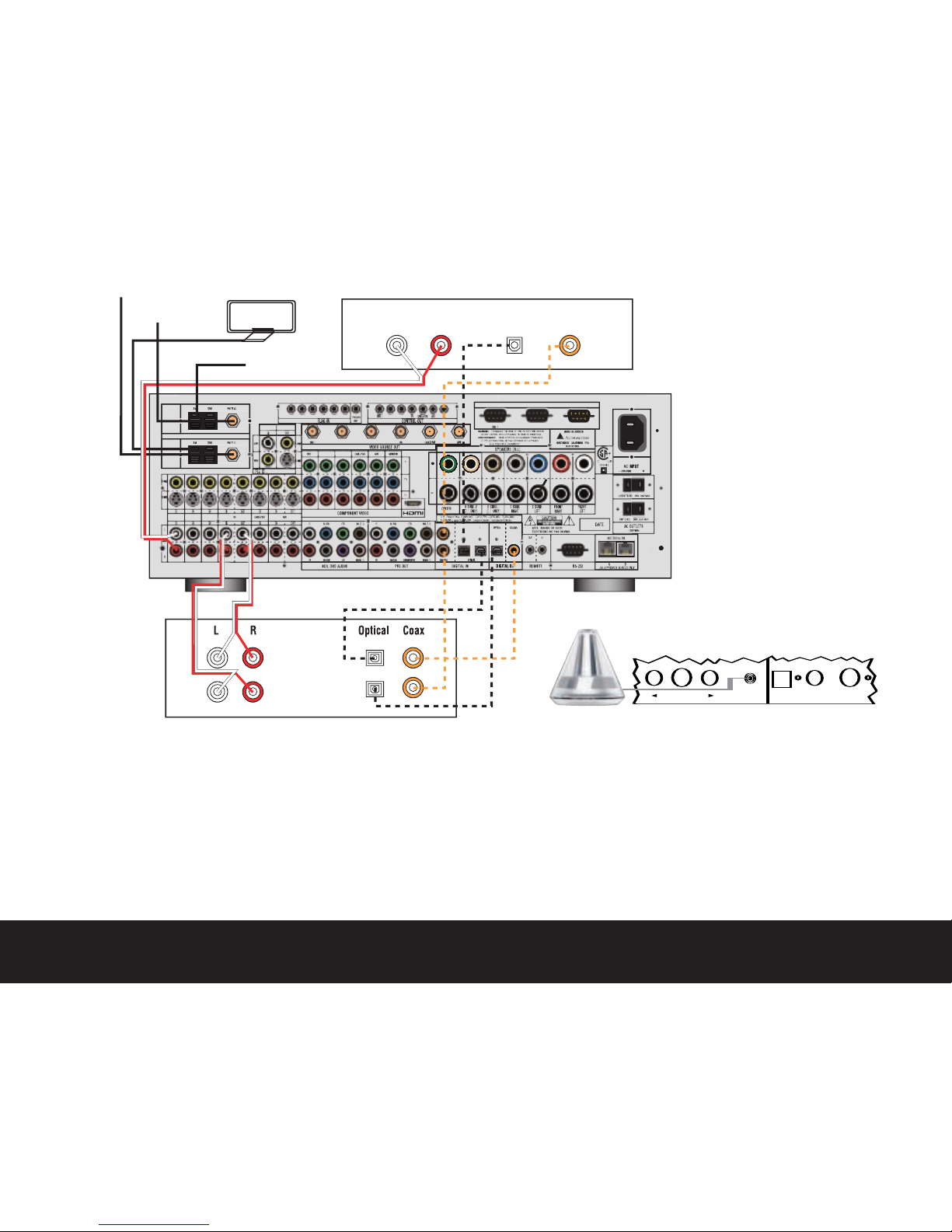
Step 4. Connect AM and FM antennas (Fig. 4).
Step 5. Connect source components, as shown in Figures 4 and 5 and
on the Device Connection Options chart on the back of this guide.
AUDIO connections: Right channel (red)on source to right (red)
on AVR, and left channel (white)on source to left (white)on AVR.
DIGITAL AUDIO connections, if available: Choose either coaxial
(orange)to coaxial (orange)OR optical to optical for each device.
Beforeusing any digital audio inputs for source equipment, you need
to go into the AVR on-screen menu (Menu/Main Room Setup/
Sources) and assign a digital audio input to that source (see Step 7).
VIDEO connections: Choose component (Y/Pb/Pr – green/blue/
red), composite (yellow)or S-video (4-pin) for each video source.
Connect the component, composite and S-video monitor outputs to
your video monitor (TV). If you are connecting composite video or
S-video sources and only connecting the component outputs to your
TV, or if using the HDMI output of the AVR21EN, make sure that the
Faroudja®video processor is on (press the FAROUDJA button on
your remote control). Switch your TV set’s input to match the type
of video used for the currently selected source.
Step 6. Plug all components into AC power outlets. The outlets on the back
of the AVR21EN should be used only for low-current products, such
as CD or DVD players, and the total should not exceed 100 watts.
Basic Receiver Configuration
Step 7. Select digital inputs: Go into the AVR on-screen menu (Menu/Main
Room Setup/Sources) and assign an available digital audio coaxial or
optical input to that source.
Step 8. Plug the EzSet/EQ microphone into the Microphone jack behind the
door on the front panel. Place the microphone in a location near the
center of the room, and then follow the instructions in the Owner’s
Manual and the on-screen menus to run EzSet/EQ. Note that you
will hear a series of test tones. When the on-screen menu indicates
that EzSet/EQ is complete, your system settings for speakers, delay
times, channel output and room equalization are entered into the
unit’smemory. Unplug the microphone and keep it for future use.
Step 9.
Your system is configured – sit back and enjoy.
Figure 4 – Audio Connections
Dashed lines (––––)indicate coaxial and optical
digital audio connections. Choose either type
(but not both) for each digital audio source.
NOTE: You must connect analog audio in addition
to any digital audio connection if you are using the
multiroom distribution network.
Figure 5 – Connecting EzSet/EQ™Microphone
Set Microphone Optical 4 Coaxial 4 S-Video
–– In - Digital - In/Out ––

RADIO 2
RADIO 1
DISC 1 DISC 2/
SAT RADIO
DISC 3/
MP3
DISC 1
DISC2/SAT RADIO
DISC2/SATRADIO
DISC 3/MP3
DISC 3/MP3
VR AUX
DISC 2/SAT RADIO DISC 3/MP3 DISC 2/SAT RADIO DISC 3/MP3
CABLE/SAT
DISC 3/MP3DISC 2/SAT RADIO
KP A/V MONITOR
Cable Box or Satellite Receiver
DVD/Disc 1
HDMI
Video S-Video Component Video
Y
Pb
Pr
Y
Pb
Pr
Video S-Video Component Video
Y
Pb
Pr
TV or Video Display
Video S-Video Component Video
SOURCECONTROL2-WAY INTERFACE
VIDEO CONNECTIONS
Device Connection Options:Recommended connections are shown in red, but connections may be made to best fit your system requirements. The Front Input Analog Audio and Composite, S-, or Component Video, Digital Audio Coaxial 3 and
Digital Audio Optical 3 inputs areon the front of the receiver.
Device Input Name Audio Input Connections Audio Output Connections Video Connections
DVD Player Disc 1 Coaxial Digital 1, 2orOptical Digital 1, 2 or Disc 1 L/R Inputs Not Required Disc 1 Component Video Input, Composite or S-Video
CD Disc 2 Coaxial Digital 1, Coaxial Digital 2, Optical 1, 2 or Disc 2 L/R Inputs Not Required Not Required
iPod Disc 3
Disc 3
L/R Inputs Not Required Composite
VCR/TiVo®VR VR L/R Inputs VR L/R Outputs VR Composite or S-Video Input and Output
Cable Box or Satellite Receiver Cable/Sat
Cable/SATL/R Inputs, Optical Digital 1 or 2†or Coaxial Digital 1 or 2†Inputs
Not Required Component Cable Sat, Composite or S-Video
TV or Video Display Not Applicable Not Required Not Required Monitor-Out HDMI Component, Composite and/or S-Video
†Check with your cable company to determine whether digital audio is available for all channels. It may be necessary to make BOTH analog and digital connections if it is not.
NOTE: If a multiroom network is used, analog audio and composite video must be connected for all sources. In addition to analog audio and composite video, other audio and video inputs can be connected for use in the main room.
250 Crossways Park Drive, Woodbury,New York 11797 www.audioaccess.com ©2007 Harman International Industries, Incorporated. All rights reserved. Part No.ZKD6615HA00
Figure 6 – Video Connections
Dotted lines (••••)indicate component, composite
or S-video connections from your video source
equipment to the AVR21EN. Component video is
the preferred connection from your sources when
available, but you may use any of the three types.
The AVR21EN is configured from the factory to
automatically select the highest-quality video
connection for a source if more than one type of
video output is connected from the same source.
For AVR21EN to TV/projector connection, HDMI
(if available on TV/projector) or component video
connection is preferred. If you are connecting
composite video or S-video sources and only
connecting the component outputs to your TV, or
if using the HDMI output of the AVR21EN, make
sure that the Faroudja video processor is on (press
the FAROUDJA button on your remote control).
Switch your TV set’sinput to match the type of
video used for the currently selected source.
NOTE: You must connect composite video in
addition to any other video connection from all
video sources if you are using the multiroom
video distribution network.
iPod is a trademark of Apple Computer,Inc., registered in the U.S.and other countries.
Autres manuels pour AVR21EN
3
Manuels Système de haut-parleurs populaires d'autres marques


Sondpex
Sondpex Active Speaker System and Digital Music... Manuel utilisateur

JVC
JVC NX-PN7 Manuel utilisateur

Marshall Amplification
Marshall Amplification AR-DM61-BT Manuel utilisateur

Yamaha
Yamaha NX-A01 - Speaker Sys Manuel utilisateur

SE Audiotechnik
SE Audiotechnik I-LINE Manuel utilisateur

Gemini
Gemini WRX-843 Series Manuel utilisateur