
AUDAX BioAx Manuel utilisateur

+44 (0) 1752 264950 | info@audaxuk.com | www.audaxuk.com
Audax®
BIO-AX
Admin User Manual

Buttons
+44 (0) 1752 264950 | [email protected] | www.audaxuk.com
Audax®
1 Menu Navigation Buttons
Enter - Select highlighted option
Up - Move curser up
Down - Move curser down
Back - Go to previous screen
8 Front Video Recording
2 Push to Talk
Buttons
3 IR Light (hold for torch)
4 Audio Record (hold for laser pointer)
5 Screen off (hold for on/off)
7 Video Recording
6 Photo
9 Tagging / SOS

Quick Start
+44 (0) 1752 264950 | [email protected] | www.audaxuk.com
Audax®
2 Clip
1 Record
Quick Start
USB slot for charging with a computer or to attach an
Audax® mini camera.
SIM card slot for using 4G communications with our
CMS software.
2.5mm headphone socket for use with CMS software
for comms.
You can press the button on the front or the orange button on top to
record whilst the camera is turned on/standby.
If the camera is off you can hold the front record button for 5 seconds
to turn the camera on and start recording automatically.
The Bio-AX® camera can work with any KlickFast clip
or accessory but Audax also offer a range of bespoke
options.
Bio-AX® can be used with our docking stations to
make it easy to export footage to the Audax DEMS
platform and of course for charging too.
4 Docking
3 Accessory Ports

LED Lights
+44 (0) 1752 264950 | [email protected] | www.audaxuk.com
Audax®
Screen
1 Light Sensor
2 Laser Pointer
3 Infa-Red Light
4 Torch / Warning Lights
Charging / Streaming 5
7 Indicator
2” TFT LCD High Resolution Screen 6
Blue = charging
Off = charged
White Flashing = not streaming
Solid white = streaming
Red = Recording
Green = Standby

Mounting
+44 (0) 1752 264950 | [email protected] | www.audaxuk.com
Audax®
4 KlickFast Clip
1 Clip Insert 2 Clip Removal
Mounting
5 KlickFast Docks
3 KlickFast Stud
Pinch the top of the clip to release the
mount.
You can slide clips into the top of the mount on
the rear of the camera.
These will click when seated correctly.
The Bio-AX® camera will work with any KlickFast
accessory by using a KlickFast stud.
Insert the KlickFast stud instead of the Crocodile
Clip included with your camera.
Slide the KlickFast stud into your chosen dock
rotate 180 degrees to lock into place.

+44 (0) 1752 264950 | [email protected] | www.audaxuk.com
Audax®
1 Power On/ Off
4 Audio recording
3 Still Images
2 Video Recording
General System Operation General System Operation
IMPORTANT NOTE
Video recorded or photos taken when IR has
been selected will be in black and white only.
Press the POWER ON / OFF button for 1 second; the cam-
era will turn on and enter the standby mode (the device will
vibrate).
When the device is ON, pressing the POWER button for 1
second will turn the device OFF.
Once turned on, the device will automatically enter the cam-
era preview mode and a live picture will be shown on the
display screen. Press the RECORD button to commence
recording; the device may vibrate and the “work” LED on the
top will change to RED (flashing). A RED circle will also
show on the display screen.
Press the RECORD button again to stop recording; the de-
vice may vibrate and the “work” RED LED will turn off. At
this point, recording will stop (unless Post-event record-
ing has been selected) and the video will be saved.
If recording is required in “low light” conditions, press the IR
button (unless IR “Auto” has been previously selected).
The IR illuminators will be turned on and the device will en-
ter the night shooting mode.
Once turned on, the device will automatically enter
the camera preview mode. Press the PHOTO but-
ton to take still images.
As already mentioned in b.3. above; if photos are to
be taken in “low light” conditions, turn on the IR
illuminators (unless IR “Auto” has been previously
selected).
When recording Video, the PHOTO button can be
pressed to capture a picture while still recording at
that time.
Once turned on, the camera will automatically
enter the camera preview mode. Press the AUDIO
button to record audio ONLY. The device will
vibrate and the “work” LED on the top will change
to AMBER (flashing).
Press the AUDIO button again to end audio
recording, and the audio file will be automatically
saved.

Warnings
+44 (0) 1752 264950 | [email protected] | www.audaxuk.com
Audax®
Warnings
1 Password Protection
6 Connection to PC
4 Charging Battery
IMPORTANT NOTE
If, after setting, your password is lost then the device will
have to be returned to be re-set. In that event, a fee will
be chargeable and any footage held on the unit might be
erased as part of the re-setting process.
5 Screen Protectors
2 Cables
3 Internal Memory
7 Changing Settings
The BIO-AX has two different Passwords set:
a. The “Settings” Menu has the initial password set as
888888 The software will not allow access to settings
without using this password. Audax recommend that this
Password is re-set and safely recorded at the earliest
opportunity.
b. The “Replay” Menu has the initial password set as
666666 This allows you to give this password to the user
so that they can view recorded footage (if you require).
However, they will NOT be able to access other areas
(settings) with this password. Audax recommend that this
Password is re-set and safely recorded at the earliest op-
portunity.
Only ever use the supplied chargers and cables. Using
other “similar” cables may invalidate the system
Warranty.
Gaining or attempting to gain physical access to the
internal memory will invalidate the system warranty.
Prior to first use of the system, charge the battery for a
minimum of 4 hours. When the battery is fully charged,
the Red “POWER” LED on the top of the device will
turn OFF. Please note that your camera may arrive
already fully charged, so don't be surprised if, the first
time you try to charge it, the red “charging” light does
not come on.
The Chest Camera device will be dispatched with a
protective film covering the camera lens (front) and
viewing screen (back).
Please ensure that the film is peeled off before using.
The Camera DOES NOT allow direct connection to a
PC for downloading of data. The ONLY way this can
be achieved is by using the CamManager software.
(Please note that this process is different if using
the Audax Docking Station).
We recommend that all recorded video / image files
are backed up before changing any system settings.
Failure to do so may cause recorded footage/files to
be deleted.

+44 (0) 1752 264950 | info@audaxuk.com | www.audaxuk.com
Video Settings
+44 (0) 1752 264950 | info@audaxuk.com | www.audaxuk.com
Audax®
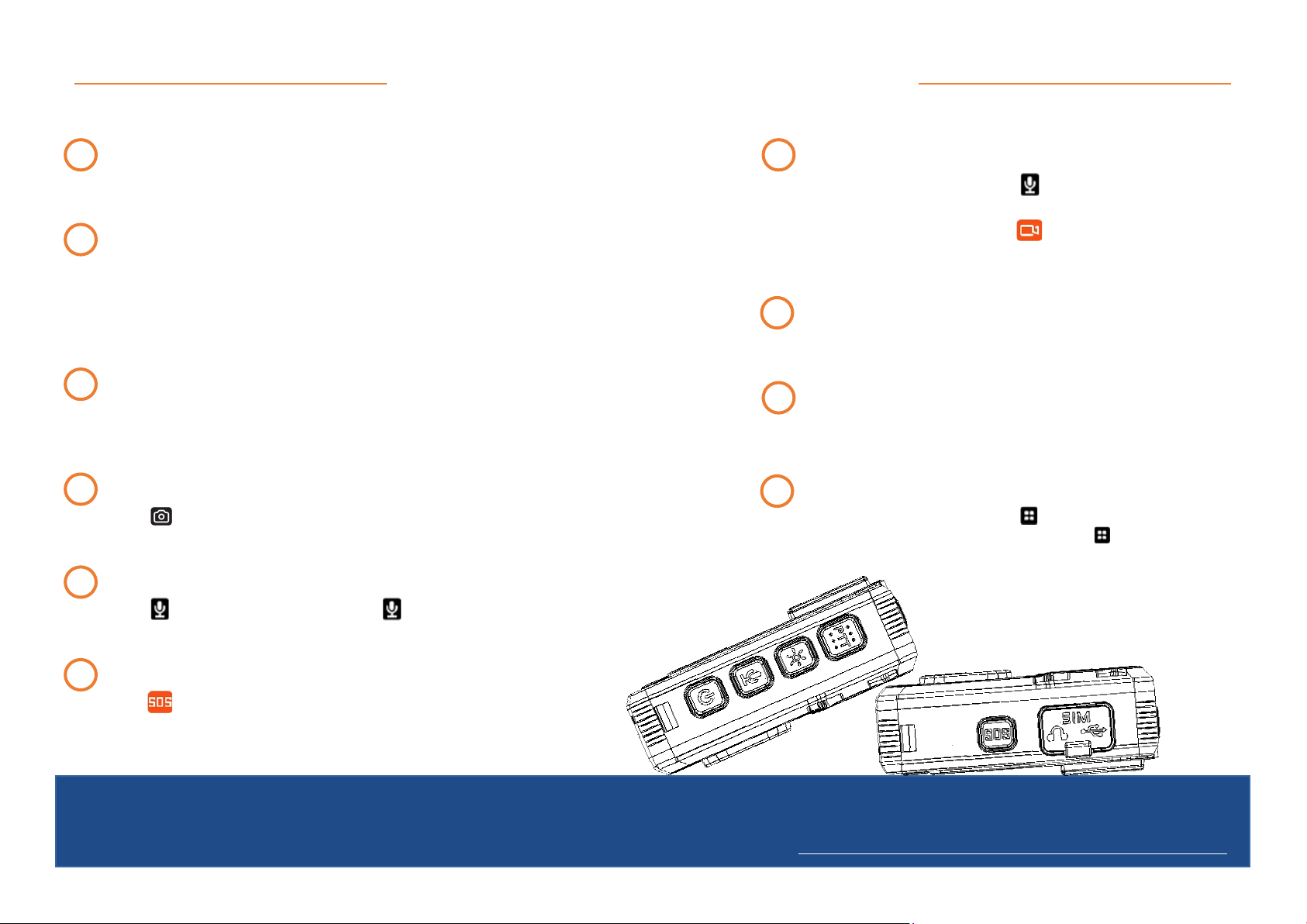
Press to take as many pictures as selected
1 Resolution
2 Quality / Bitrate*
Higher bit rate gives better quality.
3 Photo Size
Video Settings
5 Timelapse
7 Streaming Resolution
9 Streaming bit-rate
Higher bit rate gives better quality streaming.
8 Streaming Frame Rate
Higher frame rate means smoother video transmission.
10 Streaming Control
Off / Video Only / Audio Only / Text Only/ Audio and Video / All
11 H265 Encoding
This encoding saves battery and data at the cost of quality.
12 Pre-Record
13 Loop Record
Overwrites oldest data to continue recording.
14 Post Record
16 Video Length
15 One Touch Recording
Camera records automatically when camera is turned on.
There are six options to select from. The higher the resolution the better video quality.
There are six options to select from. The higher the size the
better photo quality.
There are six options to select from. The higher the resolution the better video stream
quality.
Off / 5 Sec / 10 Sec / 15 Sec / 30 Sec / 60 Sec Records into a
cache. When record is pressed this time is captured and camera
will continue recording.
Off / 5 Sec / 10 Sec / 20 Sec / 30 Sec / 60 Sec / 120 Sec.
Continue to record past when the stop record button has been
pressed.
2 min / 5 min / 10 min / 15 min / Off
(When set to off camera will record 30 minute clips)
4 Selfie / Timer
Press to initiate the selected countdown.
Press to start taking pictures at the selected time intervals.
Press again to stop.
6 Burst Mode
+44 (0) 1752 264950 | info@audaxuk.com | www.audaxuk.com
Video Settings Continued
+44 (0) 1752 264950 | info@audaxuk.com | www.audaxuk.com
Audax®
8 Playback
In preview mode press the back button to access Playback menu.
Choose from Video, Photo or Audio to browse.
1 Mute Recording
Off / Only Pre-Record / On
2 Record Notification
Off / 5 Sec / 10 Sec / 20 Sec / 30 Sec / 60 Sec
Camera will make a noise at the allotted time to remind you it’s recording.
(this does not affect the sounds at the beginning or end of recording.)
Video Settings Continued
3 Motion Detect
Camera will detect movements and record automatically with this setting turned on.
Press the record button to arm.
9 One Touch Playback
Whilst in preview mode press and hold the back button to
check the last file recorded.
7 Quick Switch from Audio/Video recording
When video is recording press to stop recording and start
audio recording.
When audio is recording press to stop recording audio and
record video.
Whilst in preview mode, press then input the settings
password. Select Data Upload and press again to enter
the video upload interface.
10 Data Upload
5 Audio Recording
Press to start recording audio. Press again to stop.
4 Photograph
Press to take a picture. This will work even when recording.
6 File Tagging
Press the button whilst recording to mark the video clip as important.

+44 (0) 1752 264950 | info@audaxuk.com | www.audaxuk.com
General Settings
+44 (0) 1752 264950 | [email protected] | www.audaxuk.com
Audax®
8 Key Tone
Key press tone On/Off
9 Voice Volume
Higher number means higher volume.
2 Language
Select the appropriate language for the camera.
General Settings
4 Vibration
Turn vibration On/Off
6 Auto Power Off
Camera will turn off after the selected time period.
3 GPS
Turn GPS functionality On/Off
10 Voice Remind
Camera will remind user when it’s recording.
11 Hourly Reminder
Turn hourly reminder On/Off
1 Access Settings Menu
Press and enter the settings password and then click on ‘General’.
5 IR Filter
Off
Manual - Press to toggle IR On/Off.
Auto - Will come on n low light even in preview mode.
Recording Auto - Will come on when recording in low light.
7 LCD Auto Off
Screen will turn off after the selected time period.
Off - Screen will stay on.
12 LED Light
Turn LED indication On/Off
13 Car DV Mode
Turn Car mode On/Off
14 File Tagging
Turn LED indication On/Off
15 Stealth Mode
On - Turn off all LED indicators, IR LED and all prompt
sound.
16 Enhanced Standby
Turn LED indication On/Off
Autres manuels pour BioAx
2
Table des matières


