Atlantis Land A02-IPCAM3_ME01 Manuel utilisateur

Where solutions begin
ISO 9001:2000 Certified Company
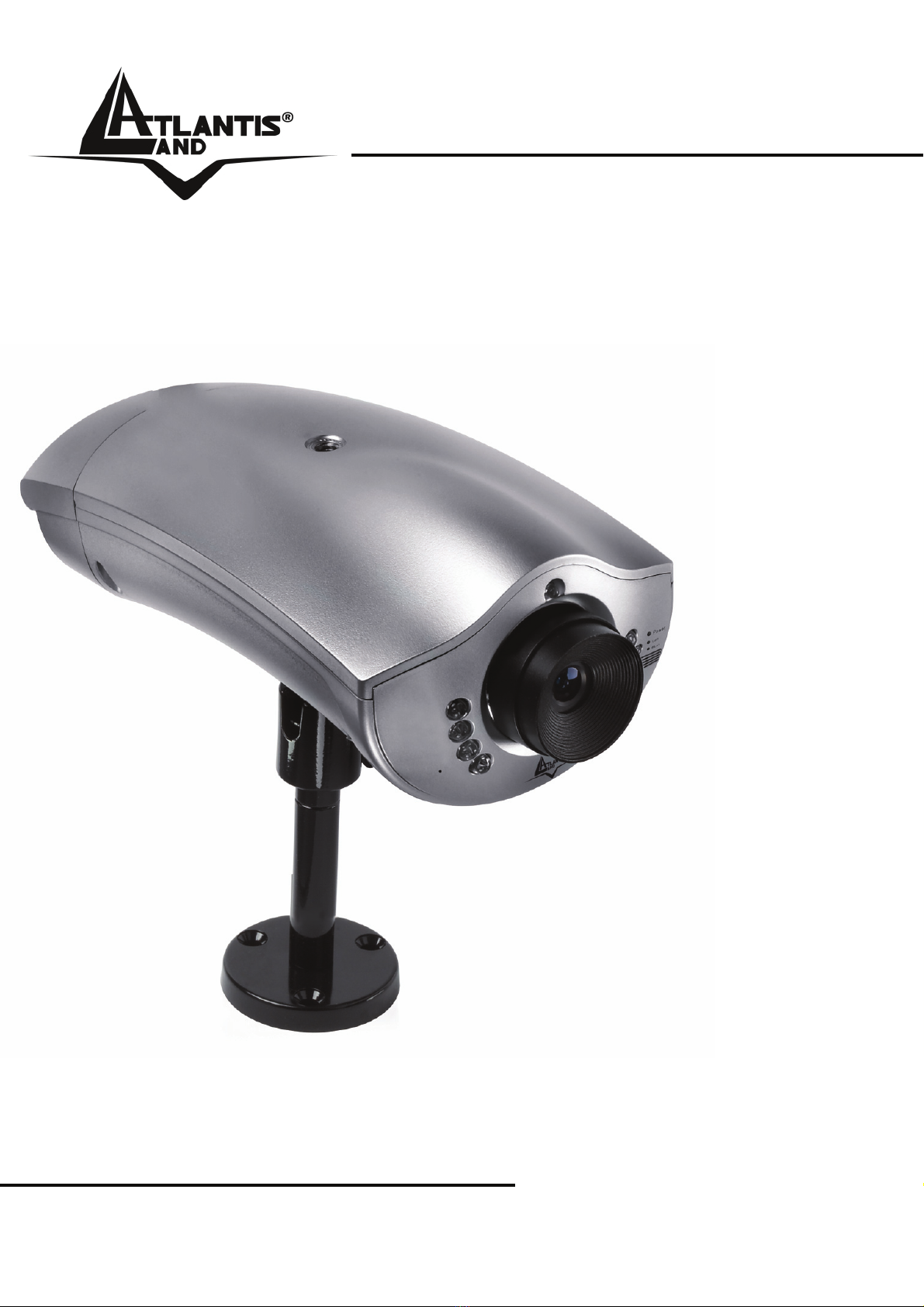
NetCamera NV
IP Security Night Vision
Camera
A02-IPCAM3
MANUAL
A02-IPCAM3_ME01


NetCamera NV
ITALIANO
Questo prodotto è coperto da garanzia Atlantis Land Fast-Swap della durata di 3
anni. Per maggiori dettagli in merito o per accedere alla documentazione completa in
Italiano fare riferimento al sito www.atlantis-land.com.
ENGLISH
This product is covered by Atlantis Land 3 years Fast-Swap warranty. For more
detailed informations please refer to the web site www.atlantis-land.com.
For more detailed instructions on configuring and using this device, please refer to the
online manual.
FRANCAIS
Ce produit est couvert par une garantie Atlantis Land Fast-Swap de 3 ans. Pour des
informations plus détaillées, référez-vous svp au site Web www.atlantis-land.com.
DEUTSCH
Dieses Produkt ist durch die Atlantis Land 3 Jahre Fast-Swap Garantie gedeckt. Für
weitere Informationen, beziehen Sie sich bitte auf Web Site www.atlantis-land.com.
ESPAÑOL
Este producto esta cubierto por Atlantis Land con una garantía Fast-Swap de 3 años.
Para mayor información diríjase a nuestro sitio Web www.atlantis-land.com.

NetCamera NV
The award of the information is facultative, but its lack will prevent ATLANTIS LAND®
from starting the Guarantee process requested.
Copyright
The Atlantis Land logo is a registered trademark of Atlantis Land S.p.A. All other
names mentioned mat be trademarks or registered trademarks of their respective
owners. Subject to change without notice. No liability for technical errors and/or
omissions.
R
R
Re
e
eg
g
gi
iis
s
st
t
te
e
er
r
r
y
y
yo
o
ou
u
ur
r
r
p
p
pr
r
ro
o
od
d
du
u
uc
c
ct
t
t!
!
!
w
w
ww
w
ww
w
w.
..a
a
at
t
tl
lla
a
an
n
nt
t
ti
iis
s
s-
-
-l
lla
a
an
n
nd
d
d.
..c
c
co
o
om
m
m
Registration on the web site www.atlantis-land.com within 15
days from the purchase of the product dismiss the customer from
showing a valid proof of purchase (Sale Receipt or Invoice) in case
of the request of intervention. For further information we invite you
to look at our web site at the section WARRANTY.

NetCamera NV
INDEX
Chapter 1 ...................................................................................................... 9
1.1 An Overview of NetCamera NV .............................................................. 9
1.2 System Requirements............................................................................. 9
1.3 Package Contents................................................................................. 10
Chapter 2 .................................................................................................... 11
2.1 Cautions for NetCamera NV ................................................................. 11
2.2 The Front LEDs.................................................................................... 12
2.3 The Rear Ports...................................................................................... 14
2.4 Assembling the Stand and Connecting to a Network............................ 16
Chapter 3 .................................................................................................... 18
3.1 Before Configuration ............................................................................. 18
3.1.1 Windows 95/98/ME ................................................................. 19
3.1.2 Windows NT4.0....................................................................... 19
3.1.3 Windows 2000......................................................................... 19
3.1.4 Windows XP............................................................................ 20
3.2 Default Settings..................................................................................... 20
3.3 Browser configuration .......................................................................... 21
Chapter 4 .................................................................................................... 24
4.1 Basic Settings ....................................................................................... 27
4.1.1 System .................................................................................... 27
Configuration.................................................................................... 28
Firmware .......................................................................................... 30
Others .............................................................................................. 32
4.1.2 Network ................................................................................... 33
Ethernet............................................................................................ 34
PPPoE.............................................................................................. 35
DDNS ............................................................................................... 37
4.1.3 User......................................................................................... 38
4.1.4 Video ....................................................................................... 39
4.1.5 Monitor .................................................................................... 41
4.2 Advanced .............................................................................................. 42

NetCamera NV
4.2.1 FTP ......................................................................................... 42
4.2.2 Mail.......................................................................................... 44
4.2.3 GPIO ....................................................................................... 46
4.2.4 TCP Message ......................................................................... 47
4.2.5 Breach Manager...................................................................... 48
Chapter 5 .................................................................................................... 50
5.1 Support ................................................................................................. 50
APPENDIX A: Frequently Asked Questions ............................................... 51
A.1 Using LEDs to Diagnose Problems ........................................... 51
A.1.1 LED Power.............................................................................. 51
A.1.2 LED LAN................................................................................. 51
A.2 WEB........................................................................................... 52
A.3 Login .......................................................................................... 52
A.4 General Questions..................................................................... 53
APPENDIX B: Trouble Shooting ................................................................. 55
APPENDIX C: Adjusting the Camera Focus............................................... 59
APPENDIX D: GPIO ................................................................................... 60
APPENDIX E: Glossary of Terms ............................................................... 66
APPENDIX F: Technical Features .............................................................. 76
A02-IPCAM3_ME01(V1.0 December 2006)

NetCamera NV
Copyright Statement
No part of this publication may be reproduced, stored in a retrieval system, or
transmitted in any form or by any means, whether electronic, mechanical,
photocopying, recording or otherwise without the prior writing of the publisher.
Windows™ 98SE/2000/ME/XP are trademarks of Microsoft® Corp. Pentium is
trademark of Intel. All copyright reserved.
The Atlantis Land logo is a registered trademark of Atlantis Land SpA. All other names
mentioned mat be trademarks or registered trademarks of their respective owners.
Subject to change without notice. No liability for technical errors and/or omissions.
Wireless LAN, Health and Authorization for use
Radio frequency electromagnetic energy is emitted from Wireless LAN devices. The
energy levels of these emissions however are far much less than the electromagnetic
energy emissions from wireless devices like for example mobile phones. Wireless LAN
devices are safe for use frequency safety standards and recommendations. The use of
Wireless LAN devices may be restricted in some situations or environments for
example:
·On board of airplanes, or
·In an explosive environment, or
·In case the interference risk to other devices or services is perceived or identified as
harmful
In case the policy regarding the use of Wireless LAN devices in specific organizations
or environments (e.g. airports, hospitals, chemical/oil/gas industrial plants, private
buildings etc.) is not clear, please ask for authorization to use these devices prior to
operating the equipment.
Regulatory Information/disclaimers
Installation and use of this Wireless LAN device must be in strict accordance with the
instructions included in the user documentation provided with the product. Any
changes or modifications made to this device that are not expressly approved by the
manufacturer may void the user’s authority to operate the equipment. The
Manufacturer is not responsible for any radio or television interference caused by
unauthorized modification of this device, of the substitution or attachment.
Manufacturer and its authorized resellers or distributors will assume no liability for any
damage or violation of government regulations arising from failing to comply with these
guidelines.

NetCamera NV
CE Mark Warning
This is a Class B product. In a domestic environment, this product may cause radio
interference, in which case the user may be required to take adequate measures.
CE in which Countries where the product may be used freely:
Germany, UK, Italy, Spain, Belgium, Netherlands, Portugal, Greece, Ireland, Denmark,
Luxembourg, Austria, Finland, Sweden, Norway and Iceland.
France: except the channel 10 through 13, law prohibits the use of other channels.
CE/EMC Restriction of Liability
The product described in this handbook was designed, produced and approved
according to the EMC-regulations and is certified to be within EMC limitations.
If the product is used in an uncertified PC, the manufacturer undertakes no warranty in
respect to the EMC limits. The described product in this handbook was constructed,
produced and certified so that the measured values are within EMC limitations. In
practice and under special circumstances, it may be possible, that the product may be
outside of the given limits if it is used in a PC that is not produced under EMC
certification. It is also possible in certain cases and under special circumstances,
which the given EMC peak values will become out of tolerance. In these cases, the
user himself is responsible for compliance with the EMC limits.

NetCamera NV
Chapter 1
Introduction
This manual is think for an advanced utilization of NetCamera NV; for this reason, you
can find explanation of any functions supported by product. For fast configuration,
please referee to Quick Start Guide.
1.1 An Overview of NetCamera NV
NetCamera NV is the ideal solution for sending videos, remote video surveillance and
for the transmission of images in real-time over your Intranet or the Internet.
NetCamera NV is equipped with a powerful CPU and integrates the robust Linux
operating system enabling to integrate, among its many features, automatic movement
detection via hardware in MJPEG format with VGA resolution and constant rates of 15
fps; recording not only the video but also the sound.
Its back panel contains 3 pairs of connectors (2 input and 1 output) allowing the
camera to communicate with different elements of a building, such as electric doors
and light switches or security related devices such as alarms.
Furthermore, thanks its 8 integrated Infrared sensors, the NetCamera NV’s automatic
Day/Night functionality will change to Infrared mode as it becomes dark, providing a
video quality on par with its daylight settings.
Its ability to see in the dark as well as the integrated motion detection functionality, turn
this camera into the ideal device for remote video surveillance night and day; even
when there is no light.
Using the web browser of any PC or notebook connected to the Internet (or Intranet),
the NetCamera NV provides the user with a highly intuitive interface to manage and
control it remotely, making it the ideal tool for remote monitoring and video
surveillance.
1.2 System Requirements
Before installing the device, your PC should meet the following:

NetCamera NV
Local Area Network: 10Base-T Ethernet or 100Base TX Fast Ethernet
CPU: Intel Celeron 1.5GHz or above (Intel Pentium 4 is preferred)
Memory Size: 128 MB (256 MB recommended)
VGA card resolution: 800x600 or above
Internet Explorer 5.0 or above (ActiveX)
1.3 Package Contents
Unpack the package and check all the items carefully. If any item contained is
damaged or missing, please contact your local dealer as soon as possible. Also, keep
the box and packing materials in case you need to ship the unit in the future. The
package should contain the following items:
One IP Security Wireless Night Vision Camera
One Quick Installation Guide
One Installation CDRom wiyh Manuals and Utility
One Metal Clip (wall mounting).
One DC Power Adapter
One RJ-45 Ethernet Cable
If any of the above items are missing, please contact your reseller.
Ce manuel convient aux modèles suivants
1
Table des matières
Autres manuels Atlantis Land Caméra de sécurité

Atlantis Land
Atlantis Land A02-IPCAM5 Manuel utilisateur

Atlantis Land
Atlantis Land NetCamera NV A02-IPCAM3 Manuel utilisateur

Atlantis Land
Atlantis Land NetCamera NVW A02-IPCAM4-W54 Manuel utilisateur

Atlantis Land
Atlantis Land NetCamera A02-IPCAM-W54 Manuel utilisateur

Atlantis Land
Atlantis Land A02-WIPCAM-11B Fiche d'information produit

Atlantis Land
Atlantis Land NetCamera A03-IPCAM-W54 Manuel utilisateur

Atlantis Land
Atlantis Land A02-WIPCAM-11B Manuel utilisateur

Atlantis Land
Atlantis Land NetCamera A03-IPCAM-W54 Manuel utilisateur