
Asus ROG ALLY Manuel utilisateur

More info:
Q21972
Revised Edition V2 / April 2023

English ...........................................................................................................................3
Deutsch.........................................................................................................................13
Français..........................................................................................................................22
Italiano...........................................................................................................................32
Nederlands...................................................................................................................42
Español..........................................................................................................................51
Português.....................................................................................................................60
Polski ..............................................................................................................................69
Magyar...........................................................................................................................78
Čeština, Slovenčina...................................................................................................86
Ελληνικά........................................................................................................................100
يبرع
...............................................................................................................................109
תירבע
..............................................................................................................................117
Notebook PC User Guide
3
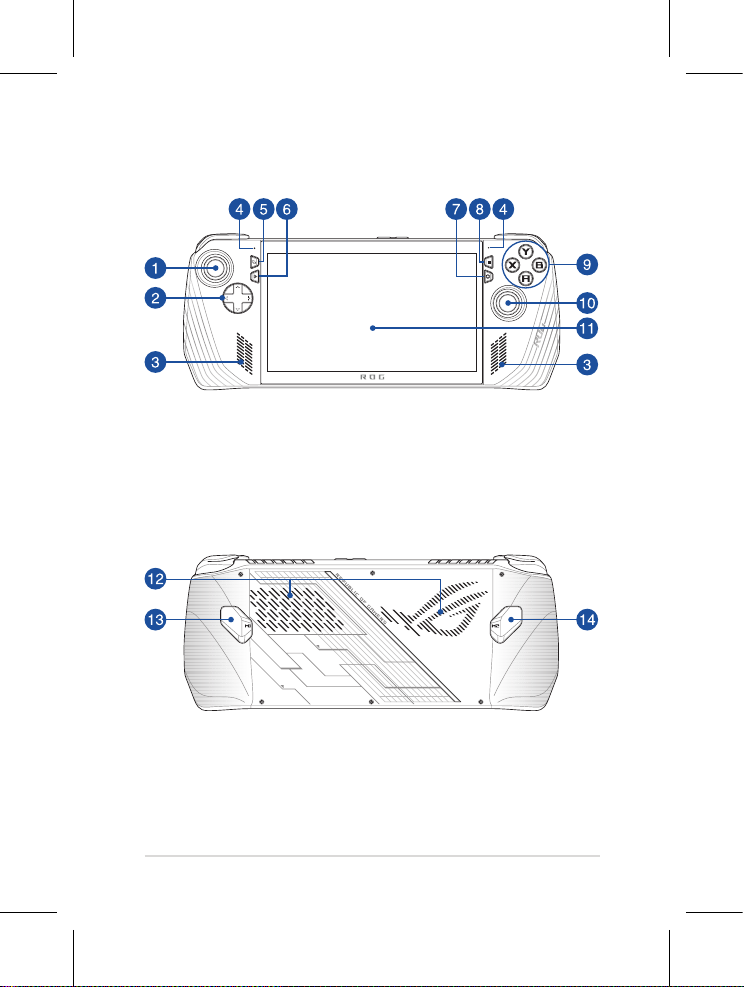
Front View
Rear View

4
Notebook PC User Guide
Left stick Macro 2 button
Directional buttons Left bumper
Audio speakers Left trigger
Array microphones Power indicator
View button Right trigger
Command Center button Right bumper
Armoury Crate button Headphone/Headset/Microphone jack
Menu button MicroSD card slot
(supports up to UHS-II)
A/B/X/Y buttons ROG XG Mobile interface
Right stick USB 3.2 Gen 2 Type-C®/DisplayPort 1.4/
Power (DC) input combo port
Touch screen Volume buttons
Air vents Two-color battery charge indicator
Macro 1 button Power button/Fingerprint sensor
Top View

Notebook PC User Guide
5
Getting started
1. Charge your ROG Handheld Console
A. Connect the DC power connector into the ROG Handheld Console’s power (DC) input
port.
B. Plug the AC power adapter into a 100V~240V power source.
NOTE: The power adapter may vary in appearance, depending on models and your
region.
IMPORTANT! Use only the bundled power adapter to charge the battery pack and
supply power to your ROG Handheld Console.
2. Press the power button to turn on your ROG Handheld Console

6
Notebook PC User Guide
Safety notices for your ROG Handheld Console
IMPORTANT!
• Ensure that your device is connected to the power adapter before turning it on for the rst
time. Always plug the power cord into a wall socket without using any extension cords. For
your safety, connect this device to a properly grounded electrical outlet only.
• Never attempt to disassemble and reassemble the device.
• Power supply specications:
- Input voltage: 100-240Vac
- Input frequency: 50-60Hz
- Rating output current: 3.25A (65W)
- Rating output voltage: 20V
WARNING!
Read the following precautions for your device’s battery:
• Only ASUS-authorized technicians should
remove the battery inside the device
(for non-removable battery only).
• The battery used in this device may present
a risk of re or chemical burn if removed or
disassembled.
• Follow the warning labels for your personal
safety.
• Risk of explosion if battery is replaced by an
incorrect type.
• Do not dispose of in re.
• Never attempt to short-circuit your
device’s battery.
• Never attempt to disassemble and
reassemble the battery
(for non-removable battery only).
• Discontinue usage if leakage is found.
• This battery and its components must be
recycled or disposed of properly.
• Keep the battery and other small
components away from children.
CAUTION!
• This device should only be used in environments with ambient temperatures between 5°C
(41°F) and 35°C (95°F).

Notebook PC User Guide
7
• La batterie de l’appareil peut présenter un
risque d’incendie ou de brûlure si celle-ci est
retirée ou désassemblée.
• La batterie et ses composants doivent
être recyclés de façon appropriée.
Avis concernant les batteries remplaçables
Copyright Information
You acknowledge that all rights of this Manual remain with ASUS. Any and all rights, including without
limitation, in the Manual or website, are and shall remain the exclusive property of ASUS and/or its
licensors. Nothing in this Manual intends to transfer any such rights, or to vest any such rights to you.
ASUS PROVIDES THIS MANUAL“AS IS”WITHOUT WARRANTY OF ANY KIND. SPECIFICATIONS AND
INFORMATION CONTAINED IN THIS MANUAL ARE FURNISHED FOR INFORMATIONAL USE ONLY, AND
ARE SUBJECT TO CHANGE AT ANY TIME WITHOUT NOTICE, AND SHOULD NOT BE CONSTRUED AS A
COMMITMENT BY ASUS.
Copyright © 2023 ASUSTeK COMPUTER INC. All Rights Reserved.
Limitation of Liability
Circumstances may arise where because of a default on ASUS’part or other liability, you are entitled to
recover damages from ASUS. In each such instance, regardless of the basis on which you are entitled to
claim damages from ASUS, ASUS is liable for no more than damages for bodily injury (including death)
and damage to real property and tangible personal property; or any other actual and direct damages
resulted from omission or failure of performing legal duties under this Warranty Statement, up to the
listed contract price of each product.
ASUS will only be responsible for or indemnify you for loss, damages or claims based in contract, tort or
infringement under this Warranty Statement.
This limit also applies to ASUS’suppliers and its reseller. It is the maximum for which ASUS, its suppliers,
and your reseller are collectively responsible.
UNDER NO CIRCUMSTANCES IS ASUS LIABLE FOR ANY OF THE FOLLOWING: (1) THIRD-PARTY CLAIMS
AGAINST YOU FOR DAMAGES; (2) LOSS OF, OR DAMAGE TO, YOUR RECORDS OR DATA; OR (3) SPECIAL,
INCIDENTAL, OR INDIRECT DAMAGES OR FOR ANY ECONOMIC CONSEQUENTIAL DAMAGES (INCLUDING
LOST PROFITS OR SAVINGS), EVEN IF ASUS, ITS SUPPLIERS ORYOUR RESELLER IS INFORMED OFTHEIR
POSSIBILITY.
Service and Support
For complete E-Manual version, refer to our multi-language website at:
https://rog.asus.com/support/
MyASUS oers a variety of support features including troubleshooting, products performance
optimization, ASUS software integration, and helps you to organize personal desktop and increase
storage space. For more details, please visit https://www.asus.com/support/FAQ/1038301/.

8
Notebook PC User Guide
Radiation Exposure Statement
The product comply with the FCC portable RF exposure limit set forth for an uncontrolled
environment and are safe for intended operation as described in this manual.The further RF
exposure reduction can be achieved if the product can be kept as far as possible from the user
body or set the device to lower output power if such function is available.
Prevention of Hearing Loss
To prevent possible hearing damage, do not listen at high volume levels for long
periods.
FCC RF Exposure Information
This device meets the government’s requirements for exposure to radio waves. This device is
designed and manufactured not to exceed the emission limits for exposure to radio frequency
(RF) energy set by the Federal Communications Commission of the U.S. Government. The
exposure standard employs a unit of measurement known as the Specic Absorption Rate,
or SAR. The SAR limit set by the FCC is 1.6 W/kg. Tests for SAR are conducted using standard
operating positions accepted by the FCC with the EUT transmitting at the specied power level
in dierent channels.The FCC has granted an Equipment Authorization for this device with
all reported SAR levels evaluated as in compliance with the FCC RF exposure guidelines. SAR
information on this device is on le with the FCC and can be found under the Display Grant
section of www.fcc.gov/oet/ea/fccid.
FCC Wi-Fi 6E Caution Statement
FCC regulations restrict the operation of this device to indoor use only.The operation of this
device is prohibited on oil platforms, cars, trains, boats, and aircraft, except that operation of this
device is permitted in large aircraft while ying above 10,000 feet.
FCC RF Caution Statement
WARNING! Any changes or modications not expressly approved by the party
responsible for compliance could void the user’s authority to operate this equipment.
The antenna used with this transmitter must not be colocated or operated in
conjunction with any other antenna or transmitter subject to the conditions of the
FCC Grant.
UL Safety Notices
• DO NOT use this device near water, for example, near a bath tub, wash bowl, kitchen sink or
laundry tub, in a wet basement or near a swimming pool.
• DO NOT use this device during an electrical storm. There may be a remote risk of electric
shock from lightning.
• DO NOT use this device in the vicinity of a gas leak.

Notebook PC User Guide
9
Regional notice for Singapore
This ASUS product complies with IMDA Standards.
Complies with
IMDA Standards
DB103778
Coating Notice
IMPORTANT! To provide electrical insulation and maintain electrical safety, a coating
is applied to insulate the device except on the areas where the I/O ports are located.
India RoHS
This product complies with the“India E-Waste (Management) Rules, 2016”and prohibits use of
lead, mercury, hexavalent chromium, polybrominated biphenyls (PBBs) and polybrominated
diphenyl ethers (PBDEs) in concentrations exceeding 0.1% by weight in homogenous materials
and 0.01% by weight in homogenous materials for cadmium, except for the exemptions listed
in Schedule II of the Rule.
Simplied EU Declaration of Conformity
ASUSTek Computer Inc. hereby declares that this device is in compliance with the essential
requirements and other relevant provisions of Directive 2014/53/EU. Full text of EU declaration
of conformity is available at https://www.asus.com/support/.
The WiFi operating in the band 5150-5350 MHz shall be restricted to indoor use for countries
listed in the table below:
AT BE BG CZ DK EE FR
DE IS IE IT EL ES CY
LV LI LT LU HU MT NL
NO PL PT RO SI SK TR
FI SE CH HR UK(NI)
Simplied UKCA Declaration of Conformity
ASUSTek Computer Inc. hereby declares that this device is in compliance with the essential
requirements and other relevant provisions of The Radio Equipment Regulations 2017 (S.I.
2017/1206). Full text of UKCA declaration of conformity is available at
https://www.asus.com/support/.

10
Notebook PC User Guide
CE RED RF Output table (Directive 2014/53/EU)
Function Frequency Maximum Output Power (EIRP)
WiFi
2412 - 2472 MHz 18.53 dBm
5150 - 5250 MHz 21.22 dBm
5250 - 5350 MHz 21.22 dBm
5470 - 5725 MHz 21.92 dBm
5725 - 5850 MHz 13.05 dBm
5945 - 6425 MHz 21.82 dBm
Bluetooth 2402 - 2480 MHz 13.72 dBm
MT7922
* Receiver category 1
UKCA RF Output table
(The Radio Equipment Regulations 2017)
a. Low Power Indoor (LPI) Wi-Fi 6E devices:
The device is restricted to indoor use only when operating in the 5945 to 6425 MHz frequency
range in Belgium (BE), Bulgaria (BG), Cyprus (CY), Czech Republic (CZ), Estonia (EE), France (FR),
Iceland (IS), Ireland (IE), Lithuania (LT), Germany (DE), Netherlands (NL), Spain (ES).
b. Very Low Power (VLP) Wi-Fi 6E devices (portable devices):
The device is not permitted to be used on Unmanned Aircraft Systems (UAS) when operating
in the 5945 to 6425 MHz frequency range in Belgium (BE), Bulgaria (BG), Cyprus (CY), Czech
Republic (CZ), Estonia (EE), France (FR), Iceland (IS), Ireland (IE), Lithuania (LT), Germany (DE),
Netherlands (NL), Spain (ES).
The WiFi operating in the band 5150-5350 MHz shall be restricted to indoor use for the country
listed below:
Function Frequency Maximum Output Power (EIRP)
WiFi
2412 - 2472 MHz 18.53 dBm
5150 - 5250 MHz 21.22 dBm
5250 - 5350 MHz 21.22 dBm
5470 - 5725 MHz 21.92 dBm
5725 - 5850 MHz 13.05 dBm
5945 - 6425 MHz 21.82 dBm
Bluetooth 2402 - 2480 MHz 13.72 dBm
MT7922
* Receiver category 1
Ce manuel convient aux modèles suivants
1
Table des matières
Langues :


