
Astell & Kern DPF11 Manuel utilisateur

INSTRUCTION BOOK
DPF11
User Guide
Product Name : Network Audio Player
Model Name : DPF11

CONTENTS
Before Use
Saftey precautions
Remark
Product specification
Package contents
Name of each part
Managing power
Connections
Upgrading the firmware
02
07
11
12
13
16
17
27
01 02
Using the Device
Basic operation
Notification bar
Music list screen
Music playback screen
Listening to music
Ripping the CD
Managing the current playlist
Managing the playlist
Searching files
28
30
32
34
35
36
38
39
42
Managing Files
MQS streaming
Purchasing music in the store
Using USB DAC function
Using bluetooth
Settings
Connecting to the network
Setting the equalizer
42
45
47
48
51
52
56
57
03
Miscellaneous
Trouble shooting
Copyright
Certiications
Gracenote
Trademarks
Disclaimers
59
60
60
63
63
63

SAFTEY
PRECAU-
TIONS
Please check [Safety Instructions] before using the device for a safety use.
Warning indicates a serious danger. Caution indicates a hazard.
Users should not decompose, repair or change the product randomly.
- iriver does not take responsibility for any problems caused by a random decomposition, change or repair.
Do not place the metal (coins, hairpins, etc.) or inflammable foreign object inside the product.
When lightning do not touch the power cord.
- You can cause fire or electric shock.
Stop using the product immediately, if the operation is not smooth or a failure occurs.
If water or foreign object get inside the product, disconnect the power plug from the outlet immediately,
quickly wipe with a dry cloth, and get the AS through the near iriver zone.
Repair for the damage due to inundation may cost, or even not possible, regardless of the quality assurance period.
Descriptions :
Instructions are divided into “Warning” and “Caution”, and the meanings are explained in the following.
Indicates “Forbidden” or “Prohibited matters”. Indicates “Required Action” or “Perform as instructed”.
Explanations of Symbols
Use
Warning
02
Before Use
Caution
03
Pay attention not to apply force or press on the part of the cable is connected, if the cable is connected
to the connection port.
- You can break the sound terminal products.
Do not disconnect the USB cable during data transfer.
Use a USB port at the rear of the PC USB cable connection.
- Connection to the USB port with assembly defect or malfunction may develop product failure.
Do not use products such as chemicals or cleaning agents, because they spoil the surface and strip lacquer.
If you attach a bad LCD protective film or stickers to the screen, the darkening screen phenomenon can occur.
If you keep the same screen, an afterimage may remain on the screen.
When you touch the screen, use a clean and dry hand.
When you touch the screen, do not press with too strong pressure.
Do not put your hands on the CD inserting slot.
Do not use a non-circular disc.
Do not use a disc with serious scratches or foreign substances.
- This may cause a malfunction.
Do not stand on the product.
Do not place heavy objects on the product.
Never connect any other type of cable to the terminal except an appropriate cable.
You can lose your hearing if you plug earphones or headphones in your ears and hear a large volume.
Before Use

04
Do not use a power code except the one comes with the product.
Do not use the power code that came with the product to other products.
- You can cause a fire or electric shock.
Please use a grounded plug as a power plug.
When removing the power plug from the outlet, hold the power plug strongly.
When you do not use the product for long periods of time, unplug the power plug from the outlet.
- You can cause a fire or electric shock.
POWER CODE AND PLUG
Do not plug or unplug with wet hands.
Plug the power plug into a 110~220V(50~60Hz) AC outlet.
If there is dust on the power plug pins or mounting surface, please remove the power plug, and then
remove the dust.
When handling the power cord, please observe the following:
Do not compromise. / Do not transform.(ex: extension) / Do not apply heat. / Do not place heavy objects.
Do not insert it in a small space. / Do not bend forcibly. / Do not twist. /Do not tie several codes together.
- You can cause a fire or electric shock.
Before Use
Warning
Caution

05
To reduce the risk of fire or electric shock, do not expose the product to rain or moisture.
Do not let the product contact with water, and do not place objects with liquids, such as vases, on the product.
Do not place or use the product on following. You can cause a fire or electric shock.
A place where you can splash water or a dump place such as a bathroom. / A place where rain or fog can flow directly./
Outside of the rainy season. A place with a high temperature like near fire or a heater/
A place where is exposed to direct sunlight/ A place where are dust, oil, or smoky (ex. Kitchen)/
A place where temperature (-5°C~40°C) is too high or low, or where there is a sudden temperature changes/
A place with a strong vibration/ A unstable place such as a wobble table a slanted surface/
A place where are strong magnetic objects such as magnets, TV, monitor, speakers, etc. /
A place with a corrosive gas (ex. Sulfite, hydrogen sulfide, chlorine ammonia)
INSTALLATION
USB Device
- You cannot connect a computer to the USB memory port on the product.
- If a USB has a large capacity, it may take several minutes or more to navigate to the file.
Please move away the product from the TV, if TV changes its color near the product, or if it makes a noise.
Before Use
Warning

06
- If static electricity is generated when connecting a USB device, a playback can run abnormally.
In this case, disconnect the USB device and then re-connect.
- A copyrighted track (WMA-DRM* tracks) cannot be played on this product.
* DRM (Digital Rights Management): several technical methods that are used to control or limit the use of
digital media contents.
- Coded or encrypted tracks in a special way cannot be played on this product.
- Do not disconnect the device when playing a file on the USB device.
Both the product and the USB device can cause a malfunction.
- If you connect by using a USB hub or extension cable, it maybe not recognized by this product.
- Devices that need to install a separate drive are not supported.
- Some USB devices may not be recognized or function correctly.
- iriver does not take responsibility for any loss of data on the USB device that occurs when using this product.
Before Use

07
Remark Cleaning the Device
To ensure the best performance from this device, you must keep discs and equipment clean.
- Disconnect the power cord before cleaning.
- Wipe the stain with a soft cloth. If there are a lot of stains on the device, wipe clean with a dry cloth, after
wiping with a damp cloth in water.
- The performance of the device can be degraded, damaged, or the paint may peel off, therefore please note
the following:
Do not wipe with a hard cloth. / Do not wipe too hard. / Do not wipe with thinner or benzene. /
Do not leave for a long time in contact with rubber or plastic/ Do not spray volatile material such as insecticide.
Disc Handling
- Do not touch or scratch the recorded reflective surface.
- Do not apply foreign substances or write on the label. Do not bend the disc.
- When you clean the disc, use a soft cloth in a straight line from the center
towards the edge.
Do not use thinner, benzene, record cleaner or antistatic sprays.
Before Use

11
Product
specifica-
tion
Before Use
Display
DAC
Storage
Digital _Out
_Input
Analog _Fixed & Variable Out
Fixed output level
Variable output level
Channel Separation
Frequency Response
THD(Total Harmonic Distortion)
SNR(Signal to Noise Ratio)
Audio File Supported
Audio Sample Rate
USB Supported
USB DAC Supported
Network Supported
CD Ripping audio format
Battery
Dimension / Weight
7”WVGA(1280x800) Touch Display
Cirrus Logic CS4398 x2 (Dual DAC)
SSD 1TB (Max 4TB, RAID 0,5)
AES/EBUx1, BNCx1, Coaxialx1, Opticalx1
AES/EBUx1, BNCx1, Coaxialx1, Opticalx1
Balanced (L/R) x2, RCA (L/R) x2
3V(RCA, Balanced)
7.5V(RCA) / 10V(Balanced)
>135dB / 1Khz
± 0.02dB / 20Hz ~ 20Khz, ± 0.4dB / 10Hz ~ 70Khz
< 0.0008% / 1Khz / 10v, <0.001% / 10Hz ~ 20kHz / 10v
118dB/10v
WAV, FLAC, WMA, MP3, OGG, APE, AAC, ALAC, AIFF, DFF, DSF
8kHz ~ 384kHz (8/16/24bits per sample)
DSD Native : DSD64(1bit/2.8MHz) / DSD128(1bit/5.6MHz)
Type A(Host) x2, Type B(Device) x1
UAC(USB Audio Class) 2.0 / DSD64, DSD128, PCM
Wi-Fi 802.11b/g/n(2.4GHz) & Ethernet 10/100/1000, DLNA(DMS,DMC,DMR)
WAV, FLAC
Capacity : 10.4A / Voltage : 7.4V(Normally) / Type : Li-Ion
214[W] x 238[H] x 243[D](mm) / 11.4kg
Specifications and appearance can be changed without previous notice.
The Auto Spec has been measured by the Balanced of the Analog Out.
12
Package
contents
Components may be changed without notice to improve product performance and quality.
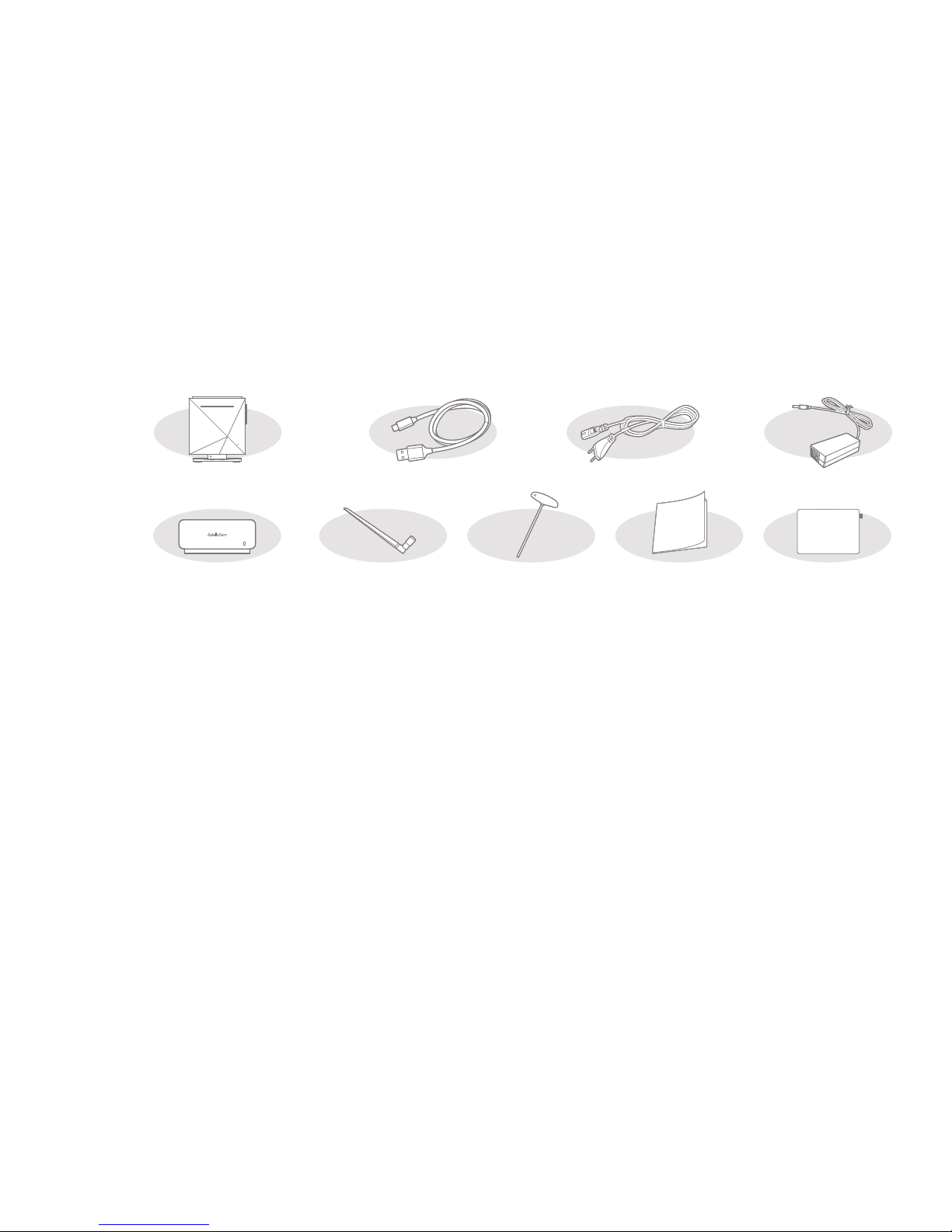
DPF11
Power Code & Adapter: Connect with the product to recharge the product.
Adapter Protective Case: Protects the adapter from external shocks. You can bind the adapter protective
case to the supplied adapter.
USB Cable for data transfer: Connects the product to the computer and sends data.
Antenna: It is an antenna for wireless network connection. Please tighten it on the [ANT] terminal of the back
of the product.
T Wrench: Use when combine or spate the body and stand of DPF11.
Quick Start Guide: A manual of basic methods of using the product.
Product Warranty: Please keep the Product Warranty well, because it is necessary when you apply for AS.
Protective Film: You can use for LCD protection.
User Manual: You can download User Manual from [http://www.astellnkern.com > Support > Download] or
check from [Settings-Help] of the product.
AdapterPower code
Adapter
Protective Case
T wrench
USB cable
for data transfer
Protective FilmQuick Start Guide
& Warranty Card
Antenna
Before Use
Table des matières
Autres manuels Astell & Kern Lecteur multimédia

Astell & Kern
Astell & Kern KANN Manuel utilisateur

Astell & Kern
Astell & Kern AK300 Manuel utilisateur

Astell & Kern
Astell & Kern AK Jr Mode d'emploi

Astell & Kern
Astell & Kern IRIVER PPF31 Manuel utilisateur

Astell & Kern
Astell & Kern AK380 Manuel utilisateur

Astell & Kern
Astell & Kern SR15 Manuel utilisateur

Astell & Kern
Astell & Kern IRIVER AK Recorder Manuel utilisateur

Astell & Kern
Astell & Kern AK500N Manuel utilisateur


