Artison RCC600-SM Manuel utilisateur

INSTALLATION GUIDE
RCC600-SM Subwoofer Module
RCC600-SA Subwoofer Amplifier

2

3
Thank you for choosing Artison’s RCC 600 In-Wall Subwoofer System. We are
pleased that you have selected our high-performance audio products.
INTRODUCTION
The following information will guide you through the installation and setup of your Artison
RCC 600 Subwoofer Module and RCC 600 Subwoofer Amplifier.
Your RCC600-SM carton should contain the following:
1 . RCC 600 Subwoofer Module
1 . RCC 600 Subwoofer Module Paint Shield
1 . RCC 600 Subwoofer Module Grille
1 . RCC 600 Subwoofer Module Wall Cut-out Template
Your RCC600-SA carton should contain the following:
1 . RCC 600 Subwoofer Amplifier
1 . Automatic Room Mode Correction™ (ARMC™) Microphone Kit
2 . Rack-Mount Ears
1 . Remote Control
1 . Detachable IEC Power Cord
If you are missing any of these parts or if you need assistance during the
installation of your RCC 600, please contact Artison’s Customer Service
Department during normal business hours, Pacific Time at (775) 833-4344.

4
RCC 600 SUBWOOFER MODULE (RCC600-SM)
The RCC 600 Subwoofer Module can be installed into either an:
Artison Pre Build Box (Volume ≈1.2 ft3) SOLD SEPERATELY
OR
Infinite Baffle (i.e. 2x4 stud wall, 16” On Center spacing at least 8 feet tall, Volume 2.8 ft3
or greater)
IMPORTANT: In an installation of two RCC600-SM’s that are being powered by one
RCC600-SA, both Subwoofer Modules need to be in either Pre Build Boxes or be in
Infinite Baffles. You cannot connect two RCC 600 Subwoofer Modules that are in
different environments to the same RCC 600 Subwoofer Amplifier.
The front of the RCC600-SM and the grille are paintable. The RCC600-SM comes from the
factory with a paint-shield attached. When painting the RCC600-SM, ONLY paint the grille and
outer edge of the module using the included paint-shield. You will have to tape the shield to the
inside face of the baffle to prevent overspray from getting on the foam damping material on the
face. DO NOT get paint on the rear of the subwoofer module. Paint can damage the
components which would VOID your Warranty.
The minimum mounting depth for the RCC600-SM is 3¾” (95.5 mm), i.e. a 2x4 stud is 3½” deep
add ¼”, ½” or ⅝” thick drywall and the RCC600-SM will fit. The maximum drywall thickness the
RCC600-SM can be mounted in is 1.3125” (33.3 mm).
INSTALLATION WITH AN ARTISON Pre Build BOX (Preferred Installation)
1. Please refer to the Installation Guide included in the Artison Pre-Build Box Carton for
installation instructions for your Artison Pre-Build Box.
2. Using the speaker wire already run inside the Pre-Build Box manage both the positive and
negative conductors through the open tie-wraps on each side of the RCC600-SM.
3. Connect the bare speaker wire ends to the spring-loaded binding posts, manage the speaker
wire back, tighten the tie-wraps and trim the excess.
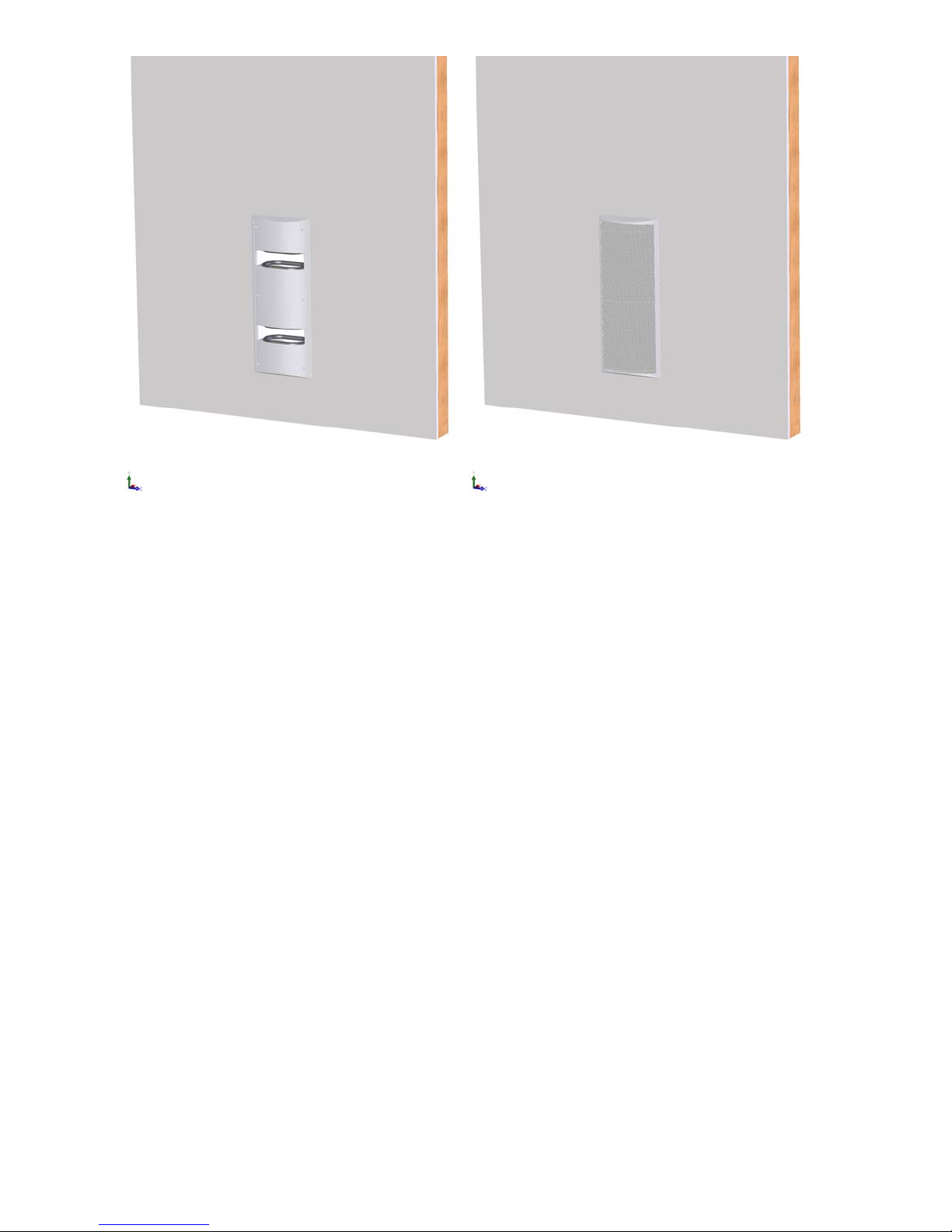
4. Install the RCC600-SM into the pre-cut opening of the Pre-Build Box. See Figure 1.
5. Carefully tighten the six dog leg clamps on the RCC600-SM using the supplied Allen Head
wrench.
6. The grille for the RCC600-SM is held in place by magnets. Simply position the grille on the
front of the module into the recessed area. See Figure 2.
NOTE: While installing the subwoofer module make sure that any excess wire is run


5
properly so that it does not interfere with the driver’s operation. The design of
the IW PBB is such that there is NO clearance between the back of the
subwoofer module and the back of the PBB. Be careful that no wires are in this
area when installing the module
INSTALLATION INTO AN INFINITE BAFFLE
1. Use the provided Cut-out Template to mark the desired wall location. Be sure that no piping,
wall studs, or electrical wires interfere with the placement of the RCC600-SM.
2. Once the hole is cut and the speaker wire is run, manage both the positive and negative
speaker wire conductors through the open tie-wraps on each side of the RCC600-SM.
3. Connect the bare speaker wire ends to the spring-loaded binding posts, manage the speaker
wire back, tighten the tie-wraps and trim the excess.
4. Install the RCC600-SM into the pre-cut opening of the Pre-Build Box. See Figure 1.
5. Carefully tighten the six dog leg clamps on the RCC600-SM using the supplied Allen Head
wrench.
6. The grille for the RCC600-SM is held in place by magnets. Simply position the grille on the
front of the module into the recessed area. See Figure 2.
7. Remove the paint-shield from the front of the RCC600-SM after the installation has been
completed
NOTE: While installing the subwoofer module ensure any excess wire is run properly
so it does not interfere with the driver’s operation.

FIGURE 1 FIGURE 2
6

7
RCC 600 SUBWOOFER AMPLIFIER (RCC600-SA)
The RCC 600 Subwoofer Amplifier can be installed into either cabinetry, on an equipment
shelf, or it can be rack-mounted into a standard 19” Equipment Rack. In any installation be sure
to provide adequate ventilation around the amplifier.
The RCC600-SA has two simple and conveniently placed mode settings. The Music
Mode or Movie Mode user controls are located on the front panel for selection based on the
source material. The Mode settings, Volume and Power Controls of the RCC600-SA can be
accessed via IR codes. The remote included with your unit can be downloaded into a learning
remote or HEX Codes are available on the Artison Web site. The Front Panel of the RCC600-SA
has an IR Receiver and there is a second hard wired feed thru jack that can be connected to an
integrated control system on the rear panel. Each control is described in detail below.
RACKMOUNT INSTALLATION OF THE RCC600-SA
1. Remove the attached feet of the amplifier.
2. Attach the included rack-mount ears to the front sides of the RCC600-SA.
3. Mount into the 19” equipment rack, the amplifier will occupy 1.5 RU.
4. If installing two RCC600-SA then the rack-mount ears can be flipped to accommodate the two
amplifiers in 3 RU.
RCC600-SA REMOTE CONTROL
The remote control has the following functions:
1. ON/OFF - This will toggle between Standby Mode (Amber Halo) and ON (Blue Halo).
2. MUSIC MODE – This selects the MUSIC MODE EQ. When active it will have a Red Halo
added to the Blue Halo.
3. MOVIE MODE – This selects the MUSIC MODE EQ. When active it will have a Red Halo
added to the Blue Halo.
4. GAIN – This will raise and lower the volume of the amplifier. A remote or the Gain Knob
on the front panel can both be used to raise or lower the bass volume. NOTE: The gain
control is configured so that the “last used” device setting will be remembered by
the amplifier.

RCC600-SA FRONT PANEL CONTROLS
GAIN – The position of this knob controls the overall gain (volume) of the subwoofer. Press
this button in and it will spring out into a rotating knob, press it back in to hide it. The front panel
gain control will become the master gain control until the remote is used. NOTE: The
amplifier by default will resume to the last setting by either gain control device.
DIM – This button controls the brightness of the Halo lighting on the front panel. There are
four brightness settings.
POWER – This button will toggle between Standby Mode (Amber Halo) and ON (Blue Halo).
MUSIC MODE – This preset EQ mode should be used for music playback. This EQ setting
provides a full range of musical bass to enhance the listening experience, when active it will
add a Red Halo to the Blue Halo.
MOVIE MODE – This preset EQ mode should be used for movie playback. This EQ setting
adds more volume and bass to help recreate the true movie theater experience, when active it
will add a Red Halo to the Blue Halo.
RCC600-SA REAR PANEL
AC POWER
1. The Power Switch is the hard ON/OFF power switch for the amplifier.
2. The Red Switch is the input voltage setting; select the appropriate 120V or 230V setting.
3. Connect the detachable IEC Power Cord underneath the Red Voltage Selection Switch.
8

AUDIO OUTPUTS
1. Connect the speaker wires to the Binding Posts. NOTE: Red is Positive and Black is
Negative.
2. Use either Bare Speaker Wire Ends or Banana Plugs to terminate the speaker wire.
AUDIO INPUTS
1. Connect to either the Balanced Female XLR or Unbalanced Female RCA Inputs.
NOTE: Both inputs have been calibrated to the same sensitivity level.
IR FEEDTHRU
1. Connect a ⅛” Stereo MINIJACK to control the RCC600-SA via your integrated control
system.
2. Both the IR Feedthru Jack and the Front Panel IR receiver are designed to allow the User
functions to be programmed into an external remote. The Hexadecimal codes for the
amplifier are located on the web at: http://www.artisonusa.com
9

POWER MODES
1. Select either:
ON – Always On.
AUTO – On with Signal Sense, without signal it will stay on for ≈15 minutes.
TRIGGER – On with a 12 Volt trigger.
2. +12V Trigger Input – Use the Green Phoenix Connector to connect a 12 volt trigger wire
from your other equipment, the polarity on the connector can be either way.
SETUP MODES
1. EQ – Select the appropriate setting based on these guidelines:
∞Baffle – The RCC 600 Subwoofer Module is installed in a wall that has an air
volume of ≥2.8 ft3.
CLOSED BOX – The RCC 600 Subwoofer Module is installed in an Artison
Pre-Build Box.
IMPORTANT: In an installation of two RCC600-SM’s that are being powered by one
RCC600-SA, both Subwoofer Modules need to be in either Pre-Build Boxes or be in
Infinite Baffles. You cannot connect two RCC 600 Subwoofer Modules that are in
different environments to the same RCC 600 Subwoofer Amplifier.
2. PHASE – Comes from the factory set at 0°. The phase of the subwoofer can be adjusted
10
Autres manuels pour RCC600-SM
1
Ce manuel convient aux modèles suivants
1
Table des matières
Autres manuels Artison Amplificateur