
AROHA CO11W Manuel utilisateur
A R O H A
E L E C T R O N I C S
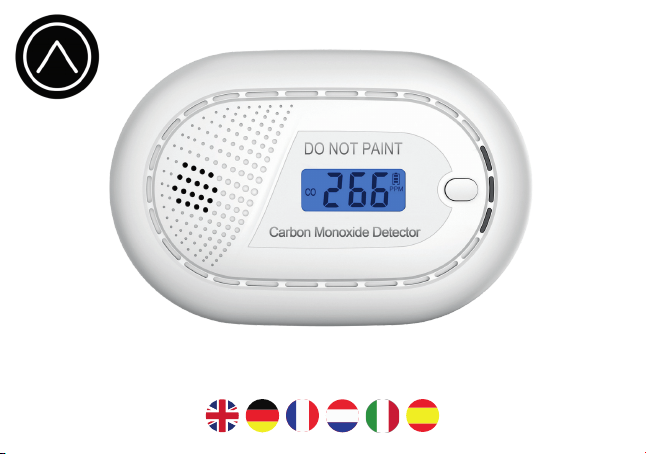
Aroha CO11W
Manual

Dear customer,
Thank you for choosing Aroha, a Dutch brand bringing safety in your home.
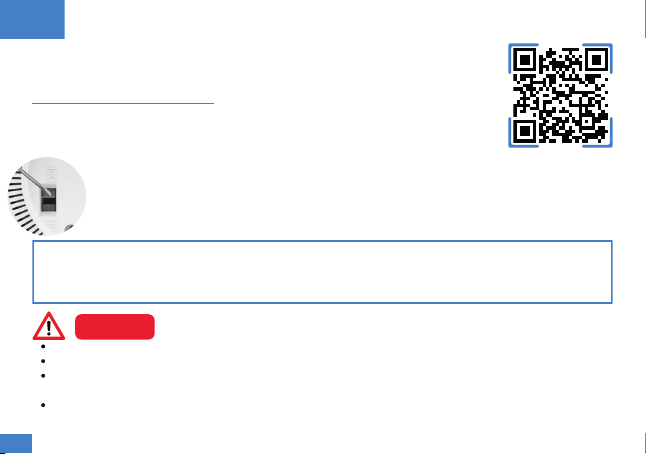
Scan the QR-code or visit www.invisionretail.com/manual for the step-by-step
instructions to safely install your detector, see the installation video's and read the
FAQ.
Please read the manual carefully before operating the detector and to ensure safe
and proper use.
Feel free to contact us with your problems, concerns and suggestions on
Aroha
Instructions, video & FAQ
Postbus 135, 4900AC Oosterhout
The Netherlands
contact@invisionretail.com
www.invisionretail.com
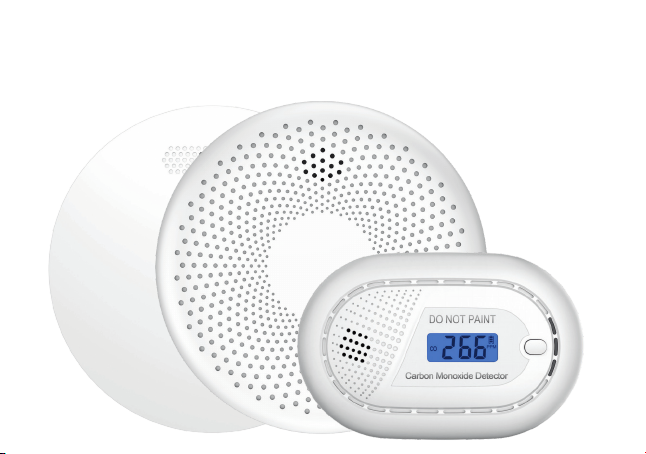
Visit our online store to see the full collection of smart WiFi and/or
interlinked smoke alarms, carbon monoxide (CO) alarms, and
combination 2-in-1 smoke and carbon monoxide alarms.
WWW.INVISIONRETAIL.COM
Instructions, video & FAQ
Why is the value 0 ppm? The default value is 0 ppm, because the natural carbon monoxide (CO)
in the air is approximately 0.2 ppm, which is rounded to 0 ppm. The display always shows the real-
time value of the amount of CO, but in a "normal" situation this is 0 ppm.
The installation instructions must be followed strictly to avoid unsafe conditions.
Do not paint your detector.
The battery cannot be replaced; do not try to replace the battery as this will render the detector
unuseable and can cause a fire due to the high-capacity lithium battery.
CO detectors are not smoke detectors. This CO detector is not a substitute for installing and
maintaining an appropriate number of smoke detectors in your home.
Please read the manual carefully to ensure safe, proper use and store it in a
safe place for future reference. Scan the QR-code or visit
www.invisionretail.com/manual for the step-by-step instructions with video to
safely install your detector and consult the FAQ.
The device is deactivated by default before leaving our factory.
Before the detector can be used, it must be activated.
A. Activate/Deactivate the detector
Aroha CO11W User manual
Power on: Set the switch on the back of the detector to “ON” using the supplied stick. The
detector beeps and the LCD screen lights up blue, after which the value increases from
000 to 999. When the screen is at 0 ppm, the detector is activated.
Power off: Set the switch on the back of the detector to “OFF” using the supplied stick.
EN
CAUTION
03
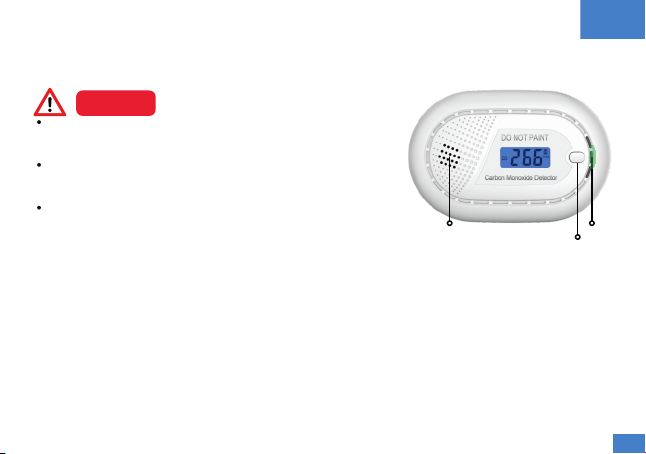
85 dB alarm
Test/silence button
LED light
B. Test your alarm
Test the detector to ensure proper operation by pressing the test button. The alarm will sound if the
detector is working well. If there is no sound, refer to the “Trouble shooting” section.
EN
DO NOT test your detector using an open flame. This may
damage the detector or ignite combustible materials and
start a structural fire.
DO NOT stand close to the detector when the alarm is
sounding. Exposure at close range may be harmful to your
ears.
Test the detector at least once a month.
CAUTION
C. LED indicators
Normal status:
Danger CO concentration:
Silence mode:
Low battery status:
Fault status:
End of life:
Green LED flashes once every 60 seconds.
Red LED flashes 4 times and beeps 4 times every 5 seconds.
Red LED flashes once every 8 seconds.
Orange LED flashes 1 time and 1 beep every 60 seconds.
Orange LED flashes 2 times and 2 beeps every 40 seconds.
Orange LED flashes 2 times and 2 beeps every 30 seconds.
04
NEVER IGNORE ANY ALARM, carbon monoxide can be deadly.
CAUTION
E. Silence mode
Silence mode should only be used if the source of the alarm is known and safe. Press the test
button to set the silence mode. During silence mode, the red LED light flashes once every 8
seconds. The detector is automatically reset after 10 minutes.
Before using the silence mode, identify the source and be certain a safe
condition exists.
CAUTION
If an alarm signal sounds, immediately move to fresh air and do not re-enter the premises until it has
been aired out and your alarm returns to its normal condition. Investigate the source of the CO
release and repair the defect.
When does the alarm sound?
EN
D. Alarm
100 ppm: Alarm between 10 and 40 minutes
50 ppm: Alarm between 60 to 90 minutes
300 ppm: Alarm within 3 minutes
F. Connect detector to your mobile phone
Step 1: A 2.4 GHz WiFi network is required to connect. If your
network broadcasts on both 2.4 and 5 GHz, disable 5 GHz during
the pairing process (as per your router manual).
Step 2: Install the Tuya Smart- or Smart Life-app on your
smartphone by scanning the QR-code on the right.
Step 3: Enable Bluetooth via settings on your phone. The app also
needs permission to use Bluetooth.
05
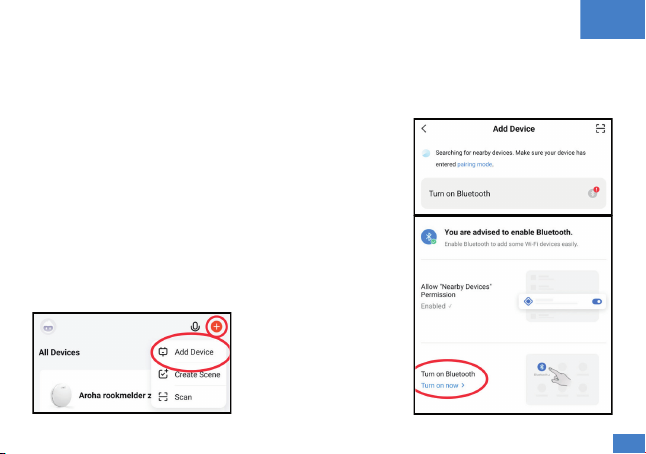
Step 4: Activate pairing mode by pressing the test button 4 times within 1 second. If this is done
correctly, the red LED light will flash rapidly. After a few seconds this will change to a green LED that
flashes rapidly for 1 minute. Within this minute you can link the detector to your app.
Step 5: Click on the “+” in the top right corner of the app home screen. Then choose “Add device”, as
you see in Figure 1. The app will now automatically look for devices that are in pairing mode. Follow
the steps as described in the app.
Figure 1: Add Device in app Figure 2: Turn on Bluetooth in app
EN
If the app itself does not yet have permission to use Bluetooth,
click on the notification and follow the steps to allow the app to
access Bluetooth as you see in Figure 2.
Frequently Asked Questions
Alarm: If an alarm sounds when you try to activate pairing
mode, a test is activated because you did not press fast enough.
After the alarm stops, try pressing the test button again 4 times
as quickly as possible within 1 second.
Low battery: The first time the detector is connected, the app
may incorrectly report that the battery is almost empty.
Disconnect the detector and then reconnect it. If the notification
is given again by the app, please contact us.
06

EN
Central location in the room, at least 30 centimeters from walls.
Avoid existing air inlets or outlets and other objects on the ceiling.
Avoid locations behind objects such as curtains and cupboards.
Mounting instructions: Use sticky pads or screws to mount the detector, or place the detector in the
desired location without permanently mounting it.
H. Maintenance and cleaning
There are a few steps you need do to keep it working properly:
Test the detector at least once a month.
Do not paint the detector. Paint will seal the vents and interfere with the sensor’s ability to detect
CO.
Never attempt to disassemble the detector to clean inside. This will damage the detector and
possibly render it unuseable.
Clean the detector at least once a month to remove dust, dirt or debris. Use a vacuum cleaner
with a soft brush and vacuum all sides and covers of the detector.
Some materials, vapours or gases, can affect the reliability of the alarms in the short or long term.
Ethylene, ethanol, alcohol, iso-propanol, benzene, toluene, ethylacetate, hydrogen, hydrogen
sulfide and sulfur dioxide are substances that at high levels can damage the sensor or cause
temporary readings that are not CO readings. Also most aerosol sprays, alcohol based products,
paint, thinner, solvent, adhesive, hair spray, after shave, perfume, auto exhaust (cold start) and
some cleaning agents.
G. Mount the detector
Determine correct mounting location: Detectors should be installed in a room with a combustion
appliance (possible source of CO).
At a horizontal distance between 1-3 meters from the CO source.
OR, in rooms without combustion appliance place the detector on breathing height.
07

EN
J. Two years of warranty
During the specified warranty period of 2 years after purchase, we will repair or replace any defective
detector that is returned. This warranty shall not apply to the detector if it has been damaged,
modified, neglected, abused or altered after the date of purchase or if it fails to operate due to
improper maintenance, and the unit will not be replaced or repaired. Please contact us at
contact@invisionretail.com regarding the warranty.
The manufacturer shall have no liability for any personal injury, property damage or any special,
incidental, contingent or consequential damage of any kind resulting from gas leakage, smoke, fire
or explosion.
I. Trouble shooting
The detector does not sound when testing: Check whether the detector is activated.
The detector beeps every 60 seconds and red LED flashes: The battery is low; the detector needs
to be replaced. Contact us on contact@invisionretail.com to replace it if the warranty is still in
place.
The detector beeps every 40 seconds and orange LED flashes: Clean the detector, by using a
vacuum cleaner with a soft brush and vacuum all sides and covers of the detector. If the issue
continues, the detector is malfunctioning. Contact us on contact@invisionretail.com to replace it
if the warranty is still in place.
The detector beeps every 30 seconds and orange LED flashes: The detector is no longer working
properly and needs to be replaced. Contact us on contact@invisionretail.com to replace it if the
warranty is still in place.
08
Anleitung, Video und FAQ
Warum ist der Wert 0 ppm? Der Standardwert beträgt 0 ppm, da das natürliche Kohlenmonoxid
(CO) in der Luft etwa 0,2 ppm beträgt, was auf 0 ppm gerundet wird. Das Display zeigt immer den
Echtzeitwert der CO-Menge an, im „normalen“ Fall beträgt dieser jedoch 0 ppm.
Die Installationsanweisungen müssen strikt befolgt werden, um unsichere Bedingungen zu
vermeiden.
Lackieren Sie Ihren Detektor nicht.
Bitte lesen Sie das Handbuch sorgfältig durch, um eine sichere und
ordnungsgemäße Verwendung zu gewährleisten, und bewahren Sie es zum
späteren Nachschlagen an einem sicheren Ort auf. Scannen Sie den QR-Code
oder besuchen Sie www.invisionretail.com/manual für die Schritt-für-Schritt-
Anleitung mit Video zur sicheren Installation Ihres Detektors und lesen Sie die FAQ.
Das Gerät ist standardmäßig deaktiviert, bevor es unser Werk verlässt. Bevor der Melder
verwendet werden kann, muss er aktiviert werden.
A. Den Detektor aktivieren/deaktivieren
Aroha CO11W Bedienungsanleitung
Einschalten: Stellen Sie den Schalter auf der Rückseite des Detektors mit dem
mitgelieferten Stick auf „ON“. Der Detektor piept und der LCD-Bildschirm leuchtet blau,
woraufhin der Wert von 000 auf 999 steigt. Wenn der Bildschirm 0 ppm anzeigt, ist der
Detektor aktiviert.
Ausschalten: Stellen Sie den Schalter auf der Rückseite des Detektors mit dem
mitgelieferten Stick auf „OFF“.
DE
VORSICHT
09
Autres manuels pour CO11W
1
Table des matières
Langues :
Manuels Alarme au monoxyde de carbone populaires d'autres marques


System Sensor
System Sensor CO1224T Manuel utilisateur

Deltronic Security
Deltronic Security CN-1231 Manuel utilisateur

GE Interlogix
GE Interlogix 240 COE - Carbon Monoxide Alarm Manuel utilisateur

Sygonix
Sygonix 2377794 Manuel utilisateur

Kidde
Kidde 8LLCO Manuel utilisateur

Convoy Tech
Convoy Tech CO311 Manuel utilisateur