
Arirang AR-36G Manuel utilisateur

USER’S MANUAL
AR-36G/AR-36NG
FEATURES
Support for disks
- DVD, DVD-R, SVCD, VCD, CD, CD-R, CD-RW, MP3,MP4 and Karaoke Maseco
Midivision disc
Karaoke support various functions
- The user can sing with more lyrics and plentiful, clear picture. The chorus and vocal is unique.
In addition, the device can play Mp3 Karaoke disc.
- IFUN feature helps discover the joy, intelligent scoring for each singing.
Qualitative picture, transparent and clear sound
- Decoding technique MPEG1, MPEG2 and MPEG4
Many advantageous functions:
- Function of presetting the song and helps to preset 99 songs, can read and play the contents
easily through displayed panel, search for a song by remote control, language is displayed in
Vietnamese.
- DVD disc can play up to 135’, including 8 different languages and 32 different captions
- MPEG-2 helps compress picture with high quality digital sound; creates the great, lively picture and
audio as in the theaters.
- Each DVD device or disk has a region code that helps to play for each country, so the code on device
and disc must be consistent with each other.
- The machine has function of reading in multi zone
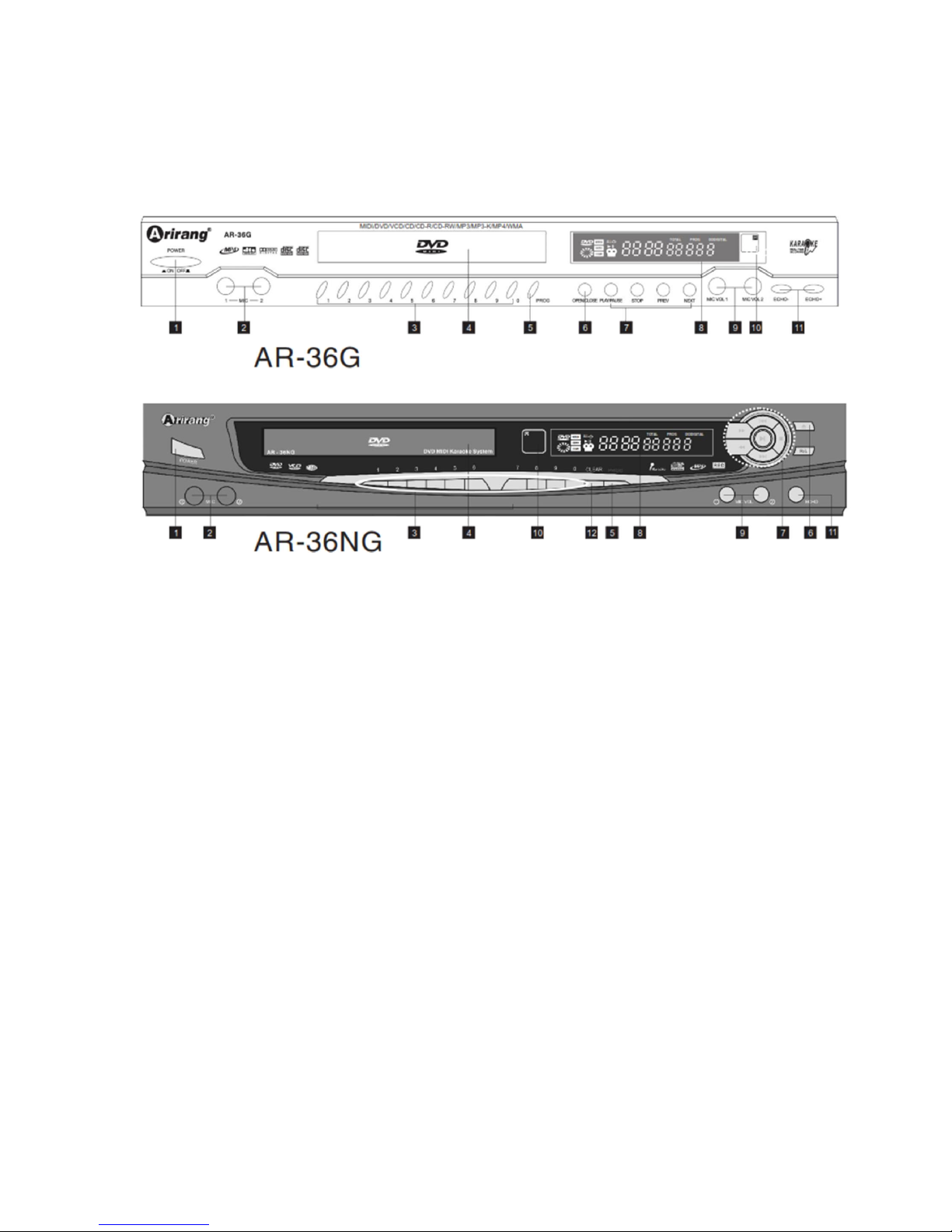
NAME OF EACH PART
Front panel:
1. POWER: On/off the power
2. MIC port: Connect to micro
3. Keys of numbers: Input the code of the song
4. Disc tray
5. PROG: reserve the code of the song
6. OPEN/CLOSE: Load/eject the disk tray
7. Control keys (PLAY/PAUSE/STOP/PREV/NEXT)
8. Displayed screen: Display disc contents being played
9. MIC VOL: Increase/decrease the volume of micro
10. Eye to receive the signal of remote control
11. ECHO: increase/decrease the effect of echo
12. Clear a code of the song incorrectly entered
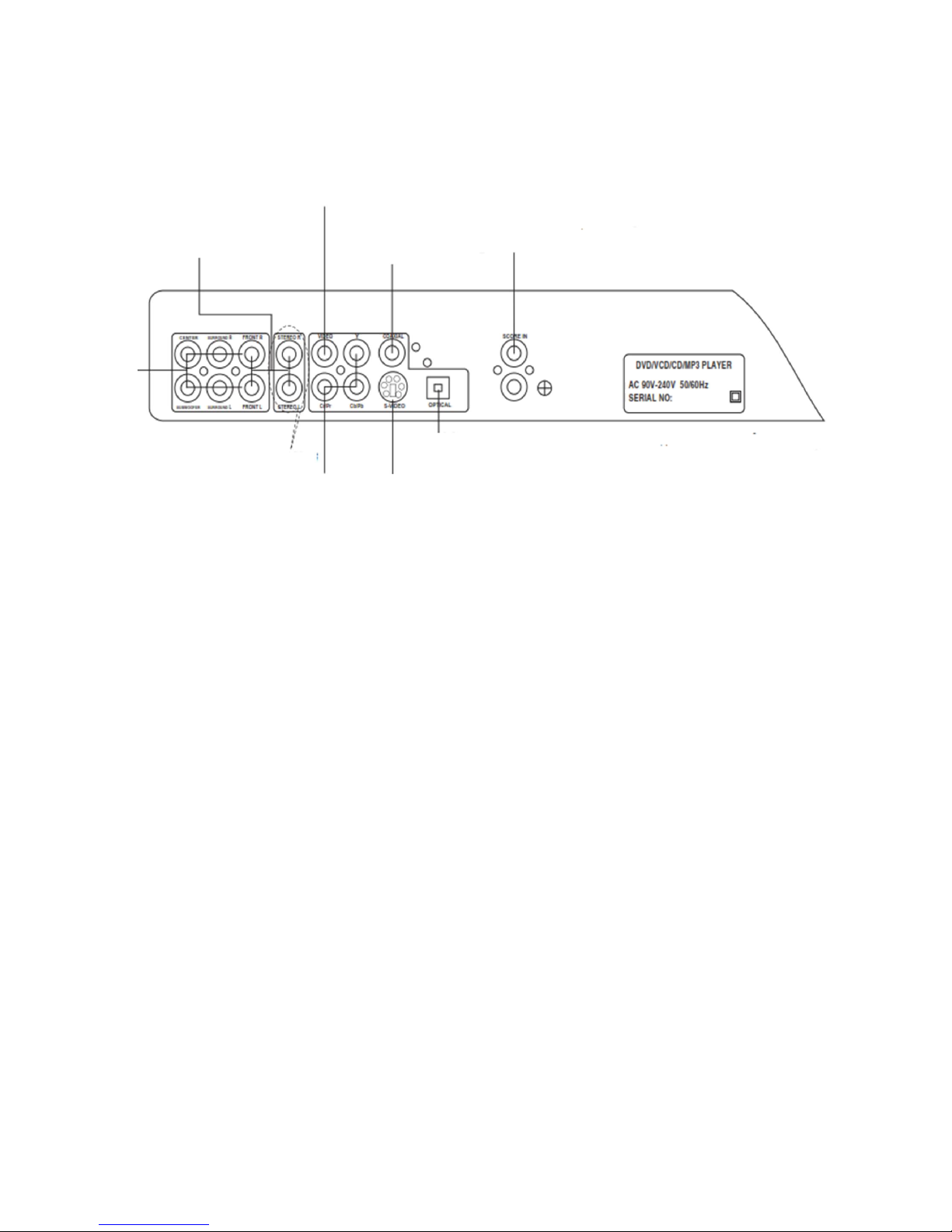
Rear panel:
Stereo audio port
Video port
Coaxial
Scoring port
5.1 channel
audio port
Component video port S-Video port
Optical audio port
Only support for 36NG

BASIC CONNECTION
Video port (yellow)
Audio port (red & white)
Only support for 36NG
Stereo
Stereo

REMOTE CONTROL
Set the device Load/eject the disc tray
Direct scoring Key of repeat/Record the song (36NG)
Interrupt sounds
Select angle view (DVD) Keys of numbers/alphabets
List of recorded songs/ Select captions
Zoom in pictures/ Key, Tempo Store the song (MIDI)
Clear the selected number
Select Menu (DVD)/ PBC (VCD2.0) Applause
Confirm the operation Arrow key (Direction key)
Select Male/female tone
Replay the song being played/Repeat Return to previous operation
Slowly play Stop
Store in the priority/Play/Pause
Fast/slow tempo Increase/decrease the key
Melody Increase/decrease the volume
Fast forward/reverse Previous/next Track/Chapter, increase/decrease the
number of character to be found
Language/Right left Search for a song
Chorus
Display the contents Favorite song
New song Popular song
Note: The remote control is directed to the device in the range of 30 degrees with a maximum distance
of 7-8m

PLAY DISC
For CD disc
-
Automatically play when disc is put in the device
- Can use PREV,NEXT to play previous song or next song and use the number keys to select the
song
For VCD disc
- Automatically play when disc is put in the device
- If the play mode is PBC on, the device will play the whole disc
- If the play mode is PBC off, the device will help play any song
- Use PBC key on the remote control to activate PBC mode (only have the effect on VCD 2.0)
For JPEG disc
+ Normal play
- Put disc in the device; use the arrow key to move to the picture folder. Then press ENTER, select
to press PLAY to display pictures
- Press STOP to return to picture folder
- Press PREV/NEXT to select the mode to display each picture or to automatically change the
picture
+ Zoom in pictures
- Use ZOOM key on the remote control to zoom in pictures, use arrow key to move the picture to
desired position

For Mp3 disc
- Press STOP key to return to the root
- Press arrow key to select the folder and the song to be played
- Press PREV/NEXT key to play the previous song or the next song
- Press ENTER key to start playing
- Press STOP key to stop playing
For Mp4 disc
- Press arrow key to select the folder and the song to be played
- Press PREV/NEXT key to display the page of previous song or next song
- Press PLAY or ENTER key to start playing
- Press PREV/NEXT key to play the previous song or the next song
- Press STOP key to stop playing
For DVD disc
MENU and TITLE
- Normally, in DVD disc has the option “Menu and Title”. The user can directly use Menu and Title key
on the remote control to enter the section of Menu or Title on disc, then use arrow key to select
sections (Chapter/Track, captions…) then press ENTER key
Title and Chapter
- Normally, in DVD disc has a lot of titles and in the title also has a lot of chapters
- Can fast select any title or chapter by using the number keys
Audio language
- Have a maximum of 8 languages in DVD disc. When play the multilingual DVD disc, please press
AUDIO key on the remote control to select many different languages
Note: This feature only has the effect on disc having the support of multiple languages

Caption language
- DVD device can support for 32 different captions, use SUBTITLE key on the remote control to select
many different captions to play
USE INSTALLATION
- Press Setup on the remote control to perform the device’s installation
- Play mode
+ Play according to the playlist: only have effect when select Set the playlist
+ Set the playlist: helps the user select the favorite song (CD/VCD/DVD), cancel the selection by Clear
key
- Installation: set general features of the device

- Audio installation:
+ KTS output: 5.1 CH audio
* Dolby Digital
* DTS
+ Stereo: when stereo function is off, the device will change to 5.1CH audio
+ Speaker Setup: FR,FL,SR,SL,CENTER,SUBWOOFER
* Speaker: small/large
* Distance: 1.0M~6.6M
* Volume: 0dB~-10dB
+ Sampling frequency: 48K/96K
+ Pro Logic II: virtual sound emulator to create the effect for DVD film
* DSP mode off (on/off the effect)
* Emulation
* Music
* Movie
* Matrix
- Video installation
+ Color system:
* NTSC
* PAL
* Progressive (480P)
* Progressive (576P)
* HDTV 720p output
* HDTV 1080i output
+ Displayed mode:

* 4:3 Letterbox
* 4:3 Standard
* 16:9 Widescreen
+ S-Video output: on/off
+ Language: Chinese/English/Vietnamese
* Displayed language: select the displayed language for the device
* Disc language: default language in DVD play
* Voice-over: select default VO language for the device
* Caption: select default caption for the device in DVD play
- General installation:
+ Lock program: limit the degree of unwholesome movies for children (supported by DVD) (*)
+ Screen saver: helps on/off screen saver when the device does not play disc
+ Default: helps restore the original setting of the device
- Karaoke installation:
+ Scale: Non-professional/Normal/Professional
* Scoring: helps on/off scoring mode
* How to score: Random/Professional
* Fun scoring: on/off iFUN scoring mode
+ Lyric: on/off the lyric when the song being played
+ Background picture: DVD/Blue
+ Drive lock: helps enter password to lock the drive (**)
+ Favorite song: helps preset favorite song by input the code of favorite song, press Enter to select and
move to the next code, press Return to store when finish
+ Greeting installation: use arrow key and Enter key to select the characters installed in the device,
helps display 2 lines of greeting with favorite color on the screen when the device is playing MIDI disc. Each line
has a maximum of 24 characters
+ Randomly play: this function has the effect of replay the song being played if the users do not select a
new song in the period of 2 minutes
(*) Password: “8888”
Ce manuel convient aux modèles suivants
1
Table des matières
Autres manuels Arirang Lecteur DVD


