
argon audio 9130TXA-M Manuel utilisateur
The World's Choice for Network Booting Solutions
1
9130TXA (Unmanaged)
with empty Boot ROM socket
9130TXA-M (Managed)
includes Argon Managed PC Boot Agent
(MBA) Boot ROM for remote management.
User’sGuide
10/100Mbps PCI
Fast Ethernet Adapter
http://www.ArgonTechnology.com
QUICK START GUIDE
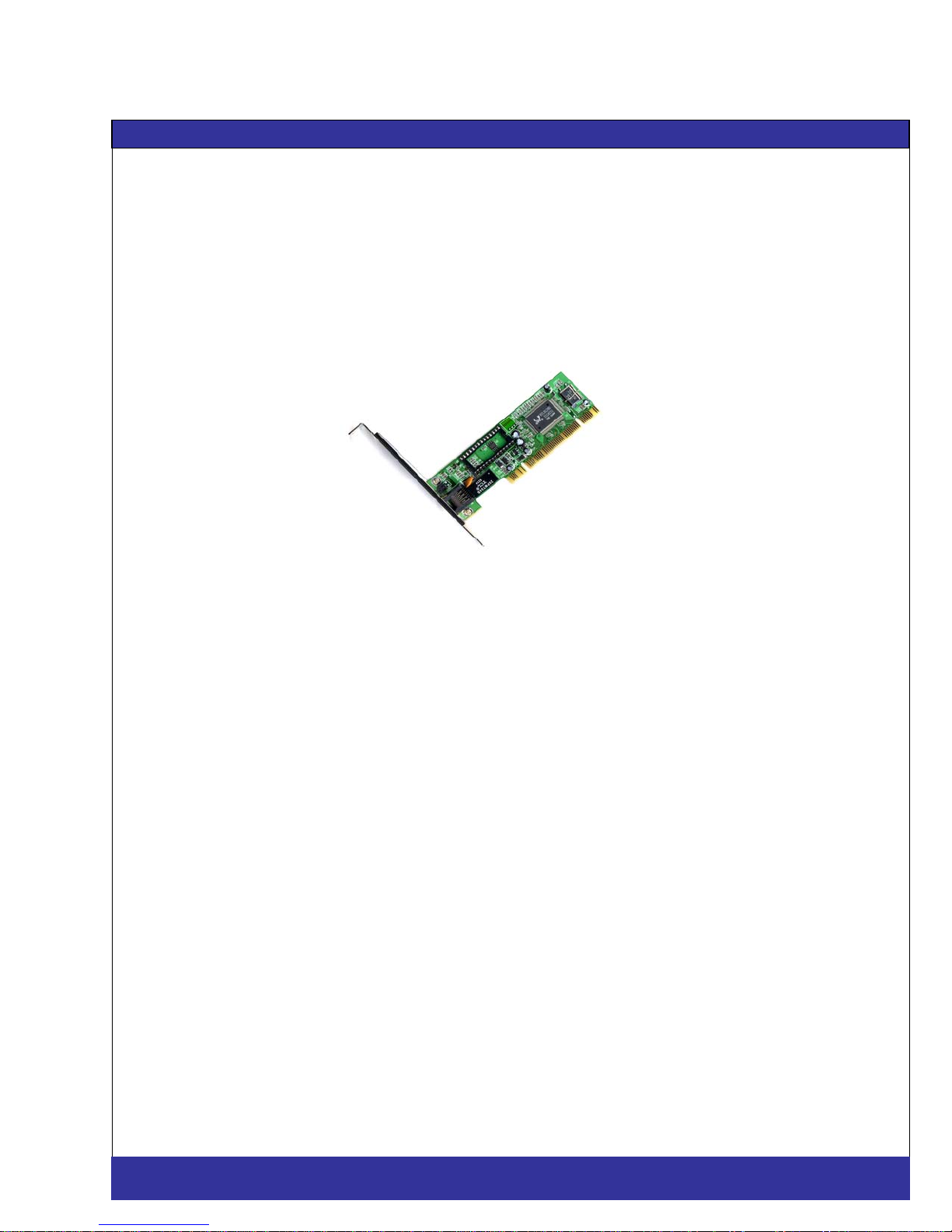
L32-bit PCI 10/100Mbps Fast Ethernet Adapter
with
Boot ROM Socket and PCI 2.2 ACPI/WOL
High Performances
This card supports speeds of up to 100Mbps, thus increasing network response time
and reducing network congestion.
Supports NWay Auto-Negotiation and Full-Duplex
This card automatically negotiates with switches/hubs to select a network speed that
will optimize your network performance. Also with full-duplex function, this card can
provide a bandwidth of up to 200Mbps in your network.
Support Wake On LAN
When this card receives a wake-up frame or magic packet from a network
management station, it will work with the system's ACPI interface to power up the
PC and enable the PC to be remotely managed by the dministrator.
2
http://www.ArgonTechnology.com
9130TXA-M
(
Mana
g
ed
)
/ 9130TXA
(
Unmana
g
ed
)
USER’S GUIDE
Features:
Fully complies with the IEEE 802.3, IEEE 802.3u and IEEE 802.3x industrial
standards.
Supports 32-bit, 33MHz PCI Local Bus Master Version 2.2/2.1.
10/100Mbps Auto-Negotiation, full-/half- duplex.
Supports Wake-on-LAN power management function.
Socket for Boot-ROM.
Plug-and-Play installation.
Achieve Microsoft Certifications including 95/98/Me/NT/2000/XP.
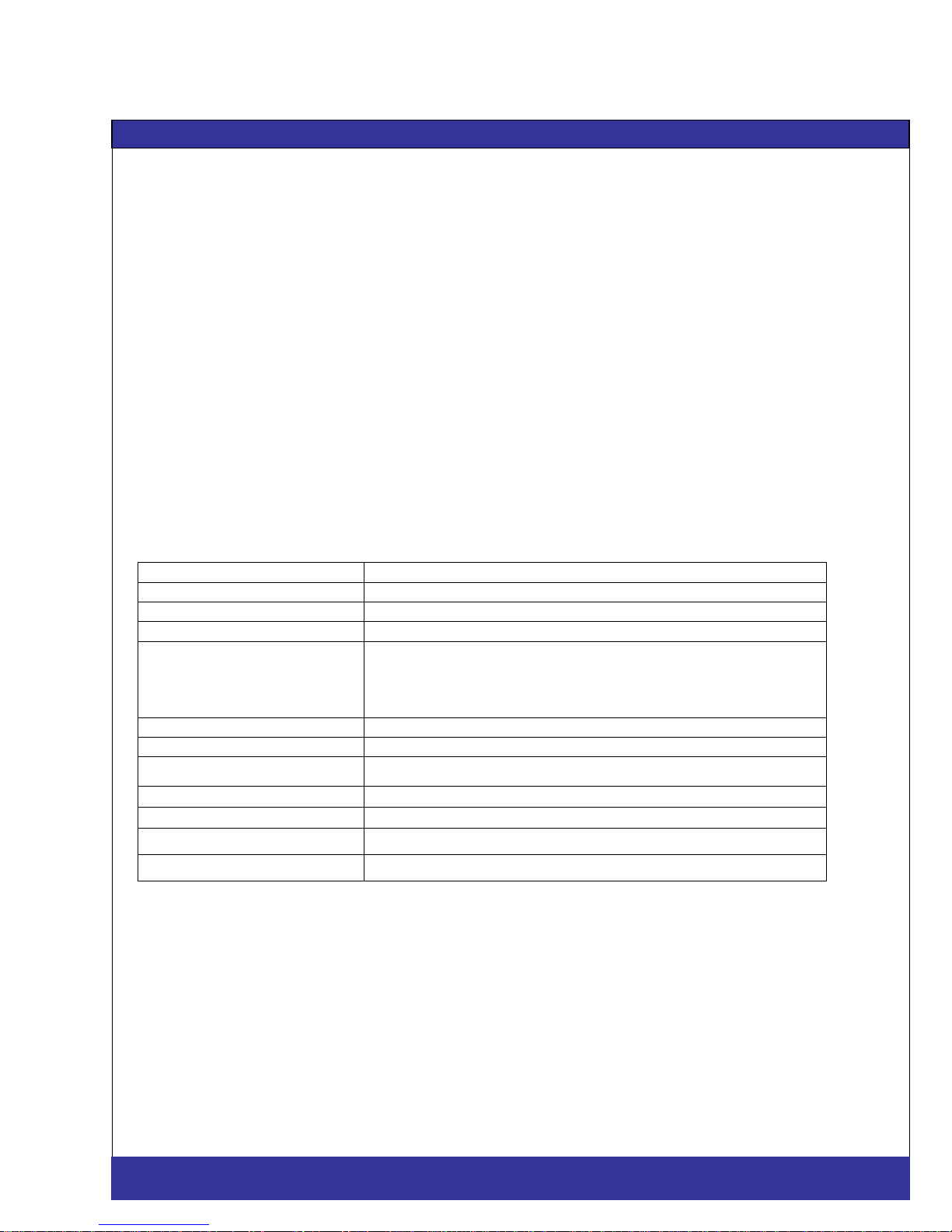
Specifications:
Product Fast Ethernet Adapter
Network Standard IEEE 802.3, IEEE 802.3u, IEEE 802.3x
Bus Architecture PCI V.2.2/2.1, 32-bit, 33MHz
Network Port UTP x 1
Network Drivers DOS, Windows 95/98/98SE/Me/NT/2000/XP, Windows for
Workgroup 3.11, Netware Server 3.x/4.x/5.x, Netware
ODI for DOS, Netware ODI Client 32, Packet Driver,
Linux, Unix and MAC
ACPI/Wake On LAN PCI V2.2
LEDs Link/Activity
Dimension 121 × 40 mm (4.76 × 1.57 in.)
Weight 48g / 0.11lb.
Operating Temperature 32-131(0-55)
Operating Humidity 10-95% (Noncondensing)
Certification FCC Class B, CE Mark, C-Tick
3
http://www.ArgonTechnology.com
9130TXA-M
(
Mana
g
ed
)
/ 9130TXA
(
Unmana
g
ed
)
USER’S GUIDE

4
This equipment has been tested and found to comply with the limits of a Class B
computing devices, pursuant to Part 15 of the FCC rules. These limits are designed
to provide reasonable protection against harmful interference in a residential
installation. This equipment generates, uses and can radiate radio frequency energy
and, if not installed and used in accordance with the instructions, may cause harmful
interference to radio communications.
If you suspect this product is causing interference, turn your computer on and off
while your radio or TV is showing interference. If the interference disappears then
when you turn the computer off and reappears then you turn the computer on,
something in the computer is causing interference.
You can try to correct the interference by one or more of the following measures :
1. Reorient/Relocate the receiving antenna.
2. Increase the separation between the equipment and
receiver.
3. Connect the equipment into an outlet on a circuit
difference from that to which the receiver is
connected.
4. Ensure that all expansion slots (on the back or side
of the computer) are covered. Also ensure that all
metal retaining brackets are tightly attached to the
computer.
FCC COMPLIANCE STATEMENT
http://www.ArgonTechnology.com
9130TXA-M
(
Mana
g
ed
)
/ 9130TXA
(
Unmana
g
ed
)
USER’S GUIDE
5
Thanks you for purchasing our 10/100Mbps Fast Ethernet Adapter. This guide is to
provide the installation and usage of this adapter for network installers and users.
The 10/100 network adapter complies to PCI 2.1 and PCI 2.2 specification and
supports half/full duplex feature which can double network speed.
This adapter supports both 10Mbps and 100Mbps network speed, 100BaseTX
operates on two pairs of category 5 UTP cable and 10BaseT operates on Category
3,4,5 UTP cable.
With the Auto-Negotiation technology, network speed is auto detected. When you
connect the adapter to 10BaseT hub via UTP cable, the network speed becomes
10Mbps. Similarly, if you connect the adapter to 100BaseTX hub, the network speed
is 100Mbps. If the hub is a switching hub which supports full duplex function, then
the speed will be doubled to 20Mbps/200Mbps.
Real hassle free installation is achieved by conforming to PCI bus. Just plug in the
card and all setup is done automatically. No more software to run !
Furthermore, this adapter support the Wake On LAN (WOL) feature allows users to
configure network adapters that are capable of “listening to” network packets even
when the computer is turned off.
This adapter supplies many drivers including NetWare Server 3.x/4.x/5.x, NetWare
ODI for DOS, NetWare ODI Client 32, NDIS driver for Windows
95/98/98SE/Me/NT/2000/XP, Windows for Workgroup 3.11, Linux, Unix, MAC and
Packet Driver for TCP/IP software. Whatever your requirements are ease of
installation, superior performance or responsive support backed up by unlimited
technical support, this adapter is the superior choice.
1Introduction
http://www.ArgonTechnology.com
9130TXA-M
(
Mana
g
ed
)
/ 9130TXA
(
Unmana
g
ed
)
USER’S GUIDE
6
(1) Features & Benefits
Supports 32-bit PCI Bus Master for high performance
and low processor utilization.
Complies to PCI 2.1 and PCI 2.2 specification
Complies with the IEEE 802.3 CSMA/CD,
100BaseTX and 10BaseT standard.
Full duplex design to double the performance to
20Mbps/200Mbps.
One STP connector for 100Mbps or 10Mbps network
speed.
Support Auto-negotiation function.
Built-in FIFO buffers to eliminate external memory.
Auto-setups IRQ and I/O address.
Supports early interrupt on transmit to increase
performance.
Supports NetWare Server 3.x/4.x/5.x, NetWare ODI for
DOS, NetWare ODI Client 32, NDIS driver for
Windows 95/98/98SE/Me/NT/2000/XP, Windows for
Workgroup 3.11, Linux, Unix, MAC and Packet Driver
for TCP/IP software.
Provides diagnostic software and one LED to
indicate network link/activity.
Features & S
p
ecifications
2
http://www.ArgonTechnology.com
9130TXA-M
(
Mana
g
ed
)
/ 9130TXA
(
Unmana
g
ed
)
USER’S GUIDE

7
(2) Technical Specification
Topology: Star
Connector: RJ-45
Standard: IEEE 802.3 10BaseT
IEEE 802.3u 100BaseTX
Transmission Rate: 10Mbps or 20Mbps
100Mbps or 200Mbps
Hardware Required: IBM compatible PC with
available PCI slot
( PCI 2.1 or PCI 2.2 )
IRQ Line: Assigned by system
I/O Address: Assigned by system
Drivers: NetWare Server 3.x/4.x/5.x,
NetWare ODI for DOS, NetWare
ODI Client 32, Windows
95/98/98SE/Me/NT/2000/XP,
Linux, Unix, MAC, Packet
Driver for TCP/IP software
Temperature: 00C to 550C (Operating)
Humidity: 10% to 90% (Non-condensing)
Certification: FCC Class B, CE Mark, C-Tick
Dimension: 120 x 40 mm
Weight: 50 g
Power consum
p
tion : 1.8W
(
Max.
)
http://www.ArgonTechnology.com
9130TXA-M
(
Mana
g
ed
)
/ 9130TXA
(
Unmana
g
ed
)
USER’S GUIDE
8
(1) Hardware Installation
To insert the network adapter into your PC, follow the steps
bellow :
1. Turn off the computer and remove its cover.
2. Insert the adapter into a PCI slot.
3. Secure this adapter to the rear of the computer
chassis and put back the computer cover.
4. Connect the adapter to the network using twisted-
pair cable.
(2) Hardware Requirement for Wake On LAN
If your motherboard support the PCI 2.1 only, then
the motherboard must provide a 3-pin WOL
connector.
(Some computers may require you to change a setting
in your computer’s BIOS or setup program to enable
the WOL feature.)
If the motherboard support PCI 2.2, we don’t need
the 3-pin WOL connector. ( the function will be
provided from the PCI bus directly )
ATX 2.01 power supply.
Note : Install only one active WOL adapter per
computer. You can install additional,
non-WOL adapters.
(3) Hardware Installation for Wake On LAN
If your motherboard support the PCI 2.2 standard, no other
procedure is needed. But, you still can follow the steps (for PCI
2.1) below on the PCI 2.2 motherboard, and all the function
include the WOL will work normally.
Installation
3
http://www.ArgonTechnology.com
9130TXA-M
(
Mana
g
ed
)
/ 9130TXA
(
Unmana
g
ed
)
USER’S GUIDE

9
If the motherboard support PCI 2.1 only, please follow the next
procedure,
1. Unpack the 3-pin auxiliary power cable.
2. Insert the 3-pin auxiliary power cable into the
connector on the adapter.
3. Attach the 3-pin auxiliary power cable to the
connector on the PC motherboard.
(4) Driver Installation
Use the drivers supplied by the diskette included in this product. For
detail description, please refer to readme.doc or readme.exe in the
diskette provides by this product.
http://www.ArgonTechnology.com
9130TXA-M
(
Mana
g
ed
)
/ 9130TXA
(
Unmana
g
ed
)
USER’S GUIDE
10
If you experience any problems with the adapter, first make sure
the appropriate driver is loaded, the proper cable is connected to
the adapter port and the hub complies with the adapter
specification, such as 10Mbps 10BaseT or 100Mbps 100BaseTX,
then check the LED.
The adapter provides one LED to indicate network status.
●Link/Activity
A LED indicates if the UTP port has been LINK ok or not. When the
light is OFF, it indicates that the UTP port has not been connected
or LINK not ok. When the light is ON, it indicates that the UTP port
LINK ok. When the light is BLINKING, it indicates that there is
traffic flow on the network which the adapter is connected to.
Trouble-shootin
g
4
http://www.ArgonTechnology.com
9130TXA-M
(
Mana
g
ed
)
/ 9130TXA
(
Unmana
g
ed
)
USER’S GUIDE
Ce manuel convient aux modèles suivants
1
Table des matières
Autres manuels argon audio Adaptateur


