
Archos 500867 - 404 Camcorder Guide de configuration

This manual contains information about the CamCorder and
Camera functions of your ARCHOS 404 CamCorder device.
These functions can be used by selecting the CamCorder
all other functions of this device in the ARCHOS 404 User
Manual.
manual.
404 CAMCORDER
CAMCORDER & CAMERA FUNCTIONS
Version 1.1SUPPLEMENT TO THE ARCHOS 404 USER MANUAL
ENGLISH

2
TAblE Of COnTEnTs
InTRODuCTIOn...........................3
ARCHOS 404 CAMCORDER DESCRIPTION . . . . . . . . . . 3
1. usIng ThE CAMCORDER . . . . . . . . . . . . . . . . 4
1.1 VIDEO RECORDING PROCEDURE . . . . . . . . . . . . . . 4
1.2 CAMCORDER SETTINGS . . . . . . . . . . . . . . . . . . . . . 5
2. usIng ThE sTIll CAMERA . . . . . . . . . . . . . . . . . . 8
2.1 TAKING PHOTOGRAPHS . . . . . . . . . . . . . . . . . . . . . 8
2.2CAMERASETTINGS ........................ 9
2.3 TAKING PHOTOS USING THE TIMER . . . . . . . . . . . 11
3. COnTROllIng ThE IMAgE QuAlITy . . . . . 12
3.1BLURREDIMAGES ........................ 12
.................. 12
TEChnICAl spECIfICATIOns. . . . . . . . . . . . . . . . . 14
3
InTRODuCTIOn
ARChOs 404 CAMCORDER DEsCRIpTIOn
CAMERA SENSOR
On the Back of the Device:
The optical sensor of the device.
Take all appropriate care to avoid scratching the
lens: use the included protective pouch to carry
the device.
ARCHOS 404 CAMCORDER INTERFACE DESCRIPTION
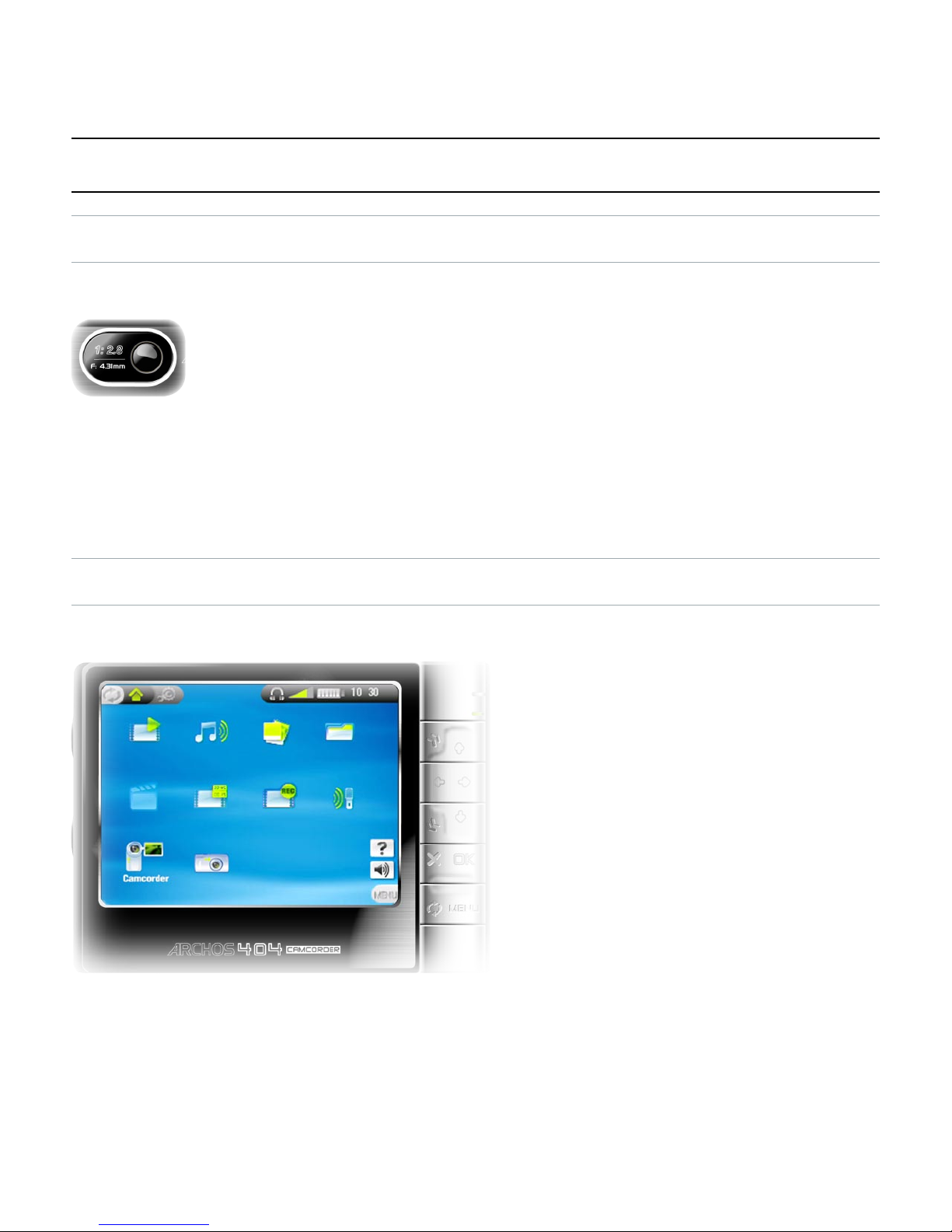
Home Screen
The Home Screen of the
ARCHOS 404 CamCorder
that of the ARCHOS 404:
CamCorder and Camera.
navigation pad and press
OK to use the particular
function.
•
•
•
•
•

4
1. usIng ThE CAMCORDER
and press OK to display the CamCorder pre-re-
cording screen.
All CamCorder recordings made by your ARCHOS device are
1.1 VIDEO RECORDIng pROCEDuRE
In the pre-record-
adjust the recording
press MEnu
select
Settings
to
enter the CamCorder
Settings Screen (see:
CamCorder Settings
).
Before and during
zoom in and out using .
= zoom active.
adjust the recorded sound volume using .
lock the exposure via the
Lock exposure
menu item (See
s
).
press
•
•
-
-
-
-

5
Press OK to start
recording.
You can pause and
restart your recording
by pressing OK.
You can adjust cer-
as Exposure and
-
ing a recording: press
MEnu and select the
Settings
menu item.
Press to stop recording.
When pressing
1.2 CAMCORDER sETTIngs
to adjust the CamCorder
recording parameters to
your personal taste.
You can access the
CamCorder Settings
screen via the
Settings
menu item in the pre-
recording screen.
•
•
•
•

6
Use to
to
Rename
-
See:
Using the Virtual Keyboard
in the ARCHOS 404 User
Manual.
Resolution
Options: QVGA (640x480).
image.
recorded videos on the built-in screen of your ARCHOS
-
you should set this to VGA for a sharper image.
Bitrate
Use this to set the level of compression of the recorded
most situations.
•
-
-
•
-
-
-
•
-
-
-
-

7
Exposure
Options: Brighter
Darker
conditions.
or +2.
White Balance
Options: Auto
This parameter lets the camera adjust to the ambient
light source in order to best record the natural colors.
Sampling
The sound sampling rate. The higher value gives a higher
drive.
Reset
default settings.
•
-
-
-
-
-
-
•
-
-
•
-
-
•
-

8
2. usIng ThE sTIll CAMERA
press OK to enter the still camera mode.
All photographs taken by your ARCHOS device are saved
2.1 TAKIng phOTOgRAphs
-
just the still camera
press MEnu
select
Settings
to
enter the Camera
Settings Screen (see:
Camera Settings
).
You can zoom in and
out using .
=
zoom active.
Lock the exposure via the
Lock exposure
menu item (See
s
).
Press
Press OK to take a picture.
•
•
•
•
•

9
When pressing
2.2 CAMERA sETTIngs
to adjust the Camera
parameters to your per-
sonal taste.
You can access the
Camera Settings
screen via the
Settings
-
Use to
to
Rename
-
etc.
-
Using the
Virtual Keyboard
in the ARCHOS 404 User Manual.
•
-
-

10
Resolution
Options: VGA
-
Image Quality
Options: Basic
Exposure
Options: Brighter
Darker
conditions.
or +2.
White Balance
Options: Auto
This parameter lets the camera adjust to the ambient
light source in order to best record the natural colors.
•
-
-
-
•
-
-
•
-
-
-
-
-
-
•
-
-
Ce manuel convient aux modèles suivants
2
Table des matières
Autres manuels Archos caméscope

Archos
Archos Helmet Camcorder Instructions d'utilisation

Archos
Archos 605 WiFi 160GB Manuel utilisateur
Archos
Archos Gmini 402 Manuel utilisateur

Archos
Archos 300 Manuel utilisateur

Archos
Archos AV300 Series Manuel utilisateur

Archos
Archos GminiTM 402 Manuel utilisateur

Archos
Archos 404 Manuel utilisateur
Manuels caméscope populaires d'autres marques


Panasonic
Panasonic AG-HMC152EN Manuel utilisateur

Insignia
Insignia NS-DCC5HB09 - Camcorder - 720p Manuel utilisateur

MYDLINK
MYDLINK DCS-6100LH Manuel utilisateur

Sony
Sony video Hi8 Handycam CCD-TR555 Manuel utilisateur

SECURECOM
SECURECOM V-5014B Manuel utilisateur

Panasonic
Panasonic HDC-SD100 Manuel utilisateur


