
Apulsetech a811 Manuel utilisateur

811
RFID Handheld Reader
User Guide
Ver. 1.0

2 | 109
RFID at your service
ㅇㅇㅇㅇㅇ
Copyright 2018. Aplusetech Co.,Ltd. All rights reserved.
Apulsetech is the manufacturer of Apulsetech RF D handheld computers.
This document and related software in this device are protected by international copyright laws.
Any part of this document may not be reproduced, removed or used in any form by any means, without
permission in writing from Apulsetech.
The contents in this manual is subject to change without prior notice.
Apulsetech and α811 are registered trademarks of Apulsetech Co.,Ltd., all other trademarks and copyrights
are property of their respective owners.
The software is provided for user understanding how to use the device and application development. All
software, including firmware, is on a licensed basis.
No right to copy a licensed program in whole or in part is granted, to other device except as permitted
under copyright law.
Apulsetech Co., Ltd.
C-1211, 60, Haan-ro,
Gwangmyeong-si,
Gyeonggi-do,
epublic of Korea
http://www.apulsetech.com
Copy
right

3 | 109
RFID at your service
Change Date Description
Ver.1.0 2018/07/25 Draft
Revision History

4 | 109
RFID at your service
Table of Contents
Copyright
Revision History
1 About this guide .................................................................................................................... 8
1.1 ntroduction ............................................................................................................................ 8
1.2 Configuration .......................................................................................................................... 8
1.3 Related document and Software ........................................................................................... 8
1.4 Service information ................................................................................................................ 8
1.5 Safety information .................................................................................................................. 9
2 Brief Description of α811 ................................................................................................... 11
2.1 Packing Contents .................................................................................................................. 11
2.2 α811 Overview ...................................................................................................................... 12
Top view ................................................................................................................. 12
Bottom view........................................................................................................... 12
Front view .............................................................................................................. 13
Back view ............................................................................................................... 14
2.3 α811 Accessories ................................................................................................................... 15
2.4 Button Functions .................................................................................................................. 17
Physical buttons .................................................................................................... 17
Software buttons ................................................................................................... 17
2.5 α811 Home Screen ................................................................................................................ 18
Quick Settings Panel.............................................................................................. 19
Status Bar .............................................................................................................. 21
Status cons ........................................................................................................... 21
Notification cons .................................................................................................. 22
3 etting Started .................................................................................................................... 24
3.1 Setup ..................................................................................................................................... 24
nstalling Replacing a Micro SD card .................................................................... 24

5 | 109
RFID at your service
nstalling and Replacing a Mini S M card .............................................................. 25
nstalling and Replacing the Battery .................................................................... 26
Charging the Battery ............................................................................................. 26
Charging ndicators ............................................................................................... 28
Battery Management ............................................................................................. 28
Switching α811 on and off..................................................................................... 29
3.2 General Settings .................................................................................................................... 31
Setting the date and time ..................................................................................... 31
Display setting ....................................................................................................... 34
Sound setting......................................................................................................... 39
Using Keyboard ..................................................................................................... 40
Firmware Update ................................................................................................... 41
3.3 Connectivity .......................................................................................................................... 45
Wi-Fi ....................................................................................................................... 45
Bluetooth ............................................................................................................... 46
USB Connection with PC ....................................................................................... 51
4 Applications ......................................................................................................................... 53
4.1 nstalling & Uninstalling Apps .............................................................................................. 53
4.2 Demo Apps ............................................................................................................................ 56
UHF RF D/ Barcode Demo ..................................................................................... 56
4.3 Default Apps .......................................................................................................................... 58
Browser .................................................................................................................. 60
Calculator .............................................................................................................. 60
Calendar................................................................................................................. 61
Camera ................................................................................................................... 62
Clock ...................................................................................................................... 64
Contacts ................................................................................................................. 68
Downloads ............................................................................................................. 69
Email ...................................................................................................................... 69

6 | 109
RFID at your service
ES File Explore ....................................................................................................... 70
Gallery .................................................................................................................... 70
Music ...................................................................................................................... 71
Messaging .............................................................................................................. 71
OS update .............................................................................................................. 72
Phone ..................................................................................................................... 72
Settings .................................................................................................................. 74
Sound Recorder ..................................................................................................... 75
Video Player ........................................................................................................... 75
5 Wireless ................................................................................................................................ 76
5.1 Local Area Networks ............................................................................................................. 76
5.2 Bluetooth .............................................................................................................................. 80
5.3 Mobile Network 3G ............................................................................................................... 83
5.4 NFC (Near Field Communications) ....................................................................................... 85
6 Accessories ........................................................................................................................... 86
6.1 Docking Cradle ...................................................................................................................... 86
6.2 Leather Case ......................................................................................................................... 87
7 Settings ................................................................................................................................ 89
7.1 Wi-Fi ....................................................................................................................................... 89
7.2 Bluetooth .............................................................................................................................. 89
7.3 Data usage ............................................................................................................................ 90
7.4 More Settings ........................................................................................................................ 91
7.5 Display ................................................................................................................................... 94
7.6 Sound & notification ............................................................................................................. 95
7.7 Apps ....................................................................................................................................... 95
7.8 Storage & USB ....................................................................................................................... 95
7.9 Battery ................................................................................................................................... 96
7.10 Memory ................................................................................................................................. 97
7.11 Users ...................................................................................................................................... 97
7.12 Tap & Play ............................................................................................................................. 98

7 | 109
RFID at your service
7.13 Location ................................................................................................................................ 98
7.14 Security ................................................................................................................................. 98
7.15 Accounts .............................................................................................................................. 101
7.16 Language & input ................................................................................................................ 101
7.17 Backup & reset .................................................................................................................... 103
7.18 Date & time .......................................................................................................................... 103
7.19 Accessibility ......................................................................................................................... 104
7.20 Printing ................................................................................................................................ 106
7.21 Developer options............................................................................................................... 106
7.22 About phone ....................................................................................................................... 106
8 Appendix 1 Specifications ................................................................................................ 107
9 Troubleshooting ................................................................................................................ 109

8 | 109
RFID at your service
1 About this guide
1.1 Introduction
The α811 (RF D Smart Reader) provides highest quality RF D reading performance with default or optional
features, WiFi, Bluetooth, 2D scanner, 3G, Camera, NFC. With Android OS, users are able to experience
efficient working performance.
This guide is designed for helping users to operate α811 effectively. Please read the guide carefully before
using α811.
1.2 Configuration
This guide provides information of the following configurations including optional features.
Model
Operating System
Radios
Memory
Data Capture
Options
α
811
Google Android 6.1
860MHz
–
960MHz
2GB RAM, 32GB
nternal
2D mager Barcode Scanner
8Mega Pixel Auto Focus with
Flash
1.3 Related document and Software
α811 Quick Guide
α811 SDK Manual
α811 Firmware update manual
α811 Demo application manual
α811 UHF Demo app
α811 Barcode Demo app
1.4 Service information
f you have problem with the device, visit our web site to analyze the problem or contact our partner in region
or HQ.
9 | 109
RFID at your service
Contact information is available at our website http://www.apulsetech.com
When requesting support, please have following information;
- Serial number of the device ( On manufacturing label )
- Firmware version
1.5 Safety information
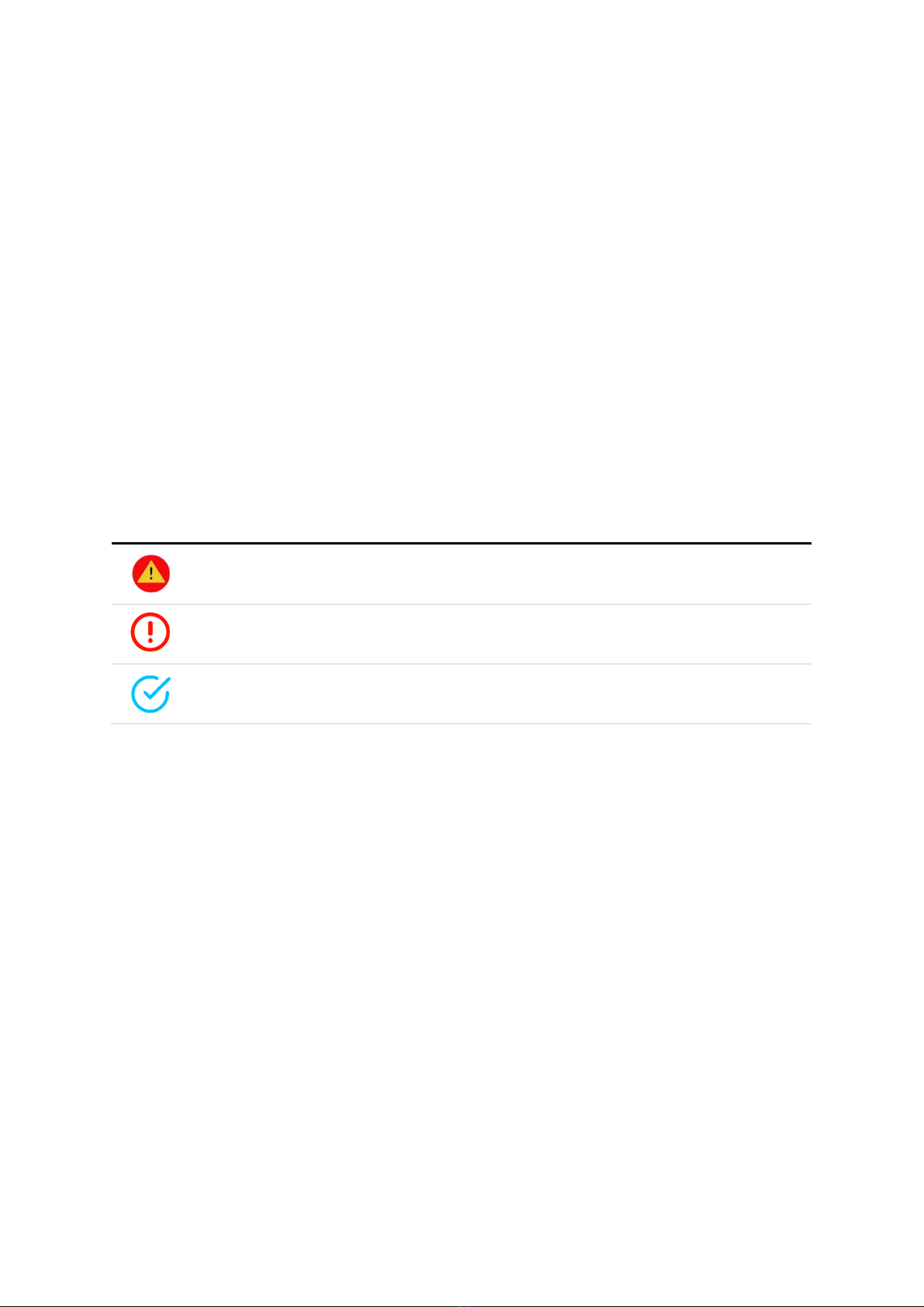
Symbols
This guide uses the following symbols to indicate hazards and additional information.
Symbol Name Description
Warning mplies information that could result in serious injury to yourself or
others.
Caution mplies information that may result in minor or serious product
damage.
Note mplies information that can help you get more important than
surrounding text, such as exceptions or additional information.
Before you use the α811, please read this chapter of information and keep your child aware of this
information. For detailed information, please refer to the safety guidelines.
Do not use α811 during driving for safety.
n medical sites, please follow the relevant regulations by turning off your α811 when you are in medical
sites.
Please turn off your α811 or turn on planes mode when you are boarding, to avoid wireless signals jamming
aircraft control signal.
Please turn off your α811 near the use of high precision electronic equipment, otherwise it may lead to
electronic equipment disability.

10 | 109
RFID at your service
Do not take apart your α811 or accessories without authorizing. Only authorized institutions can repair
this α811.
Please keep α811 away from magnetic equipment. The radiation of α811 will erase the information of the
magnetic storage device.
Please don’t use α811 under high temperature or in flammable areas (example: gas station).
Please keep your α811 and accessories away from children without supervising.
Please obey the relevant laws and regulations when you use your α811, and respect others lawful rights
and privacy.
Please obey the relevant specification of this manual when you use USB cable. Otherwise it may damage
your α811 or personal computer.
Modifying the device’s operating system or installing software from unknown sources may cause device
malfunction or data loss. mproper or unauthorized use of the device voids your one-year limited warranty.
Table des matières
Autres manuels Apulsetech Système RFID


