
Andea Electronics RL863 Manuel utilisateur

RL863 Micro-power Multi-protocol
Reader
User Manual
◆Before you use this product, please read this manual carefully, and properly keep it
for future reference.
◆As our products continue improving, they may be changed without advanced
notice.
◆The copyright of this manual belongs to our company. Unauthorized plagiarism or
dissemination will be held legally responsible.

Version:V1.3

User manual
Contents
1. Product Overview...........................................................................1
1.1. Introduction.........................................................................1
1.2. Product Features..................................................................1
1.3. Pictures...............................................................................1
1.4. Main Parameter ...................................................................2
2. Hardware Interface Description.......................................................2
3. Product Dimension .........................................................................3
4. Device Connection..........................................................................3
5. Instructions Of Configuration Tools.................................................4
5.1. Configuration Description Of Parameters..............................5
5.1.1. Communication Interface..........................................5
5.1.2. Buzzer Default Parameters........................................6
5.1.3. RF Parameters..........................................................6
5.1.4. Inventory Parameters................................................7
5.1.5. System Work Mode ..................................................9
5.2. Testing..............................................................................10
5.2.1. Multi-tags Inventory Testing ...................................10
5.2.2. Single Tag Operation Testing................................... 11
6. Troubleshooting Of FAQs .............................................................12
7. Technical Support.........................................................................13

User manual
Guangzhou Andea Electronics Technology Co., Ltd. 1/15
http://www.gzandea.com
1. Product Overview
1.1. Introduction
This product complies with ISO 15693, ISO 18000-3M3 and ISO 14443A protocol
standards, it has high sensitivity reading and writing performance and fast anti-collision
processing algorithm which supports reading electronic tags of each protocol at the
same time.
This product is widely used in desktop card issuance, access control systems,
electronic bills, libraries, finance and other fields.
1.2. Product Features
➢Operating frequency: 13.56MHz;
➢Support ISO 15693,ISO 18000-3M3 and ISO 14443A standard;
➢Support ISO 14443A protocol multi-card simultaneous reading;
➢Support ISO 15693 protocol multi-card simultaneous reading;
➢Support ISO 18000-3M3 protocol multi-card simultaneous reading;(Support zero
distance overlap reading of tags);
➢Recognition distance:0~16cm;
➢Communication interface:USB;
➢Power supply:USB 5V。
1.3. Pictures
RL863

User manual
Guangzhou Andea Electronics Technology Co., Ltd. 2/15
http://www.gzandea.com
1.4. Main Parameter
Table 1 Description of main technical parameters of the product
Parameter
Description
Operating Frequency
13.56MHz
Support Standard
ISO 15693、ISO 18000-3M3 and ISO 14443A
Recognition
Distance
ISO 15693
16 cm
ISO14443A
10 cm
ISO 18000-3M3
6 cm
Communication
Interface
USB
Voltage
5V(USB powered)
Maximum Power
0.65W
Standard Sizes
105×70×10mm
Maximum Operating
Temperature
35℃
2. Hardware Interface Description
The product uses USB communication interface, as shown in the following figure:
①Product specifications are approximate, please refer to the actual size;
②Due to continuous improvement of our products, technical parameters are
subject to change without notice.

User manual
Guangzhou Andea Electronics Technology Co., Ltd. 3/15
http://www.gzandea.com
Mini USB Interface
Figure 1 Communication interface
3. Product Dimension
The external dimensions of the product are shown in the following figure (unit:
mm):
Figure 2 Product dimension
4. Device Connection
Before using the reader, connect the reader to the computer with the supplied "USB
cable", as shown in the following figure:

User manual
Guangzhou Andea Electronics Technology Co., Ltd. 4/15
http://www.gzandea.com
USB
Figure 3 Connection diagram
5. Instructions Of Configuration Tools
After the device is connected and powered on normally, open the R-Tool folder of
the configuration tool and find the file in the folder directory.
Double-click this file to open the configuration tool, as shown below:
Figure 4 R-Tool connection interface
Select the corresponding communication method according to the actual interface
type used by the device.
Since the communication interface of the device is a USB interface, select "USB
Communication" in [Communication Interface] under [Search Parameters]. click the
[Search] button to find the device. When the device is found, the device information
will be automatically displayed in the "Discovered Devices" list as follows:

User manual
Guangzhou Andea Electronics Technology Co., Ltd. 5/15
http://www.gzandea.com
①
②
③
④
Figure 5 Connection steps
As shown above (Step ④), click the "Start" button to enter the main interface of
the test software.
5.1. Configuration Description Of Parameters
5.1.1.Communication Interface
Figure 6 Configuration interface for communication interface
⚫Bus address: between 1-255
⚫Baud Rate: 9600, 19200, 38400, 57600, 115200, 230400
⚫Parity check type: None, Odd, Even
User manual
Guangzhou Andea Electronics Technology Co., Ltd. 6/15
http://www.gzandea.com
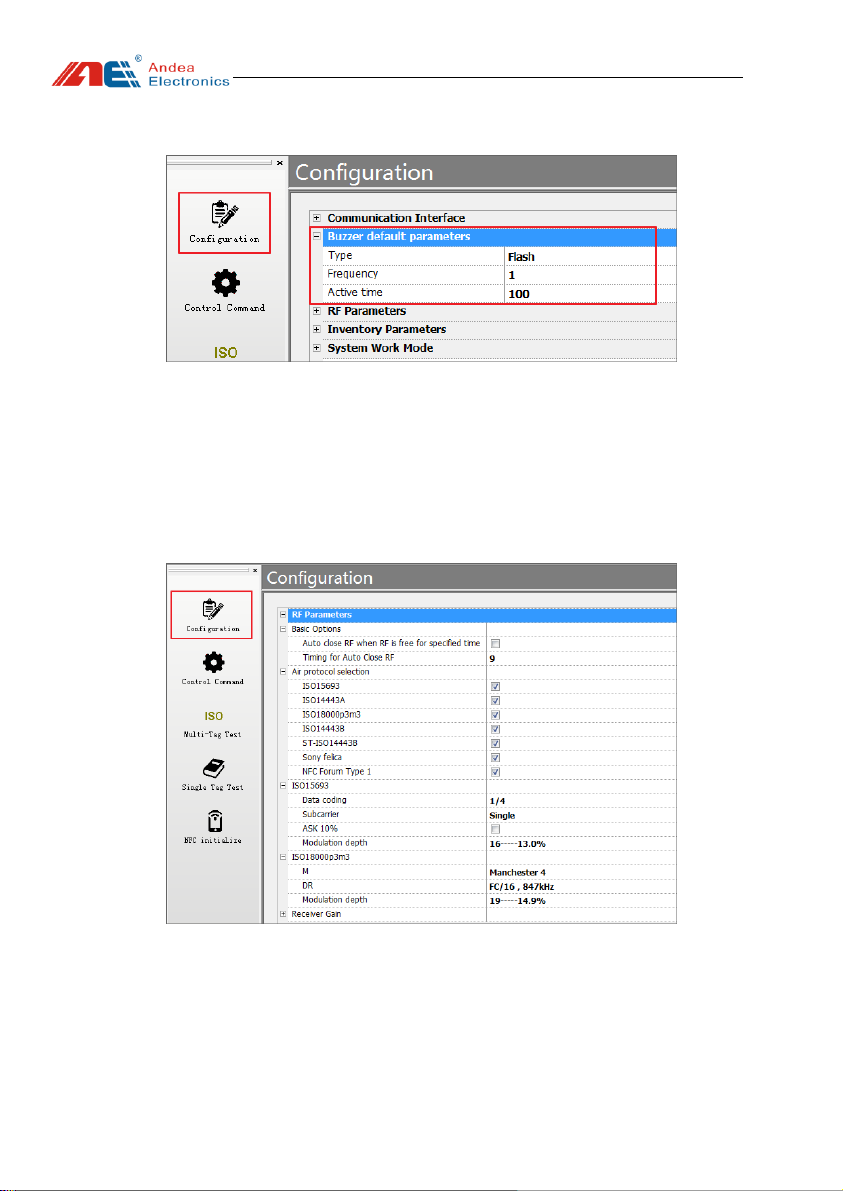
5.1.2.Buzzer Default Parameters
Figure 7 Configuration interface for buzzer default parameters
⚫Type: Unchanged, On, Off, Flash.
⚫Frequency: value range from 0 to 255, only applicable for the Flash type.
⚫Active time: the frequency of buzzer, only applicable for the Flash type.
5.1.3.RF Parameters
Figure 8 Configuration interface for RF parameters
⚫Basic options
1)Auto close RF when RF is free for specified time:In the host control mode, the
device will automatically close the RF if it does not receive a command of card
reading or opening the RF.

User manual
Guangzhou Andea Electronics Technology Co., Ltd. 7/15
http://www.gzandea.com
2)Timing for Auto Close RF:Value range: 0-256, the RF enters the idle mode if
no operation in a specified time.
⚫Air protocol selection
1) ISO15693: Enable to count tags of ISO15693 air protocol.
2) ISO14443A: Enable to count tags of ISO14443A air protocol.
3) ISO18000p3m3: Enable to count tags of ISO18000p3m3 air protocol.
4) ISO14443B: Enable to count tags of ISO14443B air protocol.
⚫ISO15693
1) Data coding: 1/4, 1/256.
2) Subcarrier: single negative carrier, double negative carrier.
3) ASK 10%: ASK modulation depth setting takes effect after the button is ticked.
Otherwise, it is ASK 100%.
4) ASK modulation depth: 0.5% -60%
⚫ISO18000p3m3
1)M: Manchester 2,Manchester 4
2) DR:FC/16847khz, FC/32424khz
3) Modulation depth:0.5%-29%
5.1.4.Inventory Parameters
Figure 9 Configuration interface for inventory parameters
Table des matières
Autres manuels Andea Electronics Lecteur de cartes


