
ANANAS GLOBAL DW-007FIT+ Manuel utilisateur
לבולג סננא0722366514
Ananas-Global
AGshop.co.il 072-2366514
- 2 -
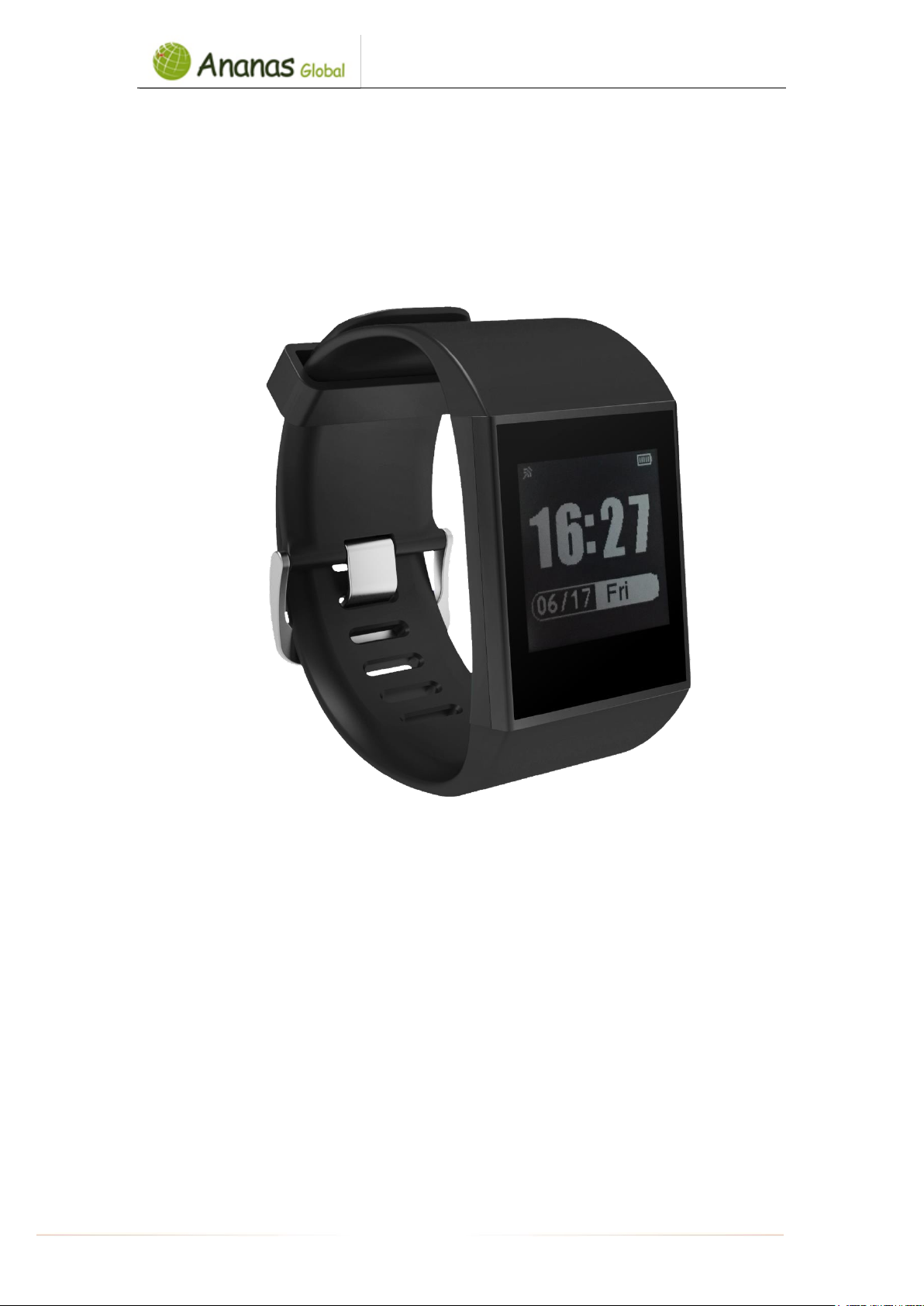
Congratulations with your Multi sport E-ink watch! All activities are displayed on the APP after
synching with the data from the wristband. Please read this manual carefully and check the
FAQ if needed.
Please note: the screenshots below differs from versions of the APP due updates of the new
versions.
1. Specification:
Display
1.28 inch 128*128 pixel E-ink display
Waterproof
IP67 waterproof
Charging
3 point connect charge DC 5V/0.5A
Function
Dynamic heart rate measurement, sleep monitor, activities reminder,
pedometer, distance, calorie, remote camera control, call remind, SMS
notifications from social media.
Compatible with below versions:
Apple Store: IOS 8.0 & above
Google Play store: Android 4.4 and above
Support Bluetooth 4.0
Notice: IP67 standard means under normal temperature, product could be in 1m deep water
last for 30 minutes. Please pay attention to following two points:
1. IP67 means that it can pass the test of soak 30 min in 1m deep water, but doesn’t mean to
swim without being affected.
2. IP67 means that it can keep working under 1 m deep water within 30 min, but doesn’t
mean vapor proof, so you may find the steam in screen after shower, because waterproof
standard is based on cold water.
2. Device activate & charger
1. Charge the watch for 1 hour before using it.
2. Make sure that the watch is full charge in order to work properly. Once the device with
low battery status, please charge the device with the charger. Clamp the charging clip
to the 3 point positioned on the back of the watch.

לבולג סננא0722366514
Ananas-Global
AGshop.co.il 072-2366514
- 3 -
3. Device Charging
Please place the Magnetic Charging Cable on the back of the watch (as shown in the
figure ).Plug it into the power adapter, or 5V/500mA(or above) standard USB adapter. For
example: Laptop、USB adapter、Bank Power and others. When wristband screen appears
icon,which means is being charged.
4. Download Application
Before connecting with the app Linksmart, please make sure the Bluetooth connection
of your mobile device has been enabled. To use “LinkSmart” APP, make sure your
mobile device is connected to the internet via Wi-Fi / 4G/ 3G.
1. Apple iPhone (IOS 8.0 and up), please search “LinkSmart” in the App store to download/
install it.
2. Android phone (4.4 and up), please search “LinkSmart” in Google Play to download and
install it.
Download the app by either scanning the QR code below or search for “LinkSmart” and
download in the Apple Store or Google Playstore.
Place the Magnetic Charging Cable on the reverse side.
לבולג סננא0722366514
Ananas-Global
AGshop.co.il 072-2366514
- 4 -
5. Wear the device
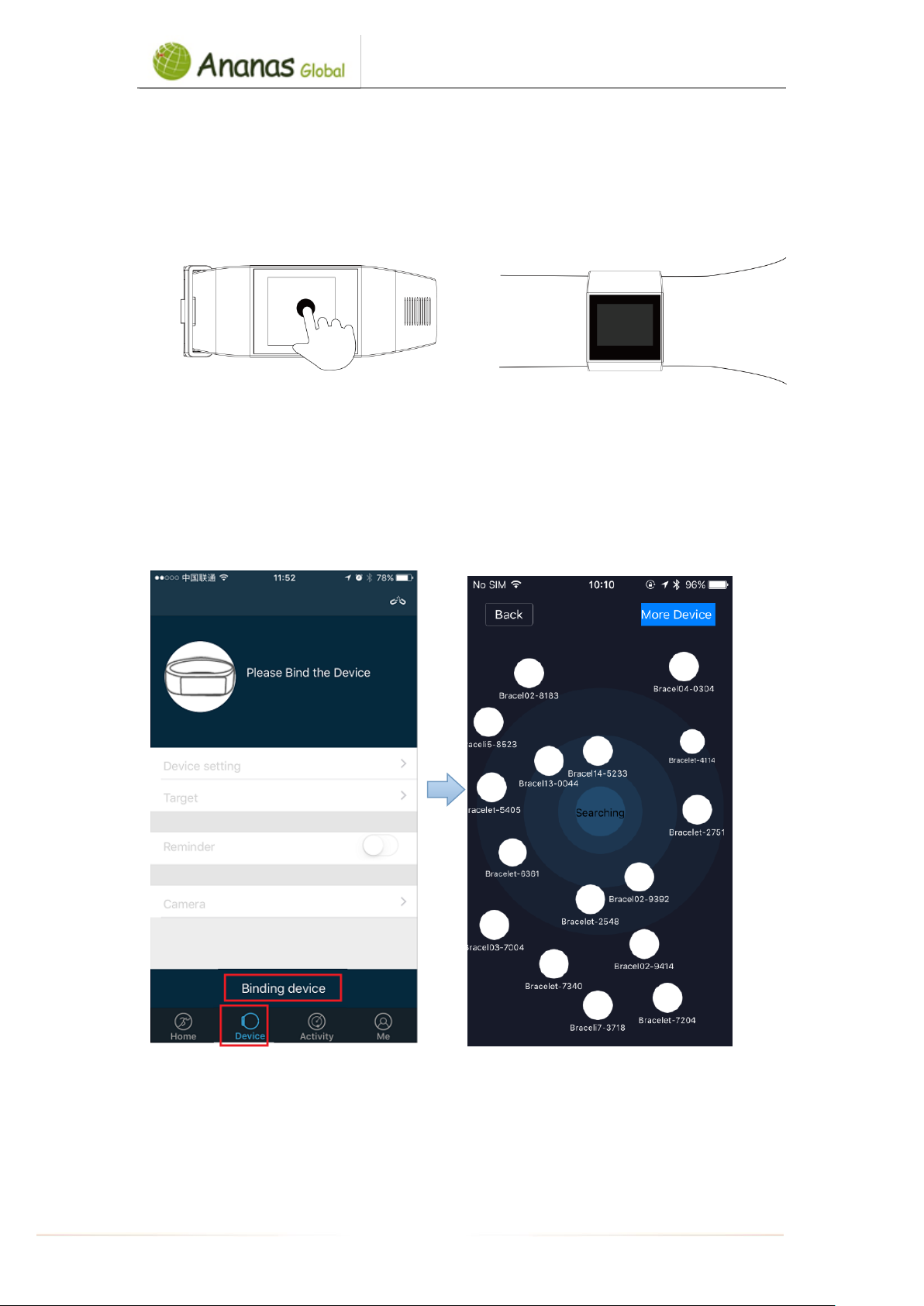
A. Press and hold the screen until the display will switch on (If there is still no response,
please try again after charging)
B. Put the watch on the wrist with the screen facing up. Make sure it fits well for accurate
results.
6. Pair the device
On your mobile device make sure the Bluetooth is enabled.
Power on the watch
Open the APP Linksmart, Click the 【Device】 In the bottom of main interface.
In the bottom of【Device】,click the “Add device”.
For example: The watch ID code is 3892 in the Bracel03-3892.
Notice:
If connection problems occur and the APP keeps showing pairing but cannot pair
successfully. Please power off the watch first.Then power on the watch,long press the
code,the watch will vibrate three times. Connect the APP again.
לבולג סננא0722366514
Ananas-Global
AGshop.co.il 072-2366514
- 5 -
7. Function icons:
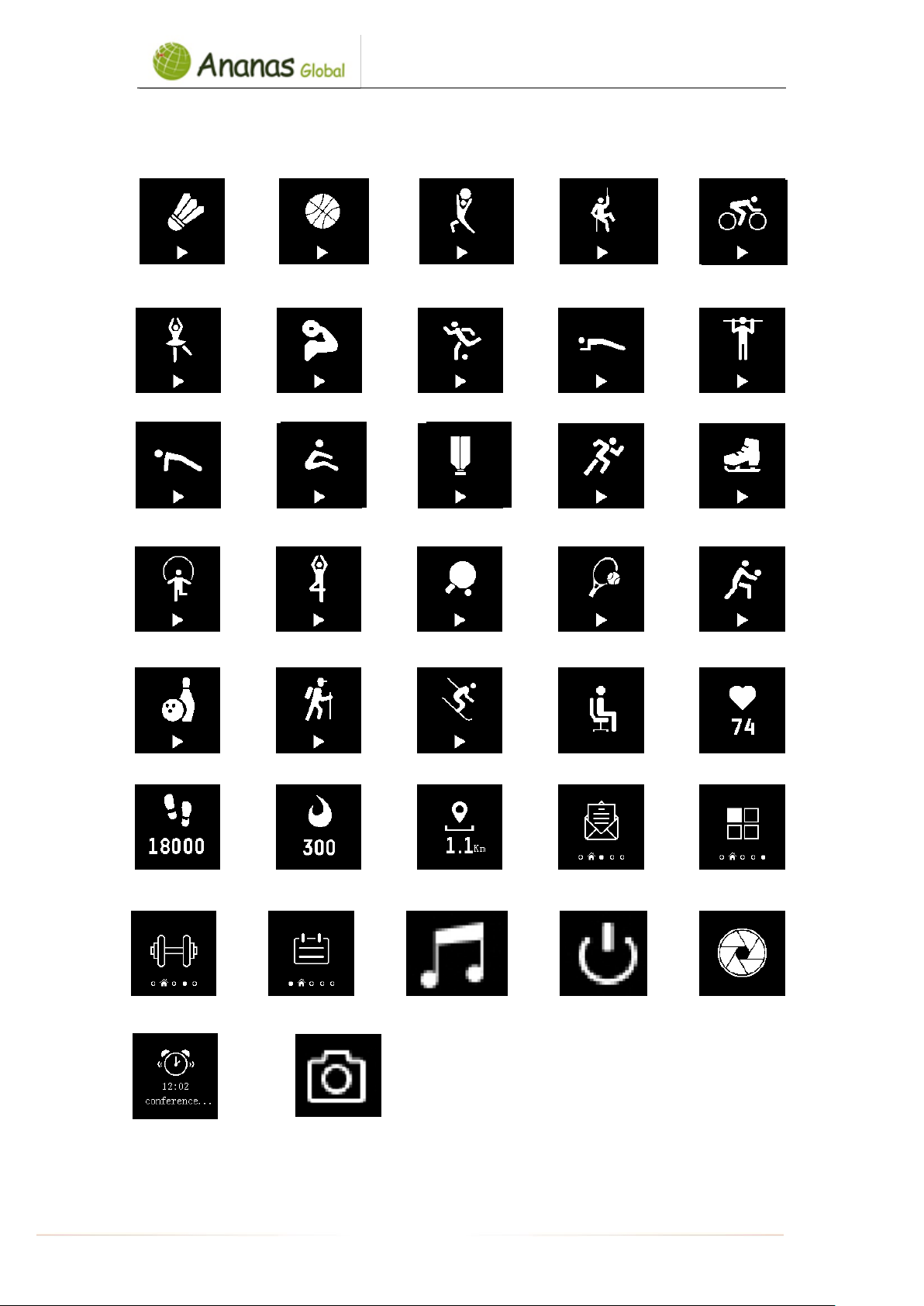
Badminton Basketball Body mechanics Climbing Cycling
Dance Fitness Football Plank Pull-up
Push-up Sit-up Shuttlecock Running Skating
Skipping Yoga Table Tennis Tennis Volleyball
Bowling Mountaineering Skiing Sedentary reminder Heart rate
Steps Distance Calories Message Function
Training Schedule music Power off Camera
Alarm clock Remote camera

לבולג סננא0722366514
Ananas-Global
AGshop.co.il 072-2366514
- 6 -
5. Function schematic diagram:
A. Operation mode: touch or slide screen , hold and long press to confirm.
B. Operate the watch
Left & Right Up & down Press and hold to start Press and hold to end Long Press
6. Synchronize data
Icon
Function
Operation
Dial pictures optional
Long press and slide to choose
dial pictures.
Test heart rate automatic.
Long press to shift on/off.
Find your phone
Long press
לבולג סננא0722366514
Ananas-Global
AGshop.co.il 072-2366514
- 7 -
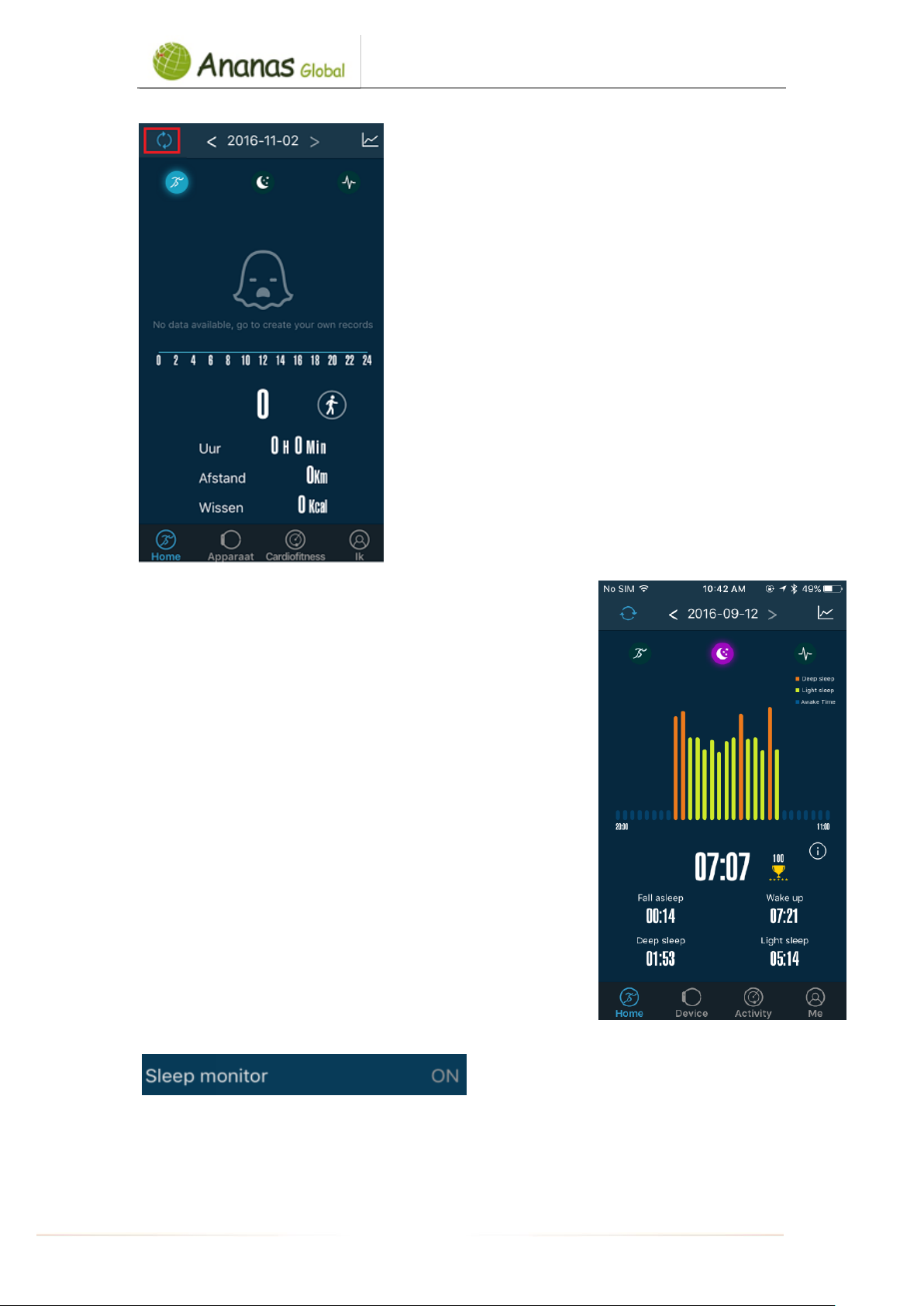
The Watch synchronizes data automatically after
pairing/connecting with your smartphone. Syncing data
includes steps, calorie, distance, date and time. To
synchronize, please click the above left corner to
synchronize; it will take 1-2 minutes. When unable to
synchronize data, disconnected the Bluetooth and retry
to connect again.
7. Sleeping monitor
The watch/device could detect and recognize automatically your
sleeping status and monitors the whole sleeping progress. This
device will analyze/tracks your sleeping quality based on the
movements you make during night.
Bad quality sleep > lots of movement
Good quality sleep > little movements
Note: you will need to wear the watch during the nighttime in
order to get the results of your sleeping quality during the night.
Enable the sleep monitoring in the app by going to the “Device”
tab and then enable the sleep monitor, the watch will detect
automatically if you are under sleeping mode.
לבולג סננא0722366514
Ananas-Global
AGshop.co.il 072-2366514
- 8 -
8. Calling and message reminder
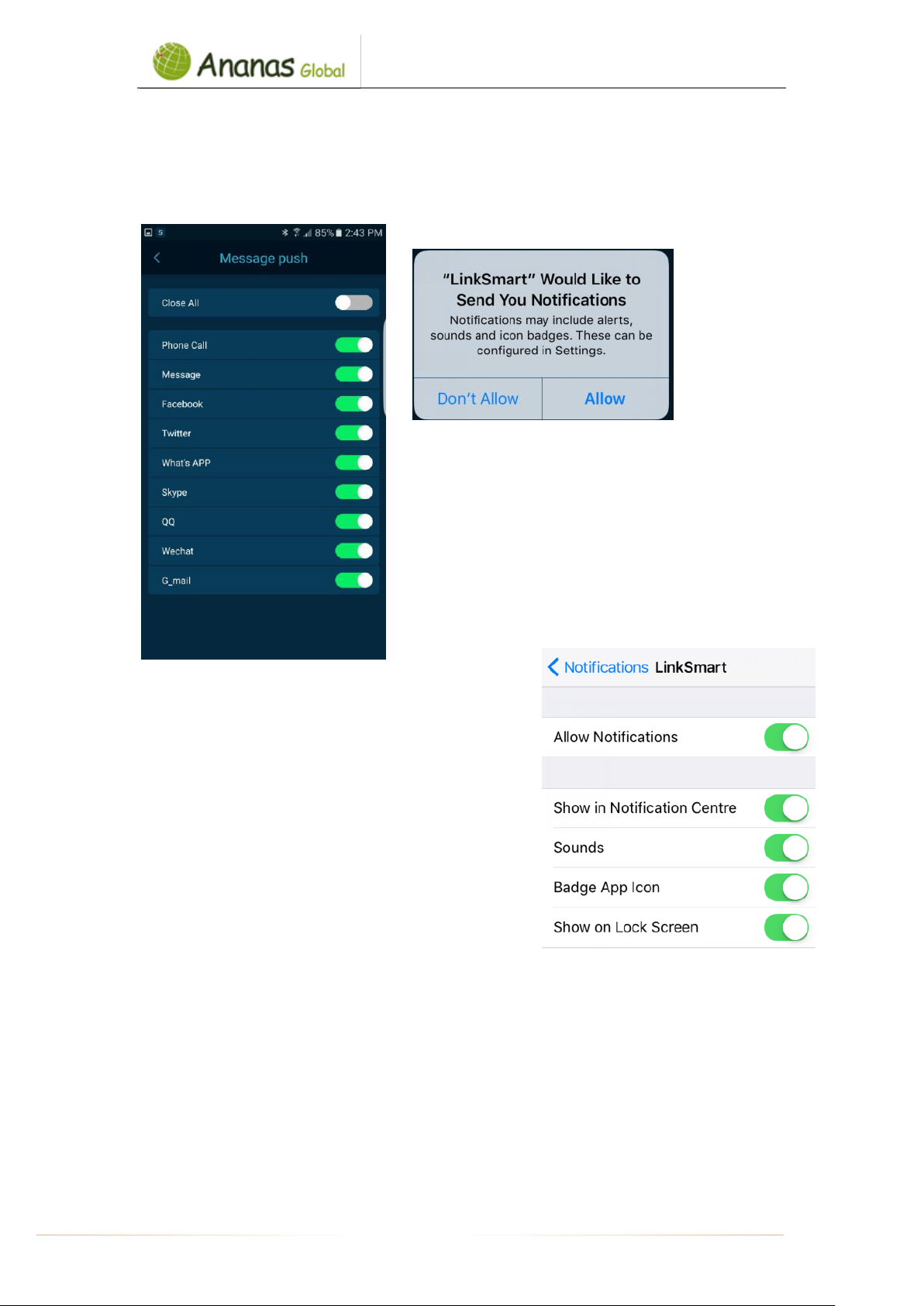
Go to [Device] tab, click [Device setting] to choose [ message push] . For Android smartphones,
it will show you below, allow ‘LinkSmart’ to send you notifications
For IOS smartphones, you need to allow “LinkSmart” to
send your notifications, once you download the app or go
to phone Setting to allow the notifications.
If it is unable to get these notifications when it is
connected with your smartphone, please disconnected
the device with the smartphone and disable the
notification function. Then enable again.
Call/message reminder
Incoming call/messages (WhatsApp, SMS, etc.) will show on the watch screen and will
vibrate. Once enabled the function, the name of the caller will show on the screen. For
messages, you will see the name of the sender and the content of the messages
לבולג סננא0722366514
Ananas-Global
AGshop.co.il 072-2366514
- 9 -
9. Alarm and activity/sedentary reminder
Set alarm by going to “Device” tab in order to add alarm. The watch will vibrate to remind you.
To remind you to be active after (adjusted) period without any movements, please enable
“sedentary reminder” in the “Device” tab in order to adjust the setting according to your
preference.
10. (Remote) Camera Control
By going to the “Device” tab, you can click on “Camera”. You will see a circle icon on the screen
of the app. By touching/press on the icon , you can control the remote of making photos.
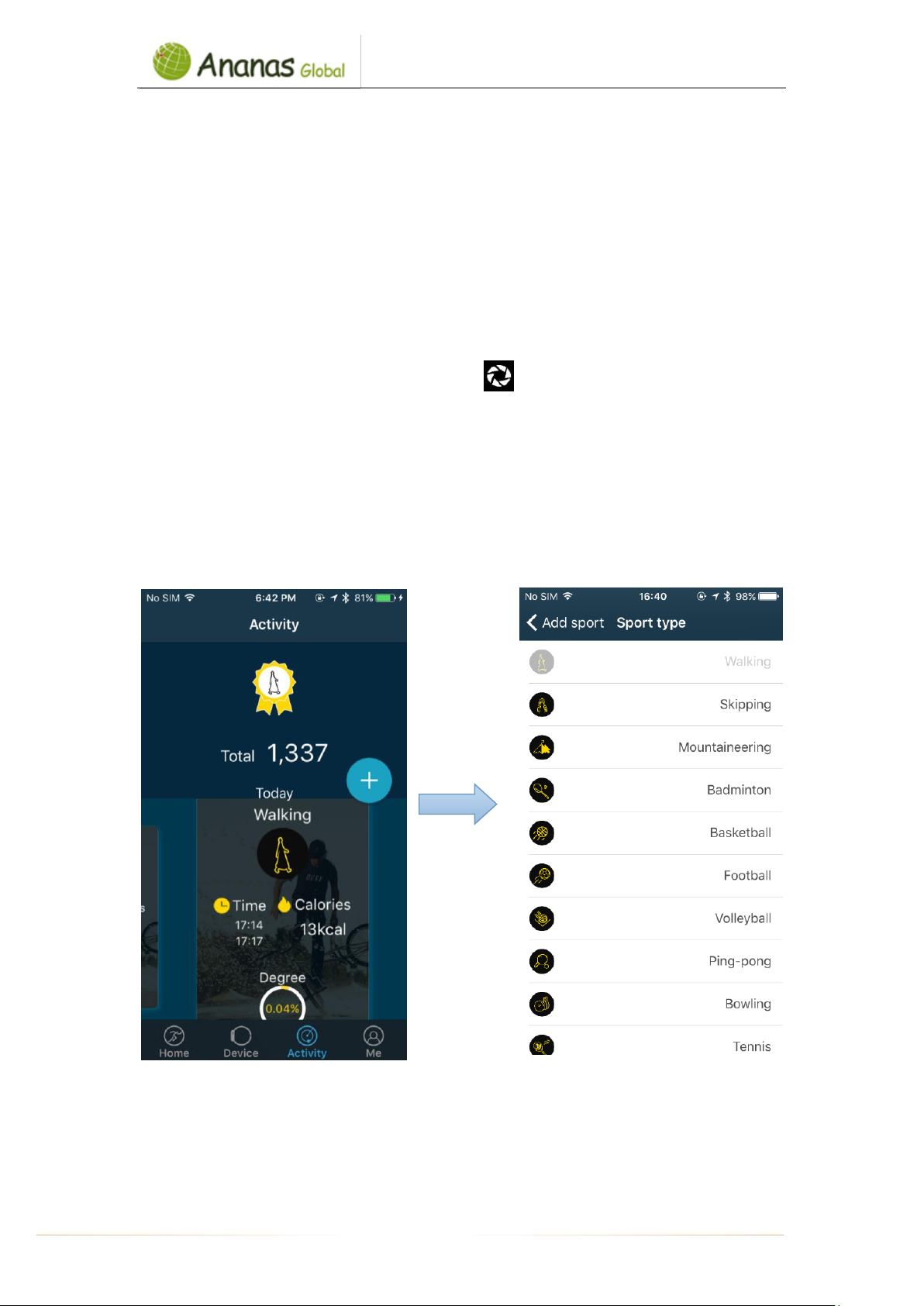
11. Sports type
Go to the [Activity] tab, click on the “+” to add sport type. Or go to [Device] interface, click on
the [Target setting]. You can choose any five type of sports. You can set an exercise goal and
reminder.
12. Check day/week/month activity data
לבולג סננא0722366514
Ananas-Global
AGshop.co.il 072-2366514
- 10 -
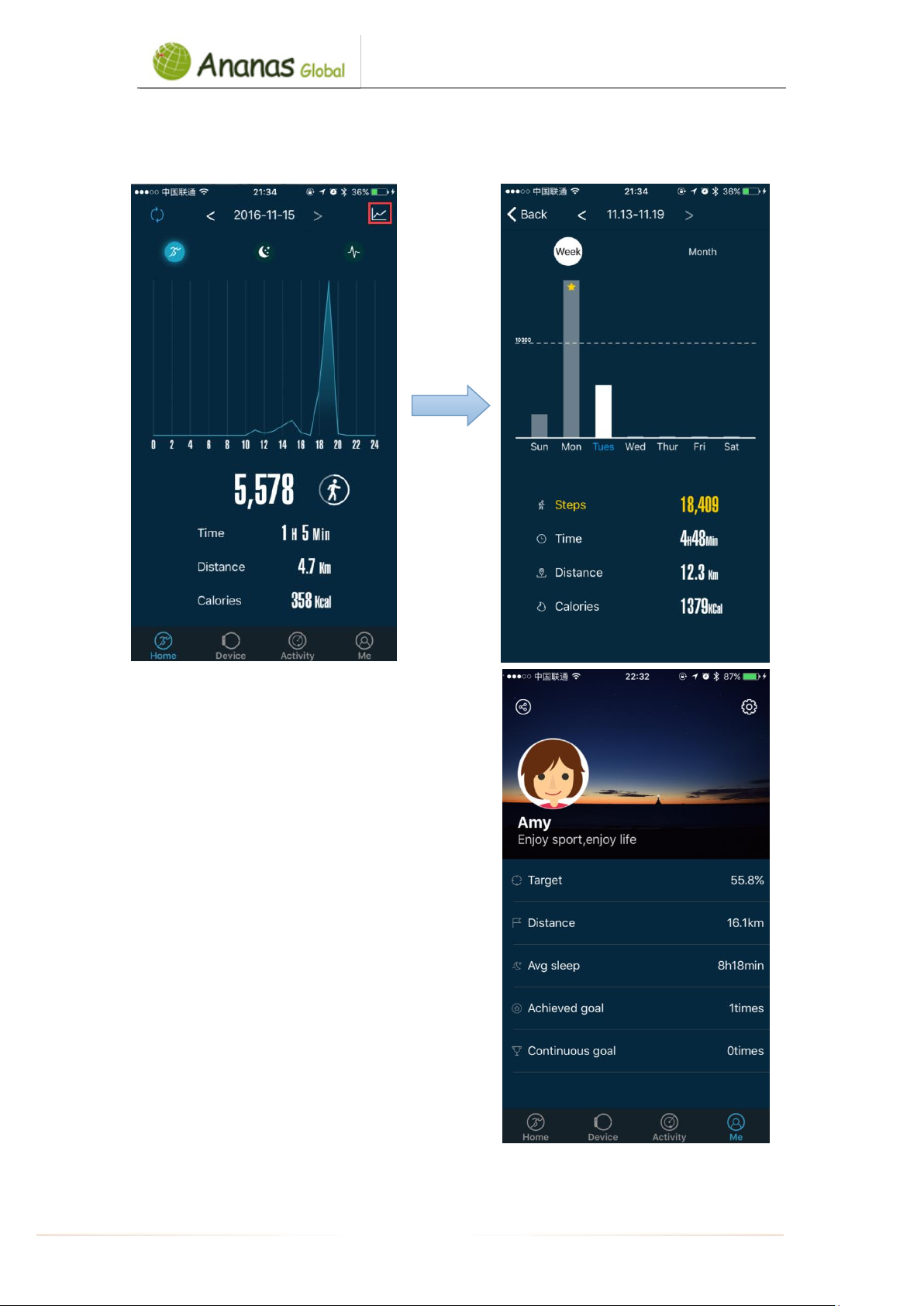
Go to [Home] tab to check each day activity date ( step /sleeping quality/heart rate,etc). Click
the above right corner to check your week/month activity date:
13. Total/average activity data
Go to App [Me] interface to check
your total and average activity data
Table des matières


