AMobile GT50VH2 Manuel utilisateur

I
2018.03
GT50VH2
5” Rugged Android™ Handheld
Device with LTE solution
User's Manual
Version 1.0

- II -
This page is intentionally left blank.

- i -
Revision History
Version Release Time Description
1.0 2018.3Initial release

- ii -
Preface
Contents
Copyright
Copyright © 2016 AMobile Intelligent Corp. All Rights Reserved.
This document contains proprietary information protected by copyright. No
part of this manual may be reproduced by any mechanical, electronic, or other
means in any form without prior written permission of the manufacturer.
Disclaimer
The information in this document is subject to change without prior notice in
order to improve the reliability, design and function. It does not represent a
commitment on the part of the manufacturer.
Under no circumstances will the manufacturer be liable for any direct, indirect,
special, incidental, or consequential damages arising from the use or inability
to use the product or documentation, even if advised of the possibility of such
damages.
About This Manual
This user’s manual provides the general information and installation
instructions for the product. The manual is meant for the experienced users
and integrators with hardware knowledge of personal computers. If you are not
sure about any description in this manual, consult your vendor before further
handling.
We recommend that you keep one copy of this manual for the quick reference
for any necessary maintenance in the future. Thank you for choosing AMobile
products.

- iii -
Contents
Revision History ............................................................................................i
Contents........................................................................................................ii
Preface...........................................................................................................v
Declaration of Conformity.....................................................................................v
CE ................................................................................................................v
EU RED Directive.........................................................................................v
FCC Class B ...............................................................................................vi
RoHS...........................................................................................................vi
SVHC / REACH.......................................................................................... vii
Symbols Description ......................................................................................... viii
Important Safety Instructions ............................................................................ viii
Rechargeable Battery Pack Safety ......................................................................x
General Cleaning Tips.........................................................................................xi
Cleaning Tools............................................................................................ xii
Recommended Cleaning Procedures ........................................................ xii
Disposing of the Equipment .............................................................................. xiii
Additional Information & Technical Support ...................................................... xiii
Warranty............................................................................................................ xiv
Chapter 1 - Introduction...............................................................................1
1.1. Product Highlights.........................................................................................2
1.2 Package Contents..........................................................................................2
1.3 Parts of the Device.........................................................................................3
1.4 Dimensions ....................................................................................................4
1.5 Specications.................................................................................................5
Chapter 2. Getting Started...........................................................................9
2.1 Installing microSD and SIM Card.................................................................10
2.2 Charging the Battery ....................................................................................13
2.2.1 Charging the Battery .........................................................................13
2.2.2 Checking the Battery Level ...............................................................13
2.3 Installing/Replacing the Battery....................................................................15
2.4 Optimizing Battery Life.................................................................................17
Chapter 3. Using the Rugged Handheld Deivce ......................................19
3.1 Using Touch Screen.....................................................................................20
3.1.1 Basic Operations...............................................................................20
3.1.2 Text Input...........................................................................................21
3.1.3 Sleep Mode.......................................................................................21

- iv -
Contents
3.2 Home Screen ...............................................................................................22
3.2.1 Extending Home Screen ...................................................................24
3.3 Using Cellular Network.................................................................................25
3.3.1 Making/Receiving Calls.....................................................................25
3.3.2 Conguring Your SIM Cards..............................................................26
3.4 Using the Wi-Fi Feature ...............................................................................26
3.4.1 Enabling Wi-Fi and Connecting to a WLAN ......................................27
3.4.2 Adding a Wi-Fi Network.....................................................................28
3.4.3 Connecting to a Wi-Fi Network by WPS ..........................................29
3.4.4 Forgetting/Modifying a Wi-Fi Network...............................................30
3.4.5 Making Your Device a Wi-Fi Hotspot.................................................31
3.5 Using the Bluetooth Feature ........................................................................32
3.5.1 Enabling Bluetooth and Pairing with Bluetooth Device .....................32
3.5.2 Conguring Bluetooth Features to Use.............................................34
3.5.3 Disconnect from a Bluetooth Device.................................................34
3.5.4 Conguring Your Bluetooth Device ...................................................34
3.6 Using the Location Feature..........................................................................35
3.6.1 Enabling/Disabling Location Service.................................................35
3.6.2 Location Mode...................................................................................36
3.7 Using the Camera ........................................................................................37
3.8 Using the NFC Feature ................................................................................39
3.8.1 Enabling/Disabling NFC ...................................................................39
3.8.2 Conguring NFC Modes....................................................................39
3.8.3 Exchanging Data with NFC-Enabled Device.....................................40
3.8.4 Using Tap & Pay................................................................................41
3.9 Using the Barcode Scanner .........................................................................42
3.9.1 Using the BarcodeScanWizard (Optional) ........................................42
3.9.2 Supported Barcode Formats.............................................................43

- v -
Preface
Declaration of Conformity
CE
The CE symbol on your product indicates that it is in compliance with the
directives of the Union European (EU). A Certicate of Compliance is available
by contacting Technical Support.
This product has passed the CE test for environmental specications when
shielded cables are used for external wiring. We recommend the use of
shielded cables. This kind of cable is available from AMobile. Please contact
your local supplier for ordering information.
EU Directive
1. Health (Article 3.1.a of the RED Directive)
Applied standard(s): EN50566 July 2001+AC :2006+A1 :2012/EN62209-1 :
2006/EN62209-2 :2010/EN50566 :2013/EN62479 :2010
2.Safety (Article 3.1.a of the R&TTE Directive)
Applied standard(s): EN 60950-1:2006+A11:2009+A1:2010+A12:2011
+A2:2013
3.Electromagnetic compatibility (Article 3.1.b of the R&TTE Directive)
Applied standard(s): EN301489-1 V1.9.2(09-2011) / EN301489-
3V1.6.1(06-2013)/ EN301489-7V1.3.1(11-2005)/EN301489-17 V2.2.1(09-
2012)/EN301489-14V1.5.1(10-2010)
4.Ecient use of the radio frequency spectrum (Article 3.2 of the R&TTE
Directive)
Applied standard(s): EN300328 V1.9.1(2015-02) / EN301893 V1.8.1(2015-03)
There are no restrictions to use the device in EU.
Preface

- vi -
Preface
FCC Class B
This device complies with Part 15 of the FCC Rules. Operation is subject to the
following two conditions:
1. This device may not cause harmful interference, and
2. This device must accept any interference received, including interference
that may cause undesired operation.
Any changes or modications not expressly approved by the guarantee of this
device could void the user’s authority to operate the equipment.
This equipment has been tested and found to comply with the limits for a
Class B digital device, pursuant to Part 15 of the FCC Rules. These limits
are designed to provide reasonable protection against harmful interference
in a residential installation. This equipment generates, uses and can radiate
radio frequency energy and, if not installed and used in accordance with the
instructions, may cause harmful interference to radio communications.
However, there is no guarantee that interference will not occur in a particular
installation. If this equipment does cause harmful interference to radio or
television reception, which can be determined by turning the equipment o and
on, the user is encouraged to try to correct the interference by one or more of
the following measures:
•Reorient or relocate the receiving antenna.
•Increase the separation between the equipment and receiver.
•Connect the equipment into an outlet on a circuit dierent from that to
which the receiver is connected.
•Consult the dealer or an experienced radio/TV technician for help.
RoHS
AMobile Intelligent Corporation certies that all components in its products
are in compliance and conform to the European Union’s Restriction of Use
of Hazardous Substances in Electrical and Electronic Equipment (RoHS)
Directive 2002/95/EC.

- vii -
Preface
The above mentioned directive was published on 2/13/2003. The main purpose
of the directive is to prohibit the use of lead, mercury, cadmium, hexavalent
chromium, polybrominated biphenyls (PBB), and polybrominated diphenyl
ethers (PBDE) in electrical and electronic products. Member states of the EU
are to enforce by 7/1/2006.
AMobile Intelligent Corporation hereby states that the listed products do not
contain unintentional additions of lead, mercury, hex chrome, PBB or PBDB
that exceed a maximum concentration value of 0.1% by weight or for cadmium
exceed 0.01% by weight, per homogenous material. Homogenous material
is dened as a substance or mixture of substances with uniform composition
(such as solders, resins, plating, etc.). Lead-free solder is used for all
terminations (Sn(96-96.5%), Ag(3.0-3.5%) and Cu(0.5%)).
SVHC / REACH
To minimize the environmental impact and take more responsibility to the
earth we live, AMobile hereby conrms all products comply with the restriction
of SVHC (Substances of Very High Concern) in (EC) 1907/2006 (REACH
--Registration, Evaluation, Authorization, and Restriction of Chemicals)
regulated by the European Union.
All substances listed in SVHC < 0.1 % by weight (1000 ppm)

- viii -
Preface
Symbols Description
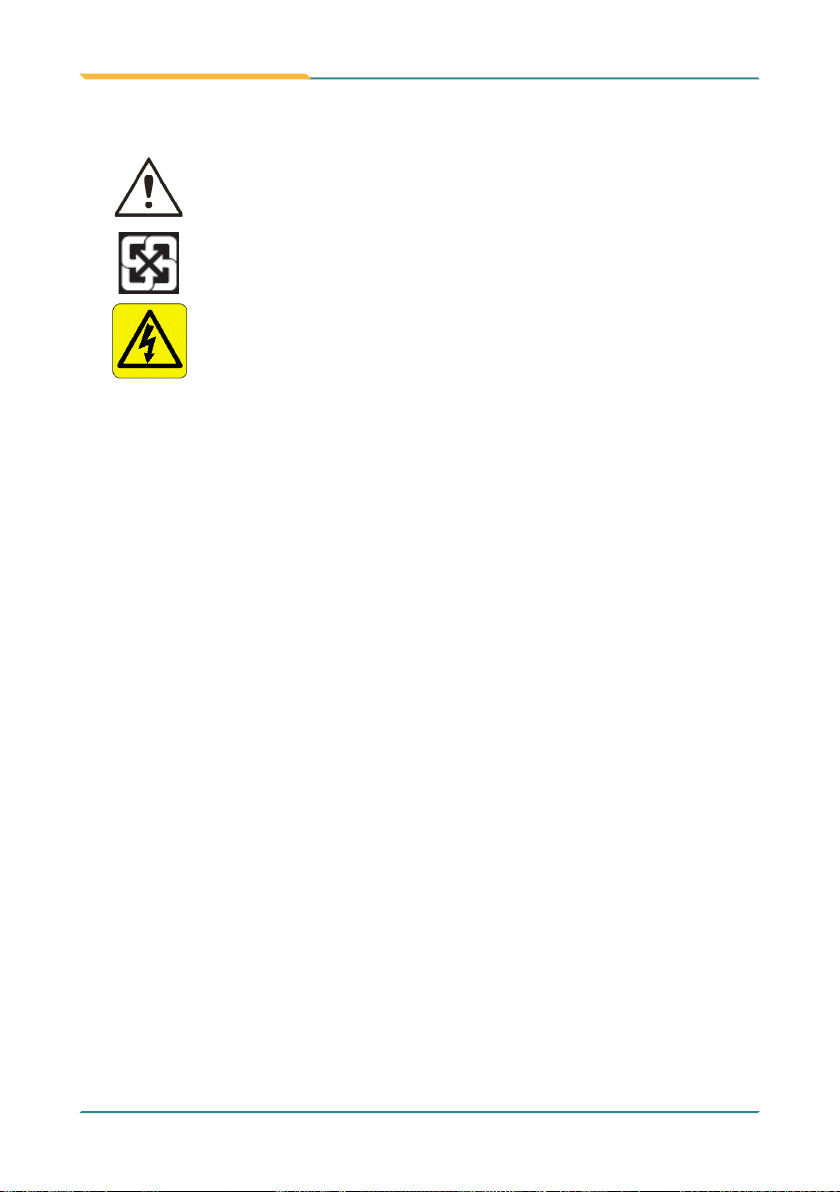
This symbol of “CAUTION” indicates that there is a danger of
injury to the user or a risk of damage to the product, should
warning notices be disregarded.
Battery Recycle
This symbol indicates electrical warning.
Important Safety Instructions
Read these safety instructions carefully:
1. Read all cautions and warnings on the equipment.
2. Place this equipment on a reliable surface when installing. Dropping it or
letting it fall may cause damage
3. Make sure the correct voltage is connected to the equipment.
4. For pluggable equipment, the socket outlet should be near the equipment
and should be easily accessible.
5. Keep this equipment away from humidity.
6. Disconnect this equipment from the A/C outlet before cleaning it. Use a
moist cloth. Do not use liquid or sprayed detergent for cleaning.
7. To fully disengage the power to the unit, please disconnect the power from
the AC outlet.
8. Do not scratch or rub the screen with a hard object.
9. Never use any of the solvents, such as Thinner Spray-type cleaner, Wax,
Benzene, Abrasive cleaner, Acid or Alkaline solvent, on the display. Harsh
chemicals may cause damage to the cabinet and the touch sensor.
10. Remove dirt with a lightly moistened cloth and a mild solvent detergent.
Then wipe the cabinet with a soft dry cloth.
11. The openings on the enclosure are for air convection and protect the
equipment from overheating. DO NOT COVER THE OPENINGS.
Table des matières
Autres manuels AMobile Comprimé