
AlzaPower PBV10PDB Manuel utilisateur
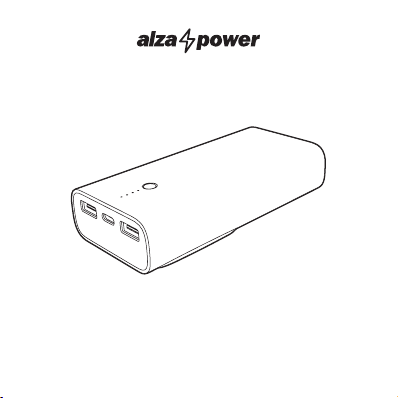
Power Bank PBV10PDB
APW-PBV10PDB
User Manual


ENGLISH 4
DEUTSCH 12
ČESKY 20
SLOVENSKY 28
MAGYAR 36
WARRANTY & SUPPORT 44
GARANTIE & BETREUUNG 44
ZÁRUKA & PODPORA 44
ZÁRUKA & PODPORA 44
GARANCIA & TÁMOGATÁS 44
4ENGLISH
We value your trust. We hope that you will be happy with our product, and as excited about it
as we are. We try to offer products of the highest quality that satisfy even the most demanding
requirements. If you are satisfied, it would make us very happy if you chose us again the next
time you make a purchase.
We are environmentally conscious, therefore we use special eco-friendly packaging. Please
recycle!
Recycling and Environmental Protection
We try to avoid using plastic packaging and film and only use them when they are absolutely
necessary to protect the product. So how are we different?
Packaging you can eat… Well, almost. :-)
We use ink made from soybeans as opposed to classic petroleum-based ink.
The majority of our packaging is made from 100% recyclable paper.
We limit the use of adhesives. If absolutely necessary, we make sure to choose only wa-
ter-soluble ones.
We think globally, which means that we actively search for eco-friendly solutions. We keep
an eye on trending technology and place findings of the scientific community into practice.
We don‘t just try to meet quotas and mandates, we aim to exceed them.
THANK YOU FOR CHOOSING US!

5ENGLISH
Battery capacity 10000 mAh
Battery type Li-Ion / 3.7 V / 38.5 Wh
Charging time 3.5h when charging via USB-C input / 4.5h when charging
directly from the mains
Total maximum output 22.5 W (max)
USB-C (input) 5 V/3.0 A; 9 V/2.0 A (max. 18 W) (PD+QC)
USB-C (output) 5 V/3.0 A; 9 V/2.2 A; 12 V/1.5 A (max. 20 W) (PD20W)
USB-A1/USB-A2 (outputs) 4.5 V/5.0 A; 5 V/4.5 A; 9 V/ 2.0 A; 12 V/1.5 A (max. 22.5 W)
USB-C+USB-A1+USB-A2
outputs
5 V/3.0 A (max. 15 W)
Fast charging support
(USB-C)
PPS, PD2.0/PD3.0, MTK-PE1.1/2.0, FCP/SCP, Samsung AFC,
QC2.0, QC3.0, BC1.2, Apple IPAD
Fast charging support
(USB-A1/A2)
MTK-PE1.1/2.0, FCP/SCP, AFC, QC2.0, QC3.0 SFCP,
BC1.2, IPAD
Dimensions 123 × 60 × 28.7 mm
Weight 218 g
Operating temperature
range
0–60 °C
Storage temperature -10–60 °C
Operating humidity 60 % ± 20 %
Storage humidity 60 % ± 20 %
TECHNICAL SPECIFICATIONS

6ENGLISH
1 Power button
2 LED power bank charge status indicators
3 USB-A1 output
4 USB-C input/output
5 USB-A2 output
6 Power plug
OVERVIEW
4
5
3
1
2
6

7ENGLISH
Checking the power status of the power bank
It is necessary to check the status of charge of the power bank before charging a device. Briefly
press the power button and it will light up depending on its charge:
• one LED indicator: the power bank is charged to <25%;
• two LED indicators: the power bank is 25-50% charged;
• three LED indicators: the power bank is 50-75% charged;
• four LED indicators: the power bank is charged to >75% charged.
If no LED is displayed after pressing the button, the power bank is completely discharged.
The power bank indicators are 4 white lights.
Note: The first light turns green in the case of PD charging (fast charging).
Use as a mains adapter
The power bank can be used as a mains adapter to charge devices from the mains.
Insert the power bank plug into a properly grounded power socket and use the USB cable
to connect the device you want to charge. You will be able to charge the power bank and
connected devices at the same time.
USB-A1/A2 or USB-C output ports support simultaneous charging and discharging. Devices
can be charged at approximately 5 V/1.0 A, but if you insert a second or third device, the
power bank and the charging of the connected devices themselves will drop. The maximum
total output is 2.4 A. When the total output current drops below 1.0 A, full charging resumes.
Use as a power bank
Charging the power bank
Charge the power bank before using it for the first time. We recommend checking the charge
status of the power bank before each use.
Insert the plug of the power bank into a properly grounded socket and let it charge. Depend-
ing on the state of charge of the power bank, the corresponding number of LEDs will light up
INSTRUCTIONS

8ENGLISH
INSTRUCTIONS
and another LED in the row will flash. As the power bank charges, all LEDs will flash and light
up. When all the LEDs light up, the power bank is fully charged.
When charging is complete, disconnect the power bank. The charging time depends on the
charger used. If the power bank will not be used for a long time, charge / discharge it to 50%
of its capacity and check its charge level regularly.
The USB-C input port supports PD2.0/3.0, QC2.0/3.0, FCP, AFC fast charging.
To achieve 9V fast charging,use a QC charger with a four-wire A to C data cable or a five-wire C
to C data cable to charge the power bank. The first indicator light will turn green.
Device charging
You can charge the device with USB-A or USB-C ports of the power bank. Plug one end of the
power cord into a USB port on your device and the other end into the USB port on the power
bank. Depending on the state of charge of the power bank, the corresponding number of
LEDs will light up and the last LED in the row will flash. As the connected device charges, the
LED indicators will gradually turn off.
USB-C supports PPS output, PD2.0/PD3.0,MTK-PE1.1/2.0, FCP/SCP, Samsung AFC and QC2.0,
QC3.0, BC1.2, Apple IPAD. PPS output protocol support: 5.0V-5.9 V (3.0 A),5.0V-11.0 V (2.0 A).
USB-A1/2 supports MTK-PE1.1/2.0, FCP/SCP, AFC, QC2.0, QC3.0, SFCP, BC1.2, IPAD output.
For fast charging, use a four-core A to C data cable or a five-core C to C data cable to charge
the device. The first LED indicator will change from white to green during fast charging.
For normal 5V device charging via USB-A1/2 or USB-C, only the 5V charging model can be
used and the LED indicator will be white.
Only one port (USB-A1 or USB-A2 or USB-C) can be used separately for fast charging. If you
plug in a second device, the power bank switches to normal charging mode.
When the power bank is charging two phones that both support QC, unplug one phone from
the USB port and after about 16 seconds, the USB-C port will switch to QC mode. The first LED
indicator will change from white to green. If you disconnect your phone from the USB-C port,
the USB-A port immediately switches to QC mode.

9ENGLISH
INSTRUCTIONS
Low voltage function
While the LED indicator is lit, press the power button for 2 seconds and the four white LED indi-
cators will gradually light up from the first to the fourth once.After it has been lit for 5 seconds,
press the button again and repeat the cycle.
If the connected device has a voltage of less than 50 mA when charging, you can enable this
function. In low current mode,the output remains on and does not go into standby mode. After
2 hours, the output automatically switches to the no-load standby mode. If you need to turn off
the low voltage mode, you can press the power button for 2 seconds or double click the power
button to turn off the low current mode.
Note: In this mode, the power bank does not support fast charging.

10 ENGLISH
• Read the safety and operating instructions. Failure to observe the safety and operating
instructions can endanger people or damage the device.
• This product is only suitable for household use.
• Use and store the product out of the reach of children. Children must not use this product.
• This product is designed to charge digital device batteries. Use it only in accordance with
the instructions in this operating manual. Do not use the product for purposes other than
those for which it is intended.
• This product does not contain parts repairable by the user . In the event of a malfunction or
defect contact the nearest authorized service center. Check the product or its accessories
regularly for damage.
• It is forbidden to use a damaged product or its accessories.
• Always disconnect the interface cable when the product or connected digital device is fully
charged. Do not leave the cable plugged in.
• If you will not be using the product for a long time, we still recommend charging it regularly
(at least once every six months). This will extend its life.
• Keep this product away from heat sources such as stoves or direct sunlight.No naked flame
sources, such as lighted candles, should be placed on the product.
• Do not expose the product to dripping or splashing water or other liquids. Do not place
containers filled with water, such as vases, on the product.
• Do not expose the product to extreme temperatures, dust or dirt.
• Do not immerse the product in water or other liquids or throw it into a fire.
• Do not use or store the product near materials / objects that could ignite, flammable or
explosive substances, etc.
• Do not leave the product unattended while it is in operation.
• While the product is in operation, ensure that there is sufficient free space around it for
proper air circulation. Use the product only on a flat and firm surface. Do not use it on
a table with a tablecloth, on a worktop on a dish towel, on a carpet, etc. Never cover the
product.
• Do not insert any objects (such as wires or other objects with metal terminals) into the
product's jacks.
• Do not short-circuit, disassemble or otherwise mechanically damage the product.
SAFETY INFORMATION
Ce manuel convient aux modèles suivants
1
Table des matières
Langues :
Autres manuels AlzaPower Bloc de piles


Manuels Bloc de piles populaires d'autres marques


IOGear
IOGear GBP24V Series Manuel utilisateur

Inventus Power
Inventus Power PROTRXion S-12V100-TRX-HD Manuel utilisateur

Clas Ohlson
Clas Ohlson PW-290A Manuel utilisateur

EINHELL
EINHELL MULTI-Ah Power X-Change Plus Manuel utilisateur

Samsung
Samsung EB-U3300 Manuel utilisateur

ECTIVE
ECTIVE LC Series Manuel utilisateur