Alpha Microsystems AM-219 Manuel utilisateur

PDI-00219-00, Rev. A01
AM-219
Diskette Drive Controller
Installation Instructions
ALPHAALPHA
MICROSYSTEMSMICROSYSTEMS
RIGHT. FROM THE START.
ALPHAALPHA
MICROSYSTEMSMICROSYSTEMS
RIGHT. FROM THE START.
ALPHAALPHA
MICROSYSTEMSMICROSYSTEMS
RIGHT. FROM THE START.
ALPHAALPHA
MICROSYSTEMSMICROSYSTEMS
RIGHT. FROM THE START.
ALPHAALPHA
MICROSYSTEMSMICROSYSTEMS
RIGHT. FROM THE START.
ALPHAALPHA
MICROSYSTEMSMICROSYSTEMS
RIGHT. FROM THE START.
ALPHAALPHA
MICROSYSTEMSMICROSYSTEMS
RIGHT. FROM THE START.
ALPHAALPHA
MICROSYSTEMSMICROSYSTEMS
RIGHT. FROM THE START.
ALPHAALPHA
MICROSYSTEMSMICROSYSTEMS
RIGHT. FROM THE START.
ALPHAALPHA
MICROSYSTEMSMICROSYSTEMS
RIGHT. FROM THE START.
ALPHAALPHA
MICROSYSTEMSMICROSYSTEMS
RIGHT. FROM THE START.
ALPHAALPHA
MICROSYSTEMSMICROSYSTEMS
RIGHT. FROM THE START.
ALPHAALPHA
MICROSYSTEMSMICROSYSTEMS
RIGHT. FROM THE START.

© 1996 Alpha Microsystems
REVISIONS INCORPORATED
REVISION DATE
00 May 1994
01 November 1996
AM-219 Diskette Drive Controller Installation Instructions
To re-order this document, request part number PDI-00219-00.
The information contained in this manual is believed to be accurate and reliable. However, no responsibility
for the accuracy, completeness or use of this information is assumed by Alpha Microsystems.
This document was written by Jack Chardi.
This document may contain references to products covered under U.S. Patent Number 4,530,048.
The following are registered trademarks of Alpha Microsystems, Santa Ana, CA 92799:
AMIGOS AMOS Alpha Micro AlphaACCOUNTING
AlphaBASIC AlphaCALC AlphaCOBOL AlphaDDE
AlphaFORTRAN 77 AlphaLAN AlphaLEDGER AlphaMAIL
AlphaMATE AlphaNET AlphaPASCAL AlphaRJE
AlphaWRITE CASELODE OmniBASIC VER-A-TEL
VIDEOTRAX
The following are trademarks of Alpha Microsystems, Santa Ana, CA 92799:
AlphaBASIC PLUS AlphaVUE AM-PC AMTEC
AlphaDDE AlphaConnect DART inSight/am
inFront/am ESP MULTI
All other copyrights and trademarks are the property of their respective holders.
ALPHA MICROSYSTEMS
2722 S. Fairview St.
P.O. Box 25059
Santa Ana, CA 92799

Page iInstallation Instructions: AM-219 Diskette Drive Controller
TABLE OF CONTENTS
1.0 INTRODUCTION . . . . . . . . . . . . . . . . . . . . . . . . . . . . . . . . . . . . . . . . . . . . . . . . 1
2.0 AM-219 SPECIFICATIONS . . . . . . . . . . . . . . . . . . . . . . . . . . . . . . . . . . . . . . . . 1
3.0 PRODUCT INSTALLATION KIT . . . . . . . . . . . . . . . . . . . . . . . . . . . . . . . . . . . . 2
3.1 3.5" Diskette Drive Specifications . . . . . . . . . . . . . . . . . . . . . . . . . . . . . . 2
3.2 5.25" Diskette Drive Specifications . . . . . . . . . . . . . . . . . . . . . . . . . . . . . 3
4.0 CONFIGURING THE AM-219 BOARD . . . . . . . . . . . . . . . . . . . . . . . . . . . . . . . 4
5.0 CONFIGURING YOUR DISKETTE DRIVE . . . . . . . . . . . . . . . . . . . . . . . . . . . . 5
5.1 Panasonic JU-475-2 Diskette Drive Configuration . . . . . . . . . . . . . . . . . 6
5.2 Panasonic JU-475-3 Diskette Drive Configuration . . . . . . . . . . . . . . . . . 7
5.3 Panasonic JU-475-4 Diskette Drive Configuration . . . . . . . . . . . . . . . . . 8
5.4 Toshiba ND-0801 Diskette Drive Configuration . . . . . . . . . . . . . . . . . . . 9
5.5 Epson SD-680L Diskette Drive Configuration . . . . . . . . . . . . . . . . . . . . 10
5.6 TEAC FD-55GFR Diskette Drive Configuration . . . . . . . . . . . . . . . . . . . 11
5.7 Toshiba ND365T Diskette Drive Configuration . . . . . . . . . . . . . . . . . . . . 12
5.8 Toshiba ND3651 Diskette Drive Configuration . . . . . . . . . . . . . . . . . . . . 13
5.9 Toshiba ND3651GR Diskette Drive Configuration . . . . . . . . . . . . . . . . . 14
5.10 TEAC FD-235HF Diskette Drive Configuration . . . . . . . . . . . . . . . . . . 15
5.11 EPSON SMD-300 Diskette Drive Configuration . . . . . . . . . . . . . . . . . . 16
6.0 DISKETTE DRIVE INSTALLATION IN AM-1400/1600 DESKTOP COMPUTERS16
7.0 DISKETTE DRIVE INSTALLATION IN RACK MOUNT AND PEDESTAL
COMPUTERS . . . . . . . . . . . . . . . . . . . . . . . . . . . . . . . . . . . . . . . . . . . . . . . . 19
7.1 Front Bezel Removal and Modification . . . . . . . . . . . . . . . . . . . . . . . . . . 20
7.2 Building and Installing the Diskette Drive Mounting Assembly . . . . . . . . 20
7.3 Installing a 3.5" Drive in Pedestal and Rack Mount Chassis . . . . . . . . . 22
7.4 Diskette Drive Installation in Other Applications . . . . . . . . . . . . . . . . . . . 23
8.0 INSTALLING THE AM-219 BOARD . . . . . . . . . . . . . . . . . . . . . . . . . . . . . . . . . . 23
9.0 CONNECTING THE INTERFACE CABLE . . . . . . . . . . . . . . . . . . . . . . . . . . . . . 32
9.1 Connecting the Power Cable . . . . . . . . . . . . . . . . . . . . . . . . . . . . . . . . . 32
10.0 FINISHING THE INSTALLATION . . . . . . . . . . . . . . . . . . . . . . . . . . . . . . . . . . 32
PDI-00219-00, Rev. A01

Page ii Installation Instructions: AM-219 Diskette Drive Controller
11.0 CREATING A SOFTWARE DRIVER . . . . . . . . . . . . . . . . . . . . . . . . . . . . . . . . 33
12.0 MODIFYING THE SYSTEM INITIALIZATION COMMAND FILE . . . . . . . . . . . 36
12.1 Modifying the Device Table . . . . . . . . . . . . . . . . . . . . . . . . . . . . . . . . . 36
12.2 Adding a BITMAP Statement . . . . . . . . . . . . . . . . . . . . . . . . . . . . . . . . 36
12.3 Adding the Device Driver to System Memory . . . . . . . . . . . . . . . . . . . . 37
12.4 Sample System Initialization Command File . . . . . . . . . . . . . . . . . . . . 37
12.5 Testing the Initialization File . . . . . . . . . . . . . . . . . . . . . . . . . . . . . . . . . 37
13.0 FORMATTING AND INITIALIZING A DISKETTE . . . . . . . . . . . . . . . . . . . . . . 38
14.0 USING YOUR DISKETTE DRIVE . . . . . . . . . . . . . . . . . . . . . . . . . . . . . . . . . . 39
PDI-00219-00, Rev. A01

Page 1Installation Instructions: AM-219 Diskette Drive Controller
1.0INTRODUCTION
This document provides hardware and software instructions for installing an AM-219
diskette drive controller and drive assembly into AM-1400, AM-1600, AM-3000M,
AM-4000, and all Eagle series computers. The AM-219 is a high-speed controller based
on the industry standard 37C65 diskette drive controller chip. Unlike earlier Alpha Micro
controllers, the AM-219 contains a fully digital data separator which requires no
adjustments or calibration for any of the supported diskette formats.
The AM-219 is designed for use with diskette drives found in IBMPC/AT compatible
computers. Some older diskette drives used in "AMOS only" configurations may not be
supported by the AM-219; however, with the low cost and availability of PC/AT
compatible diskette drives, changing over to a new drive is not an expensive proposal.
Earlier AMOS diskette controllers supported several different formats, some of which
were either obsolete or unused. The driver configuration program for the AM-219,
FIX219, supports the following formats:
AMOS 720KB 3.5" double density
AMOS 800KB 5.25" double density
AMOS 1.2MB 5.25" high density
AMOS 1.44MB 3.5" high density
PC 360KB 5.25" double density
PC 720KB 3.5" double density
PC 1.2MB 5.25" high density
PC 1.44MB 3.5" high density
The AM-219 diskette controller does not support the AM-121 VPC board!
2.0AM-219 SPECIFICATIONS
1.The AM-219 floppy controller is compatible with AM-1400, AM-1600, AM-3000M,
AM-4000, and all Eagle series computers.
2.Drives supported: two
3.Maximum transfer rate: 500kbits/second
PDI-00219-00, Rev. A01

Page 2 Installation Instructions: AM-219 Diskette Drive Controller
4.Buffer RAM: 32K bytes
5.Data Separator: Fully digital—no adjustments required
6.Formats supported: eight (four AMOS and four PC)
7.VPC support: none
3.0PRODUCT INSTALLATION KIT
The AM-219 controller supports both half-height 5.25" and 3.5" diskette drives. The part
number for the AM-219 product kit is PDB-00219-00. The installation kit includes the
following:
DWB-00219-00—AM-219 diskette controller.
HDY-50001-08—standoffs for AM-219 mounting holes.
PDI-00219-00—
AM-219 Diskette Controller Installation Instructions
.
DWB-10218-02—34-pin interface cable, supports both single and dual diskette
drive installations.
PRA-00103-00—DC power cable assembly adapter; allows a 3.5" diskette drive to
be plugged into a standard 4-pin power connector.
For installations where you are replacing an AM-214 with a new AM-219 controller, you
will continue to use your existing 34-pin interface cable, which is the cable that links the
diskette drive (or drives) to the controller. If you are installing an AM-219 into a
computer which did not previously have an AM-214 controller, you will use the 34-pin
PC style interface cable included in the installation kit. This cable (DWB-10218-02) is
designed to support both single and dual drive configurations, and is long enough to
work in any application.
3.13.5" Diskette Drive Specifications
Physical Size 3.5"
Data Capacity 1.44MB, or less depending on the format.
Diskettes 3.5", 18 sectors/track, 80 tracks/side, double sided, double
density
PDI-00219-00, Rev. A01

Page 3Installation Instructions: AM-219 Diskette Drive Controller
3.5" Diskette Drive Specifications (cont.)
Transfer Rate 500K bits/second.
Latency (Average) 100 msec.
Access Time
Track-to-track 3 msec.
Average Access Time 94 msec.
Track Density 135 TPI.
Recording Density 17434 bits/inch.
MTBF 10000 power on hours or more, normal duty cycle.
Soft Read Error Rate 1 x 10^-9
Hard Read Error Rate 1 x 10^-12
Seek Error Rate 1 x 10^-6
3.25.25" Diskette Drive Specifications
Physical Size 5.25"
Data Capacity 1.2MB, or less depending on the format.
Diskettes 5.25", 10 sectors/track, 80 tracks/side, double-sided,
double-density.
Transfer Rate 300K bits/second.
Latency (Average) 94 msec.
Access Time
Track-to-track 5 msec.
Average Access Time 150 msec.
Track Density 96 TPI.
Recording Density 5922 bits/inch.
PDI-00219-00, Rev. A01

Page 4 Installation Instructions: AM-219 Diskette Drive Controller
5.25" Diskette Drive Specifications (cont.)
MTBF 9200 power on hours or more, 25% duty cycle.
Soft Read Error Rate 1 x 10^-9
Hard Read Error Rate 1 x 10^-12
Seek Error Rate 1 x 10^-6
4.0CONFIGURING THE AM-219 BOARD
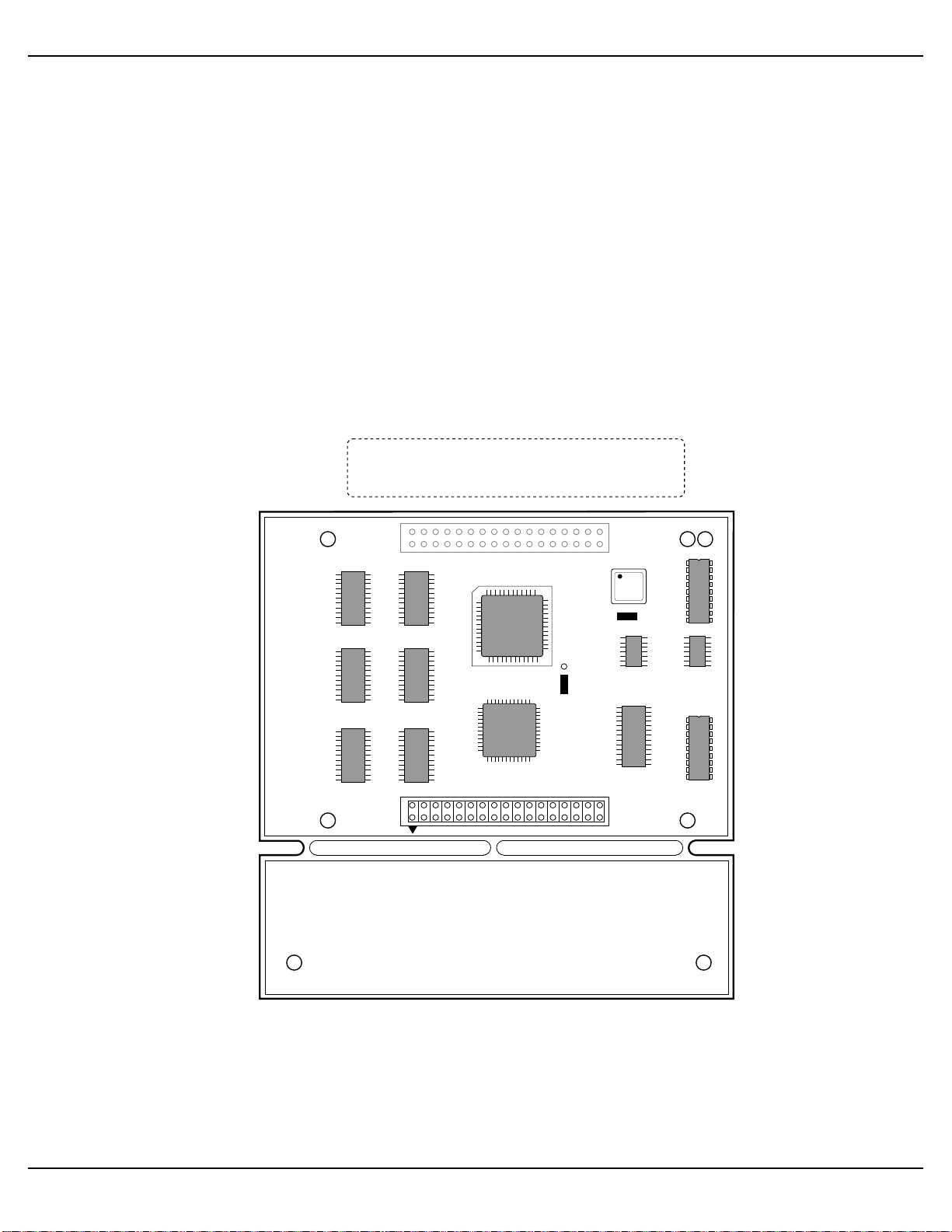
The AM-219’s jumpers have been factory configured as shown in the following
illustration. Jumpers W1 and W2 should NOT be moved; they are compatible with both
3.5" and 5.25" diskette drives.
ALPHA MICROSYSTEMS AM-219
MADE IN USA
SMC
W1
W2
J2
The W1 and W2 jumpers are factory configured
and should never be removed or reconfigured.
MC1048
AM-219 Diskette Drive Controller
PDI-00219-00, Rev. A01

Page 5Installation Instructions: AM-219 Diskette Drive Controller
5.0CONFIGURING YOUR DISKETTE DRIVE
This section contains configuration information for the following diskette drives:
Panasonic JU-475-2 5.25"
Panasonic JU-475-3 5.25"
Panasonic JU-475-4 5.25"
Toshiba ND0801 5.25"
Epson SD-680L 5.25"
Teac FD-55GFR 5.25"
Toshiba ND356T 3.5"
Toshiba ND3561 3.5"
Toshiba ND3561GR 3.5"
Teac FD-235HF 3.5"
Epson SMD-300 3.5"
The diskette drives on the following pages represent drives sold and supported by Alpha
Micro, both past and present. If you are replacing your old AM-214 board with a new
AM-219 diskette controller, you will need to change the jumper configuration on your
diskette drive (or diskette drives if you have two) in order for it to be AM-219 compatible.
Simply locate the illustration for your particular drive and configure the jumpers as
shown in the illustration. Each drive is shown with its jumpers configured for an AM-219
application, which is exactly the same configuration used in industry standard PCs. If
you have a diskette drive that is not listed in this document, it can still be used with the
AM-219 board as long as it is PC compatible—if it works in a PC, it will work with the
AM-219 board.
Each of the diskette drive illustrations show how to configure the drive for either drive
select 0 or drive select 1. If you are using a PC style 34-pin interface cable with your
AM-219 board, your diskette drive (or drives if you have two) must be configured to
drive select 1. With the PC style interface cable, it is the cable, not the drives, that
determines which drive is 0 and which drive is 1. If you take a close look at the PC style
cable, you can see a twist just before the last diskette drive connector; this twist
determines the drive select number.
If you are replacing your old AM-214 with a new AM-219 controller and using your
existing 34-pin interface cable, you will continue to use the traditional method of
configuring drive selects in AMOS-based applications. In single drive configurations, the
diskette drive must be set to drive select 0; if you have two diskette drives, you must set
the second drive to drive select 1.
PDI-00219-00, Rev. A01

Page 6 Installation Instructions: AM-219 Diskette Drive Controller
5.1Panasonic JU-475-2 Diskette Drive Configuration
DS MX
1
2
3
4
D0
DC
LR
RDY
IRD
DD
IX
SP
AT AX 1M BX CX MS
MM
HA
OA
DA
UA MC1037
PANASONIC
JU-475-2
= JUMPER INSTALLED
PANASONIC JU-475-2
5-1/4" HALF-HIGH DISKETTE DRIVE
POWER CONNECTOR
PIN #1
INTERFACE CONNECTOR
1
2
3
4
ID 1 1
2
3
4
ID 0
DRIVE SELECT
PDI-00219-00, Rev. A01
Table des matières