
Allflex AFX-100 Manuel utilisateur

EID_UM_1000109_AFX100M1.6_US
AFX-100 Reader
User Manual

EID_UM_1000109_AFX100M1.6_US

2

3
1INTRODUCTION
The AFX-100 Reader is a portable reader for RFID tags with the purpose of identifying
animals. The device is fully compliant with ISO standards ISO11784 and ISO11785 and
with the FDX-A (Destron Fecava version, Trovan technologies and Avid’s encrypted
technology), FDX-B, and HDX technologies. The reader can also capture the
temperature information with Allflex TD implants and Destron Fearing BT implants.
In addition to its tag reading functions, the AFX-100 Reader can store up to 1800 IDs,
each associated with a time/date stamp, in its internal memory and transmit them to a
personal computer via an USB interface or an optional Bluetooth® interface.
Using the device is easy and a clear menu gives several options to personally configure
your reader.
Features
Unique dual element omnidirectional antenna provides improved reading
Backlight graphical display
Audible beeper and tactile vibrator reading indicators (configurable)
Optional Bluetooth® Technology wireless connectivity (factory option)
Real-time clock/calendar for time/date stamping tag readings
Temperature reading capabilities from temperature detection implants
Compact and lightweight profile
o280mm L x 83mm W x 55mm H (11” x 3.3” x 2.2”)
o275 g (9.7 oz.)
Rechargeable 700 mAH NiMH battery provides up to 15 hours of use
3 hour fast charge time
Battery charge level indicator
Automatic shutoff conserves battery life
Carrying case for storing AFX-100 Reader and its accessories

4
2SPECIFICATIONS
General
Norms:
Full ISO 11784 and full ISO 11785 including annex C
for FDX-A (Destron, Trovan and encrypted Avid),
FDX-B and HDX.
Special feature:
Temperature scanning with TD and BT implants
User interface:
Graphical display 128x64 dots
2 keys
Buzzer and Vibrator
USB port and optional Bluetooth® module
USB interface:
Serial emulation (CDC class) from 1200bps to
115200bps.
Bluetooth® interface:
Class 2 (up to 10m)
Serial Port Profile (SPP).
Memory:
1800 animal IDs
Battery:
7.2VDC –700mAh NiMH rechargeable.
Autonomy:
15 hours @ 20°C
Date/Time autonomy:
1 monthwithout reader using @ 20°C
Battery charge duration:
3hours
Mechanical and physical
Dimensions:
280 x 83 x 55 mm (11 x 3.27 x 2.17 in)
Weight:
275 g (9.7 oz)
Material
ABS-PC
Color
Cool Gray 1
Operating temperature
-10°C to +40°C (+14°F to +104°F)
Storage temperature
-30°C to +70°C (-22°F to +158°F)
Humidity:
80%
Reading
Distance for implants HDX:
@ orientation (°)
Up to 16 cm (6.3 in) @ 0° [Figure 1]
Up to 10 cm (4 in)@ 90° [Figure 2]
Distance for implants FDX-A Destron (Fecava
version) technology:
@ orientation (°)
Up to 6 cm (2.4 in)@ 0° [Figure 1]
Up to 4 cm (1.6 in)@ 90° [Figure 2]
Distance for implants FDX-A Trovan technology:
@ orientation (°)
Up to 1 cm (0.4 in) @ 0° [Figure 1]
Up to 2 cm (0.8 in) @ 90° [Figure 2]
Distance for implants FDX-A Encrypted technology:
@ orientation (°)
Up to 4.5 cm (1.7 in) @ 0° [Figure 1]
Up to 2.8 cm (1.1 in)@ 90° [Figure 2]
Distance for implants FDX-B:
@ orientation (°)
Up to 13 cm (5.1 in) @ 0° [Figure 1]
Up to 8 cm (3.15 in)@ 90° [Figure 2]
Figure 1 - implants perpendicular to the reader.
Figure 2 - implants parallel to the reader.
2
3DESCRIPTION OF DIFFERENT PARTS
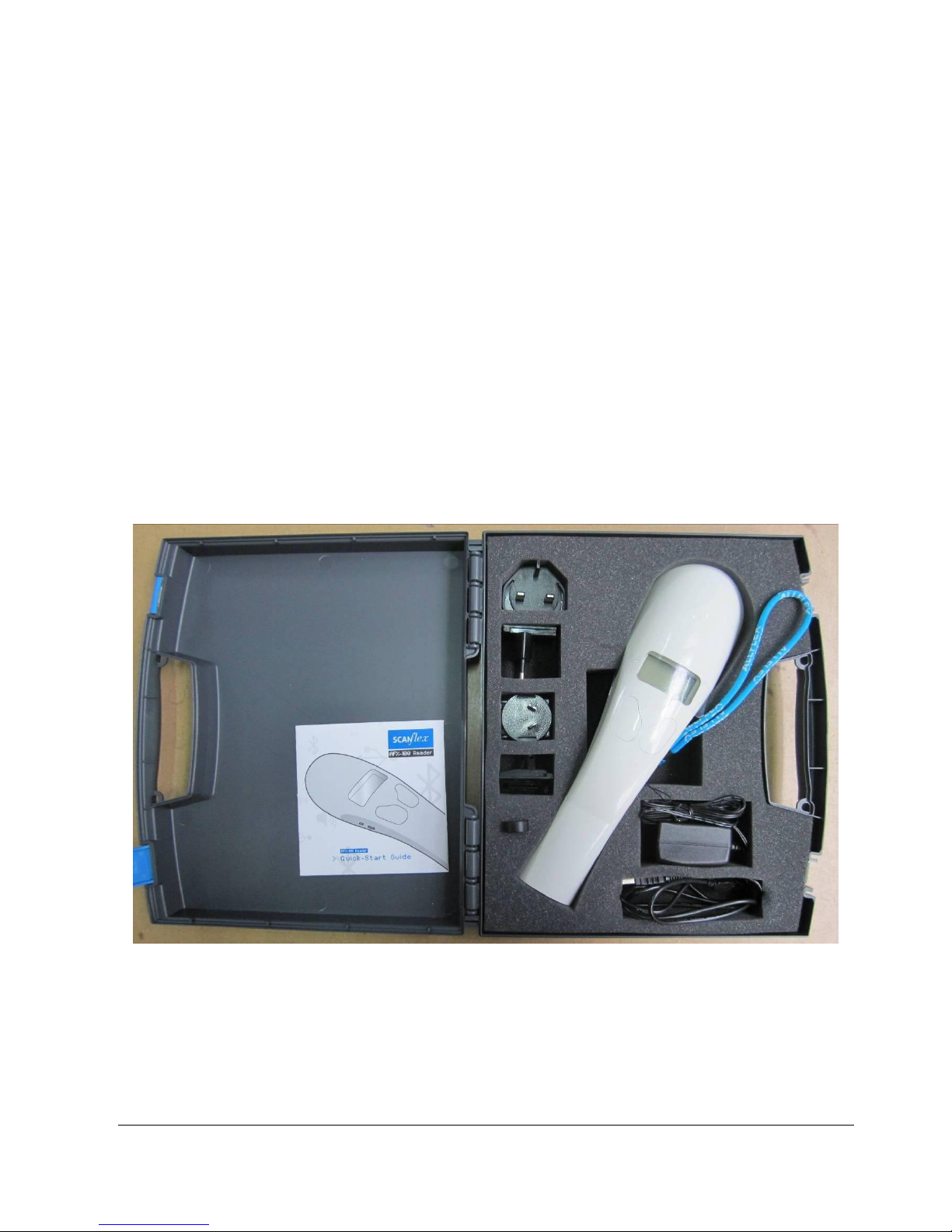
The Figure 3 below shows all parts included in the packaging.
AFX-100 Reader with optional Bluetooth® module.
Instruction Guide.
1 x 7.2 Volt DC NiMH rechargeable battery pack.
100 / 240 VAC –12 VDC wall adapter with plug kit.
USB cable.
AFX-100 Reader CD-ROM and Bluetooth® CD-ROM.
oAFX-100 CD-ROM contains the User Manual, the AFX-100 USB driver,
the protocol specifications and the demo software
oBluetooth® CD-ROM contains the driver and the applications related to the
USB Bluetooth® key.
Wrist strap.
Optional car kit.
Optional USB Bluetooth® dongle
Figure 3 –AFX-100 Reader Packaging.
USB cable
Wall adapter
Bluetooth key
Plug kit
AFX-100 Reader
Instruction guide
Wrist strap

3
The Figure 4 shows the charge connector and the USB connector used to connect the
reader to a personal computer.
Figure 4 - View of the connectors.
Charge connector
USB connector

4
4PREPARING FOR USE
It is necessary first to fully charge the Battery Pack as described below and to have an
few electronic identification eartags or implants available for testing.
The battery charge can be realized at a temperature between
+10° and +40°C.
It is very important to carry out the following three steps
before using the AFX-100 Reader.
Step 1: Installing the battery pack in the AFX-100 Reader
1
Remove the battery cover
2
Connect the battery to the
connector
3
Insert the battery and place the
wire in the box
4
Refit the cover

5
Step 2: Trickle charging the battery pack.
1
Charge the battery
Plug the power cord into the reader, then
plug the adapter into a power outlet
The battery icon changes to and
charging starts.
A L L F L E X A F X - 1 0 0
0 1 / 0 1 / 2 0 0 1
R e a d M e n u
0 0 : 0 0
The battery icon will be when
charging has finished. Charging takes
approx. 3 hours.
2
Remove the power cord.
Unplug the adapter from the power
outlet, then remove the power cord
inserted in the reader.

6
Step 3: Activating the AFX-100 Reader and read test
1
Activate the reader
Press one button to power-up the reader.
After the reader is powered-up –Press
the button READ (button under the
mention “READ” onto the display) to
read an eartag or an implant.
READ ZONE
2
Place an implant in the reading zone
Typical read
oUp to 16 cm (6.3 in) @ 0°
(implants parallel to the reader)
oUp to 6 cm (2.4 in) @ 0° (implants
parallel to the reader)
oUp to 13 cm (5.1 in) @ 0°
(implants parallel to the reader)
Table des matières
Manuels Lecteur de codes-barres populaires d'autres marques

POSMicro
POSMicro Datalogic PowerScan D7100 Manuel utilisateur

Marson
Marson MT780 Guide de configuration rapide

NCR
NCR RealPOS Manuel utilisateur

Motorola
Motorola SE3300 Guide de configuration rapide

Element
Element P130BT Manuel utilisateur

Motorola
Motorola Symbol LS3008 Manuel d'installation et d'exploitation


