
ALIGATOR WATCH LADY Manuel utilisateur

ALIGATOR WATCH LADY
USER MANUAL

CONTENT
Important............................................................................ 3
Controls and watch strap attachment ................................ 4
Removing the strap............................................................. 4
Proper wearing of the watch .............................................. 4
Charging .............................................................................. 4
Switching on and off ........................................................... 4
Control your watch ............................................................. 5
Main functions .................................................................... 6
Connecting phone............................................................... 9
Display the collected data in the app................................ 11
Watch settings .................................................................. 11
Watch face settings........................................................... 11
Change the look of the watch face ................................... 12
How to get more watch faces using the app .................... 12
Setting your own image on the dial .................................. 12
Edit personal settings and data......................................... 12
Water resistance IP68....................................................... 13
Troubleshooting................................................................ 13
Alerts do not appear on the watch ................................... 13
The watch does not connect............................................. 13
The watch cannot be charged with a power bank............ 14
Safety and ecology............................................................ 14
Built-in battery.................................................................. 14
Instructions for safe battery removal by user or by
a qualified professional:.................................................... 15
Used electrical equipment ................................................ 15
Declaration of Conformity ................................................ 15

Thank you for purchasing ALIGATOR smart watch.
Please read these operating instructions.
Important
•Handle product and accessories with care, protect it
from mechanical damage and dirt. Protect the product
and accessories from extreme temperatures. Do not
dispose of the product in a fire or expose it to
temperatures above +60 ° C, there is a risk of
explosion.
•The product contains built-in battery.
•Protect the product and accessories from falling to the
ground.
•The product does not contain any user-serviceable
parts, never disassemble the product or accessories.
•Switch the product off in aircraft unless you are
specifically allowed to use it.
•Do not use the product near explosives.
•Keep out of reach of children and do not allow them
to play with the product. It may contain small parts
that could suffocate or otherwise injure them.
•The software and hardware of the product are
continuously innovated. The manufacturer therefore
reserves the right to change the manual and individual
functions without prior notice.
•For more information, tutorials and video tutorials on
how to set up a smart watch, visit:
http://www.aligator.cz/awlady

Controls and watch strap attachment
The watch is equipped with two buttons on the side for
basic easy operation. The watch is equipped with touch
screen for the control of other watch functions
Removing the strap
The strap of the watch can be easily
removed using the lever located on each of the spring bars
on the underside of the strap.
Push the lever and the spring bar will be released.
Proper wearing of the watch
Place the watch on your wrist so its back with the heart
rate sensor fits snugly to the hand surface, see Figure 6.
Charging
Charge the watch before using it for the first time. Use the
included magnetic adapter 7 for charging.
Adapter is attached to the contacts on the back of the
watch in correct position by built-in magnets. Plug the
adapter into a suitable USB socket. Battery charging status
is shown on the screen.
Switching on and off
To turn the watch on / off, please press and hold button 1
until the watch turns on / off. It is necessary to confirm it
on LCD screen.

Control your watch
The watch screen is dimmed by default to save battery
power. To activate the screen, either touch it or press
button 1. After the set time has elapsed, screen dims itself
or you can dim it by pressing button 1.
You can select the function from menu by swiping the
touch-screen left / right.
Activate the selected function by touching the screen. To
return level up in the menu, either press 1 or swipe the
screen from left to right.
To see the messages swipe from the bottom up (moving in
the opposite way to go back).
For quick settings swipe from top to bottom. (move in the
opposite direction to return back). Press button 2 to
display the training activity menu.

Main functions
You can select from the following functions by swiping the
screen.
Stopwatch
Simple stopwatch.
Messages
View messages and notifications from your phone.
Women functions
Physiological monitoring cycles of a woman. Menstrual
cycle, ovulation cycle etc.
Music
Allows you to control the music player on your phone.

Sleep
Displays information and statistics about sleep duration
and quality.
Training
Starts a measurement of a training activity. You can choose
from variety of sports. After the training starts, the
measurement can be paused / stopped by pressing button
1 or swiping the screen from left to right.
spO2
Display the blood oxygen - experimental function,
measured value may not correspond with reality and
cannot be guaranteed in any way. Values are
approximated from a heart rate sensor. Cannot be used for
medical purposes.

mmHg
Estimated blood pressure - experimental function,
measured value may not correspond with reality and
cannot be guaranteed in any way. Values are
approximated from a heart rate sensor. Cannot be used for
medical purposes.
bpm
Heart rate - a sensor on the back of the watch is used for
measurement, so watch must be correctly positioned on
the wrist. The value is just approximate, it cannot be used
for medical purposes.
Steps
Number of steps per day. Counting always starts from
midnight.
The value is just approximate, it may differ from the
number of steps actually taken.

Connecting phone
To take full advantage of all the features, you need to
wirelessly connect the smart watch to the application on
your phone. Download and install
Fit Cloud Pro app:
Attention! After installation and the first start, you will
need to allow the application all the permissions you will
be asked, otherwise it will not work properly.
If you do not want to register, press the "Sign in as guest "
in the bottom center of the screen.
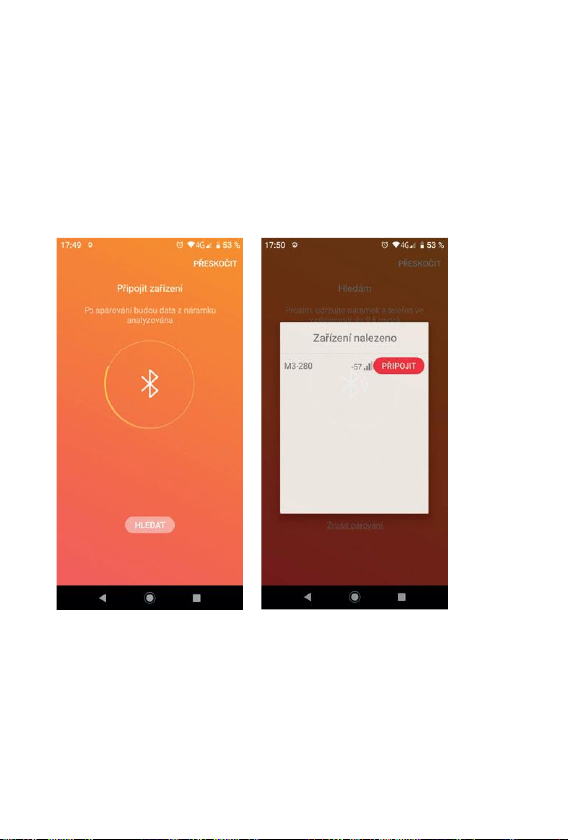
If a permission information pop-up appears for the
background activities, continue with the "Next".
Then connect the watch to the phone app:
1. move the watch close to the phone and press "Search
" button.
2. The application displays a list of found devices.
3. Tap to select AW Lady and press Connect.
4. The watch is now paired, done :-)
Table des matières
Autres manuels ALIGATOR Montre


