
Alba CMP322B Manuel utilisateur
MP3 player
With 4GB memory
Instruction manual
CMP322B/P

Page 1
Table of contents
Rechargeable battery disposal............................3
Accessories included........................................ 4
Overview of controls.........................................4
Getting started ...........................................5
Switching the unit ON/OFF................................6
Adding music.............................................6
Earphone connection.....................................7
Standby mode............................................8
Operation ................................................8
Play/Pause..................................................8
Skip tracks ..................................................9
Volume controls............................................. 9
Troubleshooting .........................................10
Care & maintenance .....................................11
Technical specifications .................................11
Disposal information ....................................11

Page 2
Safety information
Important – Please read these instructions fully before using.
CAUTION:TO REDUCE THE RISK OFELECTRIC SHOCK,DO NOT REMOVE
ANY COVER.NO USER-SERVICEABLE PARTS INSIDE,REFER ANY
SERVICING TO QUALIFIED SERVICE PERSONNEL.
• Please read this owner’s guide
• Please take the time to follow the instructions in this owner’s guide
carefully.It will help you set up and operate your system properly and enjoy
all of its advanced features.
• Please save this owner’s guide for future reference.
• The product label is located on the back of the product.
• Do not use this product near a bathtub,washbowl,kitchen sink, and
laundry tub,in a wet basement, near a swimming pool,or anywhere else
that water or moisture is present.
• Do not allow the product to be submerged in water. Do not expose
headphone socket or battery compartment to water,as water entering the
set may cause major damage.
• Only use attachments/accessories specified by the manufacturer.
• Unplug this apparatus during lightning storms or when unused for long
periods of time - to prevent damage to this product.
• Refer all servicing to qualified service personnel
• Servicing is required when the apparatus has been damaged in any way:
such as liquid has been spilled or objects have fallen into the apparatus;
the apparatus has been exposed to rain or moisture,does not operate
normally, or has been dropped -
• Do not attempt to service this product yourself.
• Opening or removing covers may expose you to dangerous voltages or
other hazards.
• To prevent risk of fire or electric shock,avoid overloading wall outlets,
extension cords,or integral convenience receptacles.
• Use suitable power sources - Plug the product into a suitable power
source,as described in the operating instructions or as marked on the
product.

Page 3
Safety information
Before making any electrical connections,ensure the following:
• Do not bend,stretch or pull the supply cable in order to avoid electric
shock.
• The supply voltage should be the same as that indicated in the technical
specifications and the appliance rating plate.
• Batteries shall not be exposed to excessive heat such as sunshine,fire or
the like.
•
Rechargeable battery disposal
Your product contains a built-in rechargable battery covered by the
European Directive 2006/66/EC.To safeguard the functionality and safety
of your product, always take your product to an official collection point or
service centre where a professional can remove the battery.
Please inform yourself about the local rules on separate collection
of batteries because the correct disposal will help prevent negative
consequences for the environmental and human health.Please do not
dispose of your batteries with your normal household waste.Always bring
your product to a professional to remove the battery.
This product complies with Electromagnetic compatibility (2004/108/EC)
directives.
Page 4
Functions & controls
Please familiarize yourself with the parts and accessories listed below.
Accessories included
• 1 x CMP322
• 1 x Instruction manual
• 1 x USB charging cable
• 1 x earphones
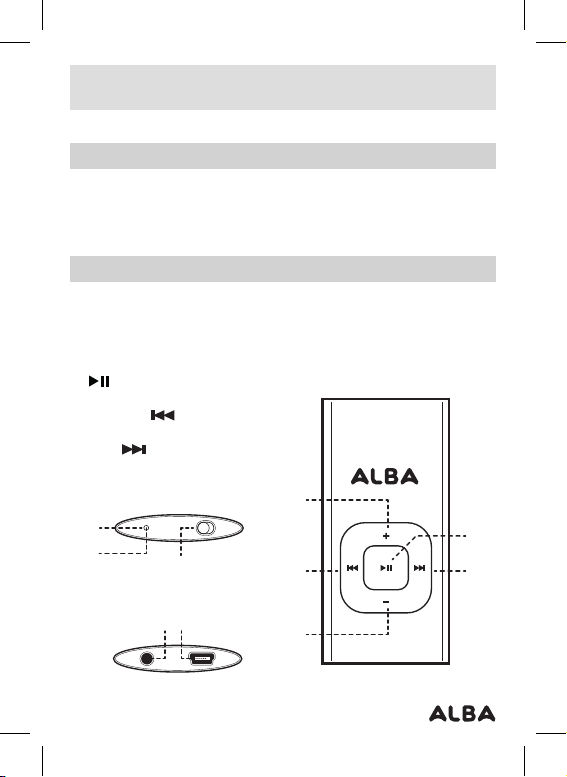
Overview of controls
1: Blue Power/Playback indicator LED
2: Earphone output (3.5mm)
3: ON/OFF switch
4: Mini USB charge/PC connection socket
5: Red charge status indicator LED
6: PLAY/PAUSE button
7: VOLUME + button
8: PREVIOUS button
9: VOLUME - button
10: SKIP button
8
1
3
24
10
6
7
9
5
8
1
3
24
10
6
7
9
5
8
1
3
24
10
6
7
9
5

Page 5
User instructions
Getting started
Before use the MP3 player will require charging fully.
Follow the below instructions to charge the MP3 player.
1: Using the usb charging cable connect the mini usb plug into the usb
charge socket (4) on the bottom of the unit.
2: Connect the other end of the cable to a laptop/pc usb input or
compatible usb mains charger.
3: Power on the pc/laptop or charger .
4: During charging the red charge led (5) will flash and when fully charged
go off.
NOTE:We strongly recommend charging only via pc/ laptop to
avoid irregular led status light operation.

Page 6
Switching the unit ON/OFF
To conserve battery life you can switch the unit off when not connected to
a power source.
1: Set the ON/OFF switch (3) to the ON position to power the unit ON. The
blue led (1) will illuminate.
2: To switch the unit OFF set the ON/OFF switch to the OFF position.The
blue led (1) will go off.
Adding music
Once the unit is charged or during charging (pc/laptop connection only)
you can copy MP3/WMA files to the MP3 player.
1: When the unit is connected to a pc or laptop a driver is automatically
installed and the device is then available in the list of devices (Named
CMP322_4G).
2: Copying MP3/WMA files is a simple as dragging & dropping files to the
device.During file transfer the blue led will flash quickly.
3: Should you have trouble finding the device, on a pc this can be found in
the ‘computer’ or ’my computer’ screen.
User instructions

Page 7
User instructions
Earphone connection
Instructions for earphone usage.
1: Connect the 3.5mm earphone plug into the EARPHONE socket (2) on
the unit.
2: When the volume is adjusted above 85dB an audible warning sound
will be heard to warn you of excessive sound pressure.This will not
be heard again until you lower the volume below 85dB and raise once
more.
To prevent possible hearing damage,do not listen
at high volume levels for long periods.
If you hear no sound during playback,do not turn
the volume up as the music may suddenly begin
at a high volume.
Excessive sound pressure from earphones and headphones can
cause hearing loss.
To avoid damaging your ears, adjust the volume to the lowest safe
level before playing, and turn up to the desired level when playback
has started.

Page 8
Standby mode
1: To enter standby mode press and hold the PLAY/PAUSE button (6).
The blue power led (1) will go off.
2: To wake the unit press and hold the PLAY/PAUSE button (6) once
more.The blue power led (1) will illuminate.
Operation
Follow the below instructions to begin operating the MP3 player.
Play/Pause
1:Press the PLAY/PAUSE button (6) to begin playback.During
playback the blue playback indicator will flash slowly
2: Press again to pause playback. During pause mode the blue playback
indicator will remain solid.
3: Should you wish to listen to music while charging you press the PLAY/
PAUSE button (6) to begin playback & press once more to pause
playback.
User instructions

Page 9
Skip tracks
1: To skip to the next track press the SKIP button (10).Press
repeatedly to skip several tracks at once.
2: To skip to the previous track press the PREVIOUS button (10).
Press repeatedly to skip several tracks at once.
Volume controls
1: To increase the volume level press the VOLUME + button (7).
2: To decrease the volume level press the VOLUME- button (9).
User instructions
Ce manuel convient aux modèles suivants
1
Table des matières
Autres manuels Alba Lecteur MP3


Manuels Lecteur MP3 populaires d'autres marques

Blaupunkt
Blaupunkt Compact Drive MP3 Manuel utilisateur

Memorex
Memorex MMP9008 - 8GB USB 2.0 Manuel utilisateur

Meizu Electronic Technology
Meizu Electronic Technology E5 Manuel utilisateur

Naxa
Naxa NMV-173NX Manuel utilisateur

Philips
Philips PSA250 Manuel utilisateur

Zipy
Zipy go! Waving Manuel utilisateur


