
AHA SIMPO-220 Manuel utilisateur

Simpo Digital Podium
User manual
MODEL : SIMPO-220

Introduction and notes about connection ------------------------ 1
Caution and Warnings ---------------------------------------- 2
System Components ---------------------------------------- 3
Explanation of connection terminal(upper part) ----------------- 4
Explanation of connection terminal(lower part) ------------------ 5
PC storage in/output ----------------------------------------- 6
LAPTOP PC connection ----------------------------------------- 7
PC connection ----------------------------------------- 8
Speaker connection ----------------------------------------- 9
Product specifications ----------------------------------------- 10
PC storage dimensions ----------------------------------------- 11
Fault diagnosis ----------------------------------------- 12
Contents

Introduction
1
The Simpo is simple. The podium is minimalistic in both design and operation, yet
powerful enough to support any kind of presentation you’d like to make. The Simpo’s hardware is
incorporated into its structure, providing functionality without the added bulk of regular podiums.
Designed to be as efficient as possible, the Simpo was designed to be operated with either a mini-pc,
laptop, or other external device. Mini-pcs are light enough and compact enough to fit into the Simpo’s
front PC Storage case, and capable of powering your presentation requirements. The Simpo also comes
with an easy-to-use laptop connection via a pull out USB and RGB cables. Multiple users can use a variety
of devices to easily connect with the Simpo. Presentations have never been so Simpo.
About connecting your external devices
We realize that devices come equipped with a variety of video output ports (VGA, HDMI,
DVI, Display, Mini Display). It’s hard to know which video output format will be used in each specific
situation, and it would be expensive and unnecessary for us to supply you with every type of connector
possible. All new video port styles have cable adapters that can be used to connect them to a VGA cable.
Your local electronics store should have these cable adaptors in stock if you find that you can’t connect
directly using a VGA port. Also remember that VGA is a video only format. Although some new ports are
able to provide audio and video signals, since the connection terminates in VGA format, this is not
possible. You must connect the audio cable to the laptop or device’s audio out put in order to have an
audio signal.
If you’d like to use the Simpo’s tablet to interact with your device through touch, it is
necessary to connect the USB cable. This cable is the means of touch communication between your device
and the tablet monitor. If you are using a dated operating system, it may also be necessary to upload a
touch driver.

Don’t use the Simpo with a damaged power cord, plug or loose socket.
It may cause fire or electric shock.
Don’t touch with a moist hand when taking out or inserting the power plug.
It may cause fire or electric shock.
Use power plugs, and sockets with grounded connections.
If using ungrounded connections, it may result in fire or electric shock.
Fully insert into plug and ensure that the connection is solid.
In the case that the contact is unstable, it may cause fire.
Don’t bend or pull the power cord by force and do not place it under by heavy objects.
It may cause fire or electric shock by damaging the cord.
Don’t unplug the power cord while in use.
It will cause breakdown of the product.
Don’t drop when moving.
It may be hurt or cause breakdown of the product.
Don’t put flammable objects such as candles, insecticides, cigarettes near the product.
It may cause fire.
Don’t place heaters beside the power cord.
It may cause fire or electrical shock and cord damage.
Don’t place near water.
The system may short or become severely damaged.
Install the product in a well ventilated location.
Caution and Warnings
2
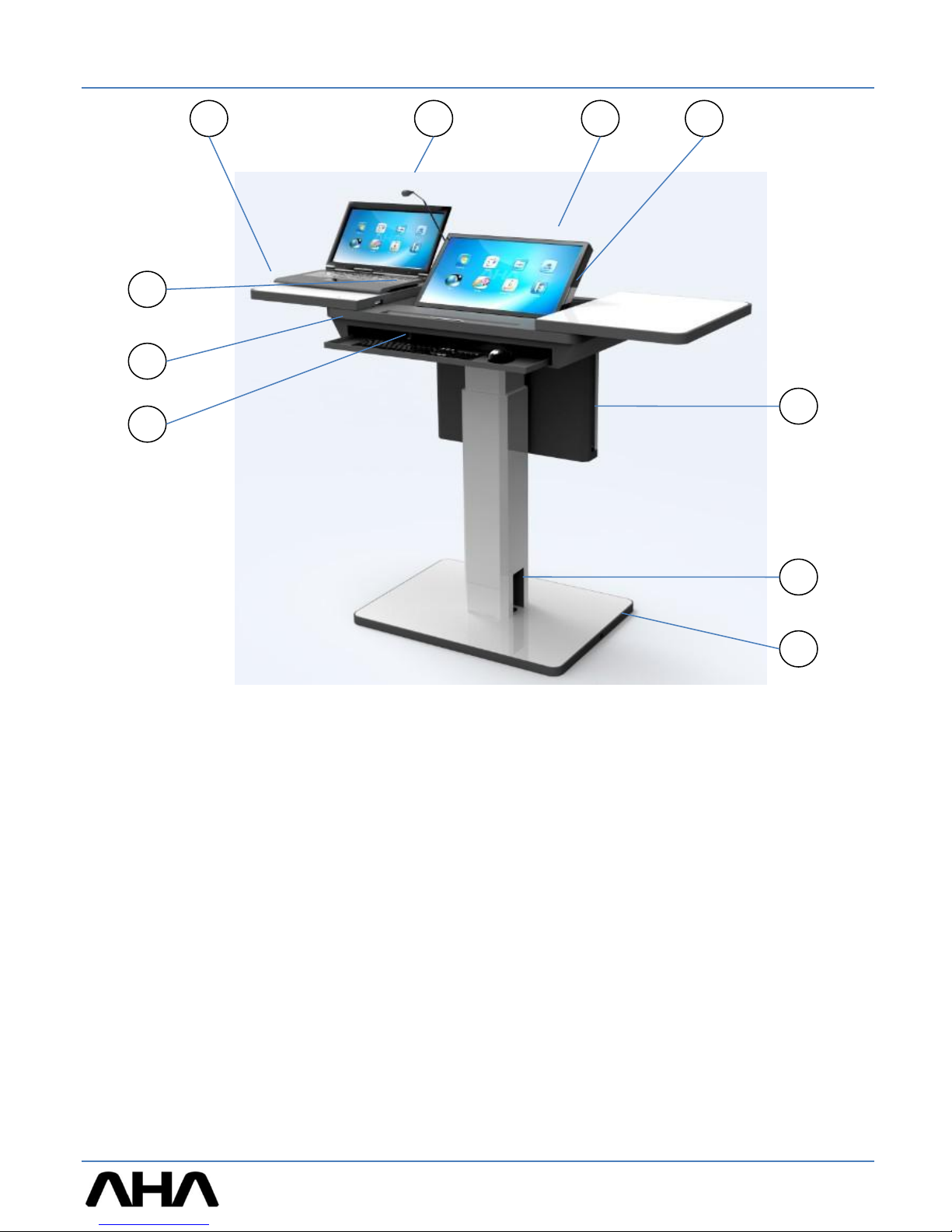
System Components
3
1 2
7
5
6
8
43
9
①Upper Cover (used to place laptops or text books). Do not sit or lean on this pullout cover, as it
is not designed to support heavy objects. If putting heavy materials on the cover, it may cause
it to break.
②Gooseneck Microphone
③Main Monitor --- 22” wide tablet monitor with adjustable angle.
④Gooseneck Microphone Storage --- tilting the microphone to the right will decline and rest the
microphone in its tray. Be mindful of the microphone when opening and closing the upper
cover.
⑤Mini PC storage
⑥Outer input/output --- power or outer apparatus connection terminal.
⑦Wheel Stop Bar --- When the resting position is selected, fix the Simpo to the floor after
adjusting the height of the stop bar.
⑧Keyboard and Mouse Drawer.
⑨Opening and closing upper plate
⑩Laptop and instrument connection * Above LAPTOP PC is not included in this product.
10

Explanation of connection terminal (upper part)
1) Input USB for latop or other external device (TABLET
sensing) / RGB(VGA) for video (gently pull the cables out,
after usage push them back into the Simpo)
2) AC OUTLET(power for outer apparatus, same voltage as
main input voltage)
3) Main power switch (when power is ON, switch will light)
4) Input video signal (input for composite audio and video)
5) USB (when connecting to outer apparatus’ sensor, for
example connecting to an IWB)
6) LAN Output (supply your external device with internet or a
network connection)
7) Voice input(Laptop headphone)
8) Voice output(Laptop MIC)
9) Volume
10) Body height adjustment switch (maximum height of 150mm)
11) Monitor angle adjustment switch (remember to fully
decline the monitor when finished with the unit. The
monitor should be down fully when closing the Simpo’s
sliding cover.)
12) Input selection switch for PC and LAPTOP. PC will display
the contents of the Simpo’s main computer and Laptop will
display the contents of an external device
4
1
2
3
4
9
12
11
10
7
6
5
8
Attention! When adjusting body height, ensure that you
do not lean or place extra weight onto the Simpo. This
will cause strain on the electric motor and cause it to
wear out prematurely.

①Speaker output terminal (25W+25W, 4 Ω)
② Audio output 1/8” (LINE OUT)
③Video output
④USB (for outer monitor touch sensor)
⑤LAN Input
⑥RGB (VGA) Output(for outer monitor)
⑦AC Power input
Imbedded fuse in AC socket.
Always change to a fuse with the same
capacity.
Explanation of connection terminal (side part)
5
1
2
3
4
7
6
5
<Attention>
①Use speakers with suitable impedance. Output impedance is 4 Ω.
②Imbedded FUSE in AC socket. When changing, make sure to use a fuse with the
proper rating. Imbedded FUSE is 250V, 4A.
FUSE

PC storage in-output
PC Connection
♦The Simpo and its PC storage were designed for use with a MINI PC.
- the PC’s monitor output port should be connected to the blue PC RGB/VGA cable.
- the PC tablet USB cable should be connected so that the monitor can be used as a tablet.
6
All cables are already connected as shown below.
PC RGB/VGA
PC USB
To computer
To upper terminal

LAPTOP PC connection
♦Sound and LAN connection
1) Connect cable from audio output terminal (Green) to the device’s audio output.
2) Connect the audio input terminal (Pink) to the device’s audio input.
3) Connect laptop LAN terminal to the device’s LAN terminal.
♦RGB/VGA and USB connection.
1) Connect RGB/VGA cable to laptop video output(VGA) on the left slide out cover.
2) Connect USB cable (for tablet) to Laptop USB terminal on the left slide out cover.
LAPTOP PC connection
It is only possible to record PC Sound if connecting amplifier’s OUT and PC’s sound IN Port (Pink).
7
Connect RGB/VGA cable and USB (for tablet) cable on the upper plate.

PC connection
♦Connection sound and LAN
1) Connect PC OUT cable to PC Audio output terminal in PC housing.
2) Connect PC IN cable to PC AUDIO input terminal in PC housing.
3) Connect LAN cable to PC LAN terminal in PC housing.
♦Connection RGB/VGA and USB
1) Connection RGB/VGA cable to PC RGB terminal in PC housing.
2) Connect USB cable to PC USB terminal in PC housing.
The Simpo was designed for use with mainly a LAPTOP PC. It was also designed to look minimalistic
and operate in the same manner. Instead of using a desktop computer to operate the Simpo, we
suggest using a mini pc. These computers are small and lack a disk drive, but they have all the
necessary capabilities for powering a presentation and connecting to networks or the internet.
Recommended mini PC size is 235(W) X 69(H) X 215(D)mm.
PC connection
If user want to use PC and LAPTOP at the same time, use Hub additionally.
8
You can find cables which can be connected to your mini PC in the PC housing
Table des matières


