AEM INFINITY ECU Manuel utilisateur

This product is legal in California for racing vehicles only and should never be
used on public highways.
WARNING:
!
This installation is not for the electronic novice or the PC illiterate!
Use this system with EXTREME caution! If you are not well versed in
electronics and vehicle instrumentation or are not PC literate, please
do not attempt the installation. Refer the installation to an AEM
trained tuning shop. A list of AEM trained tuning shops is available
at www.aemelectronics.com/dealer_locator.php or by calling 800-
423-0046. You should also visit the AEM Performance Electronics
Forum at http://www.aemelectronics.com.
NOTE: AEM holds no responsibility for any engine damage that
results from the misuse of this product!
NOTE: All supplied AEM calibrations, Wizards and other tuning
information are offered as potential starting points only. IT IS THE
RESPONSIBILITY OF THE ENGINE TUNER TO ULTIMATELY
CONFIRM IF THE CALIBRATION IS SAFE FOR ITS INTENDED USE.
AEM holds no responsibility for any engine damage that results from
the misuse or mistuning of this product!
AEM Performance Electronics
2205 126th Street Unit A, Hawthorne, CA. 90250
Phone: (310) 484-2322 Fax: (310) 484-0152
http://www.aemelectronics.com
Instruction Part Number: 10-7100
2013 AEM Performance Electronics
INFINITY
Quick Start Guide

RevC 07/15/13 Page 3
KIT CONTENTS
1 x INFINITY ECU
1 x QUICK START GUIDE
2 x USB CABLE
1 x 4GB FLASH MEMORY DEVICE
10 x ECU HARNESS TERMINALS
IMPORTANT
BACKGROUND
INFO
The Infinity platform is very different from previous generation AEM EMS products. The
hardware (circuit board assembly) is designed around averyadvanced automotive
grade microcontroller (processor or “chip”). Several layers of software reside on this
chip that allowfor real time firmware programming without the need to write computer
code. This technology hasallowed AEM to develop advanced control modelsnever
before usedon other AEM EMS products. We’ve listened to our customers over the
years and have attempted to simplify the tuning process by employing an airflow based
fuel control model eliminating many of the lookup and trim tables from previous
generation ECUs. The look andfeel is very different and it may take some time to
adjust to the newtuning environment.
Our new tuning tool, InfinityTuner is alsoabrand new product built from the ground up
to interface with the new hardware. It features amodular design that allowsusers and
developers to build completely customized templates and even design “plug in”
applications that can automate many tuning tasks. Unlike previous AEM Setup Wizards
in older products like AEM Pro and AEM Tuner, the InfinityTuner SetupWizard “plug in”
is acompletely stand-alone application that will evolve with InfinityTuner. It is much
more integrated with the ECU hardware and performscomplex validation checks for all

RevC 07/15/13 Page 4
requested changes.
Among other things, InfinityTuner is apowerful math processor. Special features allow
usersto create completely custom conversion channelsfor table data. Virtually any
function can be employed to display data in different formats or units. Math functions
are alsoused for table edits. ANY MATH function can be usednot just alist of pre-
defined selections. Advanced userswill really enjoy the flexibility thisfeature adds.
Abuilt-in logging playback/controls synchronization feature allowstuners to view live
plot data and make changes to their calibration values on the fly, knowing exactly where
the ECU wasaccessing table data. For more detailed post processing of data, AEM
offers itsnew analysis package, AEMdata.

RevC 07/15/13 Page 5
InfinityTuner: Install
Software Installation
All current InfinityTuner software installations are available for download from the AEM
Performance Electronics site at http://www.aemelectronics.com/catalog-software-
downloads-72/
1. Run the setup.exe file from within the zip file. Hit Next> and follow the instructions on
each page.
2. Read and accept the terms of agreement and pick your desired location for
InfinityTuner to be installed. Hit Next> and allow the software to complete installation.
3. You may now exit the InfinityTuner installer. To use InfinityTuner with an ECU
connected, you will need to install the necessary USB drivers. See Device Driver
Installation below.
4. If desired, add a desktop link for InfinityTuner. Click the Windows Start button and
navigate to All Programs\InfinityTuner. Right click on the InfinityTuner link and select
Send to>Desktop (create shortcut).
Device Driver Installation
For these next steps the Infinity ECU will need to be installed and powered up.
Refer to your harness instructions details. You will need the ignition key in the on
position. Connect your computer to the ECU via the USB cable.

RevC 07/15/13 Page 6
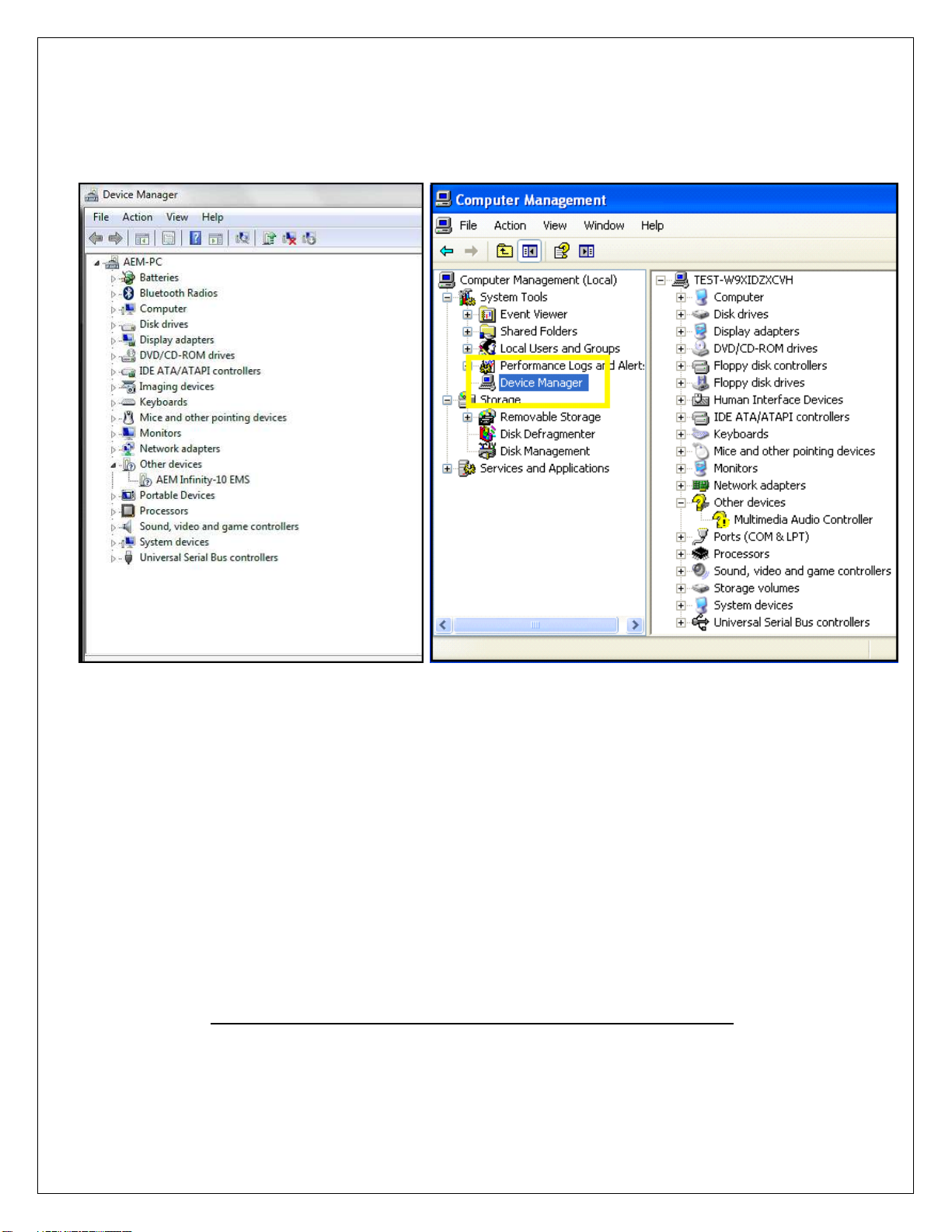
2. Open the device manager. Directions shown below for Windows 7 and Windows XP:
Windows 7 Windows XP
For Windows 7 users, you may simply search for and open the “Device
manager” using the search bar under the start tab. You should see a window that
looks similar to the Device manager shown above on the left hand side.
For Window XP users, right click on “My Computer” under the start tab. Click on
“Manage”. Select “Device Manager”. You should see a window that looks similar
to the Device manager shown above on the right hand side.
Next look for a device labeled “AEM Infinity-10 EMS” (or similar). It may be listed
under “Other devices”. Right click “AEM Infinity-10 EMS” and select Update
Driver Software. When prompted with “How do you want to search for driver
software?” select the second option, “Browse my computer for driver software
Locate and install driver software manually”. USB driver files can be downloaded
from http://www.aemelectronics.com/catalog-software-downloads-72/
Save this file in an easy to find location like the Windows Desktop. You will need
this link below.

RevC 07/15/13 Page 7
**If AEM Infinity-10 EMS does not appear on the list please verify that the USB plug is
securely plugged into your computer and the ECU. Also make sure that the
ECU is in fact powered up and connected correctly. If problem persists, try turning the
key off and then back to the on position or try a different USB port on the PC.
4. Hit Browse and select the “AEM_Drivers_Signed” folder saved above. Make sure to
have the “Include subfolders” box checked. Hit Next. This will install the driver software
onto your computer. You will now be able to use the “Connect to USB” option in
InfinityTuner.

RevC 07/15/13 Page 8
AEM
recommends
restarting
your
PC
after
making
changes
to
your
device
driver
installation.
Note: To confirm the driver installed properly you can return to your device manager
window. The “AEM Infinity-10 EMS” device will now be recognized and fall under the tab
“AEM EMS Controllers”.
Infinity ECU: Serial Number

RevC 07/15/13 Page 9
All Infinity ECUs are serialized. Be sure this identification tag stays intact. Write the
numberdown to be safe. Infinity ECU’s are programmed with cryptographically secure
firmware filesand each ECU hasaunique file set. The serial number is usedto identify
the correct files for your ECU.
AEM Infinity Account Registration
Infinity ECUs must be registered before use. The following procedure describes how to
register your new Infinity ECU. The aeminfinity.com site will always have the latest
software available for your system.
1) Go to http://www.aeminfinity.com
a. Click on “Register Here” button
2) Enter required information
a. Click the “Register” button

RevC 07/15/13 Page 10
3) A confirmation email will be sent to the supplied email address. Choose one of
the following options:
a. Click on the “click here” link
b. Or, copy the code and enter it into the Confirmation Code Box.
4) After entering the code, click on the “Confirm” button
Autres manuels AEM Accessoires automobiles

AEM
AEM 30-3508 Manuel utilisateur

AEM
AEM 22-436 Manuel utilisateur

AEM
AEM 30-1100 Manuel utilisateur

AEM
AEM 30-3500 Manuel utilisateur

AEM
AEM RaceGrade RG EGT-8 Manuel utilisateur

AEM
AEM 800037 Manuel utilisateur

AEM
AEM CD-5 Manuel utilisateur

AEM
AEM 21-5011 Feuille d'instructions

AEM
AEM GDI Series Manuel utilisateur

AEM
AEM 21-433 Manuel utilisateur