
AdvanceTC XPLORE X7 Manuel utilisateur

!
!
QUICK!
START!
GUIDE!
!
Please&read&before&using&your&new&device.&
!
!
XPLORE!X7!
!

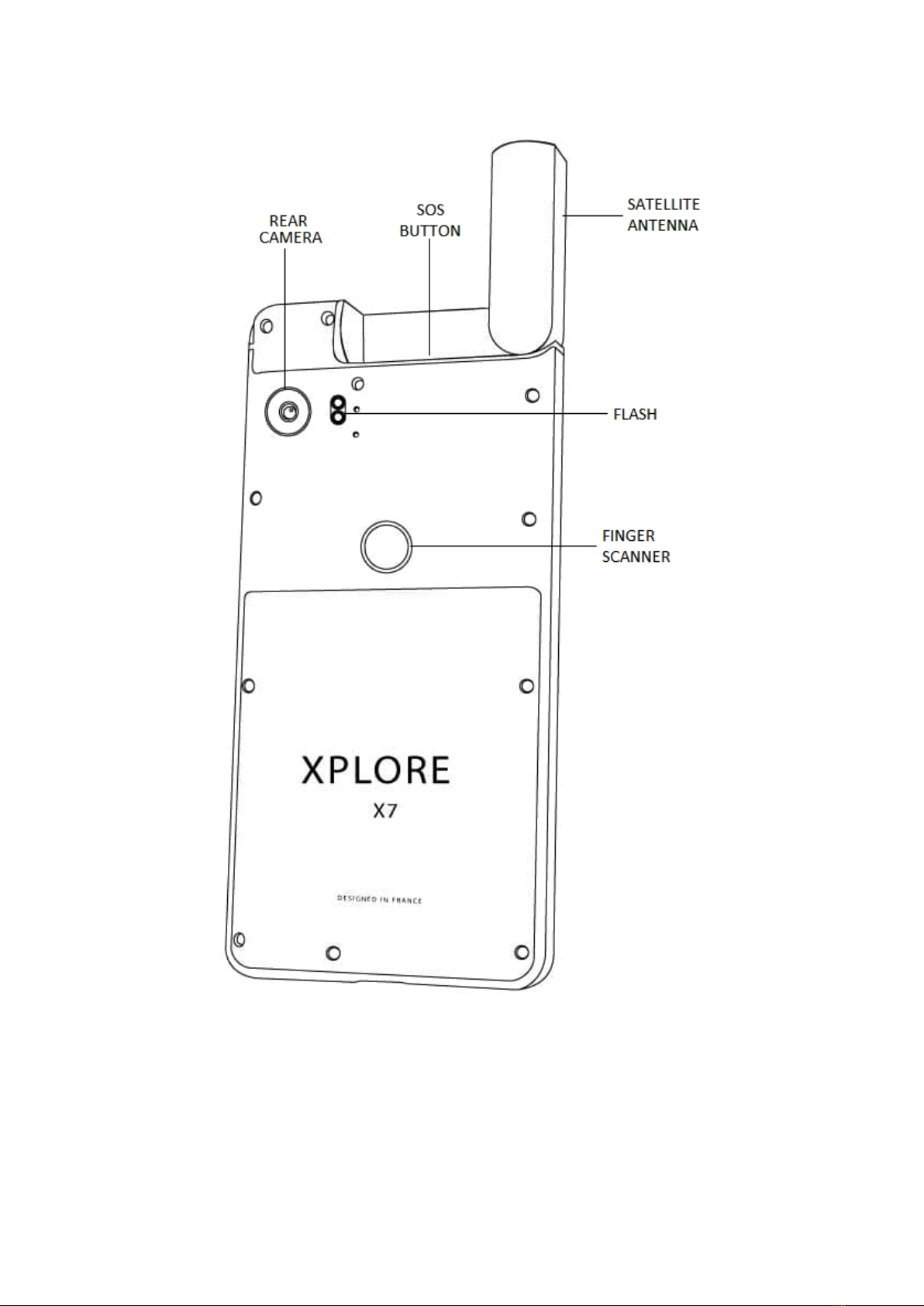
Device&Layout&
To!turn!on!the!device,!press!and!hold!the!power!key!for!a!few!
seconds.!!!!!!!
!!

!
!

Installing&one&or&two&NANO-SIM&card(s)&
!
!

WARNING:&your&device&only&accepts&NANO&SIM&cards.&
&
Do¬&attempt&to&insert&Micro&SIM&card&in&the&tray,&it&will&damage&
the&device&and&void&the&warranty.&
&
Steps:!
• Insert!the!ejection!pin!into!the!hole!on!the!tray!to!loosen!the!
tray.!Then!slide!the!tray!out!carefully.!
CAUTION:&Ensure&that&the&ejection&pin&is&perpendicular&to&the&
hole.&Otherwise,&the&device&may&be&damaged.!
• Pull!the!tray!out!carefully.!
CAUTION:&Ensure&the&tray&remains&perpendicular&to&the&hole&
while&you&pull&it&out.!
• Gently!press!the!NANO!SIM!card!into!the!tray!to!secure!it,!
with!gold!contacts!facing!down.!!
CAUTION:&If&the&card&is¬&fixed&firmly&into&the&tray&the&card&may&
leave&or&fall&out&of&the&tray.!
!! !

• Insert!the!tray!back!in!the!device!carefully.!!
!
CAUTION:&Ensure&that&the&tray&is&inserted&in&the&opening&and&
remains&perpendicular&to&the&hole&during&insertion.&Otherwise,&
the&tray&or&device&may&be&damaged.!
!
• Push!the!tray!in!completely.!!
!
!
!
!
!
!
!
!
!
!
!
!
!
!
!
!
!

Installing&one&Micro&SD&card&
!
WARNING:&your&device&only&accepts&one&MICRO&SD&in&the&slot&
next&to&the&outside&tray&door.&&
&
Steps:!
• Insert!the!ejection!pin!into!the!hole!on!the!tray!to!loosen!the!
tray.!
!
CAUTION:&Ensure&that&the&ejection&pin&is&perpendicular&to&the&
hole.&Otherwise,&the&device&may&be&damaged.!
• Pull!the!tray!out!carefully.!
CAUTION:&Ensure&the&tray&remains&perpendicular&to&the&hole&
while&you&pull&it&out.!
• Gently!press!the!Micro!SD!card!into!the!larger!slot!on!the!tray!
to!secure!it,!with!gold!contacts!facing!down.!
CAUTION:&If&the&card&is¬&fixed&firmly&into&the&tray&the&card&may&
leave&or&fall&out&of&the&tray.!
• Insert!the!tray!back!in!the!device!carefully.!!
!
CAUTION:&Ensure&that&the&tray&is&inserted&in&the&opening&and&
remains&perpendicular&to&the&hole&during&insertion.&Otherwise,&
the&tray&or&device&may&be&damaged.!
• Push!the!tray!in!completely.!!
!

Charging&the&Battery&
WARNING:&your&device&uses&the&new&USB&type&C&reversible&plug.&
You& should& only& use& the& USB& cable& provided& with& your& device.&
&
Do¬&attempt&to&connect&any&other&type&ofµ&USB&plug&in&the&
device.&It&will&break&the&connector&and&void&the&warranty.&
Before!you!turn!on!your!device!for!the!first!time,!it!is!recommended!
that!you!charge!the!battery.!
• Insert!the!small!end!of!the!USB!cable!into!the!USB!connector!
• Insert!the!other!end!of!the!USB!cable!into!the!power!adapter!
• Plug!the!power!adapter!to!an!electrical!outlet!to!start!
charging.!!
!

!
Removing&the&Battery&
Battery!is!not!user!replaceable.!Please!refer!to!your!local!dealer!for!
assistance.!
Manufacturer!does!not!accept!liability!for!any!damage!or!loss!which!
may!arise!from!failure!to!precisely!follow!these!warnings!and!
instructions.!
!
Restart&your&phone&in&event&of&error&
In!the!event!that!Android!or!any!application!software!makes!your!
phone!crash!or!stop!work,!you!can!reset!and!restart!your!phone!as!
follows:!
!
RESTART&PHONE:&press&Power&key&and&then&Volume&down&(-)&key&
together&for&about&10&seconds&until&the&phone&vibrates.&The&
device&will&then&restart.&
&
If&the&initial&start&screen&does¬&change&after&10&seconds,&you&
may&need&to&do&again&the&restart&process&above.&
!
!
!
!
!
!
Table des matières


