ADDAC ADDAC112 Manuel utilisateur

Instruments for Sonic Expression
Est.2009
December.2021
USER’S GUIDE . REV07
FIRMWARE 1.4.3
ADDAC112
VC LOOPER &
GRANULAR
PROCESSOR
INTRODUCING
From Portugal with Love!

ADDAC112 VC LOOPER &
GRANULAR PROCESSOR USER’S GUIDE
December.2021Revision.07
Welcome to:
page 2ADDAC SYSTEM
WELCOME
There’s a long history behind the granular concept and many reinterpretations of it’s core principles, this
is our take on it.
In a loose description digital Granular refer to pieces of sound files being played at the same time with
slight or completelly diferent parameters originating what is commonly refered to as granular clouds.
Normally there’s a buffer size from which the granular engine snips it’s pieces from and plays them
according to the parameters set. This buffer size is normally small in size where grains are so small
that can reach the hearing spectrum and be heard as a sort of ever changing complex wavetable, this is
the principle behind granular synthesis.
In our vision we added the possibility of long buffer sizes up to 5 minutes, allowing “softer” aproaches
to the granular principle using it as an effect that can generate from “accidental” effects like slight
“stutters” to extreme processing and transformation of any incoming audio signal.
This module is conceptually deep but easy to grasp and operate as all controls are in it’s dedicated
panel, all jack inputs and outputs have it’s own separate panel to allow no compromise when playing
it’s controls.
Some info stated in this document is still subject to change as new firmwares are released.
For the first time we sacrificed the module width to leave more space between controls.
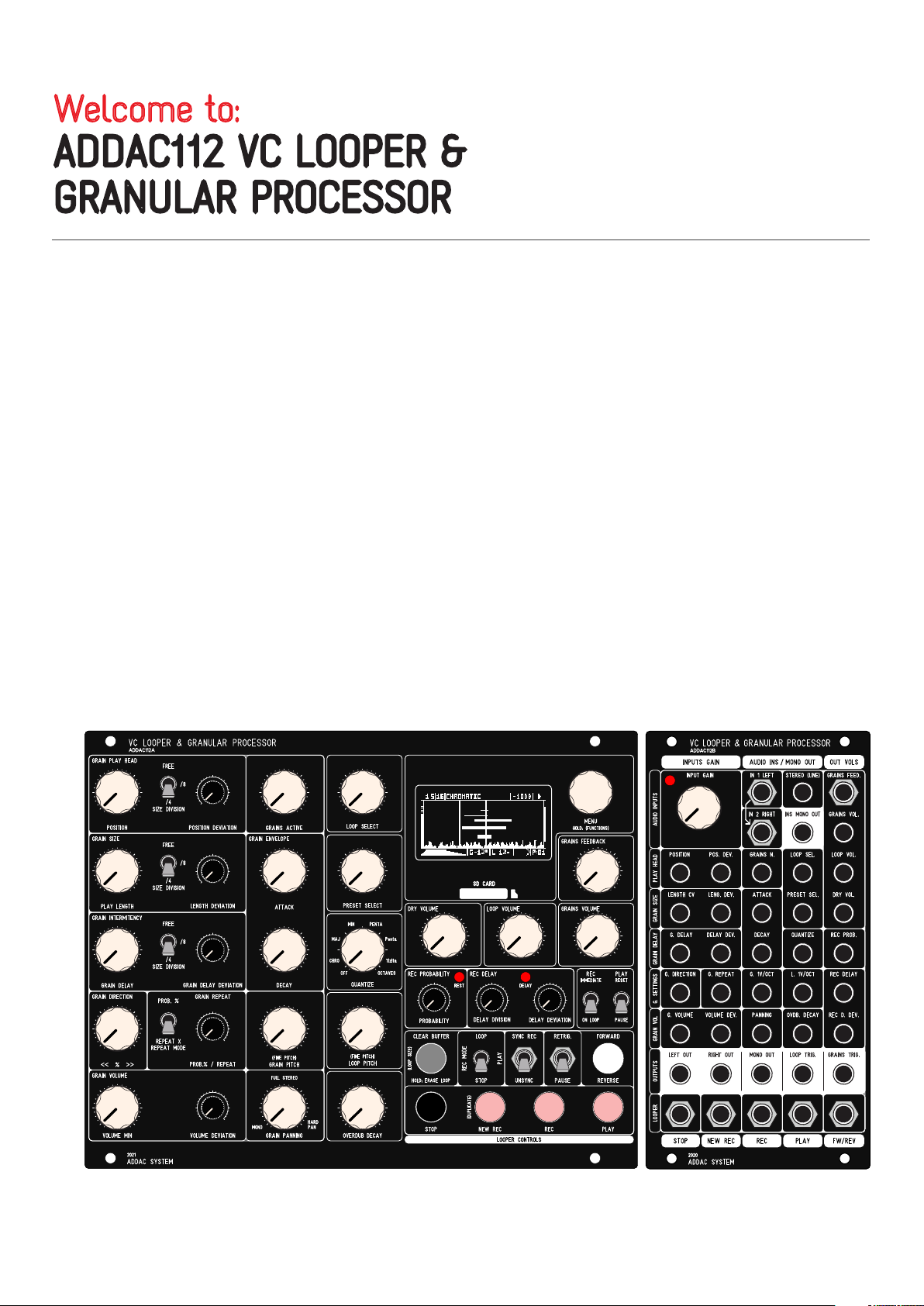
32HP 13HP

DESCRIPTION
ADDAC112 User’s Guide
page 3ADDAC SYSTEM
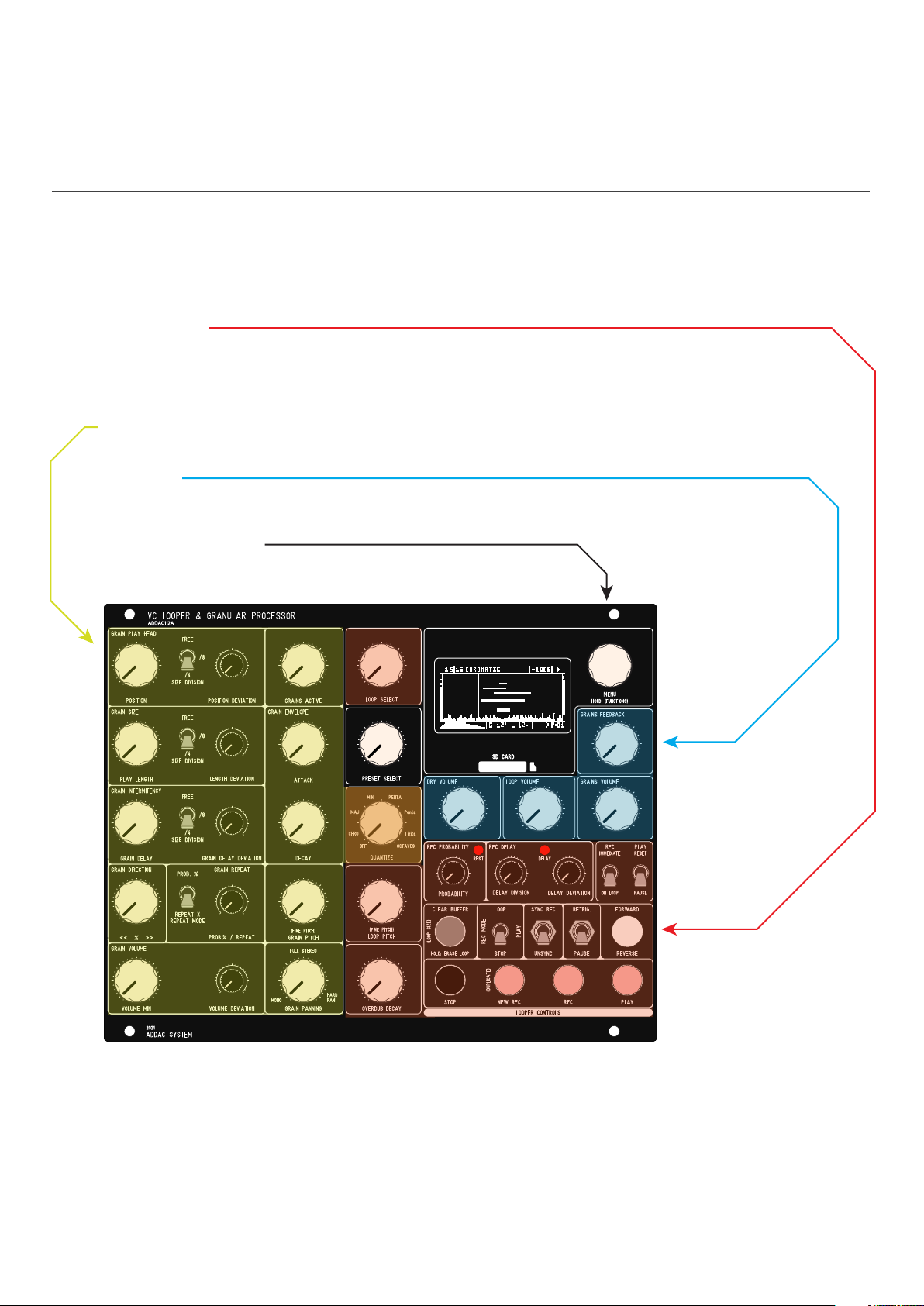
There are three main sections in this module:
Looper Engine:
The Looper is where all the Real-Time recording happens.
The audio input feeds the recording buffer, multiple controls allow to record and play loops into a list so that any
sample in the list can be accessed at ay time
and more acting as a standard looper
Granular Engine:
The Granular acts upon the buffer of whatever LOOP is selected.
Output Mix
The output mix allow individual control for the Dry Input, Looper Volume and Grains Volume.
Besides these main sections there’s also a simple strip down MENU mainly used to LOAD and SAVE Banks, no
Menu diving guaranteed.
Tech Specs:
32HP + 13HP
4.5cm deep
240mA +12V
70mA -12V
Audio Specs:
Stereo audio input and output
32-bit floating point DSP
Bit Depth: 8 or 16bit
Sample Rates: 8Khz, 11.025Khz, 16Khz, 22.05Khz, 36Khz,
44.1Khz, 48Khz 96Khz

ADDAC112 User’s Guide
page 4ADDAC SYSTEM
RIBBON CONNECTIONS
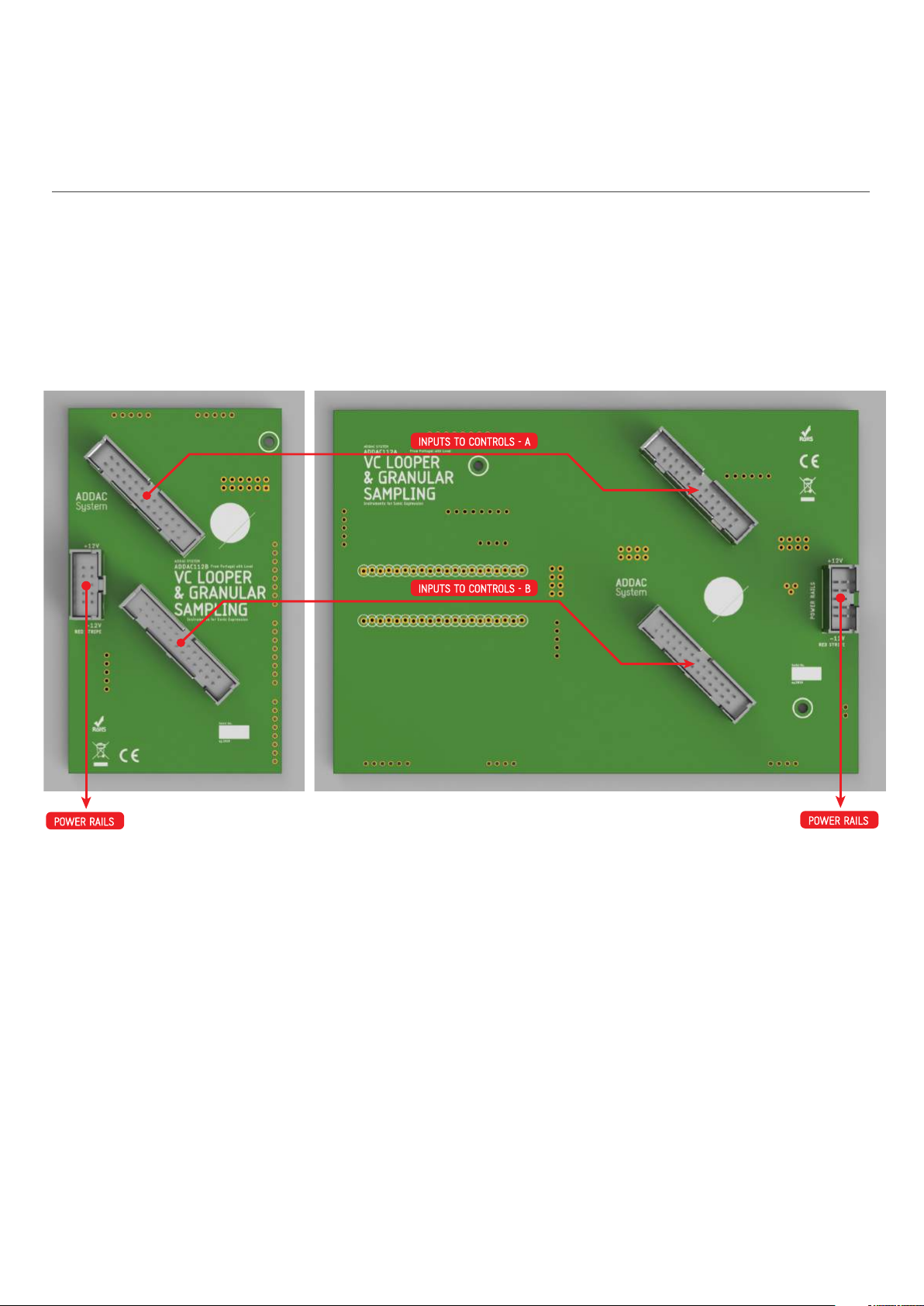
!!! WARNING !!! - !!! RED STRIPE DOWN ON ALL CONNECTORS !!!
Also notice the indentation of the boxed headers!
INPUTS TO CONTROLS - A
INPUTS TO CONTROLS - B
POWER RAILS
POWER RAILS

BANKS and PRESETS
ADDAC112 User’s Guide
page 5ADDAC SYSTEM
BANKS:
In order to make the LOAD/SAVE process simple one can only LOAD BANKS from the SD Card.
BANKS contain a list of PRESETS and a folder with a list of LOOPS.
Each BANK is saved into a folder in the SD CARD, inside the folder, together with a document contain-
ing all presets configurations, the user will find a second folder with all LOOPS in separate.WAV files.
While Saving or Loading from the SD Card the audio processing will be suspended, it may take up to
10 seconds to save a full Bank.
Once the BANK is loaded to memory jumping between LOOPS will be immediate.
A new BANK can be created at any time using the MENU: NEW BANK.
BANKS initialize with an empty list of PRESETS and LOOPS and the same overall settings as the
current Bank,
Powering up the module without any SD Card will automatically create a new Bank, this Bank will be
initialized with factory default settings.
Each BANK stores a list of up to 99 PRESETS as well as all loops used by all these PRESETS.
Upon startup the module will automatically load the last BANK saved.
All recording is written and read from volatile memory if the BANK is not saved to the SD ard Card all
data will be lost once a new BANK is loaded or power is turned off!
Users can share Banks among themselves by sharing the Bank folder.
PRESETS:
Each PRESET contains a list of LOOPS and all Granular Settings.
Each PRESET can have shared or unique LOOP lists.
PRESETS can be saved at any time using the MENU: SAVE PRESET
PRESETS can be added to the list using the MENU: NEW PRESET, this new PRESET will be created
with the current Granular settings.
As PRESETS are changed via the [PRESET SELECT] control knobs will not reflect the current values of
the front panel controls and, in this case, they will seem not to have any effect, to make them
effective once again the user must rotate the knob until it crosses the preset setting and then the
knob will become active once again.
At all times rotating the [PRESET SELECT] to the left most position will enter preset “-” in this state all
knobs always correspond to the front panel controls.
If new LOOPS or PRESETS are recorded at any point in time remember that they are not yet saved to
the SD Card, saving the current BANK before loading a new BANK or before power down is necessary
to keep all it’s contents safe in the SD Card!

LOOPS
ADDAC112 User’s Guide
page 6ADDAC SYSTEM
LOOPS:
A list of .WAV files up to 99 files per BANK
LOOPS can be added to a folder using a computer or recorded in real-time using the LOOPER Engine.
30Mb of maximum sampling time shared for all loops in a BANK.
Recording time will be diferent depending on the Sample Rate selected, as a reference at 44.1Khz will
allow for 5:40 minutes (MONO) 2:50 minutes (STEREO).
Loops recorded using the module Looper Engine will either be Mono or Stereo and have the Sample
Rate and Bit Depth defined by the settings chosen in the module’s options menu, default setting is
Stereo 44.1K 16 bit.
The total ammount of recording time will depend on these 3 settings: Channels number, Sample Rate
and Bit Depth.
LOOPS & PRESETS Can be Accessed in real-time with the dedicated [LOOP SELECT] & [PRESET
SELECT] knobs and/or CV inputs.
If new LOOPS or PRESETS are recorded at any point in time remember that they are not yet saved to
the SD Card, saving the current BANK before loading a new BANK or before power down is necessary
to keep all it’s contents safe in the SD Card!
SD CARD FILE STRUCTURE
ADDAC112 User’s Guide
page 7ADDAC SYSTEM
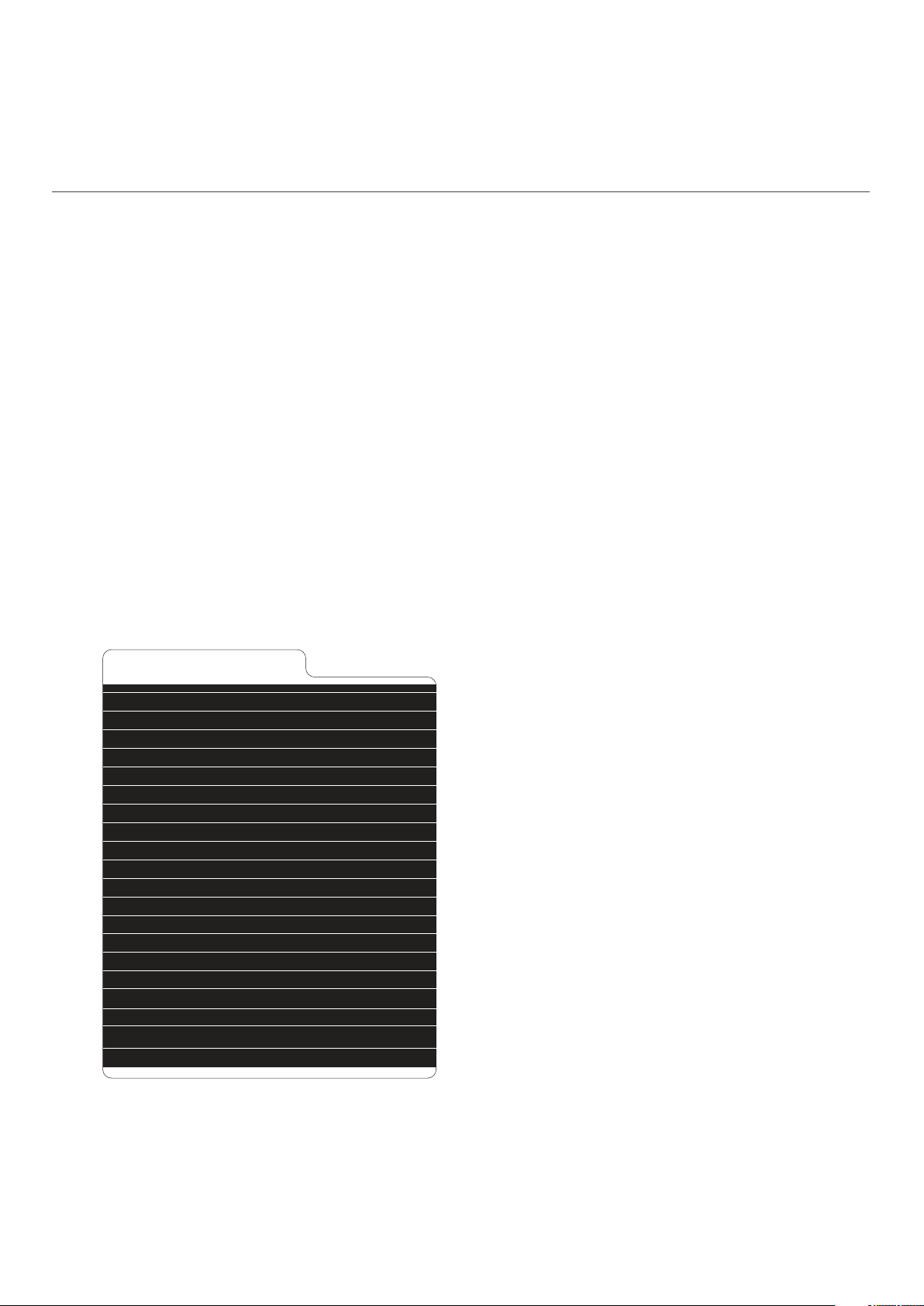
At the Root of the SD Card any folder named “BANK” proceeded by a number will be eligible to be loaded.
To create a new BANK directly on the SD Card simply create a new folder and name it, for example: BANK1.
Next, inside this BANK1 folder, create another folder named “WAV”, inside this WAV folder put any number of .wav
files as long as the whole folder is below 60Mb.
Loops indexation will respect the number at the start of the file name, if no number is present the file name will
be renamed by the module and a number at the start will be automatically attributed.
Manually changing these numbers on a computer will change the order by which they are selected by the [LOOP
SELECT].
BANK Folders are named “BANK” proceeded by a number, after the number the user can use more
characters to label the bank and make it easier to identify it when loading the bank on the module.
BANK naming examples below.
Saving a Bank on the module will add extra files:
SETTINGS.CFG stores the main configuration settings
SCALES.CFG stores the Quantization scales both Default and Custom
X.CFG stores all presets settings
DELETED folder stores all deleted loops
.WAV FILES
When adding .WAV files to the SD Card from a computer it’s important that the files have clean .WAV headers and
NO METADATA, some softwares can export without adding extra data to the file.
If errors are shown or if files are not loaded correctly you can always use a batch media converter like
MediaHuman to automate and make this task a simple process:
https://www.mediahuman.com/download.html
SD CARD STRUCTURE Description:
- GLOBAL.CFG
- BANK0 MyFirstSet
- BANK1NiceOne
- BANK2_vcoWaves
- SETTINGS.CFG
- SCALES.CFG
- 0.CFG
- 1.CFG
- 2.CFG
- 3.CFG
- DELETED
- 6.WAV
- 7.WAV
- WAV
- 1_MYLONGFILE.WAV
- 2_MYSHORTLOOP.WAV
- 3_ANOTHERLOOP.WAV
- 4_ONEMOREFILE.WAV
- 5_LOOP234.WAV
- BANK3 AcousticSET
...
> AUTOLOAD BANK FILE
> BANK0 FOLDER
> BANK1 FOLDER
> BANK2 FOLDER
> BANK SETTINGS FILE
> SCALES FILE
> PRESET 0 CONFIG FILE
> PRESET 1 CONFIG FILE
> PRESET 2 CONFIG FILE
> PRESET 3 CONFIG FILE
> DELETED FILES FOLDER
- 1st file in index
- 2nd file in index
> WAV FILES FOLDER
- 1st file in index
- 2nd file in index
- 3rd file in index
- 4th file in index
- 5th file in index
> BANK3 FOLDER
> ...

INITIAL POT SETTING: 50%
0% 25% 50% 75%
100% 100%
100%
50% 50% 50%50%
DEVIATION RANGE
DEVIATION POT SETTING: 50%
FUNCTION
RANGE
INITIAL POT SETTING: 80%
0% 25% 50% 75% 80%
100% 100%
100%
50% 50%50%50%
DEVIATION RANGE
DEVIATION POT SETTING: 50%
FUNCTION
RANGE
INITIAL POT SETTING: 25%
0% 25% 50% 75%
100% 100%
100%
20%20% 80%80%
DEVIATION RANGE
DEVIATION POT SETTING: 20%
FUNCTION
RANGE
DEVIATION
ADDAC112 User’s Guide
page 8ADDAC SYSTEM
DEVIATION is used throughout this guide to refer to a deviation from the Initial knob.
There are TWO operation modes for this setting:
RANDOM MODE
In this mode Deviation is a random function kept inside a range based on a percent-
age spread centered on the Initial knob setting. This keeps all random values inside
the main range of the knob never going above or below the range limits eliminating
“dead spots”.
The examples below will graphically exemplify this concept:
INITIAL
KNOB
DEVIATION
KNOB
INITIAL
KNOB
DEVIATION
KNOB
INITIAL
KNOB
DEVIATION
KNOB

0% 25% 50% 75% 100%
LOOP LENGTH
GRAIN1
GRAIN2
GRAIN3
GRAIN4
GRAIN5
GRAIN6
...
GRAIN1: POS:10% / LENGTH:10%
GRAINX: POS <=> ABSOLUTE( INITIAL POSITION + DEVIATION
GRAIN2: POS:10% + (5%*1)=15% | LENGTH:10% + (5%*1)=15%
GRAIN3: POS:10% + (5%*2)=20% | LENGTH:10% + (5%*2)=20%
GRAIN4: POS:10% + (5%*3)=25% | LENGTH:10% + (5%*3)=25%
GRAIN5: POS:10% + (5%*4)=30% | LENGTH:10% + (5%*4)=30%
GRAIN6: POS:10% + (5%*5)=35% | LENGTH:10% + (5%*5)=35%
GRAIN7: POS:10% + (5%*6)=40% | LENGTH:10% + (5%*6)=40%
0% 25% 50% 75% 100%
LOOP LENGTH
GRAIN1
GRAIN2
GRAIN3
GRAIN4
GRAIN5
GRAIN6
...
START
LENGTH
+INC
TOTAL
LENGTH
WRAP
AROUND
100%*
30% 0%
0
START
POSITION
END
POSITION
10% 40%
30% 60%
30 10% 70%
30% 90%
60 10% 100%
30%
120%
90 20%
50%
80%
10%
10% 30%
30%
150%
120 10% 60%
30%
180%
150 10% 90%
30%
210%
180 10% 20%
DEVIATION
ADDAC112 User’s Guide
page 9ADDAC SYSTEM
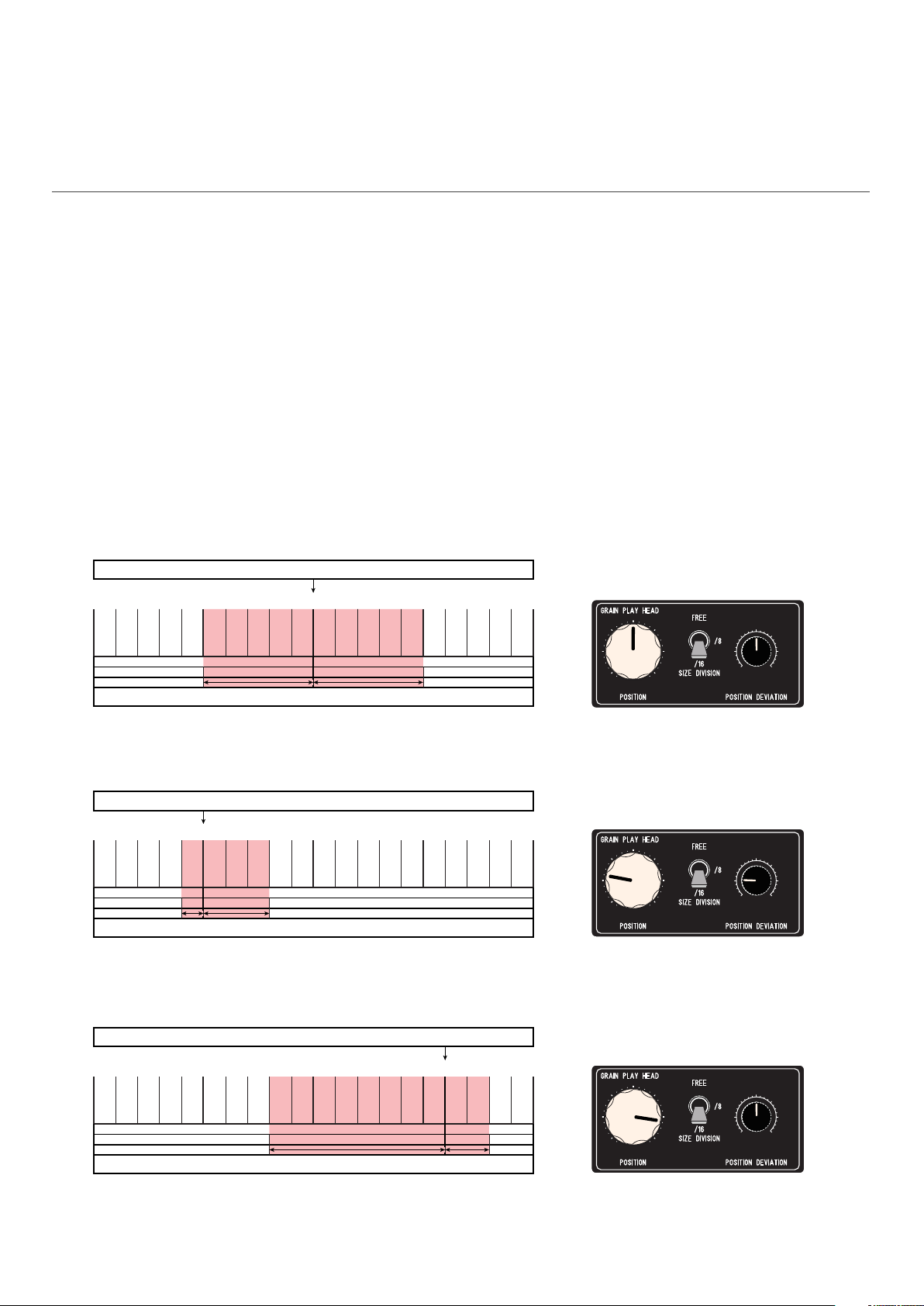
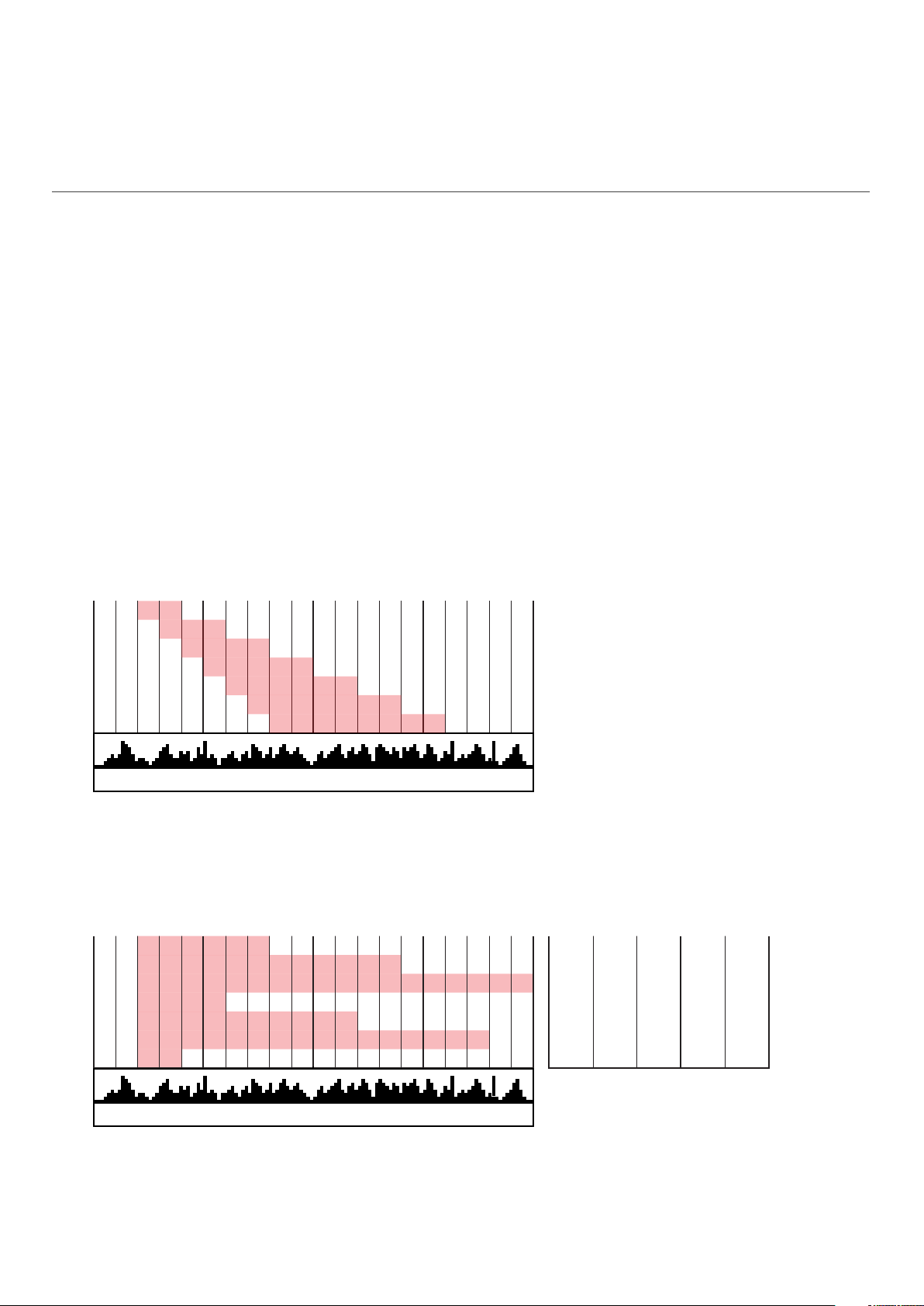
SPREAD MODE - [GRAIN PLAY HEAD] [GRAIN SIZE] [GRAIN INTERMITENCY]
In this mode Deviation sets an increment used to spread the corresponding function
over the grains index.
Grain 1 always keep the initial settings without any increment.
This mode will work best for longer loops 10 - 20 - 40 seconds or more.
The examples below will graphically exemplify this concept applied to [GRAIN PLAY
HEAD] and [GRAIN SIZE] (although not shown below [GRAIN INTERMITENCY] follows
the same principles):
Example A:
Position at 10% - Position Deviation at 5%
Length at 10% - Length Deviation at 5%
Example B:
Position at 10% - Position Deviation at 0%
Length at 30% - Length Deviation at 30%
*Wrap around is a modulus operation
which, simply put, means no value can
be greater than 100% and if so it will
simply read the two lowest numbers,
ex: 110% = 10%

0% 25% 50% 75% 100%
VOLUME
GRAIN1
GRAIN2
GRAIN3
GRAIN4
GRAIN5
GRAIN6
...
START
VOLUME
+INC
FINAL
VOLUME
WRAP
AROUND
100%
60% 60%
0
60% 75%
15
60% 90%
30
60%
105%
45 5%
20%
35%
50%
60%
120%
60
60%
135%
75
60%
150%
90
DEVIATION
ADDAC112 User’s Guide
page 10ADDAC SYSTEM
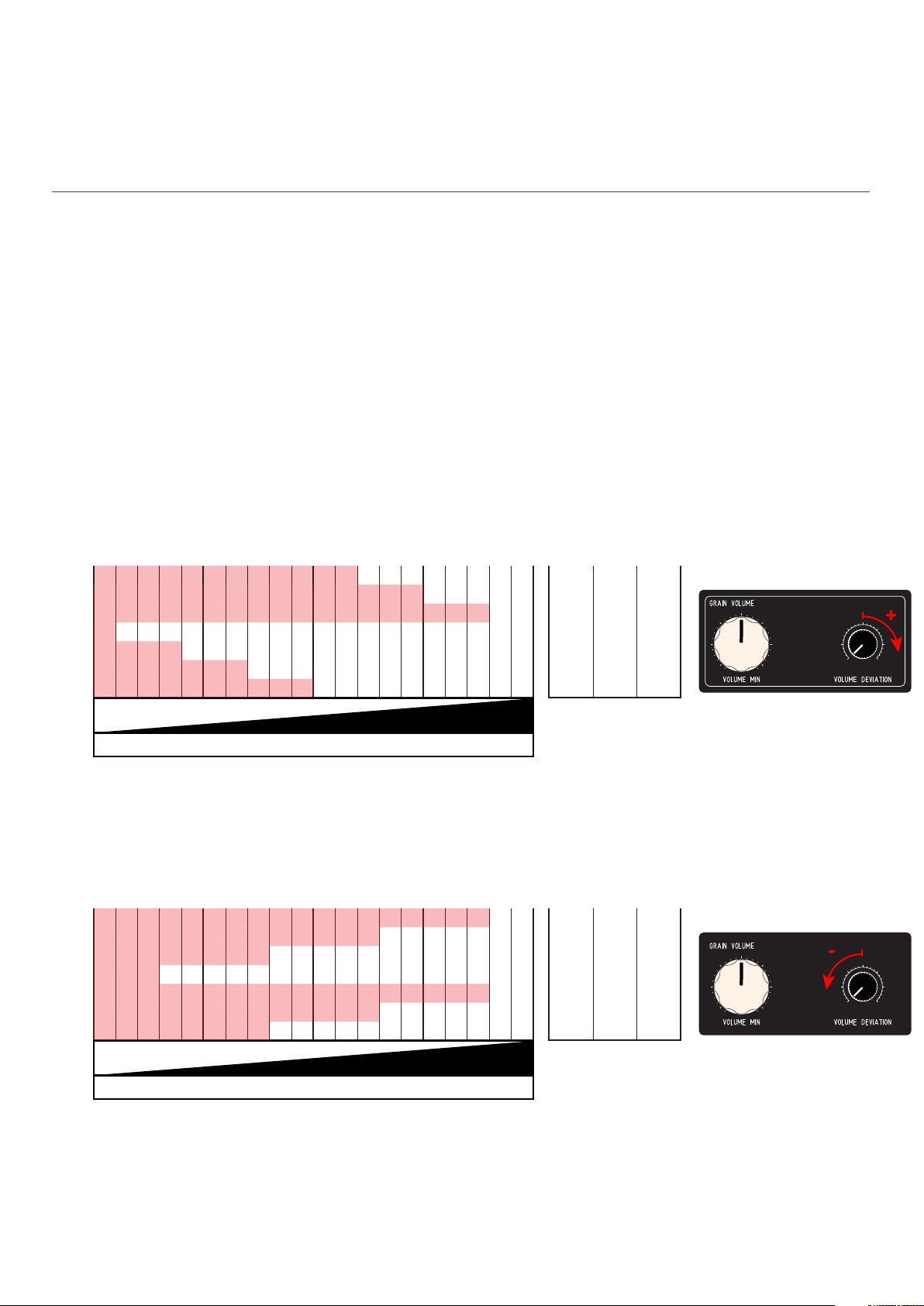
SPREAD MODE - [GRAIN VOLUME]
In this mode [VOLUME DEVIATION] sets an increment used to spread the volume over
the grains index.
Grain 1 always keep the [VOLUME MIN] setting without any increment.
The [VOLUME DEVIATION] knob will be at 0% at 12 o’clock, going counter clockwise
will subtract, clockwise will sum.
Example A:
Volume Min at 60% - Volume Deviation at +15%
Example B:
Volume Min at 90% - Volume Deviation at -25%
*Wrap around is a modulus operation
which, simply put, means no value can
be greater than 100% and if so it will
simply read the two lowest numbers,
ex: 110% = 10%
0%
100%
0% 25% 50% 75% 100%
VOLUME
GRAIN1
GRAIN2
GRAIN3
GRAIN4
GRAIN5
GRAIN6
...
START
VOLUME
SUBTRACT
FINAL
VOLUME
WRAP
AROUND
100%*
90% 90%
0
90% 65%
-25
90% 40%
15%
-50
90% -75
90%
65%
40%
90%
-0%
-100
90%
-25%
-125
90%
-50%
-150
0%
-100%
Table des matières