ACT ACTpro 1500 Guide produit

18-00085 Issue 1
ACTpro 1500 Single Door IP Controller
ACTpro 1520 Single Door IP Controller
with 12 V DC 2 amp power supply.

Operating & Installation
Instructions
This manual refers to the ACTpro 1500 and 1520 controllers, The controllers are
Single doors IP controllers expandable to 32 doors using the ACTpro 100e single
door station or the ACTpro 120 single door station with a 12 V DC 2 amp power
supply.
Access Control Technology Ltd. reserve the right to change the contents of this
manual and the system it applies to without prior notice.
While every effort has been taken by ACT to ensure the accuracy of the information
contained within this document, ACT assumes no responsibility for any errors or
omissions. No liability is assumed for damages resulting from the use of
information contained within this document.
Access Control Technology
Unit C1, South City Business Centre,
Tallaght,
Dublin 24,
Ireland.
Tel: +353-1-4662570
UK LoCall: 0845 300 5204
Fax: +353-1-4662570
Web: www.accesscontrol.ie
Copyright 2012 Access Control Technology Ltd.

ACTpro 1500 and 1520 Operating and Installation Manual
Page 3
1.0 Introduction.............................................................................5
1.1 System Overview .................................................................................5
2.0 Installation diagram................................................................7
3.0 Quick Setup Guide..................................................................8
4.0 Adding Door Stations...........................................................11
5.0 IP Address Configuration.....................................................12
5.1 Configuring for DHCP address...........................................................12
5.2 Configuring for Static IP address........................................................12
5.3 Changing Static IP address................................................................13
6.0 Hardware Installation Guide.................................................14
6.1 Readers.............................................................................................. 14
6.2 Push Button (PB)................................................................................15
6.3 Door Contact (DC)..............................................................................15
6.4 Break Glass Monitoring only ..............................................................15
7.0 ACTpro 1500 Controller Status Indicators..........................16
8.0 ACTpro 1520 Controller Status Indicators..........................17
9.0 Controller Configuration ......................................................17
9.1 Connecting PC to ACTpro 1500 Controller ........................................18
9.2 Change Installer Password ................................................................19
9.3 Change User Password .....................................................................19
9.4 Set controller Date and Time.............................................................. 20
10.0 Door settings: .....................................................................21
10.1 Enable and name doors..................................................................... 21
10.2 Set Door Relay Timers....................................................................... 21
10.3 Set Door Timed Actions .....................................................................21
11.0 User settings.......................................................................22
11.1 Add a batch of cards ..........................................................................22

ACTpro 1500 and 1520 Operating and Installation Manual
Page 4
11.2 Add individual Users...........................................................................22
12.0 Access Rights.....................................................................23
12.1 Create a Time zone........................................................................... 23
12.2 Create a Door Group.........................................................................24
12.3 Create a User group........................................................................... 25
12.4 Assign a user group to a user. ...........................................................25
13.0 Backup, Restore and Export database..............................26
13.1 Backup database................................................................................. 26
13.2 Restore database...............................................................................26
13.3 Export Log events ..............................................................................27
14.0 Installing ACTWin...............................................................28
15.0 Run ACTWin for the first time............................................29
16.0 Create a new Database.......................................................30
17.0 Connect to 1500 Controller................................................31
18.0 Connect ACTWin to more than one Controller.................32
19.0 Backup/Restore from ACTWin...........................................33
20.0 Upgrading Firmware...........................................................34
21.0 Defaulting Door Station......................................................34
22.0 Troubleshooting .................................................................35
22.1 Unknown Card.................................................................................... 35
22.2 Access Denied ................................................................................... 35
22.3 Door Offline........................................................................................35
22.4 Cannot Connect to Controller............................................................. 35
22.5 Defaulting the controller (DIP Switch 2).............................................36
23.0 Product Specification.........................................................38

ACTpro 1500 and 1520 Operating and Installation Manual
Page 5
1.0 Introduction
1.1 System Overview
ACTpro 1520 and ACTpro 1500 are single door IP controllers, the ACTpro 1520 includes
an ACTpro 1500 controller with an integrated 12 V DC 2A power supply. The ACTpro 1500
and 1520 controllers can be expanded to 32 doors with ACTpro 120 or ACTpro 100e door
stations.
ACTpro 1520 and 1500 Controllers are NOT interoperable with other ACTpro controllers
(ACTpro 1000, 2000, 3000 or 4000).
ACTpro 1520 and 1500 controllers include a web server which allows installers and users
to manage installations without requiring ACTWin software.
If an installation contains more than one controller (ACTpro 1500 or ACTpro 1520)
ACTWin software is required.
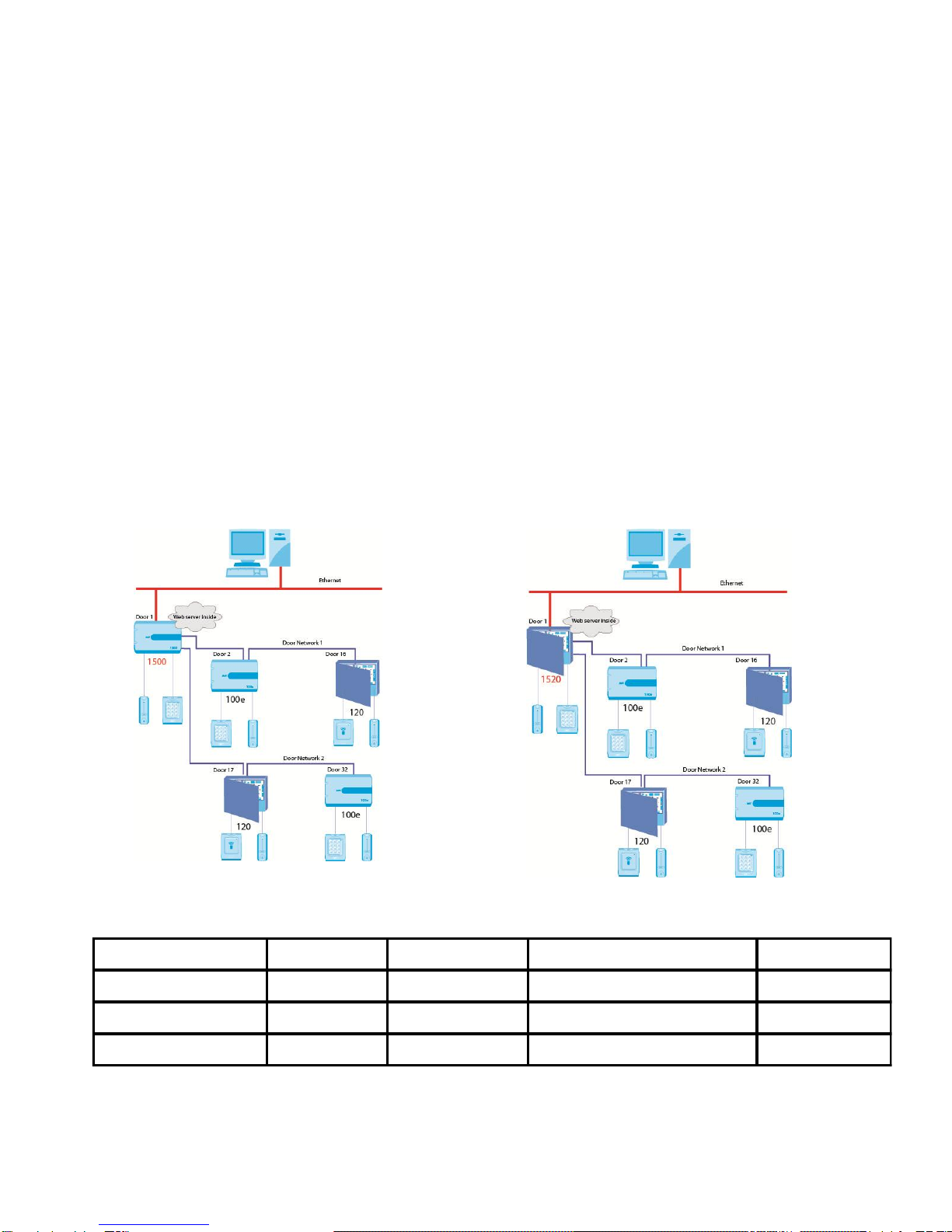
Diagram 1: ACTpro 1500 Controller ACTpro 1520 Controller
Cable Chart
From To Network Type Cable Type* Max Distance
ACTpro 1520 or 1500 PC Ethernet or USB CAT5 or mini USB 100m or 5m
ACTpro 1520 or 1500 ACTpro 100 or 120 RS485
Shielded and twisted single pair cable -
Belden 9501 or equivalent.
1.4Km
ACTpro 1500, 1520, 120, 100 Readers ACT protocol 8 Core Screen 100m

ACTpro 1500 and 1520 Operating and Installation Manual
Page 6
Diagram 2: illustrates an ACTpro 1500 and 1520 controllers managing 28 doors
(maximum is 32 doors each). With more than one controller ACTWin software required.
Diagram 2: Example: with ACTpro 1500 and 1520 Controllers
Cable Chart
From To Network Type Cable Type* Max Distance
ACTpro 1520 or 1500 PC Ethernet or USB CAT5 or mini USB 100m or 5m
ACTpro 1520 or 1500 ACTpro 120 or
100 RS485
Shielded and twisted single pair cable - Belden
9501 or equivalent.
1.4Km
ACTpro 1520, 1500, 120, 100 Readers ACT protocol 8 Core Screen 100m

ACTpro 1500 and 1520 Operating and Installation Manual
Page 7
2.0 Installation diagram
2.1 Diagram 3: ACTpro 1500 typical wiring
Note: For electric strike lock (de-
energized lock) wire between
“Common” and “Normally open” pins.
Note: The ACTpro 1520 is an ACTpro 1500 enclosed
in an ACT 12V DC 2amp power supply unit. The 12V
DC outputs are regulated by the same 2amp fused
output.

ACTpro 1500 and 1520 Operating and Installation Manual
Page 8
3.0 Quick Setup Guide
Note: See troubleshooting section of this manual for details on how to factory
default the controller.
Step 1:
Connect ACTpro 1500 or 1520 to the IP network. Controller is defaulted for dynamic IP
address (DHCP). For static (fixed) IP address set DIP switch 1 to the off position (Move
DIP switch 1 to the left). Default static IP address is 192.168.1.60.
Step 2:
Open your web browser on PC (Microsoft Internet explorer, Firefox)
Step 3:
Enter http://act1500-(followed by NetBIOS address).
e.g. http://act1500-59487 (see label on PCB)
Step 4:
Login to controller as installer
Login details:
Username: installer
Password: 999999
Diagram4: NetBIOS Name

ACTpro 1500 and 1520 Operating and Installation Manual
Page 9
Step 5:
Enable Doors
Select “Door Settings”menu which lists all 32 doors.
Select door, check enable box and enter a door name.
Press Save
Step 6:
Logout from installer menu (top right corner).
Step 7:
Login to controller as user
Login details:
Username: user
Password: 123456

ACTpro 1500 and 1520 Operating and Installation Manual
Page 10
Step 8: Add card batch
Select “Add card batch” icon from home
screen
Enter
1. Enter First card number
2. Enter last card number
3. Set “Start user” to 1 (for a new
installation),
4. Enable users.
Press Save
Ce manuel convient aux modèles suivants
1
Table des matières
Autres manuels ACT Contrôleurs