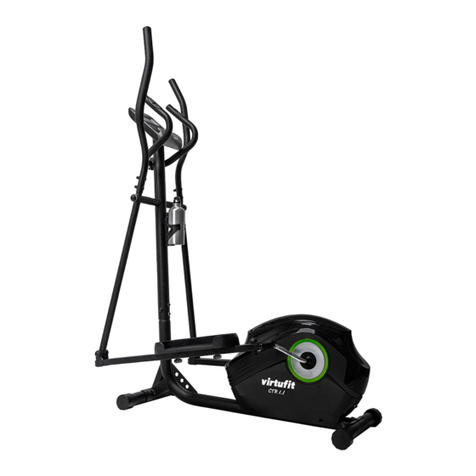
Achieve X380 Manuel utilisateur

X380 Mag Elliptical Trainer
OWNER’S MANUAL
WA0050

Table of Contents
Important Safety Information _____________
Before You Start _____________________
Assembly Instruction ___________________
Console ___________________________
Monitoring Your Heart Rate ____________
Exploded View _____________________
Parts List __________________________
Warranty / Service___________________
Page
3
4
5
10
12
14
15
16
2

Important Safety Information
WARNING!
Before using this unit or starting any exercise program, consult your physician. This is espe-
cially important for persons over the age of 35 and/or persons with pre-existing health prob-
lems. The manufacturer or distributor assumes no responsibility for personal injury or property
damage sustained by or through the use of this product.
SAFETY PRECAUTIONS AND TIPS
1. It is the owner's responsibility to ensure that all users of this unit have read the Owner's
Manual and are familiar with warnings and safety precautions.
2. This unit has a user maximum capacity of 125 kg.
3. The unit should only be used on a level surface and is intended for indoor use only. The unit
should not be placed in a garage, patio, or near water and should never be used while you are
wet. We recommend a mat be placed under the unit to protect floor or carpet and for easier
cleaning.
4. Wear comfortable, good-quality walking or running shoes and appropriate clothing. Do not
use the unit with bare feet, sandals, socks or stockings.
5.Always examine your unit before using to ensure all parts are in working order.
6.Allow the unit to fully stop before dismounting.
7. Pets should never be allowed near the unit.
8. Do not leave children unsupervised near or on the unit.
9. Never operate the unit where oxygen is being administered, or where aerosol products are
being used.
10. Never insert any object or body parts into any opening.
11. For safety and to prevent damage to your unit, no more than one person should use the unit
at a time.
12. Service to your unit should only be performed by an authorized service representative,
unless authorized and/or instructed by the manufacturer.
13. Failure to follow these instructions will void the unit warranty.
3

Before You Start
Thank you for purchasing this newAchieve Elliptical Trainer! This quality product you have
chosen was designed to meet your needs for cardiovascular exercise. Before you start, please
read the Owner's Manual and become familiar with the operation of your new unit.
Remember to take the time to perform the stretching exercises provided to avoid injury.
If you are taking medication, consult your physician to see if the medication will affect your
exercise heart rate. If you have heart problems, you are not active, and/or are over the age of
35 years, do not start an exercise program without first contacting and receiving approval from
your physician.
To avoid the risk of electrical shock, always keep the console dry. Do not spill liquids on the
console. We recommend a sealed water bottle for beverages consumed while using the unit.
Please review the following drawing below to familiarize yourself with the listed parts.
HAND PULSES
TRANSPORT WHEELS
LEFT FOOT PEDAL
CONSOLE RIGHT HANDLEBAR
LEFT HANDLEBAR
RIGHT FOOT PEDAL
4

Assembly Instruction
1. Connect Foot Tubes (4&4A) to Main Frame (1) using :
Qty 4 – (19) Hex Head Screw
Make sure that the Foot Tubes (4) with Transport Wheels (52) is assembled to the front of the
Main Frame (1). Make sure that the Foot Tubes (4A) with Foot Caps(18) is assembled to the back
of the Main Frame (1).
2. Connect the Extension Wire(58) in the console tube to
Gear Box Wire (8) in the main frame.
Then slide the Console Tube (2) onto the Main FrameAssembly
and secure the Console Tube (2) to the main frame.
REMOVEALL SECURITY TAPE AND WRAPPING BEFORE BEGINNING
1
18
19
4A
18
19
4
52
52
8
Transport Wheels
2
58
58
8
5

Assembly Instruction
3. Secure the Console Tube (2) to the main frame using:
Qty 6-(80) M8x18mm Curve Washer
Qty 6-(55) Hex Head Screw
Qty 4-(56) Plastic cap
4. Slide one Washer (76) onto the right post of ConsoleTube (2).
Next, slide on Right Handlebar (5) and secure using one Washer
(78) and one Locknut (77). Last, attach two Foam Handlebar
Shaft Caps (59) to the Right Handlebar (5) and secure using two
Screws (71).
Repeat above step to the left side assembly
55
2
55
55
56
80
80
55
56 55 80
80
2
76
76
71
5
59
59
59
71
59
78
77
77
78
3
6
6

Assembly Instruction
5. Connect Right Handlebar (5) to Right Foot Frame (9)
and secure using one Hex Head Screw (13), one
Washer (60), and one Locknut (77). Next, attach Left
and Right Foot Frame Side Covers (36 & 37) and
secure using four Screws (70).
Repeat current step to complete the left side assembly
77
60 13
60
77
13
9
9
70
36
37
70
70
37
36
70
5
3
B
A
9
3&5
3&5
13
13
A
30
62
62
31
9
9
63
63
6.Attach Right Foot Pedal (31) to Right Foot Frame (9)
using three Washers (63) and three Hex Head Screws (62).
Repeat current to complete the left side assembly
7

7. Pull Pulse Wires (64) through a hole at the top front of
Console Tube (2). Next, secure Pulse Handlebar (10) to
Console Tube (2) using two Washers (68)and two Hex
Head Screws (67).
Note: Be sure not to pinch the wires between Pulse
Handlebar (10) and Console Tube (2).
Assembly Instruction
64
10
KM/ML
8. To change KM or ML , push the switch to select scale (KM or ML)
8
64
64 58
68
67
2

9. Connect the Pulse Wires (64) and Extension Wire (58) to
Console (15). Secure Console (15) to Console Tube (2) using
four Screws (39).
Note: The four Screws(39) will already be installed into the back
of Console(15) when you remove it from the box.
Assembly Instruction
2
39
58
64
15
The monitor is powered by using the AC adaptor input, make sure the AC adapter has
already been pluged into the adapter jack on the bottom housing.
Adapter jack
Adapter
9

Console
The console with large LCD which can display RPM,
SPEED, TIME, DISTANCE, CALORIES, WATTS, and
HEARTRATE.
Power On
Make sure theAC adapter is plugged into an outlet.
Press any button to turn on the console.Along beep
will sound and the entire LCD display will light up for 2
seconds.
Sleep
This occurs if the unit senses no pedal movement or if
the console buttons have not been pressed for 3 min-
utes.
Wake
After the console enters sleep mode, press any button
to turn on the console back on.
Button function
UP/DOWN
During Setup Mode: For selecting the workout program.Also used to change Time, Calories,
Distance andAge.
During Workout: For increasing or decreasing the resistance levels
START/STOP
During Setup Mode: Enter key to confirm the Time, Calories, Distance, Pulse andAge settings
During Workout: To pause workout mode.All workout data is stored during pause mode.
MODE
During Setup Mode: For selecting desired setting you wish to change and to confirm the values
entered (Time, Calories, Distance, Pulse andAge ).
RECOVERY
This button is used to test the user's fitness level.
10
Table des matières
Manuels vélo elliptique populaires d'autres marques

Weslo
Weslo Momentum 4.0 Elliptical Manuel d'utilisation et d'entretien

Progear Fitness
Progear Fitness Air elliptical pro 1307 Manuel utilisateur

Torque Fitness
Torque Fitness XPLLP Manuel utilisateur

Octane Fitness
Octane Fitness PRO3700C Manuel utilisateur

Xterra
Xterra FS5.8e Manuel utilisateur

Bodyguard
Bodyguard E-40 Manuel utilisateur

Bonn Germany
Bonn Germany Concept 2.2 Manuel utilisateur

Precor
Precor Resolute RSL 620 Manuel utilisateur

NordicTrack
NordicTrack E 9.2 Elliptical Manuel utilisateur

Vision Fitness
Vision Fitness X6600iNetTV Manuel utilisateur

Matrix
Matrix MX-A5x Manuel utilisateur

SportsArt Fitness
SportsArt Fitness ECO-NATURAL Elite E874 Manuel utilisateur