ACADEMY DA-810DSP Manuel utilisateur

User Manual
DA-810DSP
SPECIAL DSP AMPLIFIER
Please read this manual carefully before using this product and keep it for future reference

Precautions
Warning:To prevent unit be short circuit,please do not put it in
the wet or damping places.
If unit catch water and any liquid that please turn off power
immediately and do not open cover by yourself. Please contact with
professional engineer for checking to avoid accident happen.
Packing List
For every package including below items, Please noticed retailer and
Factory if shortage:
DA-810DSP unit 1PC
User Manual 1PC
Warranty Card 1PC
Head Unit Cable 1PC (Option)
USB computer tuning cable 1PC

Contents User Manual
Mobile Application Instructions............................................................................................1-4
1. Features
1.1 Audio specification、main audio signal process diagram………........5
1.2 Input and output side panel………....…………………………………..........…...6
1.3 Software Introduction……………………………….…………................................6
1.4 Function Introduction………………………………………….................................7
2. Installation
2.1 System classic connecting reference……….......……...….......………..……...8
2.2 Unit connection..……………….………….……..…….….........................................9
2.3 Low level RCA input/output……………………………………….........................9
2.4 USB2.0 Port……………….….........………………….……….................................…10
2.5 The remote control function is introduced .............................................11
3. Software Operation
3.1 Software Installation………………………………………………..........………....…..12
3.2 Run and turn off.…………………………………………………….............………..…..12
3.3 Software interface………......……….…………………………...........……..……..…..13
3.3.1 Input signal select….…………………………….………..........…...…..13
3.3.2 Output switch……............................................................................14
3.3.3 Output voice, delay, type, mute and phase setting............14
3.3.4 Output signal equalizer and crossover operation…...........17
3.3.5 Output signal function operation.....…………………………......19
3.4 Setting introduce....………………….....................................................................21
3.4.1 Original setting change...................................................….....….21
3.4.2 Load and save the whole store a scene............................…..24
3.5 Operations Introduction..………………………….…………….............................26
3.5.1 Noise Gate.....................................…….……………….….….......…....26
3.5.2 Reset..............................................................………………..……....….26
3.5.3 Input Vol...........................................………………….….....................26
3.5.4 Information about the inquiry.………………….…......................27
3.5.5 Encrypt Setting................................................................................27
4. Common trouble shouting................………………..........……………………..........….…..........28

DA-810DSP Special DSP amplifier
1
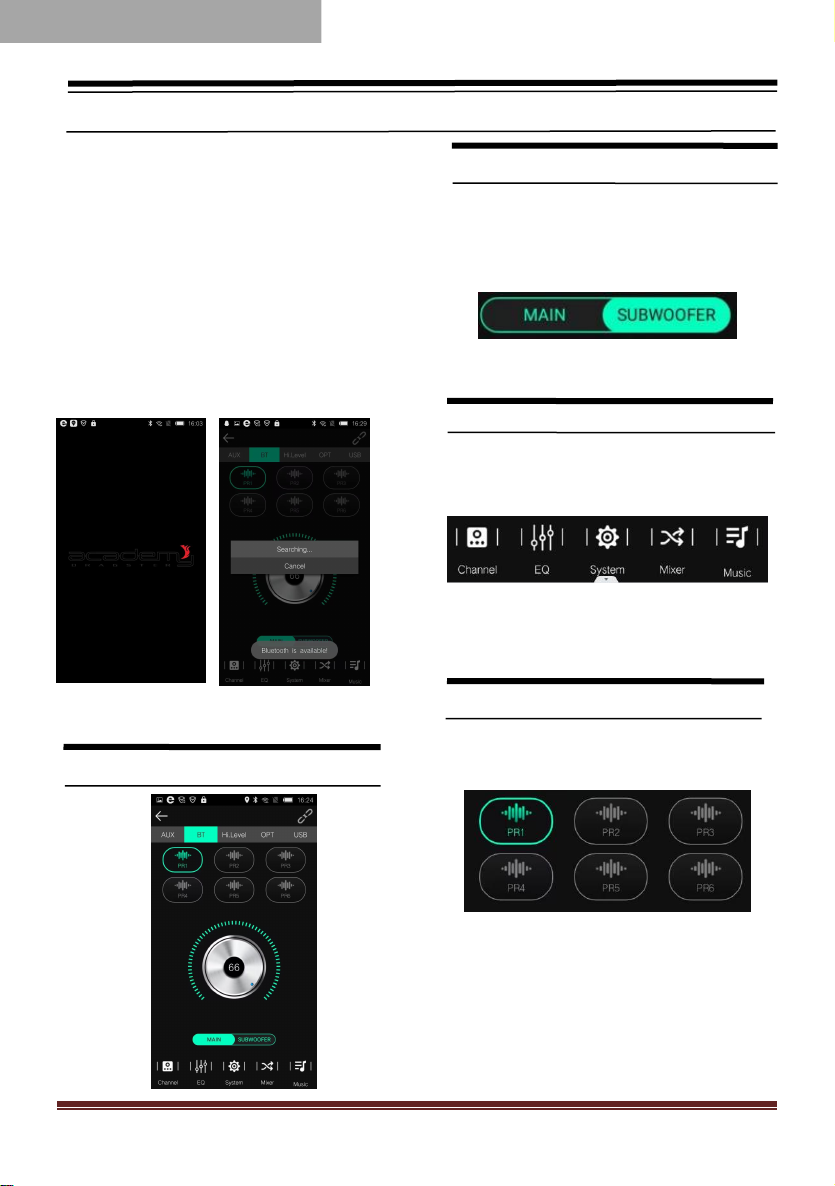
Mobile Application Instructions
Android mobile scan Qrcode on gift box to
download the application to install DA-810DSP
app. Turn on the unit and plug in external
bluetooth, then the external bluetooth will be
power on and auto enter into a paring mode
with blue light flash alternately. Open the
bluetooth of your android mobile, searching
DSP to pairing it to finish the connected.
1.User Operation Instruction
Main Interface
Main volume adjustment
●The main volume can be adjusted by
pressing the main volume scale clockwise or
counterclockwise by hand.
Input Source
1、Click Hi.Level button to switch input
source.
E.g : Head unit input source is high level,
then the Input source on app choice
Hi.Level。
Preset
There are 1~6 presets to choose from.
MOBILE APPLICATION

DA-810DSP Special DSP amplifier
2
Connection Status
1、【 】Red means not connected;【 】 gray
means connected.
When the mobile phone is connected to
Bluetooth, open the mobile phone software and
it will be connected automatically. The Bluetooth
symbol turns green. The software can control
the host playback and data adjustment.
2、User mode click [ ] to enter the [Exit]
3、Click to enter the main interface. The main
menu is at the bottom of the interface.
4、Slide to adjust the main / subwoofer volume.
The main / subwoofer volume is 0-66.
Click【EQ】to enter EQ interface
Setting EQ Output channel
1、EQ curve(gain, Q value and frequency)
2、Output EQ gain setting: A total of 31 EQ,
left.and right sliding screen can select EQ,
you can drag the slider up and down. PEQ
mode (the equalizer frequency,Q value
and gain are restored to their initial
values).
3、Click each channel Freq in the pop-up
dialog box to adjust the adjustment range:
-20dB~+20dB.
Equalization settings
1、Click 【Reset EQ 】to restore the
parameters of the 31-band equalizer to the
original.
pass-through mode (the equalizer frequency,
Q value and gain are restored to their initial
values).

DA-810DSP Special DSP amplifier
3
Channel settings
1.Choose from 10 channels to choose from
2.Output channel volume setting,Click【 】
the speaker button to mute.
2、Click 【 】to adjust the volume by
sliding left and right.
2.Click phase for every output channel:
In Phase or Out Phase(0゜/180 ゜)
Crossover settings
1. Channel high-low-pass crossover setting
with high-low-pass independent filtering.
2. Frequency Range: 20Hz~20KHz. Slope
selection: 6 dB/Oct 、12dB/Oct 、18dB/Oct 、
24dB/Oct 、30dB/Oct 、36dB/Oct 、42dB/Oct 、
48dB/Oct 、OFF.
Output Signal Function
●Click [System] to synchronize the data,for
Group/Noise-gate/Preset Setting.

DA-810DSP Special DSP amplifier
4
Delay setting
Click[Channel] to enter the delay interface.Then
click [ ] to enter the delay setting
corresponding direction of the dot to the left
and right to set the delay. for the CH1 to CH10
speakers.
Mixer settings
Click [Mixer] to enter Mixer interface, It can
Perform 10 Output Channel adjustment.
USB-L, USB-R, digital left and digital right,
Bluetooth left and Bluetooth right mix
selection and adjustment.

DA-810DSP Special DSP amplifier
5
1. Feature User Manual
1.1 Audio specification、main audio signal process diagram
This equipment adopts the audio extraction method with high sampling rate of
48KHz. The core processor is the digital signal processor (DSP) with high resolution
64 bit double precision floating point and 170 section 31 parametric equalizer or
graphic equalizer, delay and frequency device (low shear and high cut filter, the
types of specialized division include: Ning g / Bessel / Butterworth, CH1-CH10 nine
slope 6dB and 12dB /18dB/ 24dB/30dB /36dB/ 42dB/ 48dB/off optional) etc..
Main audio signal process diagram
PC APPLICATION
low level /lossless /Bluetooth input
Bluetooth
Three groups of stereo high
level input
main voice choosing
output/input adaptor
Output
voice
80W
(main
cable
output)
CH1
CH2
CH3
CH4
CH6
CH9
CH5
CH8
CH7
CH10
Mute
limiter
Mute
limiter
Mute
limiter
Mute
limiter
Mute
limiter
Mute
limiter
Mute
limiter
Mute
limiter
Mute
limiter
Mute
limiter
1-10each output channel is independent of the 31 segment equalizer
Filter / Slope choice
RCA
Low
level
output 9
output voice
Phase
time
delay
Phase
time
delay
Phase
time
delay
Phase
time
delay
Phase
time
delay
Phase
time
delay
Phase
time
delay
Phase
time
delay
Phase
time
delay
Phase
time
delay
Output
voice
Output
voice
Output
voice
Output
voice
Output
voice
Output
voice
Output
voice
Output
voice
Output
voice
RCA
Low level
Output1
80W
(main
cable
output)
RCA
Low level
Output2
80W
(main
cable
output)
RCA
Low level
Output3
80W
(main
cable
output)
RCA
Low level
Output4
35W
(main
cable
output)
RCA
Low level
Output5
35W
(main
cable
output)
RCA
Low level
Output6
35W
(main
cable
output)
RCA
Low level
Output7
35W
(main
cable
output)
RCA
Low level
Output8
RCA
Low level
Output10

DA-810DSP Special DSP amplifier
6
1. Feature User Manual
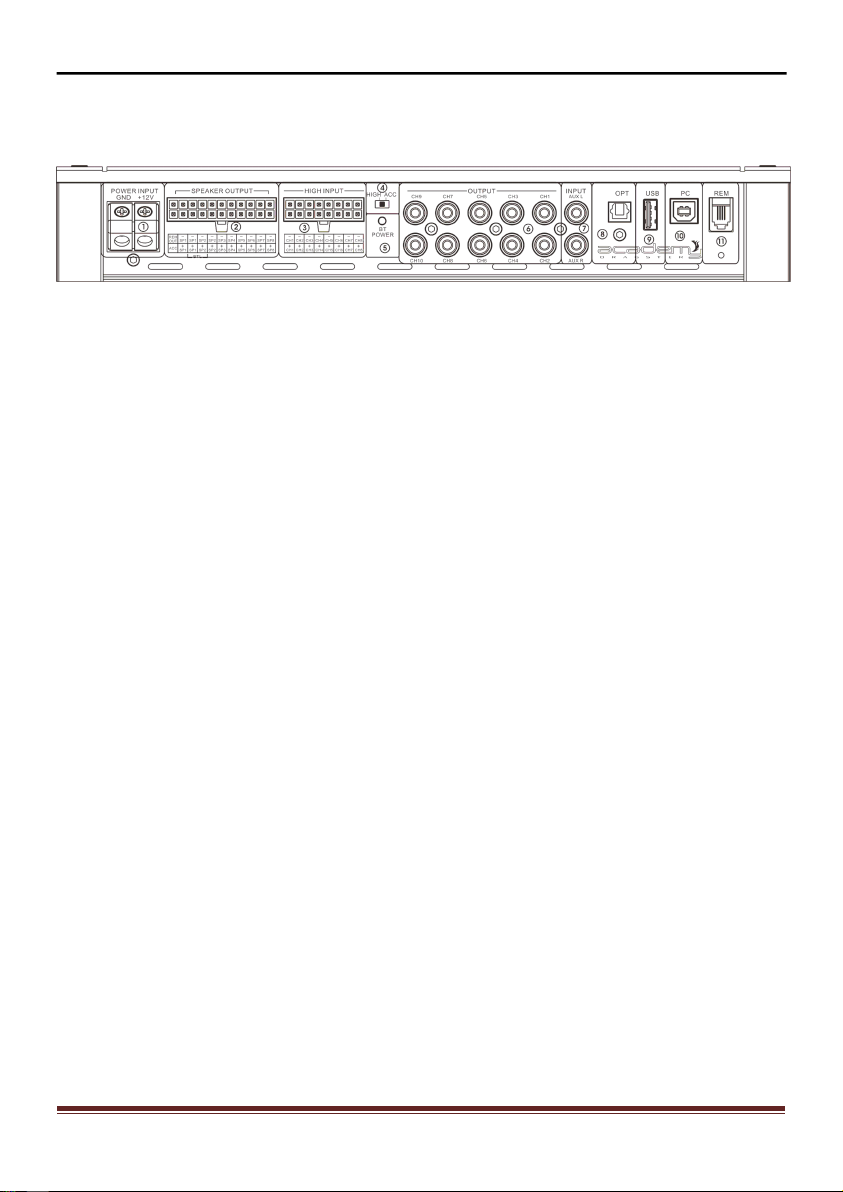
1.2 Input and output side panel
Figure 1.2.1
1) Power Input 2) Speaker Output
3) High Input 4) ACC /High convertor
5) BT/Power LED indicator 6) Low level RCA output
7) Low level RCA input 8) Optical In
9) HIFI Player 10) PC Connection
11) Remote Control
1.3 Software Introduction
DA-810DSP PC software control: (please check 3. Software Operation detail )
1) Auotmetically detect whatever the hardware is connecting with USB cable,
if ready and will connect with head unit autometically.
2) Display resolution over than 1280*760, or else cannot show fully.
3) Only for windows system's computers.

DA-810DSP Special DSP amplifier
7
1. Feature User Manual
1.4 Function Introduction
Specification
Input signal type:
8 Channel High Level Input / 2 Channel Low Level Input
Output location:
10 Channel Low Level Output [RCA] / 8 Channel High Level Output
RMS Power Output (4 Ohm):
35W x 4 CH + 80W x 4CH
RMS Power Output (2 Ohm):
50W x 4 CH + 120W x 4CH
Peak Power Output (4 Ohm):
70W x 4 CH + 150W x 4CH
Active Range :
≥110dB
S/N Ratio
≥100dB
T.H.D.
≤0.05%
Freq. Response
20Hz~20KHz
Input Impedance
Low level input:20KΩ, High level input:240Ω
Low level output impedance
100Ω
Signal input/output range
RCA Input:6Vpp;High level:26Vpp;
RCA Output:9Vpp;Amplifier:26Vpp
Equailzation:
31 Band Independent Parametric / Graphic Equalizer
Equalizer Gain:
-20.0dB ~ +20.0dB, resolution 0.1dB
Output signal crossover type:
6db/Octave- 48db/Octave, Linkwitz Riley, Butterworth & Bessel
BesselButterworth & Bessel6db/Octave- 48db/Octave, Linkwitz
Riley, Butterworth & BesselButterworth & BesselButterworth
& Bessel
Time Delay :
0.000-20.00ms, 0.00-692.0cm, 0.00-273 inch
Phase:
0 ゜/180 ゜
Bluetooth Version:
Bluetooth 5.0
Signal Input:
Bluetooth Audio Player
Optical In/ PC Connection
Android/ Ios APP & PC Software for DSP Setup & Tuning
Lossless Audio Player (USB):
for FLAC, WAV, MP3, WMA, AAC
Sampling rate:
48KHz/24Bit
Remote control:
Optional
Turn-on REM output
+12 V starting voltage output(0.2A)
Power consumption
≤0.1W
Output signal gain range
Mute, -59.9dB to 6.0dB
Table des matières