ADA Harmony synthesizer owner’s manual
The Harmony Synthesizer is designed to work with voice, guitar, piano, and other musical
instruments by taking the input signal and synthesizing a parallel harmony line. This harmony
line may be any interval within the range of one octave above the original signal to two
octaves below the signal. The effect is not limited to single note melody lines; each note of a
chord played through the Harmony Synthesizer will be harmonized.
The Harmony Synthesizer can also serve as an analog delay line. This capability allows such
effects as "slapback" echo, multiple repeating echoes, thickening/doubling of sounds,
"bathtub" reverberation, and more.
Finally, many unusual special effects (such as arpeggiation) may be realized with the
Harmony Synthesizer. These effects are covered in detail later in this manual.
LIMITATIONS OF THE HARMONY SYNTHESIZER
There are two major limitations involved with the use of this device. When used as a delay
line/echo unit, longer delay times result in less high frequency response for the delayed
signal. This effect is common to all solid-state echo units. When used to synthesize
harmonies, the harmony line will not have the exact same timbral quality as the original
signal; instead, the harmony will sound as if it is running through a tremelo unit. In order to
create harmonies, the synthesizer must cut the input signal into sections, and then "splice"
them back together in a different form to create the harmony. Every other "splice" creates a
volume shift, causing the tremulant effect.
PLUGGING IN
Plug your instrument into the jack labeled "in"; then run a cord from the jack labeled "mix out"
to your amplifier (note that the label for each jack is printed just above it on the front panel).
Leave the other jacks unconnected for now. Plug the line cord into a 115 VAC, 60 Hz outlet.
Countries using other voltages require an adapter. Turn all knobs fully counterclockwise.
Next, while playing your instrument, adjust the LEVEL control for a pleasing volume level.
For low level instruments such as guitar, the knob will generally point straight up; however, if the
Harmony Svnthesizer distorts during any of the following steps, reduce the setting of this control
until the distortion goes away.
USING THE HARMONY SYNTHESIZER AS A DELAY LINE/ECHO UNIT
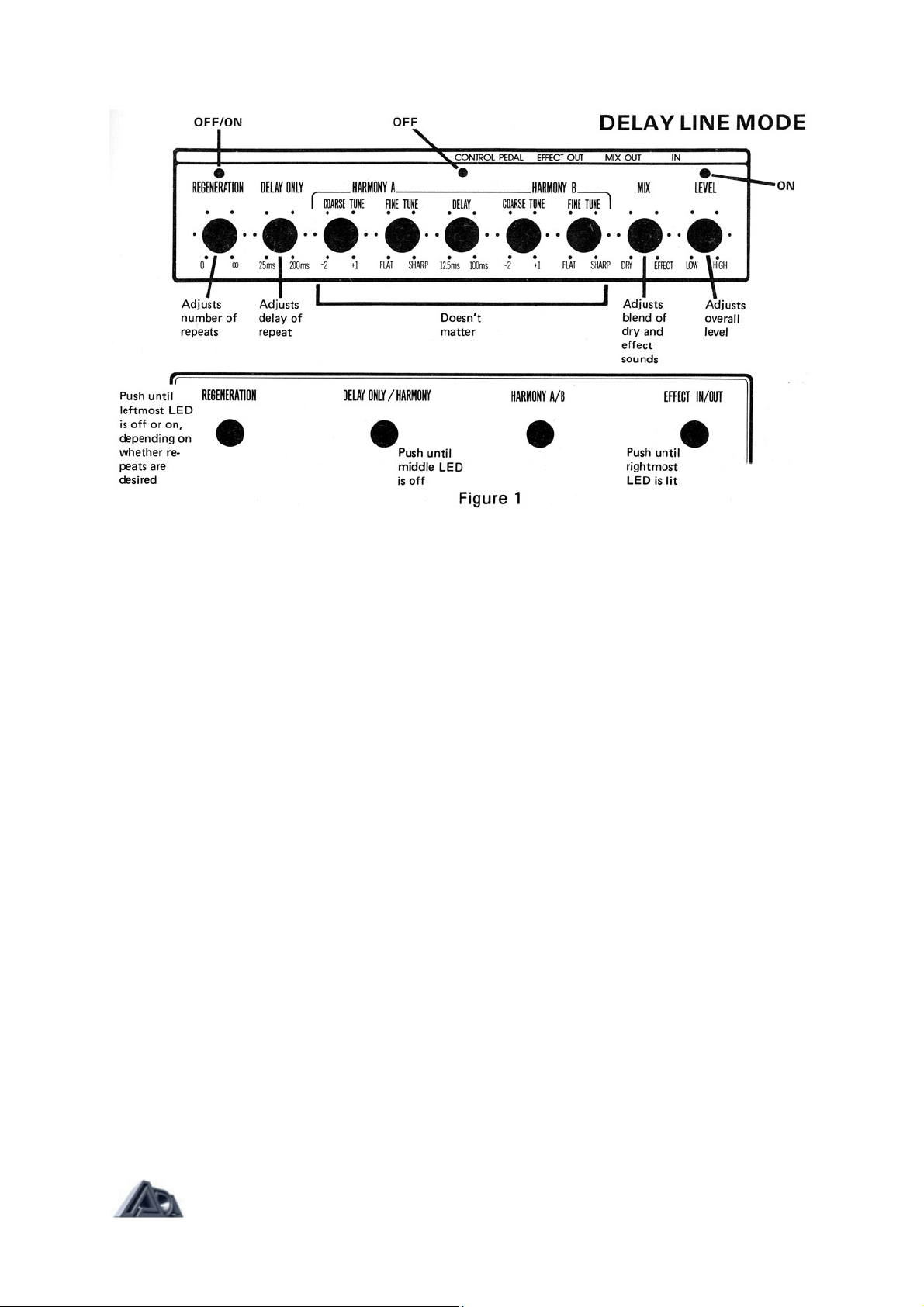
INITIAL SETUP (see figure 1): Push the EFFECT IN/OUT footswitch until the right-hand
LED is on. Push the DELAY ONLY/HARMONY footswitch until the middle LED is off. Push
the REGENERATION footswitch until the left-hand LED is off.
Play your instrument, and slowly rotate the MIX control from "dry" to "effect." In the "dry"
position, you will hear your instrument only. In the mid-position, you'll hear a slightly delayed
repeat along with your instrument. In the "effect" position, you will hear the delayed repeat
only, without the original instrument sound.
Return the MIX control to mid-position. Now, start turning the DELAY ONLY control
clockwise. This increases the delay time of the repeat.
With the DELAY ONLY control now set fully clockwise, push the REGENERA TION
footswitch so that the left-hand LED is on. Slowly turn the REGENERATION control
clockwise. This will change the echo from a single repeat to multiple repeating echoes, just
like a tape echo unit. Note that with extreme clockwise settings of the REGENERATION
control, the echoes will repeat until they turn into continuous feedback.
Next, vary the DELAY ONLY, REGENERATION, and MIX controls to become familiar with
the range of echo sounds available from the Harmony Synthesizer.
Page: 2 of 9