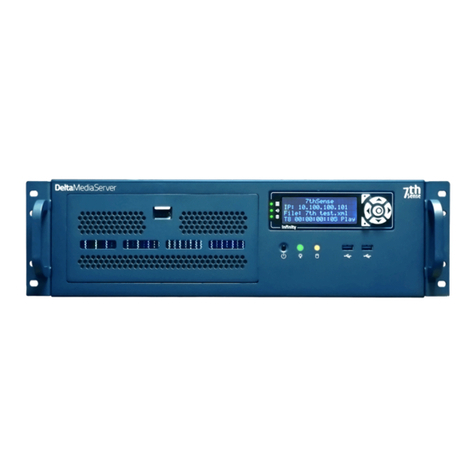
7th Sense Delta Manuel utilisateur

Delta Media Server
Managing Delta Servers
MC255-2
User Guide

2
Managing Delta Servers © 2018 7thSense Design
Delta Media Server is a trademark of 7thSense Design Ltd. Brand or product names may be registered trademarks of
their respective owners. Windows is a registered trademark of Microsoft Corporation in the United States and other
countries.
Managing Delta Servers : User Guide
Trademark Information
Copyright Information
All Rights Reserved. This document is copyrighted © by 7thSense Design Ltd and shall not be reproduced or copied
without express written authorisation from 7thSense Design Ltd.
The information in this document is subject to change without notice. 7thSense Design Ltd assumes no responsibility
for errors, and/or omissions contained in this information.
Printed: June 2018
2 The Courtyard Shoreham Road
Upper Beeding
Steyning
West Sussex
BN44 3TN
UK
T: +44 (0) 1903 812299
1032 N Crooks Road
Suite H
Clawson
Michigan 45017
USA
T: +1 248 599 2717
7thSense Design Ltd 7thSense Design LLC
E: info@7thsensedesign.com
W: 7thsensedesign.com
This edition is for software version Delta Server 2.4 and above, Delta Monitor 3.0, Stack 2.0, CDUE 1.0
Document ref.: MC255-2

3
Managing Delta Servers © 2018 7thSense Design
Contents
Introduction 5
Delta Server Front Panel 9
Panel Features ............................................................................................................................ 11
LED Status Information ................................................................................................................ 12
Display Text Colours .................................................................................................................... 13
Menu Structure ........................................................................................................................... 15
Using Delta Front Panel Menus .................................................................................................... 16
Controls ............................................................................................................................. 16
Load Show .......................................................................................................................... 17
Graphics/Render ................................................................................................................ 17
Group ................................................................................................................................. 18
Delta Version ..................................................................................................................... 18
Audio VU Meter ................................................................................................................. 18
External Control ................................................................................................................. 19
IP and PC Name ................................................................................................................. 19
Service Menu ..................................................................................................................... 19
Service Mode ..................................................................................................................... 24
Reset Audio and Front Panel ........................................................................................................ 26
DeltaMonitor 31
DeltaMonitor Dialog .................................................................................................................... 33
Service Mode ..................................................................................................................... 33
Edit: Preferences ............................................................................................................... 34
Service Menu ..................................................................................................................... 35
Registry Tools .................................................................................................................... 35
Help ................................................................................................................................... 36
External Control of Delta Servers 37
External Control Commands ........................................................................................................ 39
Commands > Master Rack ............................................................................................................ 40
Commands > Master or Slave Rack ............................................................................................... 41
Return Codes ............................................................................................................................... 49
Troubleshooting External Control ................................................................................................ 52

4
Managing Delta Servers © 2018 7thSense Design
Contents
WakeOnLan 53
DeltaFinder: Finding Servers 55
Stack web interface 57
Introduction ................................................................................................................................ 59
Installation .................................................................................................................................. 61
Stack Core Modules ..................................................................................................................... 63
Stack Overview .................................................................................................................. 63
Stack Annotate ................................................................................................................... 68
Stack Backup and Restore ................................................................................................. 74
Stack Control ...................................................................................................................... 83
Stack Control: DeltaMonitor .............................................................................................. 86
StackDesigner .................................................................................................................... 94
StackScheduler ................................................................................................................... 98
Stack API ............................................................................................................................ 99
Stack Additional Modules .......................................................................................................... 127
Managing Delta User Licences 129
Update Licence Expiry ................................................................................................................ 131
Activate a Software Licence ....................................................................................................... 134
Bandwidth Licensing .................................................................................................................. 136
Change Delta User Expiry ........................................................................................................... 137
Generate New Update Code ............................................................................................ 137
Updating Delta with new Code ....................................................................................... 139
Delta Media Server Shared Folders 141
Network Ports Used by Delta Server 145
Document Information 149
151
Index

Introduction

6
Managing Delta Servers © 2018 7thSense Design
Introduction
Introduction
There are several ways to interact with a Delta Media Server, or a network of servers.
·
As a Windows device, some operations will be via the desktop, and of course the box switches,
buttons and ports.
·
As a Delta server, some control is available via the front panel
·
This is replicated in an interactive web page in the Stack web interface.
·
DeltaMonitor is a utility that manages the front panel of the server it is on, including network
connections and graphic settings. This also has a link to the Stack web interface, which offers more
control than the DeltaMonitor application.
The Stack web interface gives much more, including an overview of all Delta Servers on a network, and a
facility to backup and restore any server. From here, the activity of any server can be seen and managed
remotely. The following parts of this Guide will help you in each approach:
Ø
Delta Server Front Panel
Ø
DeltaMonitor
Ø
Stack Web Interface
Shutting down a Delta Server
As an example of this flexibility, we are sometimes asked: what is the best way of properly shutting
down a Delta server?
Delta Media Server runs on Microsoft Windows. As such, it requires that the server is properly shut
down to prevent the operating system image and hardware from becoming corrupt. This can be done in
one of several ways:
·
Initiate a standard Windows shut-down from the Start Menu
·
Press (do not hold) the power button on the front of the server once
·
Call the shutdown_pc command within Delta Media Server via an internal sequence or external
control (see DeltaGUI sequence editor or external control help documentation) [available for Delta
Media Server v2.0.5 beta or 2.1.x release or later]
·
Initiate a shut-down from the Stack web interface (available at http://[serverIP]/ws, with default
user name = admin; password = admin). Click on the Control option on the left side menu and select
Shutdown Server.
10
32
58

7
Managing Delta Servers © 2018 7thSense Design
Introduction


Delta Server Front Panel

10
Managing Delta Servers © 2018 7thSense Design
Delta Server Front Panel
The Delta Front Panel is controlled by the DeltaMonitor application. On Delta 1.5 servers the
functionality is limited. Delta 2 adds a significant amount of additional functionality. Delta 2.4 sees
more software changes to allow for NICs to be modified in all servers (including Nano) without having
to enter Service Mode, and with further options for NIC modification throughout.
Terminology
Embedded Server – This refers to the Operating system on the server. The embedded servers include:
Nano, Nano4K and Duo II pre-2016, and Nano1, Nano2, Nano3, Nano4K in the 2016 server range. (For
further information see the Service Mode Section.)
Autres manuels pour Delta
2
Table des matières
Autres manuels 7th Sense Serveur

7th Sense
7th Sense DeltaServer Manuel utilisateur

7th Sense
7th Sense Delta Pico Manuel d'installation

7th Sense
7th Sense VIOSO Manuel utilisateur

7th Sense
7th Sense Delta Manuel utilisateur

7th Sense
7th Sense Delta Manuel utilisateur

7th Sense
7th Sense Delta Pico Manuel d'installation

7th Sense
7th Sense R Series Manuel utilisateur

7th Sense
7th Sense NanoR Manuel d'installation

7th Sense
7th Sense Delta Manuel utilisateur

7th Sense
7th Sense M101-4 Manuel utilisateur