4NSYS FDS-401Hl Manuel utilisateur

For safe use of system and to prevent product failure or accident, please read this manual
carefully before use.
Ver : HL.R1.00.ENG_1.2
DIGITAL VIDEO
RECORDER
USER MANUAL

DIGITAL VIDEO RECORDER MANUAL
DIGITAL VIDEO RECODER MANUAL
2
Before Usage
This product has been designed and manufactured to assure personal safety. Improper use can
result in electronic shock or fire hazard. The safeguards incorporated in this product will protect
you if you observe the following procedures for installation, use, and servicing.
This product does not contain any parts that can be repaired by user.
CAUTION
It is strongly recommended that you read this manual and use the product in a proper way
◈Avoid placing the unit near direct sunlight, hear source such as a heater, etc.
◈Do not share the outlet with the other appliances. It might cause an abnormal heating and a fire.
◈when smoke goes up or when you smell a strange smell, stop using the unit and turn the unit off
by unplug, and contact the after-sales service center.
◈Place the unit at a distance from a heat source. It is in danger of a fire.
◈Don’t put burning material such as a flammable spray, etc. It may cause a fire.
◈Don’t install the unit at a dusty place. It may cause a fire.
◈Plug the unit firmly not to be shaky. If the plug is not safely inserted into the outlet,
it may cause a fire.
◈When the multi-outlet is used, don’t use several appliances at the same time.
The abnormal heating of the outlet can cause a fire.
◈Don’t damage, modify, bend, twist, pull, stick, or heat the power code and the plug.
◈If the plug is loose in the outlet, don’t use. It can cause a fire or an electric shock.
◈Don’t insert the metals such as a coin, a hair pin, a piece of iron, etc., or flammable material
such as a paper, a matchstick, etc. in the product. It can cause a fire or an electric shock.
[Note]
Some contents of this manual can be different due to function improvement.
Photos for instruction can be different per channel.

DIGITAL VIDEO RECORDER MANUAL
DIGITAL VIDEO RECODER MANUAL
3
CONTENTS
1. Summary
∙ Feature ……………………………………………………………………………………………….………………………..……………….5
2. Installation
∙ Contents ………………………………..…………………………………………………………………….…………………………………..6
∙ Front panel ………………………………………………………………………………………………………………………..………….….7
∙ Rear panel.…………………………………………………………………………………………………………………………………………7
3. System Operation
∙ How to call setup menu……………………………………………………………………………………..……………………….…….9
∙ Icon………………………………………………………………………………………………………………………………………..…..…..…9
∙ Remote Controller…………………………………………………………………………….………………………………………..…..11
∙ How to setup the remote controller ID ………………………………………………………………………………..….…..12
4. System configuration
∙ System..……………………………………………………………………………………………………………………….……..……..…….13
∙ Time/Date………………….……………………………………………………………………………….……………………………..……14
∙ Password………………..……………………………………………………………………………………………..…………………..…….15
∙ Hard Disk…………………………….……………………………………………………………………………………………..……..…….16
∙ Default Setup………………..…………………………………………………………………………………………………....…….…….17
∙ Upgrade……..………………………………………………………………………………………………………………………..………....17
∙ BUTTON SETUP………..…………………………………………………………………………………..………………………….….……18
∙ RS-485……………………………..……………………………………………………………………………..……….………………….…….18
5. Display
∙ OSD……………………………………………………............................................. ……………....................................................….19
∙ SPLIT MODE……………………………………............................................. ……………....................................................….20
∙ Auto Sequence..…….………………..…………………………………………………………………………….……..…..…………….21
∙ TV Adjustment…………..………………………………………………………………………………………………...………..…..……22
6. Network Setup
∙ IP Address……….………………..………………………………………………………………….………………………………………….22
∙ Notification….………………..………………………………………………………………….………………………………………….23
∙ Selecting E-mail Notification…………………………………………………………….………………………………………….24
∙ Web Server………………………..………………………………………………………………………………………….………………….25

DIGITAL VIDEO RECORDER MANUAL
DIGITAL VIDEO RECODER MANUAL
4
∙ Free DDNS………………………..………………………………………………………………………………………….………………….25
∙ Dual Codec Setup…………..………………………………………………………………………………………….………………….31
7. Camera Setup
∙ Camera ……………….………………………………………………………………………..…………………………………..…………..…32
∙ Camera Title……….………………………………………………………………………..…………………………………..…………..…32
∙ PTZ Setting………….….……………………….………………………………………………………………………………………...……33
∙ How to use PAN/TILT….….……………………….………………………………………………………………………………...……35
8. Record
∙ Record Setup…………………………..……….……………………………………………………………………….…………………….37
∙ Schedule Record..……………………..……….…………………………………………………………….………….………………….38
∙ Holiday Record..…...…………………………..……….…………………………………………………………….………….………….39
9. Event Setup
∙ sensor…………………..………..…………………………………………………………………………………….…….……………………40
∙ Motion Detection.…………..…..……………………………………………………………………….……………………..……..……40
∙ Camera Temper Detection...……………….…………………………………………………………..……..…………………..……42
∙ Event Action……..………………..…………………………………………………………………………………………………….……..42
10. Search
∙ Search…………..…………………………….………………………………………………………….………………………………..……45
∙ DATA / TIME Search……………..……………..………………………………………………………………….………………………47
∙ Event Search...…………………………………....……………………………………………………………………..……………….……47
∙ Go to First / Go to Last…..………………………………………………………………………………………….………………..…48
∙ Search Control…………………………….……….……………………………………………………………………….……………......48
∙ Audio ……………….………………………..….………….…….……………………………………………………………..…………......49
11. Backup
∙ Backup…………………………………………………..…………………………………………………………………………………………50
12. Remote Connection-iPhone………………………………………………………………………………………………………..55
13. Windows Mobile Viewer……………………………………………………………………………………………………………….64
14. Remote Connection-Android Phone…………………………………………………………………………………………..72
15 Appendix
∙ Specification ………………………..……………………………………………………………………………….……………....………82

DIGITAL VIDEO RECORDER MANUAL
DIGITAL VIDEO RECODER MANUAL
5
1 — Summary
This Stand Alone Digital Video Recorder is capable of high quality of video and audio data
recording and provides various ways of data search by Calendar, Date/Time and event. Also the
system allows remote user to access in order to monitor and control multiple local DVRs via
TCP/IP / LAN connection.
Main features
(1) High resolution live display
(2) Easy installation and operation
(3) Motion detection record
(4) Sensor and Alarm outputs
(5) Reserved recording (Motion, Sensor/Alarm and time selected record)
(6) Network control via Dynamic IP
(7) NTSC / PAL compatible
(8) Highest data compression of H.264 technology
(9) Data backup to USB memory stick
Application
(1) Bank, ATM unit, Supermarket, Convenient store and other public places.
(2) Private homes, Apartment, Jewelry shop, Commercial compound and other places where
it needs anti theft surveillance system.
(3) Warehouse, Production line and other places where evidence is needed after any event
happened and to analyze the situation.
(4) Where to monitor sites remotely
Feature

DIGITAL VIDEO RECORDER MANUAL
DIGITAL VIDEO RECODER MANUAL
6
2 — Installation
Accessories.
ㆍ Digital Video Recorder (1EA)
ㆍ HDD Fixing screw (8pcs)
ㆍ Program CD (1EA)
ㆍ Manual (1EA)
ㆍ Power code (1EA)
ㆍ Remote controller)
ㆍ Battery AAA (1.5V 2EA)
ㆍ Adaptor (1EA)
[Note] Check the accessories before use.
Contents
DIGITAL VIDEO RECORD
HDD fixing screw (8PCS)
Battery for
remote
controller
Size : AAA
1.5V X 2EA
Power
Ada
p
te
r
Remote
controller
POWER
CODE
MANUAL
Program CD

DIGITAL VIDEO RECORDER MANUAL
DIGITAL VIDEO RECODER MANUAL
7
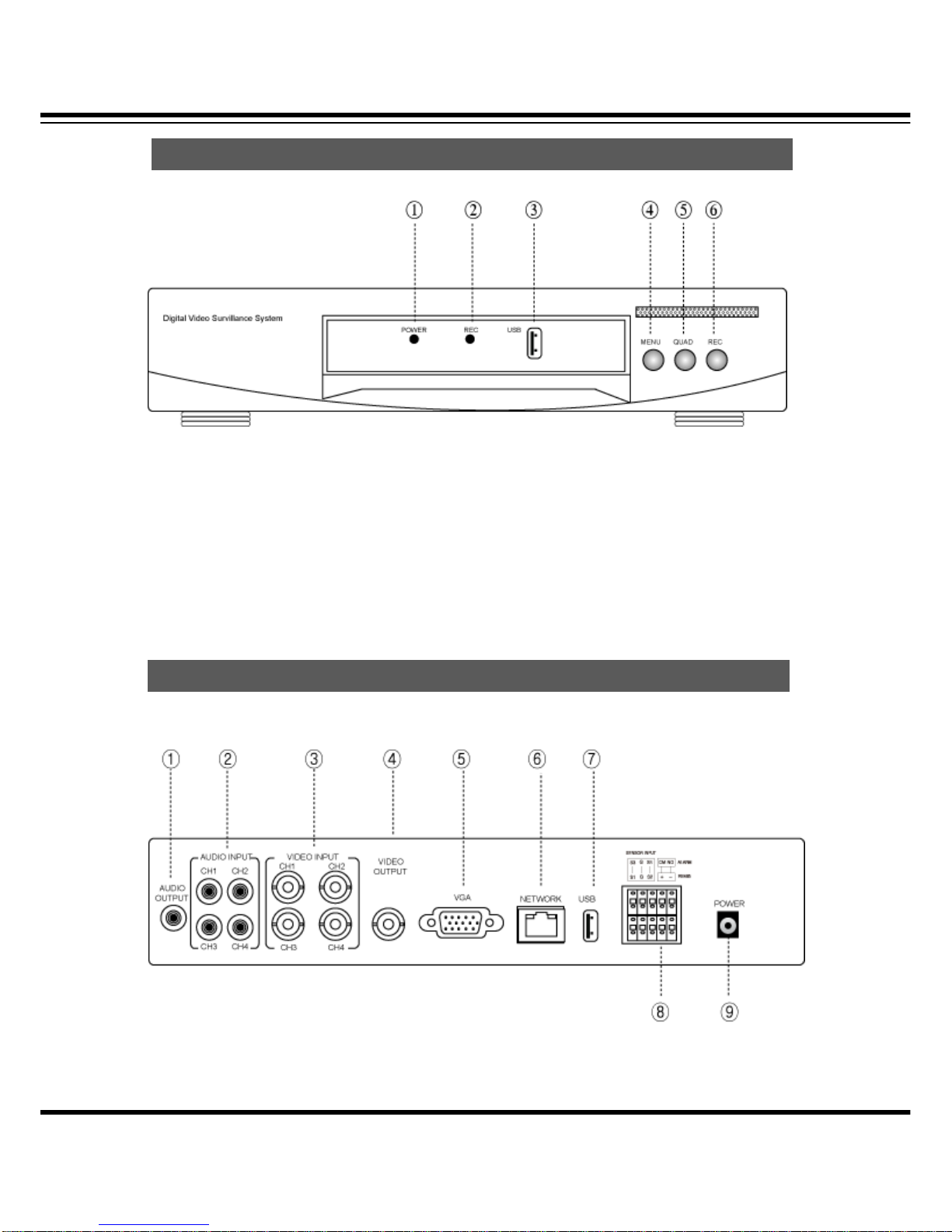
[1] POWER LED [2] RECORD LED [3] USB Port [4] MENU Button
[5] QUAD Button [6] REC Button (Emergency / Schedule)
(4Ch DVR)
Front
p
anel
Rear
p
anel

DIGITAL VIDEO RECORDER MANUAL
DIGITAL VIDEO RECODER MANUAL
8
(8Ch DVR)
[1] AUDIO OUTPUT
[2] AUDIO INPUT
[3] VIDEO INPUT
[4] VIDEO OUTPUT (COMPOSITE)
[5] VGA OUTPUT
[6] ETHERNET PORT (RJ-45)
[7] USB PORT (USB Drive / Mouse)
[8] RS-485/ALARM/SENSOR
[9] POWER (ADAPTER)

DIGITAL VIDEO RECORDER MANUAL
DIGITAL VIDEO RECODER MANUAL
9
3 — System Operation
DVR can be operated by using remote controller and mouse.
∙ By front button
Press “MENU” button.
∙ By remote controller
Press “MENU” button on the controller.
∙ By mouse
Press the right button of mouse to call pop-up menu.
[1] The icons on the live screen indicate the status.
Icon
How to call Setu
p
menu

DIGITAL VIDEO RECORDER MANUAL
DIGITAL VIDEO RECODER MANUAL
10
[2] Camera title will be shown as above.
[3] Recording Status Icon
Recording.
Video Loss.
Motion Detection.
Sensor.
Table des matières
Autres manuels 4NSYS DVR