
3M Dyantel 2250 Manuel utilisateur

September 1999
78-8097-6518-9-B
Dynatel™2250
Advanced Cable Locator
Operators Manual

TABLE OF CONTENTS
Introduction ............................................................................... 2
Installing or Replacing the Batteries ........................................ 2
Initial Receiver Configuration .................................................. 3
Receiver Battery Test ................................................................ 3
Transmitter Battery Test ........................................................... 4
Using External DC Power ......................................................... 4
Locating a Buried Cable ........................................................... 5
Transmitter Setup ................................................................ 5
Direct Connect Method ...................................................... 6
Dyna-Coupler Method ........................................................ 8
Induction Method ................................................................ 9
Receiver Setup .................................................................... 10
About Trace Modes ............................................................. 11
Selecting Passive Power Frequencies ................................. 12
Selecting Auxiliary Frequencies ......................................... 12
Determining Cable Depth and Current .............................. 13
Using Current Indications During Locating ...................... 14
Locating an Active Duct Probe (ADP) ..................................... 15
Determining ADP Depth .................................................... 15
Locating EMS Markers ............................................................. 16
Locating Markers while Tracing Cable Path ...................... 16
Locating Markers Using the receiver ................................. 16
Toning Aerial Faults .................................................................. 17
Transmitter Setup ................................................................ 17
Receiver Setup .................................................................... 17
Cable or Pair Identification ....................................................... 18
Transmitter Setup ................................................................ 18
Cable Identification Receiver Setup ......................................... 18
Pair Identification Receiver Setup ............................................ 19
Optional Accessories ................................................................. 20
Technical Information ............................................................... 21
Page 1

INTRODUCTION
The 3M™Dynatel™2250 Advanced Cable Locator consists of a Transmitter
and a Receiver for locating buried cables or Active Duct Probes (sondes).
It also measures and pinpoints conductor faults in aerial cables. The
Transmitter provides four frequencies to accommodate varying factors
such as distance, cable type, or soil conditions. If desired, all four
frequencies may be transmitted at once. The Transmitter also provides a
separate Tone function for identifying cables and pairs. The Receiver
provides four locating modes to accomplish fast or difficult tracing and to
pinpoint or verify a buried cable. The Receiver detects 50 or 60 Hz AC
Power signals and also measures the signal current in a cable and displays
its magnitude. The depth of buried cables or sondes may also be displayed.
Note: For more detailed locating instructions and advanced locating
techniques, ask your 3M sales representative or call 800/426-8688 for a
free publication called Cable and Pipe Locating Techniques.
INSTALLING OR REPLACING THE BATTERIES
Battery Disposal: Since regulations vary, consult applicable regulations
or authorities before disposal.
6 'C'
cells
6 'AA'
cells
CAUTION!
Do not connect batteries improperly, charge or dispose of in fire.
Batteries may leak or explode and cause personal injury. Always
remove batteries when storing the units.
Page 2

INITIAL RECEIVER CONFIGURATION
Display depth units (inches, feet and inches, or centimeters) may be
changed while holding and pressing .
For each press, one of
three units will display. To change the passive Power frequency, press and
hold then press to toggle between 50 or 60 Hz as displayed in
the lower left corner of the display.
To change the Null bar graph display mode, press and hold
then
press to toggle between normal Null bar graph display (Null flag will
flash) and inverse Null bar graph display (Null flag is solid). See section
About Trace Modes (Page 11) for further information.
Page 3
RECEIVER BATTERY TEST
The Receiver batteries are tested for two seconds every time the unit is
turned on. The time interval can be extended by pressing and holding .
During the battery test, the bar graph should extend to the right of the
battery level mark, otherwise replace the batteries.
Note: When batteries are low, the battery test indicator will flash.
Battery Test
Indicator
Battery Level
Mark

TRANSMITTER BATTERY TEST
To test the Batteries, press and hold . Listen to the tone and watch
the display.
• solid tone and 'OK' indicates batteries good;
• beeping tone and 'LO' indicates batteries low;
• no tone and '- -' indicates replace batteries.
Note: The battery test indicates battery condition for normal output
levels. If the unit resets when the high output level is selected, use the
normal output level or replace the batteries.
USING EXTERNAL DC POWER AND 5 WATT OUTPUT
If the unit has the option A, the Transmitter can be operated from an
external 12VDC source as well as its internal batteries. Use the supplied
cigarette lighter adapter cable to connect the DC power from a vehicle's
battery source to the Transmitter's external power jack located next to the
output jack.
Note: The internal batteries will not be recharged with external DC.
5 Watt Output
An external DC source is required for 5 watt output. To select 5 watt
operation, press once for high output (3W) and again for 5 watt
operation. The High Output flag will turn on for 3W and flash for 5W.
Page 4

LOCATING A BURIED CABLE
Transmitter Setup
Perform a battery test and then connect the Transmitter using one of the
three methods below to put tracing signal on a cable.
Note: Key descriptions can be found inside the Transmitter lid.
DANGER!
Voltage greater than 240 volts will damage equipment and cause
personal injury and death. Make all direct test connections before
turning on the Transmitter. Then activate the Transmitter in the Ohms
mode and check the display for voltage readings. Follow standard
procedures for reducing the voltage.
WARNING!
Potential for electrical shock exists when handling connecting cables
while the Transmitter is in the TRACE, FAULT or TONE modes. Turn
the Transmitter off before handling connecting cables.
Page 5
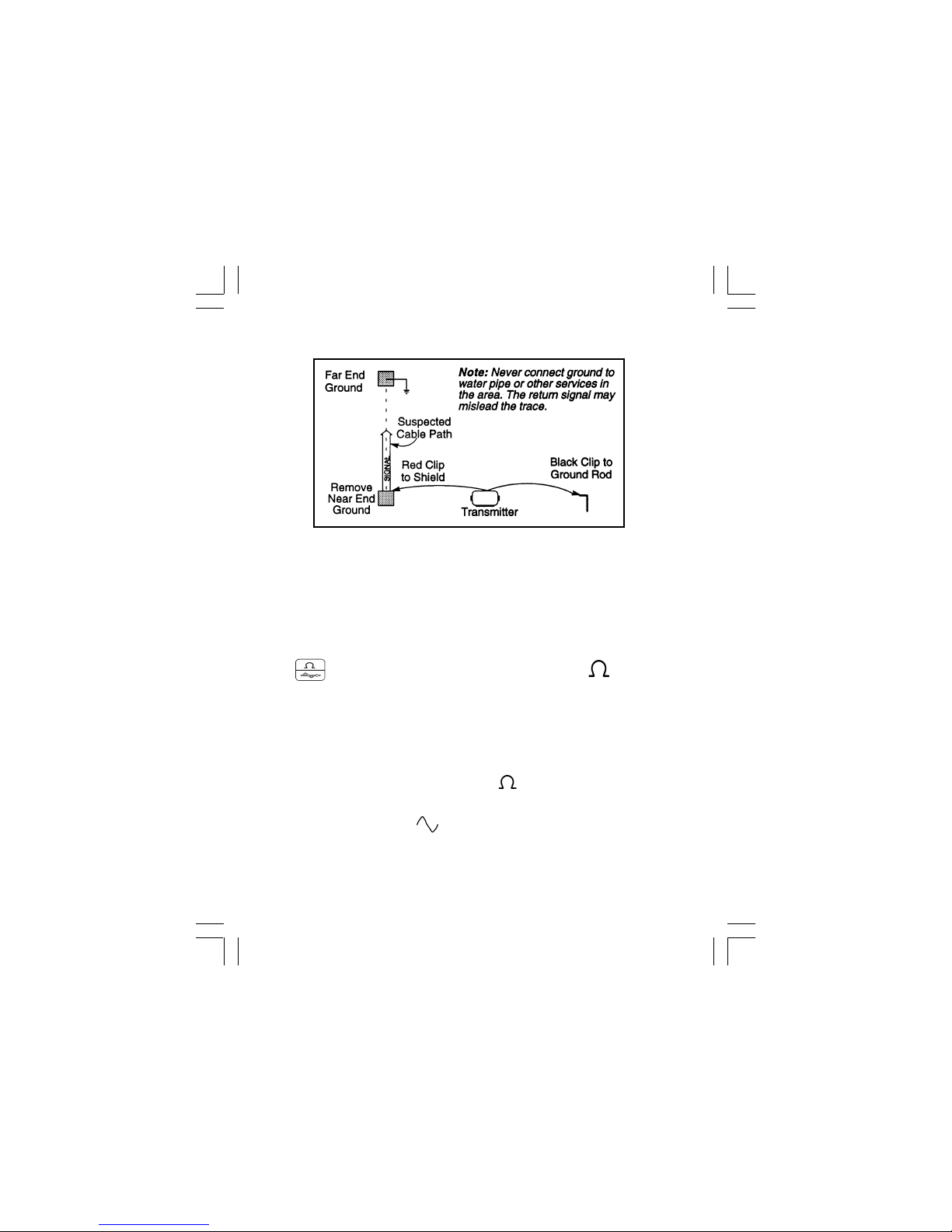
Make sure the Transmitter is off. Plug the direct connect cable into the
front panel jack. Connect the Black clip to the ground rod. Place the
ground rod in the earth perpendicular to the suspected cable path. If
necessary, extend the black lead with the Ground Extension Cable. Next,
remove the ground bonding and attach the Red clip to the shield.
Press to turn the Transmitter on in the Ohms mode . It will
measure the continuity of the cable under test. The results are displayed in
ohms and as a tone (solid tone = good ground; beeping tone = usable
ground; no tone = poor or no ground).
Note: In the ohms mode, the Transmitter can detect voltage as well as ohms. If a
low voltage is detected, the display will alternate between displaying ohms and
volts. When displaying ohms, the flag over the will be visible. When displaying
volts, the flag over the 'V' will be visible. When the voltage magnitude is sufficient
to impair the accuracy of the ohms measurement, only voltage will be displayed. If
the voltage is AC, a sine wave will be visible on the display. If a high AC
voltage is detected, a rapid beeping tone will be heard.
Note: Never attach or remove the direct connect cable from the Transmitter front
panel jack while the red and black clips are connected to a cable.
Direct Connect Method
Page 6

Press to select Trace mode. Press again to select one or all of the
four frequencies. The display will alternate between displaying the
selected frequency and the output signal current. It is best to choose the
lowest frequency for direct connect with far-end ground and a high
frequency for direct connect with no far-end ground.
Press to select high output level for longer tracing distances and
deep cables.
Transmitter setup is finished, now go to LOCATING A BURIED
CABLE - RECEIVER SETUP (Page 10).
Page 7

Dyna-Coupler Method
Cable Path
Connect the Dyna-Coupler to the Transmitter front panel jack using the
coupler cable.
Clamp the Dyna-Coupler around the cable below any bonds just before the
cable enters the earth. The jaws of the coupler must fully close.
Press to turn Transmitter on. Press again to select 8, 33, or 200 kHz.
Select high output level by pressing .
Transmitter setup is finished, now go to LOCATING A BURIED
CABLE - RECEIVER SETUP (PAGE 10).
Page 8

Induction Method
Place the transmitter on the ground over the target cable with the lid hinge
in line with the cable path. Press to turn the Transmitter on.
Press again to select either 33 kHz or 200 kHz. For greater tracing range,
select high output level by pressing .
Note: If the Receiver is less than 50 feet from the Transmitter, it can pick
up signal through the air. For best results, keep the Receiver away from
the Transmitter by at least that distance.
Transmitter setup is finished, now go to LOCATING A BURIED CABLE
- RECEIVER SETUP (PAGE 10).
Page 9
Table des matières


