
3e Technologies International 3e-250 Manuel utilisateur

3e-250
Bluetooth to RS-232
Cordless Adaptor
User’s Guide
3e Technologies International
700 King Farm Blvd.
Rockville, MD 20850
(301) 670-6779
www.3eti.com
29000107.001 013003

Intentionally left blank

3e-250
Bluetooth to RS-232
Cordless Adaptor
User’s Guide
3e Technologies International
700 King Farm Blvd.
Rockville, MD 20850
(301) 670-6779
www.3eti.com

iii
Copyright © 2003 3e Technologies International, Inc. All rights reserved. No part of this
documentation may be reproduced in any form or by any means or to make any derivative work
(such as translation, transformation, or adaptation) without written permission from 3e Technologies
International.
3e Technologies International reserves the right to revise this documentation and to make changes in
content from time to time without obligation on the part of 3e Technologies International to provide
notication of such revision or change.
3e Technologies International provides this documentation without warranty, term or condition
of any kind, either implied or expressed, including, but not limited to, the implied warranties,
terms, or conditions of merchantability, satisfactory quality, and tness for a particular purpose.
3e Technologies International may make improvements or changes in the product(s) and/or the
program(s) described in this documentation at any time.
If there is any software or removable media described in this documentation, it is furnished under a
license agreement included with the product as a separate document, in the printed documentation,
or on the removable media in a readable le such as license.txt or the like. If you are unable to locate a
copy of the license, contact 3e Technologies International and a copy will be provided to you.
UNITED STATES GOVERNMENT LEGEND
If you are a United States Government agency, then this documentation and the product described
herein are provided to you subject to the following:
All technical data and computer software are commercial in nature and developed solely at private
expense. Software is delivered as “Commercial Computer Software” as dened in DFARS 252.227-
7014 (June 1995) or as a “commercial item” as dened in FAR 2.101(a) and as such is provided with
only such rights as are provided in 3e Technologies International’s standard commercial license for
the software. Technical data is provided with limited rights only as provided in DFAR 252.227-7015
(Nov 1995) or FAR 52.227-14 (June 1987), whichever is applicable. You agree not to remove or deface
any portion of any legend provided on any licensed program or documentation contained in, or
delivered to you in conjunction with, this User Guide.
________________________________________________
3e Technologies International and the 3e Technologies International logo are registered trademarks.
Windows is a registered trademark of Microsoft Corporation. Macintosh and Mac OS are registered
trademarks of Apple Computer, Inc.
Any other company and product name mentioned herein are trademarks of the respective companies
with which they are associated.
EXPORT RESTRICTIONS
This 3e Technologies International product contains encryption and may require U.S. and/or local
government authorization prior to export to another country.

iii
Table of Contents
Introduction ......................................................................................................................1
Installation ........................................................................................................................1
Initial Setup.......................................................................................................................2
Operation and Maintenance ..........................................................................................6
Transferring data from PC to PC .............................................................................6
Connecting to a Test Instrument..............................................................................7
Using the LEDs...........................................................................................................7
Maintaining Battery Life...........................................................................................8
Conguration Commands for the 3e-250 Adapter ...............................................8
Troubleshooting .............................................................................................................10
Manufacturer’s Statement ......................................................................................10
Advices and Warnings ............................................................................................10
REGULATORY COMPLIANCE..................................................................................11
FCC Part 15 Declaration of Conformity (DoC)....................................................11
FCC Radiation Exposure Statement......................................................................11

iv
Intentionally left blank

1
Introduction
The 3e-250 Bluetooth to RS-232 Cordless Adapter is a Plug and Play
adapter that allows you to use your RS-232 (serial) port to communicate
wirelessly between multiple pieces of equipment.
In itself, the 3e-250 requires no installation of software or drivers on
the host machine. It doesn't initiate communications, but simply acts as a
substitute for a wired serial connection. As such, it allows direct commu-
nication between equipment such as data recorders, computers, handheld
devices, test electronics equipment, measurement devices and the like.
It enables users to connect measurement devices wirelessly to a cen-
tral analysis and recording area, eliminating the need to download infor-
mation from an unconnected measurement device.
The adapter incorporates a Bluetooth solution containing a BT 1.1
compliant transceiver operating in the 2.4 GHz range using frequency-
hopping at 1600 times/sec among the available frequency ranges.
The operating range of the 3e-250 is up to 30m or 100 feet. It provides
link control functionality and supports operation within a Bluetooth
piconet in a slave mode. It supports all Bluetooth data rates of up to 723
Kbits/sec.
Installation
The 3e-250 Cordless Adapter comes precongured with certain basic
parameters. No setup is required unless you wish to change these presets.
The pre-congured parameters are:
• Device Name
The default name is 3ETI Serial Device. This name will be pre-
sented to other devices which are trying to connect to it. (You
might want to change this name if you are going to use a number
of these Adapters.)
• RS-232 baud rate
The default baud rate is 9600, 8-N-1. (You might need to change
this default setup depending on the device that you will be attach-
ing it to.)
If any change to the conguration is required, or you plan to imple-

2
3e-250 Bluetooth to RS-232 Cordless Adapter
3
User's Guide
ment more than a direct RS-232 cable replacement function, you will
need to install at least one remote Bluetooth master device on a PC.
The Bluetooth master, such as the 3e-240 Bluetooth USB Dongle, in-
stalls on a USB port on your laptop and comes with software that allows
you to manage up to 7 slaves. Some examples of possible congurations
are shown below.
Initial Setup
If some setup is required or you want to ensure the Adapter is work-
ing, move the power switch to the "on" position and attach the DB9 serial
port to a serial port on your computer.
To verify that the device is working, open a "Hyper Terminal" applica-
tion on your computer. You will usually nd this application by following
the path, Start àPrograms à Accessories à Communications.
With your 3e-250 Adapter on and attached to your COM port, the
Hyper Terminal window should prompt you to connect to, for instance,
Com 2 (if that is where your device is plugged in) as shown in the follow-
ing picture.
DB9 connector
Off On

2
3e-250 Bluetooth to RS-232 Cordless Adapter
3
User's Guide
The New Connection wizard will ask you to name your session and
give you a choice of icons to associate with it. You can call it anything that
will readily identify it for you. We chose "port1."
Click OK to begin the Hyper Terminal session.
You will next see a "connect to" screen. Select the COM port to which
the 3e-250 is connected and click OK.
Set the "connect using" dropdown menu to the COM port you are us-
ing on your computer. This is usually COM1 or COM2.
Click OK to go to the COM2 Properties screen.
4
3e-250 Bluetooth to RS-232 Cordless Adapter
5
User's Guide
Initially, set the properties to 9600 8-N-1 with ow control at Hard-
ware.
If you will be using the 3e-250 Adapter with test equipment and you
know that it requires a different baud rate than 9600, you can change that
later, using the Hyper Terminal session. Normally, the only things that
you will need to change are the baud rate and the device name.
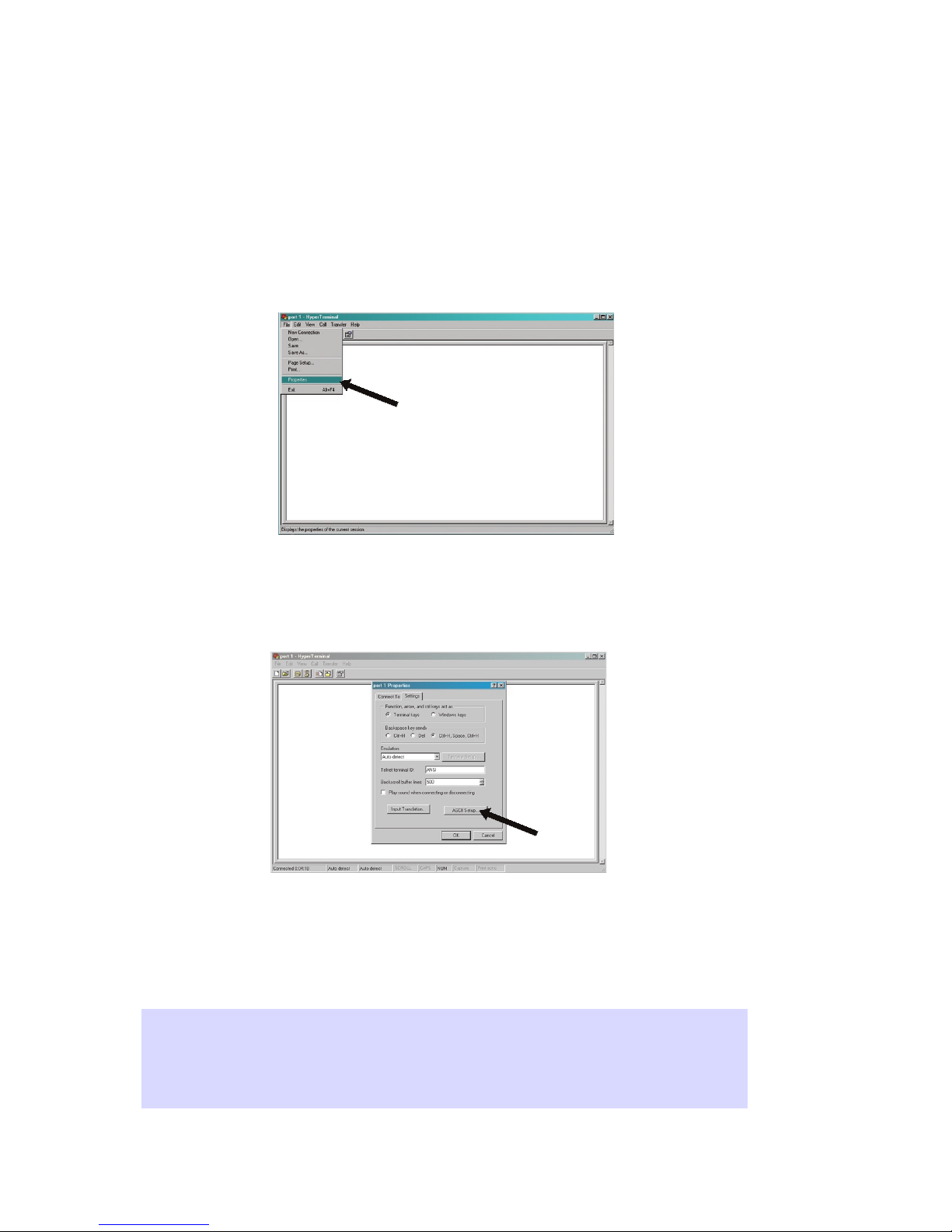
Click OK to save your settings and select Properties from the File
dropdown menu.
In the Properties window, select the Settings tab. In the Backspace
Key Sends section, select the "Ctrl+H, Space, Ctrl+H" radio button. And
click on the ASCII Setup button.
In the ASCII Setup window, make sure you check the selection for
"Send line end with line feeds" and "Echo typed characters locally."
Checking these options will provide feedback when you issue commands
in hyperterminal. (This is very useful as a means of checking that your
command has been accepted.
Important Note: If you are working in Windows XP, and your hyper-
terminal software will not access the Bluetooth device, you may have to
set the MODE switches to the ON position for both DSR and CTS.
Table des matières


