2E 2E-OPS-1200 Manuel utilisateur

PORTABLE POWER STATION
User Manual
ПОРТАТИВНА ЕЛЕКТРОСТАНЦІЯ
Інструкція з експлуатації
ПОРТАТИВНАЯ ЭЛЕКТРОСТАНЦИЯ
Руководство пользователя
Модель / Model: 2E-OPS-1200
AC 1200 W / Oure Sine Wave / 1080 Wh / 300000 mAh
AC 1200 Вт / Чиста синусоїда / 1080 Вт·год / 300000 мА·год
AC 1200 Вт / Чистая синусоида / 1080 Вт·час / 300000 мА·час
EN
RU
UA

EN
2
WARNING
1. Please avoid using the product near high temperature, high
humidity, direct sun environment and fire place.
2. Do not disassemble or modify this product, it will cause
malfunction and fire.
3. Please discard or recycle the product according to the
methods prescribed by local laws.
4. Be careful not to drop the product from a high place and
give the product a strong impact.
5. Keep or use the product in a place out of the reach of
children.
6. Please use our company’s genuine accessories. The
damage caused by the use of non-genuine accessories
cannot be repaired free of charge.
7. Please leave a space of about 30cm away from the side
suction and exhaust ports, so as not to affect the heat
dissipation of the product.
8. When not using this product, please turn off the power and
unplug the power cord. Please avoid storing the product in
a place exposed to direct sunlight with high temperature
and humidity.
9. For long-term storage, please consume power from full
power to no power once every 3 months, and then recharge
to about 50%.
10.Please do not use this product and its accessory cables
and connecting equipment when there is a defect.
Please do not store the product for a long time in extremely
high and low temperature places such as in the car and in the
field warehouse to avoid shortening the battery life.

EN
2 3
CONTENT
Packing List ................................................................................4
Product introduction.......................................................................5
Technical Specication................................................................7
UPS mode ..................................................................................8
Solar panel connection..................................................................9
Car charging.............................................................................10
Warranty Card...........................................................................29

EN
4
Packing List
After opening the package, please check whether the product
appearance is damaged or lack of accessories.
№ITEM QUANTITY
1 Portable Power Station 1
2 168W AC Adapter (with AC Cable) 1
3 Type-C Cable (30 cm Type-C to Type-C) 1
4 Car Cigarette (Female with DC5.5*2.1 connector) 1
5 User Manual 1

EN
4 5
Product introduction
1. Hand shank
2. 15W Wireless Charging
3. 12V Cigar lighter (Female)
4. LED On/O Power Button
5. Main On/O Power Button
6. Led Screen Display
7. AC On/O Power Button
8. VDE(Europe) Socket Output (AC230V/50Hz)
9.1. DC On/O Power Button
9.2 DC5.5*2.1 Output
10. Anderson Port for Solar Charging
11. DC7.9 Input only
12.1. USB Port / Wireless Charging ON/OFF
Button
12.2. Type-C1 Input/Output PD100W
12.3. Type-C2 Output PD100W only
13. LED Torch
1. 15W Wireless Charging
2. hand shank
3. 2*12V Cigar lighter(Female)
4. LED On/Off Power Button
5.Main On/Off Power Button
6. LED Screen Display
7. AC On/Off Power Button
8. 2*VDE(Europe) Socket Output(AC230V/50Hz)
9.1. DC On/Off Power Button
9.2. 3*DC5.5*2.1 Output
10. Anderson Port For Solar Charging
11. DC7.9 Input Only
12.1. USB Port/Wireless Charging On/Off Button
12.2. Type-C1 Input/Output PD100W
12.3. Type-C2 Output PD100W only
13. LED Torch
1.Type-C1 Input/Output, no need to do any actions, connect your device, the Power Station will be
discharged automatically.
2.Press the Light Button(4) for 3-5 seconds, the lighting will be turned on, click the light button to switch
different modes (Weak/Strong/Blink).
The following steps must be turned on the Power Station: Press Power Button(5) for 3-5 seconds
a.When the Screen is lighted on, Press the USB Power button(12.1) to turn on the Type-C2+4*USB-A+
Wireless output
b.Press the DC button (9.1, till LED for DC is lighted on), then 3*DC5.5(at the bottom of the screen) and
2*12V Car outlet (at the top of the screen) can be output.
c.Press the AC Power Button(7) for 3-5seconds,the Screen show moment Voltage 230V means AC
Socket can be output. Press AC Power Button again for 3-5seconds to cut off the AC Output(the LED
for AC was turned off).
Notice:
1.It is recommended that the loaded device should not exceed 1200W, and the excessive power may cause output protection
or burn out the product.
2.Only Anderson Port for Solar Charging
3.The Cooling Fan will be started when the total output Power >=150W(1pc), Power >=300W(2pcs)
4.USB-A QC3.0-18W have no output when DC Charging Input
5.DC input will be cut off @85% battery level when DC+PD Input same time
6.3*DC5.5 and 3*Car Outlet have no output when DC7.9 Input
7.DC Output will be cut off when AC Output reached 1000W
1. Type-C1 Input/Output, no need to do any actions, connect your
device, the Power Station will be discharged automatically.
2. Press the Light Button (4) for 3-5 seconds, the lighting will be
turned on, click the light button to switch dierent modes (Weak/
Strong/Blink).
3. The following steps must be turned on the Power Station: Press
Power Button (5) for 3-5 seconds
a
. When the Screen is lighted on, Press the USB Power button (12.1) to
turn on the Type-C2+4*USB-A+Wireless output.
b. Press the DC button (9.1) (till LED for DC is lighted on), then
3*DC5.5(at the bottom of the screen) and 2*12V Car outlet (at the top
of the screen) can be output.
c. Press the AC Power Button (7)for 3-5seconds,the Screen show
moment Voltage 230V means AC Socket can be output. Press AC
Power Button again for 3-5seconds to cut o the AC Output(the
LED for AC was turned o ).

EN
6
Notice:
1. It is recommended that the loaded device should not exceed 1200W,
and the excessive power may cause output protection or burn out the
product.
2. Only Anderson Port for Solar Charging
3. The Cooling Fan will be started when the total output Power
>=150W(1pc), Power >=300W(2pcs)
4. USB-A QC3.0-18W have no output when DC Charging Input
5. DC input will be cut o @85% battery level when DC+PD Input same
time
6. 3*DC5.5 and 2*Car Outlet have no output when DC7.9 Input
7. DC Output will be cut o when AC Output reached 1000W

EN
6 7
Technical Specification
OUTPUT
AC OUTPUT
Rated Voltage 230 V
Rated Power 1200 W/1080 Wh
Peak Power 2400 W @1s
Over Load 1300 W @10s
Frequency 50 Hz
DC12V OUTPUT
DC5.5*2.1-1/2/3 12 -13 V/10 A(Share)
Car Cigar Lighter 12 -13 V/10 A(Share)
3*DC5.5*2.1 Output and 2 Car Cigar Lighter share 12 -13
V/10 A
TYPE-C OUTPUT Type-C1 PD100W
Type-C2 PD100W
USB-A OUTPUT USB-A1/A2 5 V/3 A, 9 V/2 A, 12 V/1.5 A
USB-A3/A4 5 V/2.1 A
Wireless Output
Rated Power 5 W/7.5 W/10 W/15 W (Max.)
Operation Frequency 110-205 KHz
The maximum intensity of
the transmitter’s magnetic
eld at a distance of 10 m
66 dBμA/m
Software V 2.0
LED LIGHT Power 12W(Max.)/1320-1600 Lums Continuous lighting 90H
Lighting (Weak/Strong) / SOS (Quick/Slow Flash)
INPUT
INPUT
DC7.9*0.9: 5-28 V/6 A, 168 W (Max.)
Anderson Port: for Solar Charging Only 120 W (Max.)
Type-C1: PD100 W (Max.)
Support Type-C+DC Input 268 W (Max.)
BATTERY
SIZE/N.W
338.1*247*245.1 mm/11.60 KG

EN
8
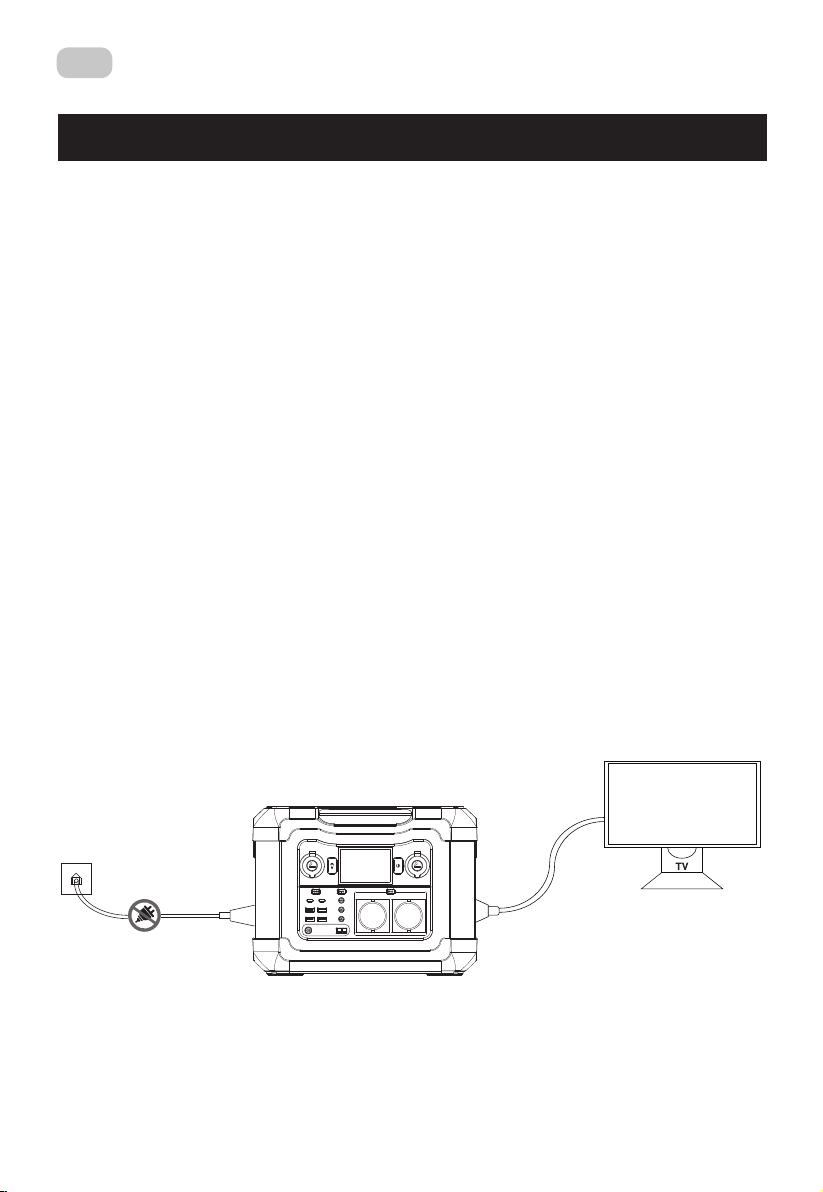
UPS mode
UPS function
This product has the bypass mode, does not need to pass through the
battery, can directly output from the AC.
In UPS mode, when the AC input power of the mains is cut o due to a
power outage, the AC input power of the mains can be used in about
automatic switch to product battery power within 10 ms to ensure AC
output.
UPS Connections
As shown in the gure below, connect the product between the
socket on the wall and the electrical appliances, and the power of the
product is in the ON state.When you turn on the power of the electrical
appliances, it will directly uses the AC power of the power grid.
In this state, when the power grid is cut o, it will automatically switch
to the product’s internal battery to supply power.

EN
8 9
Solar panel connection
Our products can be connected to solar panels and can be charged
through solar panels.
Solar panel input can be the most maximum 120W.
• Solar panel charging power, according to the weather and climate conditions.
• Only Anderson Port for Solar Charging
Connecting Pattern

10
EN
10
Car charging
This product can be charged by the cigarette lighter in the car with an
DC cable or PD Cable.
Connect Car Charger to the cigarette lighter in the car and the DC5.5
port OR Type-C port on the side of the product, turn on the engine of
the car, and the LED of this product will show the input power.
• On-board charging should be carried out with the car engine turned on. If the
engine is not turned on, the battery might run out.
Table des matières
Langues :
Autres manuels 2E Alimentation