
MDH PCBL 1600 Manuel utilisateur

PCBL 1600/1800 POWER WHEELCHAIR
MODERN
INSTRUCTIONS FOR USE
Edition 01.2022

2
TABLE OF CONTENTS
1. Practice before operating..........................................................................................................3
2. User’s safety..............................................................................................................................3
3. Driving outdoor.........................................................................................................................4
4. Driving over the hills on uneven terrain....................................................................................4
5. Technical parameters................................................................................................................5
6. Battery and charging...............................................................................................................12
7. Maintenance and cleaning......................................................................................................13
8. Specification............................................................................................................................15
Please, read the instruction carefully before the first use of the wheelchair. If any part of the text is
not clear or if you need any further information, please, contact your dealer.
The PCBL wheelchair is designed according to the latest trends and technology. Its construction
enables optimal adaptation to user’s needs. Solid and durable construction, innovative solutions and
reliable safety systems guarantee maximum comfort of use.
In order to ensure smooth wheelchair operation and safety the wheelchair should be regularly
checked at a service point. In case of any doubts or needs, please, do not hesitate to contact your
local dealer or service point.
Please, make sure that you filled in the guarantee form and that you returned it to your dealer. It will
help to ensure the best service.
Not following the instruction may result in vehicle damage or serious injury.
3
1. PRACTICE BEFORE OPERATING
Before driving the vehicle on everyday basis, you should find an open area such as a park to
practice maneuvers .
We recommend that when you practice driving you should be accompanied by an assistant.
Always make sure that the vehicle is set off before getting in or getting out of the vehicle.
Always check that the speed setting is chosen according to your experience and skills.
While practicing, keep the speed at the slowest position.
In order to drive safely, make sure that you are familiar with vehicle characteristics and ways of
driving.
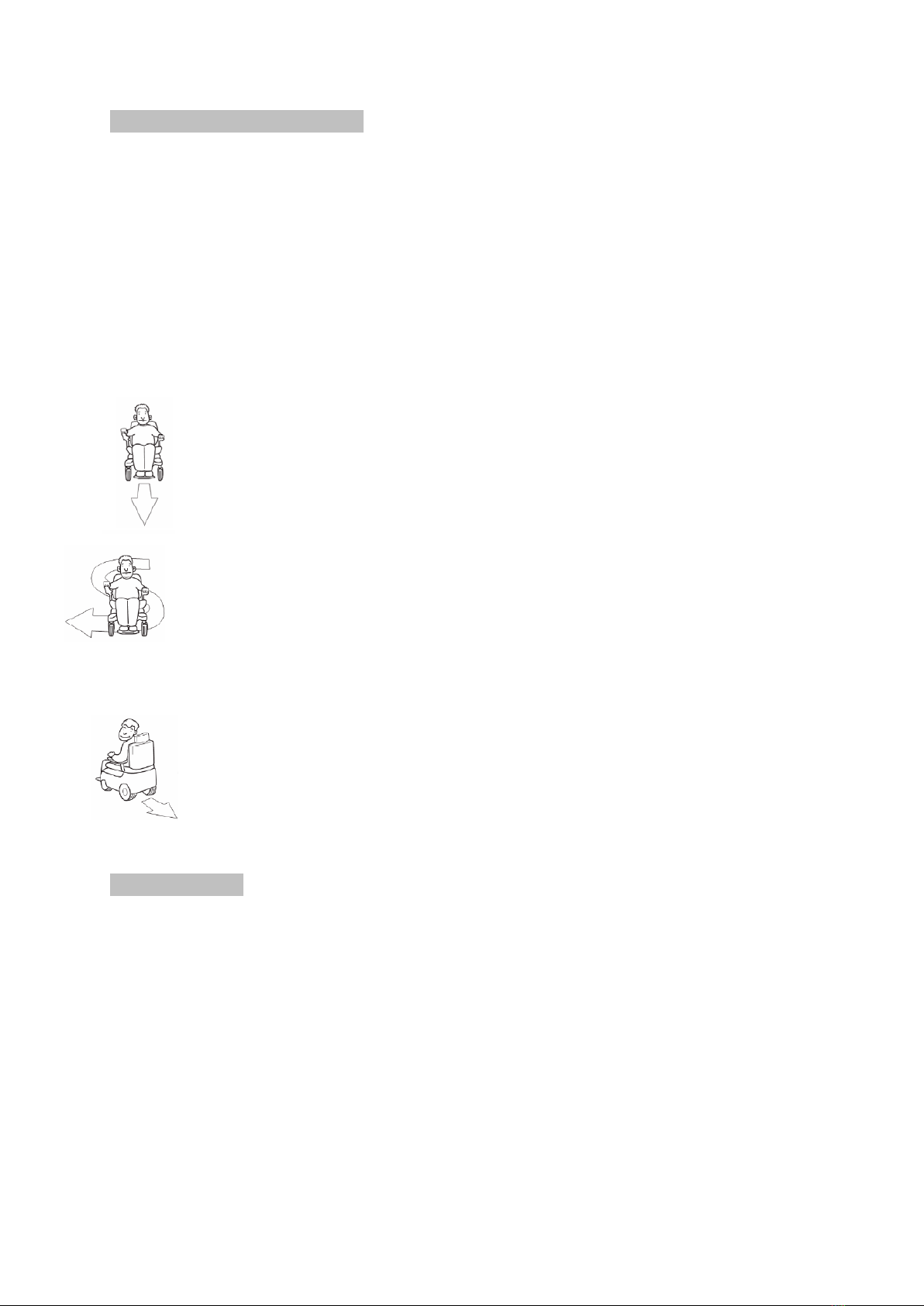
First, practice moving forward.
Make sure that the speed is set on the slowest position.
Then, practice “S” turns.
Finally, practice driving backwards.
Please, mark that while driving backwards the vehicle always moves slower regardless of
the speed setting.
2. USER’S SAFETY
Do not carry passengers
Do not drive after drinking alcohol
Consult your physician to check if your medications impair your driving abilities
Do not use any personal communication devices such as CB radios, cellular phones
Do not tow a trailer
Do not drive across a slope

4
3. DRIVING OUTDOOR
The wheelchair is not designed to move in the street traffic
Do not use the wheelchair during rain or snow, when the temperature is higher than 30°or
lower than 0°
Do not use the wheelchair on soft, uneven, unprotected surfaces such as grass, gravel, sand
or decks, beside a river, lake
Do not use the wheelchairs for off-road driving
If possible, do not use the wheelchair outdoors at night
Make sure that there are no obstacles behind you when you drive backwards. We also
recommend setting the speed at the slowest position
Do not stop suddenly, always try to make turns gently
Always keep your arms on the armrests and feet on the footrest while driving
Do not try to climb curbs higher than 7cm
Do not try to drive over a hole/gap wider than 10 cm
4. DRIVING OVER THE HILLS AND 0N UNEVEN TERRAIN
Driving on the hills and other uneven terrains is more dangerous than driving on flat surfaces.
Following the below rules is essential to avoid accidents and serious injuries.
Do not try to climb a hill which grade exceeds 10°
Do not move backwards while going up/down the hill
Do not use the wheelchair on soft, uneven, unprotected surfaces such as grass, gravel or
sand
When you drive down the slope, choose the slowest speed
Do not get in or off the wheelchair if it stays on a slope (in order to get in/off the wheelchair
you need to place it on flat surface)
Always climb or descend the hills perpendicular to the slope.

5
5. TECHNICAL PARAMETERS
1. controller
2. armrests
3. backrest
4. seat
5. footrests
6. anti-tip wheels
7. rear wheels
8. front wheels
9. motor
10. front light
controller
armrest
rear wheel
seat
motor
front wheel
footrests
backrest
anti-tip wheel
front light

6
Assembly
1. Install the battery by putting it into the rails placed on the wheelchair frame under the seat.
2. Assemble the armrests –choose the desired height and screw in the butterfly screw.
3. Assemble the swing away footrest, block them in a chosen position.
4. Install the control panel: put the control panel onto its holder, choose its optimal position and
screw in the butterfly screw.
5. Connect the main supply to the control panel.
6. Using the Velcro bands, attach the cushion to the seat.
Reclining backrest and seat
It is possible to have four different seat positions.
Unblock the blocking screw placed on the frame, under the seat. Choose required position and scew
in the screw making sure it is blocked.
Assembling and removing the footrests
Pull the blocking lever. In order to remove the footrest, pull it outside and remove. In order to
assemble the footrest, push it inside till the blocking mechanism is blocked.

7
Adjusting the control panel position
Unscrew the butterfly screw, adjust the control panel and screw in the butterfly screw.
Moving the control panel to left/right armrest
Disconnect the supply from the control panel. Remove both armrests. Unscrew and remove the
control panel holder. Attach the holder to left/right armrest and then install the control panel on the
holder. Install the armrests and screw in their blocking screws.
Adjusting the armrest and seat width
In order to adjust armrest height, locate the screw on the holder placed horizontally on the side of
the seat. Unscrew the screw, put the armrest into the holder and choose desired height. Then,
screw in the screw.
You can adjust the seat width by increasing the distance between the armrests. Unscrew the blocking
screw placed under the seat, move the armrests outside and block the screw.
Adjusting the backrest
In order to adjust the backrest angle, pull the Velcro bands backwards (you can find the Velcro bands
at the bottom part of the backrest) and choose required backrest position. If you loosen the Velcro
band, the backrest will block automatically.
Motor clutch
The power chair is equipped with two clutch levers. The levers allow you to disengage the drive
motors and maneuver the chair manually.
1.The red lever is up, the electric drive is turn off. The wheelchair can be pushed.
2.The red lever is down, the electric drive in on.
WARNING! Please, remember that when the system of electric drive is turn off, the
electromagnetic brakes are also disconnected. Never switch off the electromagnetic drive if
there is no person who may push your wheelchair. Never switch off the electromagnetic drive if
the wheelchair is staying on the slope or on any other inclined terrain –the wheelchair may go
downhill which may lead to wheelchair damage or injury.

8
Electronic control panel
Electronic control panel allows to control power wheelchair, battery power status and general
condition of the whole electronic system.
Electronic control panel is usually placed on the armrest and joint to the battery and motor. The
panel can be attached to the left /right armrest or behind the wheelchair (when it is used by a
caregiver).
Joystick
The joystick allows to control direction and speed of movement. Push the joystick forward to release
the electromagnetic brake and set the wheelchair in motion. The more you push the joystick
forward, the faster the wheelchair will move. If you release the joystick, the wheelchair will slow
down and stop. If you move the joystick backwards, you will drive in reverse.
WARNING! If the wheelchair starts to move in an unexpected direction, release the joystick and
let it return to central, neutral position. If the joystick is not damaged, the brakes will be
activated and the wheelchair will stop.
joystick
left turn signal button
right turn signal button
deceleration button
acceleration button
front light button
warning light button
battery indicator
horn button
switch on button
speed indicator

9
Switch on button
NEVER, even in case of danger or other unpredictable situations, turn off the wheelchair by pressing
the switch on button –the wheelchair will abruptly stop which may cause falling down. Always turn
off the power if you do not intend to drive it –in this way you will avoid unpredictable wheelchair ‘s
movements.
Battery status bar
You can find the battery status bar at the top of controller. Using the color light indicator, the battery
status bar provides information on supply, approximate power of the batteries, electric systems of
the wheelchair using a color code.
Constant red, yellow and green light indicate that batteries are fully charged, electric systems and
electronic system of control panel are efficient.
Constant red and yellow light indicate that you should charge batteries, the electric systems and
electronic system of control panel are efficient.
Only constant red light or slowly blinking red light –you should charge the batteries as soon as
possible, the electric systems and electronic system of control panel are efficient.
If the lights blink, the electronic system or electric system does not work properly.
If the warning lights blink continuously, the joystick was not is neutral position when the power
wheelchair was switched off. Turn off the power, release the joystick and again turn on the power.
Speed adjustment buttons
There are two speed adjustment buttons –if you want to slow down, press deceleration button. The
actual speed is shown on the indicator placed below the battery status bar. The faster you move, the
more lights are on.
Horn button
Press the button to activate the horn.
Charger socket
The socket is used for battery charging –plug to the power outlet (max 12A).
WARNING! If you followed the user’s manual instructions but the warning lights are still
blinking, please, contact your dealer.

10
Driving lights button
When you switch on the driving lights, the corresponding light icon will activate.
Left turn button
When you press the button, the corresponding light icon will activate. In order to switch off the
winker, press the button again.
Right turn button
When you press the button, the corresponding light icon will activate. In order to switch off the
winker, press the button again.
Warning light button
Activates the warning lights.
Connectors
Motor connector - connects the electronic control panel and motor
Battery connector - connects the electronic control panel and battery
Driving lights connector - connects the electronic control panel and lights connector
Overload protector
The batteries are equipped with overload protector (50AH) which automatically disconnects a load
when current exceeds a predetermined value.
When the wheelchair is overloaded, the motor power is being reduced and the wheelchair speed
diminished till the motor and electronic control panel reach admissible temperature. If necessary, the
overload protector will disconnect the load and the wheelchair will stop and wait till the motor is
cooled down.
WARNING! If any of the control light indicators flashes or many different light icons will light,
one of the control panel button may be damaged.
WARNING! Always make sure that the electronic control panel is properly connected to the
other parts ) motor, battery. Not following this rule may lead to control panel damage or
damage to other wheelchair parts.
Autres manuels pour PCBL 1600
1
Ce manuel convient aux modèles suivants
1
Table des matières
Autres manuels MDH Fauteuil roulant

MDH
MDH SCRUBBY Manuel utilisateur

MDH
MDH PCBL 1600 Manuel utilisateur

MDH
MDH VITEA CARE BACZUS RELAX Manuel utilisateur

MDH
MDH Vitea Care BABY HERO Manuel utilisateur

MDH
MDH W4029-HUNTER PLUS Manuel utilisateur

MDH
MDH RIDER II Manuel utilisateur

MDH
MDH 1018 LIMBER Manuel utilisateur

MDH
MDH Vitea Care DRVK0M PP Manuel utilisateur

MDH
MDH W4025 Manuel utilisateur

MDH
MDH W 4028 Manuel utilisateur


